Mini ITX SFF Gaming PC Build Guide
A mini ITX SFF gaming PC build packs a full gaming rig into a case about the size of a small bookshelf or smaller. The appeal is obvious: a compact footprint, a clean desk, and a machine that can move between rooms without a tower on the floor. The trade-off is that every part has to fit a tight space. Graphics card length, CPU cooler height, power supply format, and airflow all become hard limits. This guide explains how to plan a small form factor build so it runs well, stays serviceable, and does not force you into compromises you will regret later.
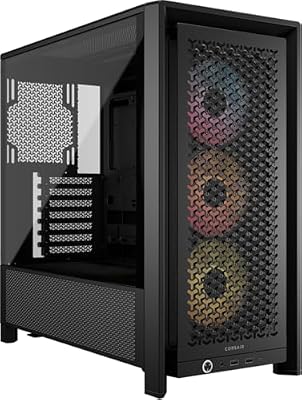
The hero listing above is the closest match for this query, not a guaranteed exact model. Check the card for the exact case, board size, and included components before you buy. Small form factor cases differ a lot in their clearance limits, so the specifications on each card matter more than the photos.


What Mini ITX Means for a Gaming Build
Mini ITX is a motherboard standard that measures about 170mm by 170mm. It usually has a single PCIe slot for the graphics card and two RAM slots. That limited layout is the main reason small builds feel different from a standard ATX tower. You get fewer expansion slots and fewer memory slots, but the board still supports modern CPUs and fast NVMe storage.
For a gaming PC, the single slot is rarely a problem. Most gamers use one graphics card and one or two drives. The real limit is physical space: the card has to fit the case length, the cooler has to fit the case height, and the power supply has to fit the format the case supports. Plan around those three numbers before you pick any other part.
Why Small Builds Need More Planning
In a large case, a mistake in fitment can be solved with a different cooler or a shorter cable. In a small case, the same mistake may mean returning the whole build. Measure the card length, the cooler height, and the radiator size, and compare them with the case specifications. Leave a few millimeters of margin for cables and fan connectors, because they add bulk that the spec sheet does not show.
Choosing the Right Case
The case is the first decision. Mini ITX cases range from very compact boxes that only fit a short graphics card to larger ITX enclosures that take a long card and a tall air cooler. The best case for you depends on the GPU you want and the thermal load it will produce. A card with a large heatsink needs more clearance and more airflow than a small low-power card.
Check the power supply support as well. Many small cases need an SFX or SFX-L power supply instead of a standard ATX unit, which changes your options and sometimes the price. Our notes on a popular small case with a generous interior show how much room a well-designed ITX case can offer, and the overview of the best ITX and mini gaming cases compares more options.
Airflow in a Small Enclosure
Small cases with a closed design can trap heat quickly. Look for a mesh front, a vented top or side, and at least one intake fan that can push air across the graphics card. A fan that sits directly on a card heatsink can help, but only if the case has a clear exhaust path. Thermal design is the difference between a compact PC that stays quiet and one that throttles after twenty minutes.
Power Supply, Cooling and Component Fit
The power supply is the part most often overlooked in a small build. SFX units are smaller and often more expensive per watt than ATX units, but a good SFX unit can handle a mid-high GPU and a modern CPU with headroom. Choose a unit with an 80 Plus efficiency rating and a warranty from a reputable maker. Our guide to a compact 850W SFX unit covers a common option in this class.
CPU Cooler Height and Options
A low-profile tower cooler is the usual choice in a small case, but its height limit can rule out some high-performance models. An AIO liquid cooler can free up space around the CPU if the case has a radiator mount that fits. Check the cooler height specification and the radiator clearance, and confirm that the memory modules have enough space under the cooler fan.
Graphics Card Length
Graphics card length is the limit that causes the most returns. A card that is labeled as compact may still be too long for the shortest ITX cases. Compare the card length with the case’s maximum GPU length, and remember that the power connector adds length in some designs. If you want a high-end card in a small case, choose the case first and then find cards that fit.

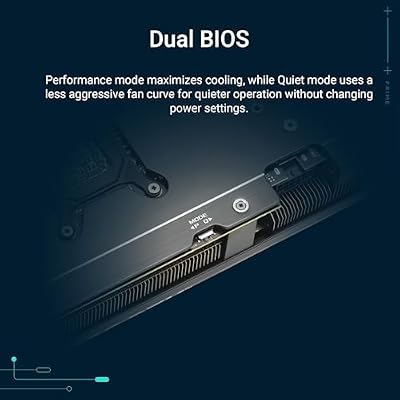
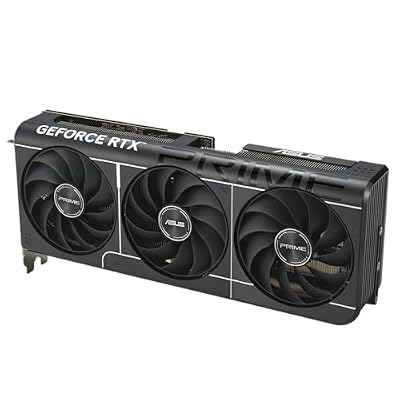
ASUS PRIME GeForce RTX 5070 12GB GDDR7 OC Edition Gaming Graphics Card | SFF-Ready, PCIe 5.0, HDMI/DP 2.1, 2.5-slot, Axial-tech Fans, Dual BIOS






As an Amazon Associate we earn from qualifying purchases. Product prices and availability are accurate as of the date/time indicated.

GIGABYTE GeForce RTX 5070 WINDFORCE OC SFF 12G Graphics Card, 12GB 192-bit GDDR7, PCIe 5.0, WINDFORCE Cooling System, GV-N5070WF3OC-12GD Video Card


As an Amazon Associate we earn from qualifying purchases. Product prices and availability are accurate as of the date/time indicated.
Mini ITX Build Comparison
The table below compares three common approaches to a small form factor gaming PC. Pricing is shown as a check-current-price note because the cost of small cases, SFX units, and compact boards varies widely by model and region.
| Build Style | Typical Layout | Best For | Typical Price Range |
|---|---|---|---|
| Ultra-compact console-sized | Short GPU, low-profile cooler, SFX PSU | Living room and desk setups | Check current price |
| Mid-size ITX tower | Full-length GPU, tower air cooler, SFX-L PSU | Higher performance in a compact case | Check current price |
| ITX with AIO liquid cooling | Radiator at the top or side, compact pump | Clean look and strong CPU cooling | Check current price |
Motherboard and Memory Considerations
A mini ITX board gives you fewer features than a full ATX board, but the core of a gaming build is still the same. Pick a board with the chipset and socket that match your CPU, enough M.2 slots for your storage, and a power delivery design that handles the processor you plan to use. Many small boards have one or two M.2 slots, so plan your storage before you buy the board.
For memory, choose a matched kit of DDR5 with two modules so the board runs in dual channel. Enable the EXPO or XMP profile in BIOS after installation. If you want a broader view of board choices, our comparison of ATX, Micro ATX and Mini ITX motherboards explains where each format makes sense.
Building a Mini ITX PC Step by Step
Start by installing the CPU and cooler on the motherboard outside the case. Small boards are easier to work with on a flat surface, and you can check the cooler fit before the board goes into the chassis. Install the RAM and the M.2 drive, then mount the board using the case standoffs. Connect the front panel and power cables before you install the graphics card, because a card in place can block access to the header pins.
Install the power supply and route its cables carefully. Modular cables reduce clutter, but the cable length still needs to fit the case path. Mount the graphics card last, then connect its power cables and check that the card is seated fully in the slot. Boot the system and confirm the BIOS shows the expected memory speed and CPU temperature before you install drivers.
For a general build sequence that applies to every format, our gaming PC build guide for 2026 covers the same stages with more detail on BIOS setup and driver installation.
Common Mini ITX Mistakes
The most frequent mistake is choosing the GPU before the case. Buyers fall in love with a card, then find that no compact case fits it with a usable cooler. Choose the case first, then pick the card that fits the length and thermal limits.
The second mistake is underestimating heat. A small case with a high-power GPU needs careful airflow planning, and a fan on the card alone may not be enough. Monitor temperatures during the first few sessions and adjust the fan curves.
The third mistake is skipping the power supply research. An SFX unit with a weak fan or a low wattage rating can cause throttling or noise. Buy a unit with headroom and a proven record.
Upgrade Path and Serviceability
A mini ITX build is still upgradable, but the upgrade path is narrower than a tower. Plan the CPU socket, the memory type, and the case clearance so that a future GPU or CPU fits. Keep the original packaging for the case and cooler if you can, because returning a tight fit is difficult. If you think you will change the GPU later, choose a case with a generous length limit now.
Servicing a small build also takes more care. Removing the GPU or the cooler may require taking out the motherboard, so keep a clear photo log of the cable routing. This makes future repairs much faster and reduces the risk of damaging a connector.
For a broader list of compact options, see the best mini PCs for gaming if you want a prebuilt route, or our mini gaming PC picks for ready-to-run options.
For related reading, see the best PSUs for a gaming PC gaming PC case picks.
Frequently Asked Questions
Can a mini ITX build run a high-end graphics card?
Yes, if the case has enough length and thermal clearance for that card. Check the maximum GPU length and the airflow design of the case before you buy the card.
Is a mini ITX build more expensive than a standard tower?
It often costs more per performance point because compact cases, SFX power supplies, and small boards carry a premium. Compare the total build cost, not just the case price.
Do mini ITX builds run hotter?
They can, because the space for airflow is limited. A well-chosen case with mesh panels and a sensible fan curve can keep temperatures under control, but the margin is smaller than in a large tower.
Should I choose an SFX or SFX-L power supply?
Check the case specification first. Some cases only support SFX, while others allow SFX-L with a longer shroud. SFX-L often offers a larger fan and more options for quiet operation.
Final Thoughts on a Mini ITX Gaming PC
A mini ITX SFF gaming PC build rewards careful planning. Start with the case, measure the graphics card and cooler limits, choose an SFX or SFX-L power supply with headroom, and keep airflow in mind from the first sketch. Done well, the result is a powerful gaming machine that fits almost anywhere. Use the listings above as a starting point, confirm the exact model and fit on each card, and you will avoid the most common compact build mistakes.