

Silent Gaming PC Build Quiet 2026
A silent gaming PC build is less about a single magic part and more about balance. A quiet machine keeps its fans slow while the GPU and CPU stay within safe temperatures, and it avoids the high-pitched whine that comes from cheap fans and coil noise. Most noisy gaming PCs are not broken. They are built with a small case, a tight airflow path, and a fan curve that ramps up too early. This guide explains how to plan a quiet build from the case down to the power supply, so the machine stays calm during long sessions and still delivers the performance you paid for.
The hero listing above is a closest match for the query, not a guaranteed exact model. Check the card for the exact model, included fans, and price before ordering. Several of the alternatives use different cases and coolers, so compare the noise specifications and fan sizes rather than the appearance alone.

What Makes a Gaming PC Loud
Noise in a gaming PC comes from three sources: moving air, vibration, and electrical whine. Fans create most of the audible noise, especially when they spin fast to move air through a restricted case. Vibration comes from loose panels, hard drives, and fans mounted without rubber isolation. Electrical whine, or coil whine, comes from power components under load and is hard to predict, although a good power supply and a stable GPU load reduce it.
A quiet build tackles the first two directly and reduces the third where it can. The goal is not zero airflow. It is enough airflow at low fan speeds, which usually means large fans, a case with wide mesh panels, and a cooler that does not need to push air through a dense fin stack at full speed.
Fan Size Matters More Than Fan Count
A 140mm fan at a moderate speed often moves more air with less noise than a 120mm fan running fast. Larger fans also reach a useful airflow level at lower RPM, which keeps the sound profile smoother. Before buying a case, check whether it supports 140mm fans in the front and top, and whether the radiator mounts accept the size you plan to use. A case that only fits small fans will force your fans to run harder.
Case Choice Sets the Noise Floor
A sound-dampened case with thick panels and a closed front can reduce noise, but it also restricts airflow. A mesh front with dust filters usually gives better temperatures, so the fan curve stays lower. The best quiet builds often use a mesh front, a solid or lightly ventilated side panel, and sound-absorbing foam only where it does not block intake air. Test the airflow path before you add dampening material.
Choosing Quiet Components
Every component has a noise budget. The CPU cooler, the GPU fans, the power supply fan, and the case fans all contribute. Start with the part that runs most often at load, which is usually the GPU, and work outward. A quiet GPU keeps its fans at a low curve under typical gaming loads, and a quiet CPU cooler does not need to spin up during light tasks like browsing.
CPU Cooler Options
A large tower air cooler with two fans can be very quiet at moderate speeds and avoids the pump noise some users hear from AIO liquid coolers. An AIO can be just as quiet, but the pump and radiator fans both matter, and the pump noise can be more noticeable in a quiet room. If you choose an AIO, pick one with a larger radiator and fans that are rated for low noise, and keep the pump speed at a moderate level in the software.
Our overview of the best air CPU coolers for gaming and the comparison of air versus AIO cooling explain the trade-offs in more detail.
Power Supply Fan Behavior
Many modern power supplies have a zero-RPM mode that keeps the fan off at light load. That helps a quiet build during idle and browsing. Under gaming load, the fan will spin up, so choose a unit with a large fan and a well-tuned curve. A quality 850W unit usually has more thermal headroom than a smaller one, which keeps the fan from working as hard. For options worth a look, see the best 850W gaming power supplies.
Storage and Vibration
Mechanical hard drives are the most common source of a constant hum in a case. A quiet build uses NVMe SSDs for the system and game drives, with no moving parts. If you still need bulk storage, mount the drive on rubber isolators and keep it away from the front panel.
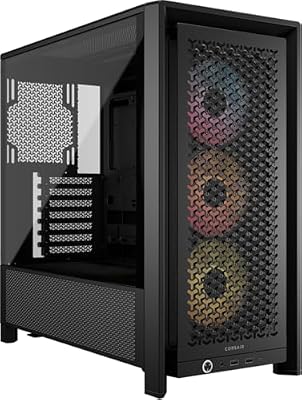
CORSAIR 4000D RS ARGB FRAME Customisable Mid-Tower PC Case – Black | 3x Pre-Installed Fans, High Airflow, Fully Modular, Easy InfiniRail Fan Mounting, GPU Anti-Sag, Reverse Motherboard Support


As an Amazon Associate we earn from qualifying purchases. Product prices and availability are accurate as of the date/time indicated.
Quiet Build Comparison
The table below compares three approaches to a quiet gaming PC. The noise levels are described in qualitative terms because exact decibel figures vary by fan model, speed, and room. Check the current price and reviews on each listing before you buy.
| Quiet Approach | Key Parts | Best For | Typical Price Range |
|---|---|---|---|
| Large air cooler and mesh case | Tower cooler, 140mm intake fans, mesh front | Low maintenance, quiet at idle and load | Check current price |
| Tuned AIO with large radiator | 360mm AIO, low-noise fans, zero-RPM PSU | Clean layout, strong cooling headroom | Check current price |
| Dampened compact case | Sound-dampened panels, low-speed fans | Shared rooms, bedrooms, studio desks | Check current price |

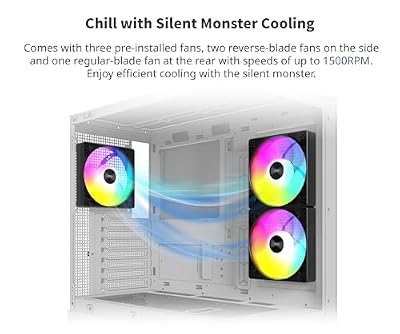
MONTECH XR Panoramic ATX Gaming PC Case, Mid Tower, 3 ARGB PWM Fans, Black | High Airflow; 2 Reverse-Blade Side & 1 Rear ARGB PWM Fan; Magnetic Filter; 420mm GPU, 360mm Radiator; USB-C; Up to 9 Fans



As an Amazon Associate we earn from qualifying purchases. Product prices and availability are accurate as of the date/time indicated.
Fan Curves and Software Tuning
Hardware sets the noise floor, but software decides how often your fans spin up. Set a fan curve that stays low until the component reaches a moderate temperature, then ramps smoothly. Avoid curves that jump from low speed to full speed in a few degrees, because that is what people hear as annoying. Most motherboard utilities and GPU tools let you set a custom curve for each fan group.
Undervolting the GPU is another way to reduce heat and noise. It lowers the voltage at a given clock speed, which reduces power draw and fan speed. Results depend on the silicon lottery, so test in a stress tool and a real game. Our guide on undervolting an RTX 5070 for cooler temperatures shows the steps for a similar card class.
Monitor temperatures during a long session to confirm the curve is working. Tools that show CPU and GPU temperature history help you spot a fan curve that is too conservative. The steps in our guide on how to check GPU and CPU temperature are a good starting point.
Building for Quiet Operation Step by Step
Start with the case and confirm the fan slots, radiator mounts, and dust filters. Install the largest intake fans you can fit at the front and bottom. Mount the CPU cooler with the fan orientation that pushes air toward the rear exhaust, then add a top exhaust if the case has room. Install the GPU and route the power cables neatly so they do not block the intake path. Finally, secure the drives and any loose cables with ties.
After the build, boot the system and set the BIOS fan profile to a quiet mode before installing drivers. Run a stress test and listen to the fans. If one fan has a higher pitch or rattle, check its mounting screws and the cable connector. A single loose fan can ruin an otherwise quiet build.
For a full walkthrough of the assembly sequence, see our step-by-step gaming PC building guide.
Mistakes That Make Quiet Builds Loud
The most common mistake is buying a small case with a closed front and expecting quiet results. The fans have to run fast to move air, and the noise follows. The second mistake is choosing the cheapest fans to save money, then replacing them later. Quality fan bearings and blade designs are a good place to spend, because the fans run most of the time.
Another common error is ignoring the GPU. A high-end card with a small cooler can be the loudest part of the system under load. Read reviews that measure the GPU noise at gaming load, not just idle, and prefer models with larger heatsinks.
The last mistake is poor isolation. Fans and drives mounted directly to a metal panel can transmit vibration. Use rubber grommets and check that the panels are not rattling when the fans spin up.
For a broader list of options across budgets, our gaming PC builds for every budget in 2026 shows where a quiet build fits into the total cost.
For related reading, see the best gaming PC cases the best gaming PC power supplies.
Frequently Asked Questions
Is a silent gaming PC realistic under heavy load?
A machine can be very quiet at idle and light use, and quiet enough for most rooms under gaming load if the cooling and case airflow are well matched. Completely silent operation under a sustained heavy load is unrealistic for most builds.
Are liquid coolers quieter than air coolers?
Not always. A good tower air cooler with large fans can be as quiet as an AIO. AIO pump noise can be noticeable in a quiet room, so the choice depends on the case and your noise tolerance.
Do I need sound-dampening foam?
It can help a little, but it can also block airflow. Start with fan size, fan curves, and isolation first. Add dampening only if the case has enough airflow margin.
What is the quietest way to add storage?
Use NVMe SSDs for system and game drives. They have no moving parts, which removes the most common constant hum in a gaming PC.
Final Thoughts on a Quiet Gaming PC
A silent gaming PC build comes from matching large, slow fans to a case that moves air, choosing a cooler and power supply that do not need to work hard, and tuning the fan curves so they stay low through normal use. The listings above are a good starting point. Confirm the exact model, fan count, and price on each card, then build with care so the machine runs cool and calm for years.








