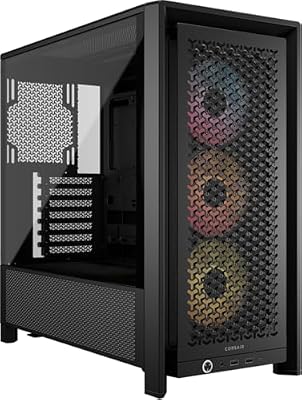
RTX 5080 Gaming PC Build Mid Range
An RTX 5080 gaming PC build sits at a useful point in the market. The card offers strong performance at high resolutions and enough headroom for demanding games, but it does not require the extreme power supply, cooling, and case size of the very top tier. A mid-range build around the RTX 5080 is a sensible choice for players who want smooth 1440p at high refresh rates and capable 4K performance in many titles, without paying for the highest-end parts in every slot. This guide explains how to balance the rest of the system around that card, from the CPU and memory to the power supply and cooling.
The hero listing above is the closest match for this query, not a guaranteed exact model. Check the card for the exact GPU model, the CPU, memory configuration, and power supply before ordering. Listings for the same query can differ in included parts, so confirm the specifications on each card.


Where the RTX 5080 Fits in a Mid-Range Build
The RTX 5080 is a high-tier card, but in a complete build it sits below the very top of the lineup. That position is useful. It delivers strong frame rates at 1440p with high settings and can handle many 4K titles with upscaling, while keeping power draw and cooling needs manageable compared with the flagship. For a mid-range build, the RTX 5080 is best paired with a capable but not extreme CPU, enough memory, and a power supply that leaves room for stable operation.
The main question is whether the rest of the build can keep up. A high-tier GPU paired with a weak CPU or too little memory will leave performance on the table. The goal is balance: the CPU should not limit the GPU in your favorite games, and the memory should be large enough to avoid stutter in modern titles.
Target Resolution and Refresh Rate
Pick a target before you buy parts. For 1440p at 144Hz or higher, the RTX 5080 gives a comfortable margin in many games, and the CPU becomes more important. For 4K, the GPU does most of the work, and upscaling features help keep frame rates smooth. Our comparison of the RTX 5080 and the RTX 5070 Ti shows how the two cards differ in practice, and the best GPU for 1440p gaming compares the wider field.
Choosing the CPU and Memory
For a balanced RTX 5080 build, pick an eight-core processor with strong single-thread performance and good cache. Many CPU-limited games, including large open worlds and competitive shooters, benefit from a faster processor when the GPU is this strong. A six-core chip can work for some titles, but it may hold back high-refresh play. Check reviews that test the CPU with a fast GPU at 1080p and 1440p, because those tests show the real limit.
Memory should be 32GB of DDR5 as a practical target. Some modern games use more memory, and 32GB leaves room for background apps, streaming tools, and the operating system. Buy a matched two-stick kit and enable the EXPO or XMP profile in BIOS so it runs at its rated speed. Our guide to the best CPU for gaming helps match a processor to the build, and the best 32GB DDR5 RAM options covers memory kits.
RTX 5080 Build Comparison
The table below compares three ways to build around the RTX 5080. Pricing is shown as a check-current-price note because GPU and CPU prices change often and vary by retailer and region.
| Build Approach | Typical Parts | Best For | Typical Price Range |
|---|---|---|---|
| 1440p high refresh build | RTX 5080, eight-core CPU, 32GB DDR5, 2TB NVMe | Competitive and high-refresh gaming | Check current price |
| 4K upscaling build | RTX 5080, strong CPU, 32GB DDR5, 1000W class PSU | Large 4K displays and single-player titles | Check current price |
| Streaming and gaming build | RTX 5080, higher core count CPU, 64GB DDR5 | Players who stream or record while gaming | Check current price |
Power Supply and Case Planning
The RTX 5080 needs a capable power supply with enough headroom for the GPU’s transient spikes and the CPU’s load. A 850W unit from a reputable maker is a common choice for a balanced build, and a 1000W unit gives more room for overclocking or future upgrades. Check the GPU’s power connector requirements and make sure the PSU provides the correct cables. Our overview of the best PSUs for a gaming PC explains the options, and the best 1000W PSUs for high-end cards covers the larger class.
The case must fit the card length and provide clear airflow. A mesh front panel, at least two intake fans, and one or two exhaust fans help the GPU run cooler. Measure the GPU length against the case’s maximum clearance before ordering, because high-end cards are often long. Our list of the best mid-tower gaming cases in 2026 is a good place to start.
Cooling the RTX 5080 Build
An RTX 5080 produces significant heat under sustained gaming load, so the cooler and case airflow matter. Choose a GPU model with a large heatsink and at least two fans, and make sure the case lets fresh air reach the card. A tower air cooler for the CPU works well in a mid-range build and keeps maintenance simple. An AIO can work too, but the radiator needs a mount that does not block the GPU’s intake.
For a comparison of cooling approaches, read air versus AIO cooling in 2026. If you plan to tune the card for lower temperatures, our undervolting guide shows the approach for a similar card class, and the same testing method applies to the RTX 5080.
Storage and Motherboard Choices
Choose a motherboard with enough M.2 slots for your game library and a PCIe slot that supports the GPU at full speed. A 2TB NVMe drive is a good starting point, because modern games often exceed 100GB each. Add a second drive if you have a large library. Check the board’s memory support list and the number of USB ports you need for peripherals and capture devices.
For a broader view of storage, our guide to the best 2TB gaming SSDs in 2026 covers the options worth considering.
Step-by-Step Build Notes
Install the CPU and cooler on the motherboard outside the case, then add the memory in the correct slots and install the first NVMe drive. Mount the board in the case, connect the front panel and fan headers, and install the power supply. Route the cables cleanly, keeping the GPU’s power path short and unobstructed. Install the GPU last, seat it firmly in the top PCIe slot, and connect its power cables.
Enter BIOS after the first boot, enable the memory profile, and check the CPU and system temperatures at idle. Install the graphics driver from the manufacturer, then run a stress test and a demanding game for an hour. Watch the GPU temperature and clock speed. If the card throttles, check the case airflow and the fan curve before changing other parts. For the full procedure, see our step-by-step gaming PC building guide.
Common RTX 5080 Build Mistakes
The first mistake is choosing a power supply that is too small. A high-tier GPU needs a PSU with headroom, and an underpowered unit can cause shutdowns under load. The second mistake is forgetting to measure the card. A long GPU can block the drive cage or the front radiator, so check the case clearance before buying.
The third mistake is pairing the card with a CPU that holds it back. In high-refresh games, a weak processor can cap the frame rate well below what the GPU can deliver. The fourth is skipping the memory profile, which can leave the RAM at a slower default speed.
Upgrade Path and Value
A mid-range RTX 5080 build has a long useful life at 1440p and a capable 4K experience with upscaling. Choose a platform and power supply that can handle a future CPU upgrade, and keep the memory at 32GB or more so the system stays responsive. A future GPU upgrade is easier if the case and PSU have room for a larger card.
If you are comparing this build against other tiers, our guide to gaming PC builds for every budget in 2026 places the RTX 5080 in context, and the RTX 5090 review shows what the next tier up offers.
Frequently Asked Questions
Is the RTX 5080 good for 4K gaming?
It can deliver smooth 4K gaming in many titles, especially with upscaling enabled. Demanding games may require lower settings to hold a high frame rate, so check reviews for the titles you play.
What CPU pairs well with an RTX 5080?
An eight-core processor with strong single-thread performance is a good balance for most builds. For high-refresh 1440p gaming, a faster CPU helps in CPU-limited titles.
What power supply does an RTX 5080 build need?
A quality 850W unit is a common choice for a balanced build. A 1000W unit gives more headroom and room for future upgrades. Check the GPU’s power connector requirements before buying.
Is 32GB of RAM enough for an RTX 5080 build?
For most gaming, 32GB is a comfortable target. If you stream, record, or run heavy background applications, 64GB gives more room.
Final Thoughts on a Mid-Range RTX 5080 Gaming PC
An RTX 5080 gaming PC build offers strong performance at 1440p and capable 4K gaming without the extreme requirements of the top tier. Balance the GPU with an eight-core CPU, 32GB of DDR5, a power supply with headroom, and a case with clear airflow and enough clearance for a long card. The listings above are a useful starting point. Confirm the exact GPU model, CPU, and price on each card, and you will have a machine that handles demanding games with room to spare.