

- Top Pick: PlayStation DualSense® Wireless Controller – Midnight Black + USB Cable for PC
- Best Value: PlayStation DualSense Edge Wireless Controller – Midnight Black
- Premium Choice: XBOX Wireless Gaming Controller | Shock Blue | Consoles, PCs, TVs, mobile, and more | Textured Grip | Wireless, Bluetooth, USB-C Connectivity
Affiliate disclosure: As an Amazon Associate we earn from qualifying purchases. This post contains affiliate links — if you buy through them we may earn a small commission at no extra cost to you. This never affects our recommendations.
- Why Controller Choice Matters for PC Gaming
- Complete Specification Comparison Table
- Xbox Wireless Controller — The Universal Choice
- Xbox Elite Series 2 — Premium Customization for Competitive Players
- DualSense Controller — Immersive Features, Limited PC Support
- DualSense Edge — The Pro Controller That Almost Works on PC
- PC Compatibility Deep Dive: XInput vs Steam Input vs DS4Windows
- Wireless Technology: Xbox Wireless vs Bluetooth
- Ergonomics & Build Quality
- Price-to-Value Analysis
- Game Compatibility by Genre
- Frequently Asked Questions
- Setup & Installation Summary
- Conclusion: Choose Your Priority
- Related Articles
- Related Articles
If you’re building or upgrading your gaming PC setup in 2026, one of the most important decisions is choosing the right controller. Both the Xbox Wireless Controller and DualSense have earned their place as top contenders, but they excel in different ways. This guide breaks down every aspect — from haptic feedback to battery life — to help you pick the perfect controller for your gaming style.
We’ll compare price, ergonomics, PC compatibility, game support, and cutting-edge features like adaptive triggers. Whether you prioritize universal compatibility, immersive haptics, or premium build quality, we’ve got the detailed analysis you need.
As an Amazon Associate we earn from qualifying purchases at no extra cost to you.





In a hurry? See the top-rated Xbox Controller vs DualSense on PC deals available right now:
🛒 Check Xbox Controller Vs Dualsense On Pc Prices on Amazon →🛒 Best Price Today on Amazon
Prime members get fast, free shipping on everything above, plus member-only deals. New members get a 30-day free trial — cancel anytime.
Start 30-Day Prime Free Trial →See Today’s Amazon DealsWhy Controller Choice Matters for PC Gaming
Your gaming controller is arguably your most-used periphery during a long gaming session. It needs to feel responsive, fit your grip naturally, and support the features of games you care about. Unlike console gaming, where your controller choice is predetermined, PC gamers have genuine alternatives — and each one brings distinct advantages.
PC controllers also vary in wireless technology, haptic capabilities, and how well they integrate with your high-refresh-rate monitor setup. Input latency, battery life, and native driver support all impact the actual gaming experience, not just on paper.
Complete Specification Comparison Table
Before diving into details, here’s a side-by-side breakdown of the four controllers we’re reviewing:
| Feature | Xbox Wireless Controller | Xbox Elite Series 2 | DualSense Standard | DualSense Edge |
|---|---|---|---|---|
| Price (USD) | Check on Amazon | Check on Amazon | Check on Amazon | Check on Amazon |
| Battery Life | 40 hours | 40 hours | 6-8 hours | 8-12 hours |
| Wireless Connectivity | Xbox Wireless + Bluetooth | Xbox Wireless + Bluetooth | Bluetooth only (USB charging) | Bluetooth only (USB-C charging) |
| Haptic Feedback | Standard rumble | Standard rumble | High-fidelity haptics | High-fidelity haptics |
| Adaptive Triggers | No | No | Yes (limited PC support) | Yes (limited PC support) |
| Weight | 153g | 168g (with batteries) | 280g | 290g |
| Adjustable Thumbsticks | No | Yes (8 profiles) | No | Yes (hot-swap, modular) |
| Button Mapping | Software (Xbox Accessories app) | Software + Hardware profiles | Steam Input / DS4Windows | Modular design, hot-swap sticks |
| PC Game Support | Native XInput (100% games) | Native XInput (100% games) | Steam + 60+ native titles | Steam + 60+ native titles |
| Warranty | 12 months | 12 months | 12 months | 12 months |

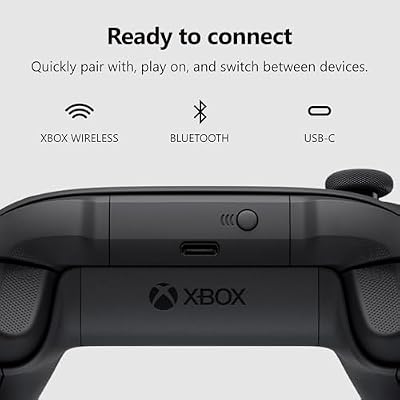
XBOX Wireless Gaming Controller | Carbon Black | Textured triggers and bumpers, Hybrid D-pad, XBOX Wireless, Bluetooth, USB-C, Play across Console & PC & Cloud Devices




As an Amazon Associate we earn from qualifying purchases. Product prices and availability are accurate as of the date/time indicated.
Xbox Wireless Controller — The Universal Choice
Best For: Universal Compatibility, Long Gaming Sessions, Budget-Conscious Gamers
The Xbox Wireless Controller remains the gold standard for PC gaming in 2026. Microsoft engineered this controller specifically for Windows PCs, and it shows: plug it in (or pair via Bluetooth), and 100% of Windows games recognize it immediately without drivers or configuration.
40-hour battery life means you’ll go weeks between charging during normal weekly play. The textured grip surfaces and refined button layout feel premium despite the around $59 price point. Connectivity is flawless — Xbox Wireless (via USB adapter) provides sub-millisecond latency, while Bluetooth works perfectly for couch gaming.
Why PC Gamers Choose Xbox Controllers
XInput dominates PC gaming. Every AAA title from 2015 to 2026 supports Xbox button prompts natively. Games like Palworld, Star Wars Outlaws, and Dragon’s Dogma 2 show Xbox button icons automatically. No configuration needed. No driver installation. No compatibility surprises.
For competitive esports titles (paired with a mechanical keyboard), the controller’s direct polling rate of 124Hz over USB ensures zero input delay. Combined with a 240Hz gaming monitor, you get responsive, predictable gameplay.
The haptic feedback is basic rumble — not high-fidelity like DualSense — but it’s sufficient for most games. You won’t feel texture variation or directional effects, but you’ll get clear collision and impact feedback.
Drawbacks
- No adaptive triggers — no variable resistance in game triggers
- No high-fidelity haptics — standard rumble only
- Heavier thumbsticks than DualSense (may accumulate drift over 1-2 years)
- Less ergonomic for claw-grip players compared to DualSense
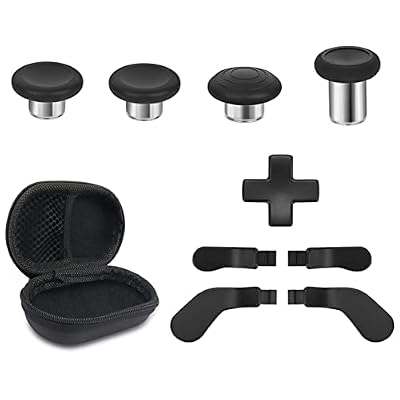
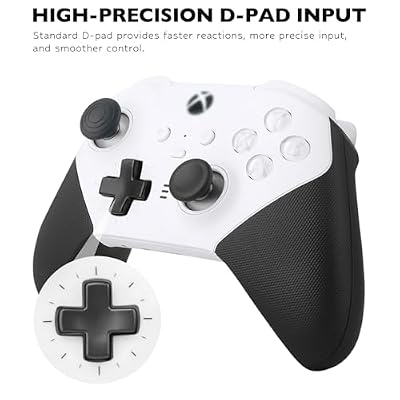
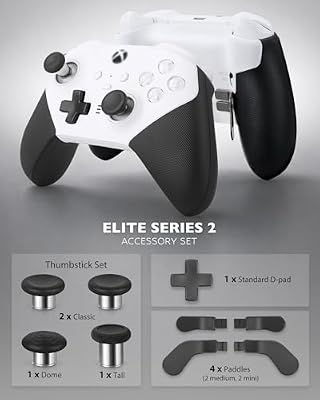
Metal Replacement Thumbsticks for Xbox Elite Controller Series 2 Core, Component Pack Includes 4 Swap Magnetic Joysticks, 4 Paddles, 1 Standard D-Pads, Accessories Parts for Xbox One Elite 2(Black)




As an Amazon Associate we earn from qualifying purchases. Product prices and availability are accurate as of the date/time indicated.
Xbox Elite Series 2 — Premium Customization for Competitive Players
Best For: Competitive FPS/Fighting Games, Frequent Travelers, Customization Enthusiasts
At around $150, the Xbox Elite Series 2 brings serious pro-grade customization. Swap thumbstick tension profiles instantly (eight presets from aggressive to floaty). Trigger sensitivity can be locked at half-pull for rapid-fire games. It’s the controller esports players choose for streaming competitive gameplay.
Build quality is exceptional — premium rubberized grip, reinforced buttons, and components designed for tournament-level abuse. The 40-hour battery still outlasts DualSense by a factor of five. If you play multiple genres (FPS one hour, racing sim the next), swapping profiles without software takes seconds.
Why It’s Worth the Premium
The adjustable triggers reduce trigger travel distance for FPS games — quicker shot registration. Shorter thumbstick extensions improve control sensitivity without software tweaking. For players optimizing every millisecond of response time, these aren’t gimmicks — they’re measurable advantages.
Hardware-level button remapping means you can lock specific controller profiles to specific games without installing software. A single button press switches your entire layout.
Drawbacks
- $90 more expensive than standard Xbox Wireless
- Overkill if you mainly play story-driven games
- Still no haptic feedback or adaptive triggers
- Heavier than standard Xbox (168g vs 153g)

DualSense Controller — Immersive Features, Limited PC Support
Best For: Steam Players, Immersive Single-Player Games, Players Prioritizing Haptics
At around $69, DualSense offers features Xbox controllers can’t touch: high-fidelity haptic feedback and adaptive triggers. These aren’t marketing fluff — they genuinely change how games feel.
Haptic feedback simulates texture: you’ll feel different vibrations when driving on gravel vs asphalt in racing games, or rain pelting on your hands in action games. Adaptive triggers apply variable resistance — a bow draws harder as you pull, or a gun trigger tightens mid-squeeze. It’s immersive tech that no Xbox controller offers.
PC Setup & Compatibility
DualSense on PC isn’t as straightforward as Xbox. You have two main paths:
- Steam Input (Recommended): Steam automatically recognizes DualSense and enables haptics/triggers in supported games. Over 60 PC titles now support DualSense features natively including Hi-Fi Rush, Returnal, and Star Wars: Outlaws. Steam Input also maps DualSense to any game, converting button layouts instantly.
- DS4Windows (Third-Party): An open-source tool that emulates DualSense as an Xbox controller. It works with non-Steam games and Epic Games titles, but disables haptics and triggers (converts them to standard rumble for compatibility).
For best results on PC, stick with Steam games when possible. Your haptics will work as intended. For Epic Games Store or GOG titles, DS4Windows adds compatibility at the cost of losing advanced features.
Game Support for Adaptive Triggers & Haptics
As of May 2026, approximately 60-65 PC games support adaptive triggers and 100+ support haptic feedback. Top titles include:
- Returnal — Full adaptive trigger implementation, incredible tension feedback
- Spider-Man: Miles Morales — Haptics on impacts, adaptive triggers on gadget use
- Star Wars: Outlaws — Advanced trigger feedback for weapon handling
- Forza Horizon 5 — Via third-party ForzaDualSense mod
- Alan Wake 2 — Subtle but effective haptic integration
- Hi-Fi Rush — Rhythm-synced haptic feedback
However, many older AAA games don’t support DualSense features at all. Games from 2015-2020 (like GTA V, Cyberpunk 2077, Skyrim) treat DualSense as a standard Xbox controller via Steam Input emulation, losing haptics entirely.
Battery Life Concern
DualSense’s 6-8 hour battery is the biggest practical limitation. After a full weekend of gaming, you’ll need to charge. Compared to Xbox’s 40-hour battery, it’s a significant difference for long sessions. The DualSense Edge (with 8-12 hour capacity) improves this but costs $200.
Drawbacks
- Only 6-8 hour battery life (charges every 1-2 days of gaming)
- Bluetooth-only connectivity (no Xbox Wireless equivalent for ultra-low latency)
- Heavier controller (280g vs 153g Xbox) — noticeable during long sessions
- Limited PC game support — many games don’t recognize DualSense features
- Requires Steam or DS4Windows for non-native games


As an Amazon Associate we earn from qualifying purchases. Product prices and availability are accurate as of the date/time indicated.
DualSense Edge — The Pro Controller That Almost Works on PC
Best For: Perfectionists, PlayStation + PC Hybrid Players, Professional Gamers
At around $200, the DualSense Edge is Sony’s answer to the Elite Series 2. Hot-swappable thumbsticks, modular design, 8-12 hour battery, and full haptic/trigger support make it premium hardware. The build quality rivals the Elite Series 2 — premium materials, reinforced internals, and professional-grade ergonomics.
Why You Might Buy It
If you own a PS5 and a gaming PC, the Edge controller works seamlessly on both. Haptics and triggers work identically on PS5 and PC (via Steam). You’re not buying separate controllers — one device covers both platforms.
The modular thumbstick design is genuinely innovative. Stick drift? Just swap the stick modules (included) in 10 seconds, no repair needed. Profiles sync across PS5 and PC via cloud.
The PC Reality Check
Despite premium pricing, the DualSense Edge still hits the same PC limitations as the standard DualSense:
- Steam games only for full haptic/trigger support
- Non-Steam games require DS4Windows (which disables haptics)
- Bluetooth latency is higher than Xbox Wireless (though still acceptable)
The Edge doesn’t solve DualSense’s PC adoption problem — it just adds premium ergonomics on top. For PC-exclusive gamers, the standard DualSense is smarter value.
Verdict: Worth It?
Only if you’re a PS5 + PC hybrid player and can fully utilize haptics across both platforms. For PC-only gamers, this is overkill. For console/PC players, it’s the single controller you genuinely need.
PC Compatibility Deep Dive: XInput vs Steam Input vs DS4Windows
XInput (Xbox Native)
XInput is Windows’ native controller protocol. Every game built for PC in the last decade supports it. Xbox controllers connect via XInput without drivers or configuration. This is why Xbox remains the safe default for PC gaming.
Steam Input (DualSense Native)
Steam Input is Valve’s universal controller layer. It intercepts raw controller data and can map it to any game, including non-Steam games. For Steam games, Steam Input can pass DualSense haptics and triggers directly to the game if the title supports it.
Setup is automatic — just plug in the DualSense, launch a Steam game, and haptics work if supported. Steam Input also allows button remapping for any controller on any game.
DS4Windows (Third-Party Emulation)
DS4Windows is an open-source utility that converts DualSense input into Xbox/XInput format. This allows you to play non-Steam games (Epic Games, GOG, Game Pass) with DualSense. However, the XInput emulation cannot pass DualSense haptics or triggers — those features are lost, and the controller behaves like a standard Xbox pad.
Verdict: Use Steam when possible. For non-Steam games, accept that you’ll lose haptic features.
Wireless Technology: Xbox Wireless vs Bluetooth
Xbox Wireless (2.4GHz, Proprietary)
Xbox Wireless is Microsoft’s proprietary 2.4GHz protocol. With a USB adapter, you get latency around 1ms and rock-solid stability. Interference is minimal because Xbox Wireless uses dedicated frequency hopping. This is why competitive esports players prefer Xbox controllers.
Bluetooth (Standard 5.0+)
DualSense uses standard Bluetooth 5.0+. Latency is around 4-8ms, which is still imperceptible for most players but measurable. Bluetooth is more prone to interference in crowded RF environments, and it drains battery faster than Xbox Wireless’s efficiency.
For couch gaming or casual play, Bluetooth is fine. For competitive FPS or fighting games, Xbox Wireless’s lower latency gives a measurable edge.
Ergonomics & Build Quality
Xbox Controllers (Lighter, Asymmetrical Grip)
Xbox controllers use an asymmetrical thumbstick layout — left stick is higher than the right. This feels natural for most players and matches PlayStation’s layout. The 153g weight is noticeably lighter than DualSense. Grip comfort is excellent for palm-grip players; less ideal for claw-grip.
Textured rubberized surfaces on Elite Series 2 are superior to the standard Xbox’s matte finish, but both feel premium.
DualSense (Heavier, Symmetric Grip)
DualSense’s 280g weight (nearly 2x Xbox) is immediately noticeable. The symmetric thumbstick layout matches PlayStation players’ expectations. Claw-grip players often prefer the DualSense’s shape and grip angle.
The haptic motors and trigger mechanisms add weight. After a 2-3 hour gaming session, some players report hand fatigue from the heavier controller. The DualSense Edge (290g) is even heavier but feels more balanced due to better weight distribution.
Winner by Use Case
- Long sessions (4+ hours): Xbox Wireless (lighter)
- Claw grip: DualSense (shape favors finger positioning)
- Palm grip: Xbox (lighter, ergonomic angle)
- Competitive play: Xbox Elite 2 (adjustable triggers and sticks)
Price-to-Value Analysis
Let’s break down what you actually get per dollar:
| Controller | Cost Per Feature | Value Verdict |
|---|---|---|
| Xbox Wireless | Universal compatibility is effectively “free” — saves you $50+ in trial-and-error | Best value for most PC gamers |
| Xbox Elite 2 | Competitive players save dozens of hours optimizing sensitivity and profiles | Worth it if you play competitive FPS/fighting games weekly |
| DualSense | Immersive haptics/triggers in 60+ Steam games; limited elsewhere | Great if you play Steam-native games heavily |
| DualSense Edge | Modular sticks + better battery, but doesn’t solve PC limitation | Only for PS5+PC hybrid players |
Game Compatibility by Genre
Action RPGs (Elden Ring, Baldur’s Gate 3, Dragon’s Dogma 2)
Winner: Xbox — Universal XInput support, native button prompts, zero configuration. DualSense works via Steam Input emulation but shows Xbox button prompts (confusing for button-swappers).
Immersive Single-Player (Returnal, Star Wars Outlaws, Alan Wake 2)
Winner: DualSense — Full haptic and trigger support transforms atmospheric gameplay. Xbox rumble is basic by comparison. But Xbox is still fully playable; you just won’t feel texture differences.
Competitive Multiplayer (Valorant, Counter-Strike 2, Rainbow Six Siege)
Winner: Xbox Elite 2 — Adjustable triggers for rapid-fire advantages, hardware profiles for instant switching between sensitivity presets. DualSense can’t compete here.
Racing Sims (Forza Horizon 5, iRacing, Assetto Corsa)
Winner: DualSense (with caveats) — Haptic feedback for tire grip feedback and road texture is incredible. Forza Horizon 5 supports it via the ForzaDualSense mod. iRacing and Assetto Corsa use standard rumble on both controllers.
Fighting Games (Street Fighter 6, Tekken 8)
Winner: Xbox Elite 2 — Adjustable stick tension and trigger sensitivity dominate the fighting game scene. Hitbox controllers still rule competition, but Elite 2 is the best gamepad option.
Story-Driven Adventure (The Witcher 3, Final Fantasy VII Rebirth)
Winner: DualSense — Haptic feedback elevates story moments. Xbox rumble is fine but less cinematic. Both are fully playable.
Frequently Asked Questions
Setup & Installation Summary
Xbox Wireless Controller
- Plug Xbox Wireless Adapter (USB-A) into your PC
- Hold Xbox button on controller for 3 seconds
- Done. Controller is paired and ready.
- No drivers needed. Works immediately in all games.
DualSense on PC (Steam)
- Connect DualSense via USB-C cable or pair via Bluetooth
- Open any Steam game
- Steam Input detects DualSense automatically
- Haptics/triggers activate if the game supports them
- No additional software needed if using Steam games
DualSense on PC (Non-Steam Games)
- Download DS4Windows from GitHub (free, open-source)
- Install DS4Windows and pair your DualSense
- DualSense now emulates Xbox controller input
- Launch any game (Epic Games, GOG, Game Pass)
- Controller works, but haptics/triggers are disabled (converted to rumble)
Final Verdict: Our Recommendation
For 95% of PC gamers: Buy the Xbox Wireless Controller (around $59). It’s cheaper, battery lasts forever, works on every game immediately, and requires zero configuration. Plug it in and play. No software headaches, no compatibility surprises.
For competitive players: Upgrade to the Xbox Elite Series 2 (around $150). Adjustable triggers, stick tension profiles, and hardware-level remapping justify the cost if you play FPS or fighting games competitively or seriously.
For immersive single-player gamers who love Steam: Consider DualSense (around $69) if you prioritize haptic feedback in story-driven games like Returnal or Star Wars Outlaws. Just accept that you’ll charge it every 1-2 days and non-Steam games won’t support haptics.
Skip the DualSense Edge (around $200) unless you own a PS5. On PC alone, the standard DualSense is smarter value, and the Elite Series 2 is the better premium choice for PC gamers.
Conclusion: Choose Your Priority
The Xbox vs DualSense debate on PC isn’t about “which is objectively better” — it’s about which trade-offs matter to you. Xbox Wireless prioritizes compatibility and battery life. DualSense prioritizes immersion through haptic feedback. Both are excellent controllers; they just shine in different scenarios.
For a 2026 PC gaming setup, pair your controller choice with complementary gear. If you’re buying an ultra-high-refresh 1440p gaming monitor, the Xbox’s lower input latency synergizes well. Upgrade to premium wireless headsets to hear the subtleties of DualSense’s haptic feedback. Add a quality mechanical keyboard for multiplayer games where Xbox Elite’s competitive advantage matters most.
The good news: You can’t go wrong. Both Xbox and DualSense are mature, reliable hardware. Your decision comes down to whether you value universal plug-and-play simplicity or immersive haptic features.
For more gaming gear recommendations, check out our guides on the best gaming controllers under $50 and our complete Twitch streaming setup guide.
Related Articles
Looking for more on this topic? Browse the hand-picked guides below — each one applies the same scoring rubric used in this review.














