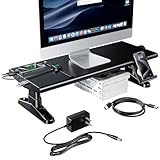
- Top Pick: OImatser Monitor Stand Riser with USB 3.0 Hub & Type-C Port, Foldable Adjustable Computer Stand with Storage Drawer, Pen Slot & Phone Holder, Space Saving Laptop Stand for Home Office Desk Organization (White-3.0 HUB-Adapter)
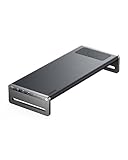
- Best Value: Anker 675 USB-C Docking Station, 12-in-1 Monitor Stand, Wireless Charging
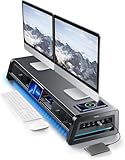
- Premium Choice: Simple Trending 2-Tier Metal Dual Monitor Stand with USB & 2 Drawers, Black
A monitor stand with a built-in docking station is one of the smartest desk upgrades you can make. It lifts your screen to a healthier eye level while turning the empty space beneath into a hub of USB ports, card readers, and sometimes wireless charging. One accessory declutters your desk, improves your posture, and expands a laptop’s meager connectivity all at once.
These stands range from simple risers with a USB pass-through to full 12-in-1 docks that drive external displays and deliver power. Choosing well means matching the port loadout to your laptop and peripherals. Here is how the leading models stack up.
As an Amazon Associate we earn from qualifying purchases at no extra cost to you.



🎮 Get More From Your Setup — Free
Prime Gaming gives you free PC games every month, in-game loot, and a free Twitch channel sub — plus fast free shipping on all the gear above. New members get a 30-day free trial.
Watch: Monitor Stand With Docking Station — Video Review
Design & Build
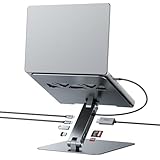
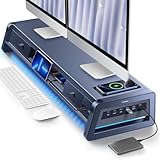
Materials and footprint vary widely. Metal risers like the Simple Trending 2-tier stand and the Vaydeer all-in-one dual-monitor riser feel sturdy enough to carry two screens and add drawers for stationery. The Anker 675 combines a monitor stand with a 12-in-1 dock and a wireless charging pad in a clean, office-ready shell. Compact options such as the OImatser foldable stand and the adjustable USB-C riser prioritize a small desk footprint, while the BENFEI 7-in-1 laptop stand tilts toward mobile users who dock and undock often.
Performance
Connectivity is the real story. The Anker 675 leads for a single-cable workflow, driving a display, charging a phone wirelessly, and breaking out numerous USB ports from one dock. The Vaydeer riser pairs eight USB ports with a wireless charging pad and LED accent, making it a strong centerpiece for a dual-monitor battle station. For laptop users, the BENFEI 7-in-1 delivers 4K@60Hz HDMI, 100W power delivery, and fast 10Gbps USB-C, so a MacBook or ThinkPad gains full desktop capability. The OImatser and USB-C docking riser cover everyday needs, adding storage drawers and phone holders for tidy organization.
Pros & Cons
- Raises the screen to eye level for better posture and neck comfort.
- Consolidates ports, card readers, and charging into one accessory.
- Reclaims desk space with storage drawers and cable management.
- Single-cable docking on the better models simplifies laptop setups.
- High-end docks cost more than a plain riser plus a separate hub.
- Power delivery varies, so check wattage if you charge a demanding laptop.
Alternatives to Consider
If a clean single-cable desk is the goal, the Anker 675 12-in-1 stand is the premium centerpiece, while the Vaydeer riser is the better fit for dual-monitor users who want eight ports and wireless charging. Laptop-first buyers who dock and travel should favor the BENFEI 7-in-1 for its full 4K and 100W capability in a portable form. Anyone who mainly needs a sturdy lift with a few extra ports and drawers will be well served by the OImatser foldable stand or the Simple Trending two-tier riser.
Related Guides
- How to Choose a Gaming Monitor in 2026 — Resolution, Refresh Rate, Panel Type
- ASUS TUF VG289Q 28 Inch 4K 60Hz Monitor
- JVC DT-V1900 Buyer's Guide: Underrated 19-Inch BVM Alternative
- 720 Hz Monitor (2026)
Frequently Asked Questions
Will one of these drive an external monitor?
Docks with HDMI output, like the Anker 675 and BENFEI 7-in-1, add a 4K external display, while simpler USB risers only expand ports and charging.
How much power delivery do I need for a laptop?
Ultrabooks are happy with 65W, but larger or performance laptops benefit from 100W passthrough, which the BENFEI dock provides.
Can these hold two monitors?
Yes, dual-monitor risers such as the Vaydeer and Simple Trending stands are built to support two screens side by side with a stable metal frame.
Is the wireless charging pad worth it?
If you keep a Qi-compatible phone on your desk, the integrated pad on the Anker and Vaydeer models removes another cable and keeps the phone within reach.
Verdict
The best monitor stand with a docking station is the one whose ports match your gear. For an all-in-one, single-cable workspace the Anker 675 leads, the Vaydeer riser is the dual-monitor favorite, and the BENFEI 7-in-1 is the top laptop companion. Buy for your actual peripherals and you gain better ergonomics and a tidier desk in a single move.