

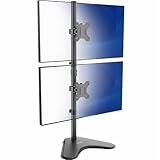
- Top Pick: Dual Monitor Stand – Vertical Stack Screen Free-Standing Monitor Riser Fits Two 13 to 34 Inch Screen with Swivel, Tilt, Height Adjustable, Holds One (1) Screen Up to 44Lbs
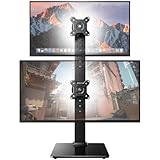
- Best Value: HUANUO 17-32 Inch Dual Monitor Stand, Vertical Dual Monitor Mount, Monitor Stand 2 Monitors, Ergonomic Adjustable Tilt/Swivel/Rotate, Weight Max 19.8 lbs, VESA 75/100mm
- Premium Choice: MOUNT PRO Vertical Dual Monitor Mount, Stacked Monitor Stand for 2 Computer Screens up to 32 inches, Full Motion Adjustable Tall Display Desk Mount, Each Arm Holds up to 17.6lbs, VESA Mount
Stacking two monitors vertically is a desk-space revelation. Instead of sprawling side to side, a monitor stack stand lifts your second screen directly above the first, freeing surface area while keeping both displays within an easy glance. It is a favorite layout for coders, traders, and streamers who want reference material overhead and their main work at eye level.
The trick is choosing between a freestanding riser and a clamp-mounted arm, and matching the stand’s weight rating and VESA support to your screens. We compared the most trusted vertical stacking solutions, from HUANUO and MOUNT PRO mounts to the VIVO ultrawide-friendly stand, to sort out which suits which setup.
Related guide: Retro gaming console reviews
As an Amazon Associate we earn from qualifying purchases at no extra cost to you.




🎮 Get More From Your Setup — Free
Prime Gaming gives you free PC games every month, in-game loot, and a free Twitch channel sub — plus fast free shipping on all the gear above. New members get a 30-day free trial.
Watch: Monitor Stack Stand — Video Review
Design & Build
There are two families here. Freestanding risers like the VIVO STAND-V002L and the generic vertical stack riser sit on the desk with a weighted base, no clamping required, and the VIVO version is notable for holding two ultrawide screens up to 34 inches in a stacked position. Clamp-and-grommet arms like the HUANUO 17-32″ mount, MOUNT PRO vertical mount, and the Freelift dual mount bolt to the desk edge and float the screens on adjustable arms, giving you full tilt, swivel, and height control. Build quality across these is solid aluminum and steel, with the arm-based designs feeling more premium and adjustable.
Performance
What matters most is weight rating and adjustability. The HUANUO stacked mounts handle up to 17.6 lbs per arm and fit VESA 75/100mm, which covers the vast majority of 24-32″ panels. The MOUNT PRO and Freelift arms offer full-motion articulation, letting you angle the top screen down toward your face, a genuine ergonomic win that fixed risers can’t replicate. Freestanding options trade some adjustability for zero desk damage and easy repositioning, which renters and glass-desk owners will appreciate. If your monitors are heavier gaming panels, verify each arm’s rating, since exceeding it causes sag over time.
Pros & Cons
- Reclaims desk space: Vertical stacking clears the surface a side-by-side layout eats up.
- Ergonomic viewing: Full-motion arms let you tilt the top screen toward your eyes.
- VESA versatility: Most support both 75mm and 100mm patterns for wide compatibility.
- Cleaner cabling: Arms route cables and lift screens off the desk entirely.
- Weight limits: Heavier panels can exceed per-arm ratings and sag.
- Install effort: Clamp mounts require a compatible desk edge and setup time.
Alternatives to Consider
If you run large ultrawide monitors, the VIVO STAND-V002L freestanding stand is purpose-built for stacking screens up to 34 inches and skips clamping entirely. For standard 27-32″ dual setups where adjustability matters most, the MOUNT PRO or Freelift full-motion arms are the better ergonomic choice. Budget-focused buyers who just need a reliable clamp mount will find the HUANUO models cover the essentials at a friendlier price.
Related Guides
- Best Gaming Monitor Under $200 2026: Top Budget Displays
- Best Monitor for Console Gaming 2026: Expert Reviews for PS5, Xbox Series X
- Best Gaming Monitor Under $400 in 2026: Top 5 Picks for 1440p Value
- Best Curved Gaming Monitors (2026): Immersive Screens for Every Budget
- Sony PVM-20M4U Buyer's Guide: Holy Grail of Retro CRTs
Frequently Asked Questions
Do my monitors need VESA holes for a stack stand?
For arm and mount-based stands, yes, they need standard VESA 75mm or 100mm holes. Some freestanding risers cradle the existing monitor foot instead, so check the design.
How much weight can these hold?
Typical arms rate each screen at roughly 17-22 lbs. Always confirm your monitor’s weight against the mount’s per-arm limit before installing.
Will a clamp mount damage my desk?
Quality clamps use padded contact points and spread the load, but very thin or glass desks may need the grommet option or a freestanding riser instead.
Can I stack two different-sized monitors?
Yes, as long as both meet the VESA and weight specs. Full-motion arms make it easy to align mismatched sizes to a comfortable viewing line.
Verdict
A monitor stack stand is one of the highest-impact desk upgrades for the money, transforming clutter into a clean vertical workspace. For most users the HUANUO stacked mount balances price and capability, adjustability seekers should choose the MOUNT PRO or Freelift arms, and ultrawide owners are best served by the VIVO freestanding stand.
















