- Top Pick: AM5 CPU Thermal Pad AM5 Thermal Pastes Guard for 7950X 7900X 7700X 7600X Heat Distribution Lower Temperatures CPU Coolers
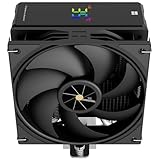
- Best Value: Thermalright Assassin X 120R Digital Black CPU Cooler, Digital Screen Top Cover, TL-P12 PWM Quiet Fan CPU Air Cooler, Computer Heatsink Cooling, Support AM4/AM5,Intel LGA1851/1700/115X/1200
- Premium Choice: of 100 Copper Sheet Heat Dissipation Thermal Pad Heatsink Lower Smartphone Operating Temperatures Effectively CPU Heat Sink
If your gaming sessions end with a laptop that sounds like a jet engine or a desktop that throttles mid-match, heat is the culprit. Modern CPUs from AMD’s Ryzen 7000 series to Intel’s 14th-gen chips are built to run hot by design, often boosting until they hit 90-95°C before pulling back performance. The good news is that dropping temperatures by 10-20°C is usually a matter of better contact, better airflow, and a few smart parts swaps rather than an expensive overhaul.
This guide walks through the most effective ways to cool a CPU in 2026, whether you’re troubleshooting a console, tuning a Ryzen or Intel build, or just trying to quiet down a noisy rig. We’ll cover mounting pressure issues, thermal interface materials, air cooling upgrades, and fan control, along with a few products worth keeping on hand.
As an Amazon Associate we earn from qualifying purchases at no extra cost to you.



⚡ Save on Your Next PC — Amazon Prime
Prime members get fast free shipping on the systems above, plus early access to Prime Day & Black Friday PC deals. New members get a 30-day free trial.
Watch: How to Lower CPU Temperatures — Video Review
Diagnose the Real Source of the Heat
Before buying anything, figure out where the heat is actually building up. Run a stress test (Cinebench or Prime95 for 10-15 minutes) while monitoring temps with HWInfo or Core Temp. A CPU that spikes past 90°C almost immediately often has a mounting or contact problem rather than a raw cooling capacity problem.
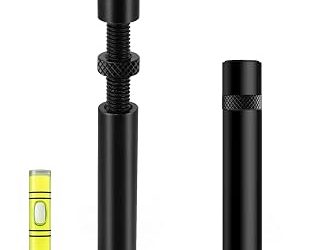
- Intel LGA1700 chips (12th-14th gen) are notorious for socket bending, which lifts the corners of the CPU die away from the cooler and creates hotspots of 10°C or more. An LGA 1700 anti-bending contact frame replaces the stock ILM bracket and applies even pressure across the die.
- Check case intake temps versus ambient room temp. If your intake air is already 35°C+, no cooler upgrade will fully fix things until airflow improves.
- Listen for fan behavior. Fans that stay pinned at full speed under light load usually indicate a bad control curve, not necessarily bad thermals.
Upgrade to a Proper Air Cooler
Stock coolers bundled with Ryzen and budget Intel chips are adequate for idle and light gaming, but they struggle once a CPU sustains 65W+ under load. A dedicated tower cooler is still the best value-per-degree upgrade you can make.
- The Thermalright Assassin X 120R Digital is a strong mid-range pick, with a 120mm PWM fan and enough heatpipe surface area to handle a 7700X or i5-14600K comfortably, typically trimming 15-20°C off a stock cooler under sustained load.
- It supports AM4, AM5, and Intel LGA1851/1700/115X/1200, so it carries over across upgrades.
- The digital temperature display on top is a nice bonus for spotting thermal creep without opening monitoring software.
Don’t Overlook Thermal Interface Material
Paste and pads degrade. If your CPU has been running hot for over two years without a repaste, that alone could account for 5-10°C of unnecessary heat.
- For AM5 builds running 7950X, 7900X, 7700X, or 7600X chips, a purpose-cut AM5 CPU thermal pad guarantees even coverage across the IHS, which matters more on Ryzen’s smaller dies than people expect.
- For VRMs, M.2 drives, and even GPU memory chips, a bulk copper sheet thermal pad pack is genuinely useful. Copper’s higher conductivity than standard silicone pads (roughly 380 W/mK versus 3-8 W/mK) makes it a smart budget upgrade for secondary hotspots.
- Reapply paste with a thin, even layer. Too much paste insulates rather than transfers heat.
Control Airflow, Not Just Fan Speed
Cooling is a system, not a single part. A great cooler in a case with poor airflow still runs hot.
- A PWM fan speed controller module with a temperature alarm lets you set custom ramp curves and get an audible warning before a thermal event, useful for silent builds where you’d rather not run fans at max speed constantly.
- Aim for slight positive pressure (more intake than exhaust) to reduce dust buildup while keeping consistent airflow across the motherboard.
- Clean dust filters monthly. A clogged filter can raise CPU temps by 5°C or more without any other change.
Don’t Forget Console Cooling
Consoles run fixed-clock APUs that rely entirely on their internal fan to avoid thermal throttling. An Xbox Series S with a worn or failing fan will show symptoms nearly identical to a PC with a dead cooler: loud spin-up noise, random shutdowns, and visible frame drops during long sessions. A replacement 5-blade internal cooling fan for Xbox Series S is a straightforward fix that restores factory-level airflow to the internal intercooler.
Tips
- Repaste every 2-3 years, or sooner if you notice load temps creeping up 5°C+ compared to when the system was new.
- Keep at least 2-3cm of clearance around case intake and exhaust vents; a case shoved against a wall can raise temps 3-5°C.
- Undervolting is free performance-per-watt. Many Ryzen and Intel chips can drop 10-15°C with a modest undervolt and negligible clock loss.
- Reseat coolers if you haven’t touched the system in over a year; mounting pressure can loosen from vibration and shipping.
Frequently Asked Questions
What CPU temperature is considered too hot for gaming?
Sustained temps above 85°C on Intel or 90°C on Ryzen during gaming indicate you’re close to the throttle point. Occasional short spikes into the high 80s are normal, but consistent readings there mean it’s time to address cooling.
Is liquid cooling always better than air cooling?
Not necessarily. A high-end air cooler like a dual-tower unit can match or beat a 240mm AIO in many cases, with no pump to fail and no coolant to eventually degrade. Liquid cooling pulls ahead mainly on CPUs pulling 200W+ under load.
Can bad thermal paste application really cause bending-related hotspots?
Yes, but it’s often a mounting pressure issue rather than the paste itself. Uneven pressure from a bent socket or an unevenly tightened cooler creates gaps that paste alone can’t bridge, which is why contact frames have become popular fixes for LGA1700 boards.
How often should I replace case or CPU cooler fans?
Most quality PWM fans last 4-6 years under normal use. If you hear grinding, notice inconsistent RPM, or see higher idle temps with no other changes, it’s worth swapping the fan before it fails completely.
Conclusion
Lower CPU temperatures come from stacking small wins: solid mounting contact, fresh thermal interface material, a cooler matched to your chip’s actual power draw, and airflow that isn’t fighting itself. Start with diagnostics, fix the biggest offender first, whether that’s a bent socket, dried-out paste, or a dying fan, and you’ll likely see double-digit temperature drops without needing to replace the whole system.