- Top Pick: ARCTIC Liquid Freezer III Pro 360 A-RGB – AIO CPU Cooler, Water Cooling
- Best Value: BXQINLENX 24-Piece Silver Chrome G1/4" Fittings Kit for Custom PC Water Cooling Systems (Silver)
- Premium Choice: Thermalright Aqua Elite 240 V3 Water Cooling CPU Cooler, Double PWM ARGB Fans with S-FDB Bearings,Efficient PWM Controlled Pump,for AMD/AM4/AM5, Intel LGA1150/1151/1200/1700/1851, (AE240 V3)
Every gaming PC build eventually comes down to one thermal decision: air or water. Both approaches can tame a modern CPU under full load, but they get there in very different ways, with different price tags, noise profiles, and long-term maintenance needs. In 2026, with CPUs and GPUs pushing more heat than ever, picking the right cooling method matters more than most builders realize.
This guide breaks down air cooling versus liquid cooling for gaming rigs, using real products you can buy today, so you can match your budget, case size, and noise tolerance to the right setup instead of guessing.
As an Amazon Associate we earn from qualifying purchases at no extra cost to you.





⚡ Save on Your Next PC — Amazon Prime
Prime members get fast free shipping on the systems above, plus early access to Prime Day & Black Friday PC deals. New members get a 30-day free trial.
Watch: Air vs Water Cooling for Gaming PCs — Video Review
Quick Verdict
For most gamers, a quality dual-tower air cooler like the Thermalright Peerless Assassin 120 SE delivers 90% of the cooling performance of an AIO at a third of the price and zero long-term risk. Go with liquid cooling, such as the ARCTIC Liquid Freezer III Pro 360 or Thermalright Aqua Elite 240 V3, if you’re running a power-hungry CPU (65W+ over stock, overclocked, or a high-end Intel/AMD chip), building in a case with limited air tower clearance, or simply want the cleaner aesthetic of tubing and a pump block on your window panel.
Key Differences
- Cooling ceiling: A 360mm AIO like the Liquid Freezer III Pro can dissipate more sustained heat than any dual-tower air cooler, giving it the edge with 250W+ CPUs.
- Noise at idle and load: Air coolers like the Peerless Assassin 120 SE run near-silent at idle since there’s no pump; AIOs add a constant low pump hum, though premium pumps like Thermalright’s S-FDB bearing design keep it under 25dB.
- Failure risk: Air coolers have no fluid to leak and effectively no failure point beyond the fans. AIOs and custom loops carry a small but real pump-failure or leak risk over 5+ years.
- Install complexity: Air coolers mount in minutes. AIOs need radiator placement planning and tubing routing; a full custom loop with a DIYhz radiator and BXQINLENX fittings kit is a weekend project, not a 20-minute swap.
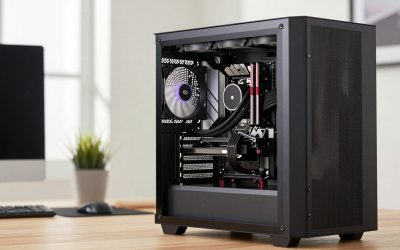
- Case compatibility: Big air towers need 160mm+ of clearance and can shadow RAM slots. AIOs need radiator mounting points, which is where a case like the MUSETEX K2 with its 7-fan layout and dual tempered glass panels becomes relevant, since it’s built with AIO and airflow flexibility in mind.
- Cost per degree: The Peerless Assassin 120 SE costs a fraction of a 360mm AIO while trailing it by only 3-5°C under sustained load in most reviews, making air the better value per thermal headroom dollar.
Air Cooling
Air cooling has quietly gotten very good. The Thermalright Peerless Assassin 120 SE uses six heat pipes and AGHP (Alternate Grooved Heat Pipe) technology across dual 120mm PWM fans spinning up to 1550RPM, and it handles mid-range and even many high-end AM5 and LGA1700 chips without breaking 80°C under gaming loads. There’s no pump to fail, no fluid to leak, and setup is straightforward: mount the bracket, apply paste, clip the tower on.
The tradeoff is size and, in extreme overclocking scenarios, a slightly lower thermal ceiling than a 360mm radiator. A dual-tower cooler can also crowd your first RAM slot or clash with tall memory heatsinks. But for 95% of gaming builds, especially anything paired with a mid-tower case and a CPU under 150W TDP, air cooling remains the safer, cheaper, and more maintenance-free choice.
Water Cooling
Liquid cooling shines when heat output climbs. The ARCTIC Liquid Freezer III Pro 360 pairs a 360mm radiator with A-RGB fans and an integrated VRM fan on the pump block, giving it an edge on boards with weaker VRM airflow. It’s a strong pick for overclocked Intel K-series chips or Ryzen X3D parts pushed to their thermal limits. The Thermalright Aqua Elite 240 V3 is the more compact alternative, using dual PWM ARGB fans and an S-FDB bearing pump for quieter, more consistent operation in cases that can’t fit a 360mm radiator.
For builders who want full control, a custom loop built around a DIYhz 12-pipe aluminum radiator and a BXQINLENX G1/4″ fittings kit offers better sustained thermals and a distinctive look, but it demands real assembly time, periodic fluid maintenance, and a case with enough radiator mounting room. That’s where a case like the MUSETEX K2, with its dual tempered glass panels and pre-installed ARGB fans, pays off twice: once for airflow, once for showing off the loop.
Which Should You Buy?
- Choose air cooling (Peerless Assassin 120 SE) if you’re on a budget, running a mid-range CPU, or want a maintenance-free setup with no failure risk.
- Choose a 360mm AIO (Liquid Freezer III Pro) if you’re running a high-TDP or overclocked CPU and want the lowest sustained temperatures with minimal effort.
- Choose a 240mm AIO (Aqua Elite 240 V3) if you want liquid cooling’s aesthetics and performance but your case can’t fit a 360mm radiator.
- Choose a custom loop (DIYhz radiator + BXQINLENX fittings) if you’re an enthusiast who wants maximum thermal headroom and full aesthetic control, and you’re comfortable with maintenance.
- Pair any AIO or custom loop with a case built for it, like the MUSETEX K2, to avoid airflow and mounting headaches down the line.
Frequently Asked Questions
Is water cooling actually better than air cooling for gaming?
Only under sustained heavy loads or with high-TDP CPUs. For typical gaming sessions, a good air cooler like the Peerless Assassin 120 SE keeps pace with a 240mm AIO within a few degrees, so “better” depends heavily on your specific CPU and case.
Do AIO coolers need maintenance?
Closed-loop AIOs like the Liquid Freezer III Pro and Aqua Elite 240 V3 are sealed and don’t require refilling, but pumps typically have a rated lifespan of 5-7 years. Custom loops with components like a DIYhz radiator need periodic fluid changes and leak checks.
Will an air cooler fit in a small case?
Check clearance first. Dual-tower coolers can require 155-165mm of vertical space, which rules out slim cases. A case like the MUSETEX K2 has enough room for both large air towers and 360mm AIO radiators, making it a flexible choice either way.
Is a custom water loop worth it for gaming?
For most gamers, no, the performance gain over a 360mm AIO doesn’t justify the cost and maintenance. It’s worth it if you’re chasing extreme overclocks, cooling both CPU and GPU in one loop, or specifically want the build aesthetics that parts like the BXQINLENX fittings kit enable.
Final Verdict
Air cooling remains the smarter default for most gaming builds in 2026, offering excellent thermals, near-zero risk, and the lowest cost per degree of cooling. Reach for liquid cooling when your CPU’s power draw, your case’s airflow limitations, or your aesthetic goals push you there, starting with a 360mm AIO like the Liquid Freezer III Pro for serious performance, or a full custom loop if you want total control over your build.