⚡ Key Takeaways
- How Each Cooling Method Works
- Air vs Liquid: Head-to-Head
- Where Air Coolers Win
- Where Liquid Coolers Win
- Matching the Cooler to Your CPU
- Noise: The Factor People Underestimate
- Maintenance Over the Long Term
- Case and Motherboard Considerations
- Thermal Paste and Mounting Matter Too
- Related Guides
- Frequently Asked Questions
- The Verdict
- Related Articles
- Related Guides

Prime
Best Seller
Noctua NH-D15, Premium CPU Cooler with 2X NF-A15 PWM 140mm Fans (Brown)
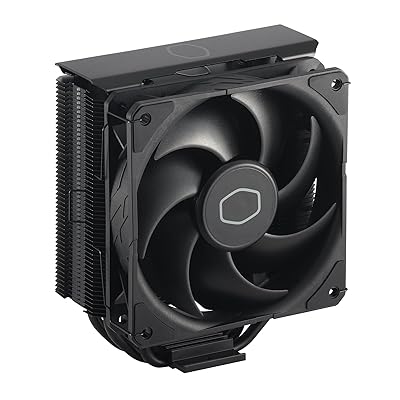


- An air cooler uses a metal baseplate that contacts the CPU, heat pipes that carry heat upward into a stack of aluminum fins, and one or two fans that blow air through those fins.
- A high-end dual-tower air cooler can match or beat a 240 mm AIO on many processors, often while running quieter and lasting longer.
- Liquid AIOs shine when you need to dissipate a lot of heat, want a clean look, or are building in a case where a giant tower will not fit.
- The most important factor is how much heat your processor produces.
The debate over air vs liquid cpu cooling is one of the most common questions in PC building, and the answer is more nuanced than internet arguments suggest. Both can keep a modern Ryzen 9000 or Core Ultra processor running cool and quiet. The right choice depends on your CPU’s heat output, your case, your budget, and how much you care about aesthetics. This guide compares the two approaches honestly so you can pick what fits your build.
As an Amazon Associate we earn from qualifying purchases at no extra cost to you.








🛒 Best Price Today on Amazon
Prime members get fast, free shipping on everything above, plus member-only deals. New members get a 30-day free trial — cancel anytime.
How Each Cooling Method Works
Both air and liquid coolers do the same fundamental job: move heat away from the CPU and dump it into the air inside or outside your case. They just take different paths.
An air cooler uses a metal baseplate that contacts the CPU, heat pipes that carry heat upward into a stack of aluminum fins, and one or two fans that blow air through those fins. It is a self-contained, gravity-and-conduction solution with no moving liquid.
A liquid cooler, specifically an all-in-one (AIO), uses a pump on the CPU that circulates coolant through tubes to a radiator mounted on the case. Fans on the radiator expel the heat. The liquid simply transports heat to a larger surface area away from the socket.
Air vs Liquid: Head-to-Head
| Factor | Air Cooler | Liquid AIO |
|---|---|---|
| Peak cooling | Excellent (top-tier towers) | Excellent to best (240–420 mm) |
| Noise | Very quiet to moderate | Quiet, but pump adds a faint hum |
| Reliability | Extremely high, no pump | High, but pump can eventually fail |
| Installation | Simple, one unit | More steps, radiator mounting |
| Cost | Lower for equal performance | Higher |
| Aesthetics | Bulky over the socket | Clean, opens up the board |
| RAM clearance | Can block tall RAM | No clearance issues |
Where Air Coolers Win
A high-end dual-tower air cooler can match or beat a 240 mm AIO on many processors, often while running quieter and lasting longer. Air coolers have no pump, so there is one fewer part that can fail and one fewer source of noise. They are also easier to install and far cheaper for the cooling they provide.
- Reliability: With no liquid and no pump, a quality air cooler can last the lifetime of multiple builds.
- Value: You get more cooling per dollar than an equivalent AIO.
- Simplicity: Bolt it on, attach the fan, done.
The main downsides are size and clearance. Top air coolers are large and heavy, can overhang tall memory modules, and may not fit in compact cases. Check clearance specs before buying.
Where Liquid Coolers Win
Liquid AIOs shine when you need to dissipate a lot of heat, want a clean look, or are building in a case where a giant tower will not fit. A 360 mm radiator can handle the heat output of the most demanding processors during sustained all-core workloads better than nearly any air cooler.
- High heat handling: Larger radiators excel with hot, high-core-count CPUs under heavy load.
- Aesthetics: The socket area stays open, showing off your board and RAM.
- Flexibility: The radiator moves heat to the top or front of the case, away from other components.
The trade-offs are cost, installation complexity, and the pump as an additional failure point. For a deeper look at specific models in both categories, see our roundup of the best CPU coolers for gaming in 2026.
Matching the Cooler to Your CPU
The most important factor is how much heat your processor produces. Match the cooler to the chip, not to a trend.
- Efficient mainstream CPUs (mid-range Ryzen and Core Ultra) are easily handled by a solid mid-tier air cooler.
- High-end gaming CPUs run cool in games but can get hot in all-core work; a premium air tower or a 240–280 mm AIO is ideal.
- Flagship, high-core-count chips under sustained heavy loads benefit most from a 360 mm AIO or the very best dual-tower air coolers.
Remember that gaming rarely maxes out all CPU cores, so a chip that runs hot in rendering may stay comfortably cool while you play. If you want to understand the temperatures you should expect, pair this with our guide on safe CPU temperatures.
Noise: The Factor People Underestimate
Cooling performance gets all the attention, but noise is what you actually live with day to day. Both cooler types can be quiet or loud depending on how they are configured. An air cooler with a large fin stack and slow-spinning fans moves plenty of air without much noise, because it does not have to spin fast to keep up. A liquid AIO adds a pump, which produces a low hum that some people notice in a quiet room, on top of the radiator fan noise. A poorly tuned AIO with small high-speed fans on a thick radiator can actually be louder than a good air cooler. The key on either side is sizing the cooler generously so its fans can run slowly and quietly while still keeping your CPU cool.
Maintenance Over the Long Term
Air and liquid coolers age differently. An air cooler is essentially maintenance-free aside from occasional dusting; the only wearable part is the fan, which is cheap and easy to replace. A liquid AIO is also low-maintenance day to day, but it has a finite lifespan because the sealed coolant slowly permeates the tubing over years and the pump eventually wears out. When that happens, the whole unit must be replaced. For builders who keep a system for many years and value set-and-forget reliability, this favors air cooling. For those who upgrade more frequently or prioritize peak cooling and aesthetics now, the AIO’s finite lifespan is less of a concern.
Case and Motherboard Considerations
Your case dictates what fits. Measure the maximum CPU cooler height for air coolers and the supported radiator sizes for AIOs before you buy. Compact and small-form-factor cases often favor low-profile air coolers or compact AIOs. Make sure your motherboard has the fan and pump headers you need, and confirm RAM clearance if you choose a large air tower.
Thermal Paste and Mounting Matter Too
Whichever cooler you choose, its performance depends heavily on a proper mount and good thermal paste. Even the best cooler will run poorly if it is seated unevenly or the paste is applied badly, creating air gaps that trap heat. Apply a modest amount of quality paste, seat the cooler with even pressure across all mounting points, and avoid over-tightening. A stable build also benefits from clean power; a quality unit from our roundup of the best gaming power supplies for 2026 keeps your whole system, and its cooling, running reliably. Many premium coolers include their own paste and clear mounting instructions. If your temperatures are higher than expected after installation, a remount with fresh paste is often the fix, regardless of whether you went with air or liquid cooling.
Frequently Asked Questions
Is liquid cooling better than air cooling?
Not universally. A large liquid AIO handles extreme heat loads and looks cleaner, but a top-tier air cooler can match a mid-size AIO while being cheaper and more reliable. The best choice depends on your CPU’s heat output, your case, and your priorities.
Will an AIO leak and destroy my PC?
Leaks in quality sealed AIOs are rare. The bigger long-term concern is pump wear, since pumps eventually fail after years of use. Buy from a reputable brand with a solid warranty, and the risk is minimal for a typical ownership period.
Do I need liquid cooling for gaming?
For most gaming, no. Games rarely load all CPU cores, so a good air cooler keeps temperatures in check. Liquid cooling becomes more compelling for flagship CPUs, heavy multi-core workloads, or builds where aesthetics and case constraints matter.
Are air coolers louder than liquid coolers?
It depends on the models. A large air cooler with slow-spinning fans can be extremely quiet, while an AIO adds a faint pump hum on top of its radiator fans. Either type can be near-silent when properly sized for the heat load.
How long do liquid coolers last?
Quality AIOs typically last several years, often five or more, before the pump may begin to weaken. Air coolers can effectively last indefinitely since the only wearable part is the fan, which is easily replaced.
The Verdict
For the majority of gamers, a high-quality air cooler offers the best blend of performance, reliability, and value. Choose a liquid AIO when you are taming a very hot processor, building in a constrained case, or you want that clean, open-socket look. Both can keep a 2026 CPU cool, so match the cooler to your chip and your priorities rather than the loudest voices online.