⚡ Key Takeaways
- What Liquid Cooling Actually Does
- The Honest Truth About Most Gaming Workloads
- When You Do Not Need Liquid Cooling
- When Liquid Cooling Makes Sense
- The Trade-Offs of Going Liquid
- Custom Loops: A Different Conversation Entirely
- Spending Your Budget Wisely
- Air Coolers Are Better Than You Think
- How to Make the Decision
- The Role of Case Airflow
- Related Guides
- Frequently Asked Questions
- The Verdict
- Related Articles
- Related Guides

Prime
Best Seller
Corsair iCUE H100i Elite Capellix Liquid CPU Cooler
View on Amazon.com


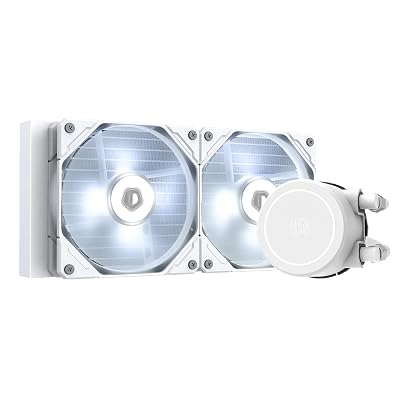
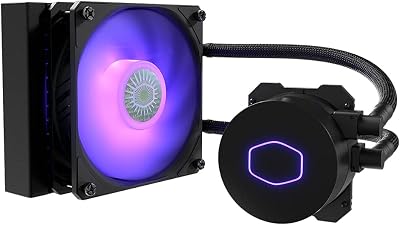
- An all-in-one liquid cooler, or AIO, uses a pump to circulate coolant from a block on your CPU through tubes to a radiator mounted in your case.
- Gaming typically loads only a handful of cores heavily, so your processor produces far less heat while gaming than it does during an all-core stress test or heavy rendering.
- For these users, the money saved on an AIO is better spent on a faster GPU, more storage, or a better monitor, upgrades you will actually notice while gaming.
- Liquid cooling is not pointless; it genuinely shines in specific scenarios.
If you are weighing your cooling options and wondering “do i need liquid cooling,” the honest answer for most gamers is no. Liquid cooling looks impressive and excels in specific situations, but a quality air cooler keeps the vast majority of modern processors comfortably cool while costing less and lasting longer. This guide cuts through the hype to help you decide whether liquid cooling is genuinely worth it for your build, or whether your money is better spent elsewhere.
As an Amazon Associate we earn from qualifying purchases at no extra cost to you.


🛒 Best Price Today on Amazon
Prime members get fast, free shipping on everything above, plus member-only deals. New members get a 30-day free trial — cancel anytime.
What Liquid Cooling Actually Does
An all-in-one liquid cooler, or AIO, uses a pump to circulate coolant from a block on your CPU through tubes to a radiator mounted in your case. Fans on that radiator expel the heat. The advantage is that liquid moves heat to a large radiator away from the cramped CPU socket, which can help with very hot, high-power processors. It is not magic; it is simply a different way of transporting the same heat.
The Honest Truth About Most Gaming Workloads
Here is the key insight many people miss: games rarely max out all your CPU cores. Gaming typically loads only a handful of cores heavily, so your processor produces far less heat while gaming than it does during an all-core stress test or heavy rendering. This means that even a powerful gaming CPU usually stays comfortably cool on a good air cooler during actual gameplay.
In other words, the heavy heat loads that justify liquid cooling often do not occur during the gaming you actually do. If you understand what temperatures to expect, our overview of safe CPU temperatures shows that gaming numbers are usually well within range for air coolers.
When You Do Not Need Liquid Cooling
- You play games and do light tasks. A solid air cooler handles this easily.
- You run a mid-range CPU. Efficient mainstream chips produce modest heat.
- You want maximum reliability. Air coolers have no pump to fail.
- You are on a budget. Air delivers more cooling per dollar.
- You value quiet, fuss-free operation. A large air tower with slow fans is whisper-quiet.
For these users, the money saved on an AIO is better spent on a faster GPU, more storage, or a better monitor, upgrades you will actually notice while gaming.
When Liquid Cooling Makes Sense
Liquid cooling is not pointless; it genuinely shines in specific scenarios. Consider an AIO if any of the following apply to you.
| Scenario | Why Liquid Helps |
|---|---|
| Flagship high-core-count CPU | Large radiators tame heavy all-core heat |
| Heavy rendering / streaming / production | Sustained all-core loads run hot |
| Compact case, no room for a tall tower | Radiator mounts on the case wall |
| Clean, open-socket aesthetics desired | Frees up the area around the CPU |
| Tall RAM clearance issues | No bulky cooler over the memory slots |
If you fall into one of these groups, a quality AIO is a reasonable investment. For specific recommendations across both air and liquid, see our roundup of the best CPU coolers for gaming in 2026.
The Trade-Offs of Going Liquid
Before you commit, weigh the downsides honestly.
- Cost: An AIO costs more than an air cooler of comparable performance.
- Reliability: The pump is an additional part that can eventually fail, ending the cooler’s life.
- Installation: Mounting a radiator and routing tubes is more involved than bolting on a tower.
- Pump noise: A faint pump hum is present even when fans are quiet.
- Lifespan: Air coolers can outlast multiple builds; AIOs have a finite service life.
Custom Loops: A Different Conversation Entirely
When people debate liquid cooling, they almost always mean all-in-one units, but there is a third option worth mentioning: the custom open loop. These use separate components, a reservoir, pump, water blocks, tubing, and a radiator, that you assemble and fill yourself. Custom loops can deliver the best cooling and the most striking aesthetics, and they can cool both the CPU and GPU together. However, they are expensive, time-consuming to build, and require periodic maintenance such as refilling and cleaning. For the overwhelming majority of gamers, a custom loop is a hobby project rather than a practical necessity. Unless you specifically enjoy building and maintaining one, an air cooler or a sealed AIO makes far more sense for a gaming PC.
Spending Your Budget Wisely
Cooling is just one part of a build, and the money you allocate to it competes with everything else. If you are choosing between a premium AIO and a good air cooler that performs nearly as well for your CPU, the difference in cost can fund a more meaningful upgrade elsewhere. A faster graphics card, additional storage, more memory, or a better monitor will each have a far larger impact on your actual gaming experience than a fancier cooler that you do not need. The smart approach is to spend exactly enough on cooling to keep your CPU comfortable and quiet, then direct the remaining budget toward the components that determine how your games actually look and run.
Air Coolers Are Better Than You Think
Modern high-end air coolers are remarkably capable. A premium dual-tower model can match or exceed a mid-size AIO on many processors while running quieter and lasting far longer. For gaming specifically, where heat loads are moderate, a good air cooler is more than sufficient. Just confirm it fits your case height and does not block your RAM. Building on a quality motherboard with strong power delivery further helps keep your CPU stable and cool.
How to Make the Decision
- Identify your CPU’s heat output. Mid-range chips run cool; flagship high-core-count chips run hot under heavy loads.
- Consider your real workloads. Pure gaming favors air; heavy rendering or streaming favors liquid.
- Check your case. Tight cases may need a compact AIO; roomy cases fit large air towers.
- Weigh aesthetics. If a clean, open look matters to you, that is a valid reason to choose liquid.
- Respect your budget. If money is tight, air cooling frees funds for upgrades you will feel more.
The Role of Case Airflow
No cooler works in isolation, and your case airflow often matters as much as the cooler itself. Both air coolers and AIO radiators ultimately dump heat into the air inside or passing through your case, so if that air is stagnant and hot, even an expensive cooler will struggle. A case with good intake and exhaust fans, clear airflow paths, and minimal dust gives any cooler the cool, fresh air it needs to do its job. Before assuming you need to upgrade to liquid cooling, check whether improving your case airflow solves the problem. Often a couple of well-placed fans and a clean interior do more for your temperatures than switching cooler types.
Frequently Asked Questions
Is liquid cooling necessary for gaming?
For most gamers, no. Games rarely load all CPU cores, so a quality air cooler keeps temperatures in check during gameplay. Liquid cooling becomes worthwhile mainly for flagship CPUs, heavy multi-core workloads, compact cases, or aesthetic preferences.
Will air cooling overheat my CPU?
A properly sized air cooler will not overheat a CPU during normal gaming. Top-tier air towers handle even powerful processors well. Overheating usually stems from an undersized cooler, dust buildup, or poor case airflow rather than air cooling itself.
Does liquid cooling improve gaming performance?
Indirectly and only slightly. Cooler temperatures can let a CPU sustain higher boost clocks, but in gaming the difference over a good air cooler is usually negligible because gaming does not generate enough heat to matter much.
Are AIO liquid coolers risky?
Leaks in quality sealed AIOs are rare. The more realistic long-term concern is pump wear, since pumps eventually fail after several years. Choose a reputable brand with a strong warranty and the risk is low for typical ownership.
What is the main advantage of liquid cooling?
Its main advantages are taming the heat of very hot, high-core-count CPUs under sustained loads, fitting in cases where a tall tower will not, and providing a clean open-socket look. For pure gaming, those advantages are situational rather than essential.
The Verdict
Do you need liquid cooling? For most gamers, the honest answer is no. A quality air cooler keeps modern gaming CPUs cool, quiet, and reliable while saving you money for upgrades that matter more. Reserve liquid cooling for flagship chips, heavy production workloads, tight cases, or when you simply want that clean aesthetic. Match the cooler to your actual needs, not the marketing.