⚡ Key Takeaways
- Where the Watts Actually Go
- Typical Whole-System Power by Build Tier
- Idle, Browsing, and Gaming Are Very Different
- How to Estimate Your System’s Draw
- Sizing Your Power Supply Correctly
- Why Transient Spikes Matter So Much
- Laptops vs Desktops
- Efficiency Ratings Explained
- What It Costs to Run
- Managing Heat and Noise From Power Draw
- Related Guides
- Frequently Asked Questions
- Conclusion
- Related Articles



- In a gaming PC, two components dominate power draw: the graphics card and the processor.
- Your PC does not draw maximum power all the time.
- A good rule is to choose a power supply rated comfortably above your estimated peak draw, leaving roughly 30 percent headroom.
- A modern graphics card does not pull a steady, flat amount of power.
If you are sizing a power supply, planning your electricity bill, or just curious, understanding gaming pc power consumption is more useful than most people realize. The honest answer is that it varies wildly: a modest esports rig might sip 150 watts under load, while a flagship build with an RTX 5090 and a Ryzen 9 9950X3D can pull well over 600 watts during demanding games. This guide explains where that power goes, how to estimate your own system’s draw, and how to size a supply correctly.
As an Amazon Associate we earn from qualifying purchases at no extra cost to you.




Related: best gaming PC desk accessories.
Related: best ARGB case fans.
Related: best X3D gaming CPUs.
Related: best Ryzen 5 CPUs for gaming.
Related: best L-shaped gaming desks.
🛒 Best Price Today on Amazon
Prime members get fast, free shipping on everything above, plus member-only deals. New members get a 30-day free trial — cancel anytime.
Where the Watts Actually Go
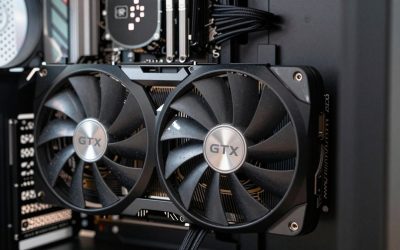
In a gaming PC, two components dominate power draw: the graphics card and the processor. Everything else, your storage, fans, RAM, and motherboard, adds up to a relatively small slice.
| Component | Idle | Gaming Load |
|---|---|---|
| GPU (high-end) | 15–40 W | 300–575 W |
| CPU (high-end) | 15–50 W | 90–230 W |
| Motherboard | 15–30 W | 30–60 W |
| RAM (2 sticks) | 4–8 W | 8–15 W |
| NVMe SSD | 2–4 W | 5–8 W |
| Fans / RGB | 5–15 W | 10–25 W |
As the table shows, the GPU is the single biggest variable. Choosing a more efficient mid-range card instead of a flagship can cut your gaming power draw nearly in half.
Typical Whole-System Power by Build Tier
Here is a realistic picture of total system draw measured at the wall during gaming, including power supply inefficiency.
| Build Tier | Example Parts | Gaming Draw |
|---|---|---|
| Esports / budget | Ryzen 5 + RTX 5060 | 200–280 W |
| Mainstream 1440p | Ryzen 7 + RTX 5070 | 350–450 W |
| High-end 4K | Ryzen 9 + RTX 5080 | 500–600 W |
| Flagship / enthusiast | 9950X3D + RTX 5090 | 650–800 W |
Idle, Browsing, and Gaming Are Very Different
Your PC does not draw maximum power all the time. Most systems spend the majority of their lives idling on the desktop, browsing, or playing video, where draw is a fraction of the gaming peak.
- Idle desktop: Often 50–90 W for a complete system.
- Web browsing / video: Typically 70–130 W.
- Gaming: The numbers in the tables above.
- Stress test / rendering: The absolute peak, often higher than gaming.
This matters for your electricity bill, because the gaming peak only applies while you actually play. If you understand thermals as well, our guide on choosing a CPU cooler explains how power and heat are directly linked.
How to Estimate Your System’s Draw
- Find your GPU’s rated board power. The manufacturer lists a total board power figure; this is the largest single number you need.
- Add your CPU’s power limit under load. Check the rated package power for sustained loads.
- Add roughly 80–120 W for the motherboard, memory, storage, and fans combined.
- Add headroom for transient spikes. Modern GPUs spike briefly far above their average, so never run your supply at its limit.
Sizing Your Power Supply Correctly
A good rule is to choose a power supply rated comfortably above your estimated peak draw, leaving roughly 30 percent headroom. This keeps the unit operating in its efficient range and absorbs the transient spikes that current GPUs produce.
| System Type | Suggested PSU |
|---|---|
| Esports / budget | 550–650 W |
| Mainstream 1440p | 650–750 W |
| High-end 4K | 850 W |
| Flagship (RTX 5090) | 1000–1200 W |
Pay attention to the 12V-2×6 power connector and the ATX 3.x specification, which is designed to handle the steep power transients of current graphics cards. Our roundup of the best gaming power supplies for 2026 lists ATX 3.x units with native 12V-2×6 cables. If you are still deciding on a card, the best mid-range GPUs for 2026 offer excellent efficiency that keeps total draw, and your PSU requirement, lower.
Why Transient Spikes Matter So Much
One of the most misunderstood aspects of gaming PC power consumption is the difference between average draw and momentary spikes. A modern graphics card does not pull a steady, flat amount of power. Instead, its draw fluctuates constantly, and for brief fractions of a second it can spike far above its rated board power as it ramps clocks up and down. These transient spikes can momentarily reach nearly double the average figure on high-end cards. A power supply that is sized only for the average draw may trip its protection circuitry and shut down during these spikes, causing seemingly random crashes under load. This is precisely why generous headroom and an ATX 3.x design, which is built to tolerate these spikes, are so important for current hardware.
Laptops vs Desktops
It is worth noting that gaming laptops draw far less power than equivalent desktops, often topping out between 150 and 280 watts even with powerful mobile hardware. Mobile chips are tuned for efficiency and operate within strict thermal and power limits to preserve battery life and manage heat in a thin chassis. A desktop with similar gaming performance will typically draw considerably more from the wall because its components run at higher power limits for maximum performance. If energy use is a top priority, a well-tuned or undervolted desktop narrows that gap, but the desktop’s advantage in raw performance and upgradability usually justifies the extra draw for serious gamers.
Efficiency Ratings Explained
The 80 Plus rating (Bronze, Gold, Platinum, and so on) tells you how much wall power actually reaches your components versus being lost as heat. A Gold-rated unit is around 90 percent efficient at typical loads. Higher efficiency means slightly lower electricity use and less waste heat in your room, though the price premium for top tiers takes years to recoup on energy savings alone.
What It Costs to Run
To estimate cost, multiply your average gaming draw in kilowatts by hours played and your local electricity rate. For example, a 450 W system played three hours a day is about 1.35 kWh daily. At typical residential rates this is a modest monthly cost, far less than most people fear. The flagship builds draw more, but even they are a minor line item compared to heating and cooling a home.
Managing Heat and Noise From Power Draw
Every watt your PC consumes ultimately becomes heat that must be removed from the case and your room. A flagship system drawing 700 watts dumps a noticeable amount of warmth into a small space, which can make the room uncomfortable during long sessions and forces your fans to spin faster and louder to keep up. This is another reason to consider efficiency when planning a build. Capping frame rates in games that do not need maximum frames, undervolting your components, and choosing efficient parts all reduce both power draw and the heat and noise that come with it, making for a more pleasant gaming environment.
Frequently Asked Questions
How many watts does a gaming PC use on average?
A mainstream gaming PC typically draws 300 to 500 watts while gaming, idling far lower at 50 to 100 watts. Budget systems can stay under 280 watts, while flagship builds with top GPUs can exceed 700 watts at peak.
Does a bigger power supply use more electricity?
No. A power supply only delivers the power your components actually request. A 1000 W unit running a 400 W system draws roughly the same from the wall as a 650 W unit running the same parts. Oversizing affects efficiency curves slightly, not total consumption.
Why does my GPU spike above its rated power?
Modern graphics cards produce brief transient spikes that can momentarily exceed their average board power by a large margin. This is normal and is exactly why ATX 3.x power supplies and generous headroom are recommended for current high-end cards.
Will undervolting reduce my power consumption?
Yes. Undervolting your GPU or CPU lowers the voltage at a given clock speed, reducing power draw and heat with little or no performance loss. It is one of the most effective ways to cut consumption on a powerful gaming PC.
Does a higher frame rate use more power?
Generally yes, because pushing more frames keeps the GPU working harder. Capping your frame rate or enabling a frame limiter in games you do not need maxed out can noticeably reduce power draw, heat, and fan noise.
Conclusion
Gaming PC power consumption ranges from around 200 watts for an efficient build to over 700 watts for a flagship rig, with the GPU as the dominant factor. Estimate your peak draw, add comfortable headroom, and choose a quality ATX 3.x power supply. Done right, you get stable performance, room to upgrade, and an electricity bill that is far smaller than the wattage numbers might suggest.