

- Top Pick: ODK 53" L Shaped Gaming Desk with Shelves, LED & Outlets, Black
- Best Value: KDD RGB Gaming Headphone and Controller Stand with 2 Type-C and 1 USB Ports
- Premium Choice: KDD Headphone Stand with Drawer – Headset & Controller Holder for Desk – Aluminum Supporting Bar Earphone Stand with Cable Organizer – Universal Gaming PC Accessories Storage
🛒 Best Price Today on Amazon
Prime members get fast, free shipping on everything above, plus member-only deals. New members get a 30-day free trial — cancel anytime.
- Best Gaming PC Desk Accessories in 2026
- Quick Comparison of Our Top Desk Accessories
- Cable Management: The Upgrade You Feel Every Day
- Monitor Risers and Under-Desk Space
- Headset Stands, Mouse Bungees, and Controller Holders
- Desk Mats, USB Hubs, and LED Lighting
- Verdict: Building the Perfect 2026 Gaming Desk
- Related Guides
- Frequently Asked Questions
- Related Articles
Best Gaming PC Desk Accessories in 2026
Your gaming rig is only as good as the space around it. You can drop thousands on a graphics card and a 240Hz monitor, but if your desk is a tangle of cables, your headset is slumped on a stack of games, and your controller keeps sliding onto the floor, the whole setup feels chaotic instead of premium. In 2026, the desk-side ecosystem has grown up: cable management is cleaner, monitor risers double as USB hubs, and even a simple mouse bungee can shave milliseconds off your flick shots by killing cord drag.
As an Amazon Associate we earn from qualifying purchases at no extra cost to you.


This guide rounds up the best gaming PC desk accessories worth buying this year, from cable management kits and monitor risers to headset stands, controller holders, desk mats, and under-desk hooks. We focused on gear that solves a real annoyance rather than gadgets that just look flashy in a product photo. Every pick balances build quality, price, and how much it actually improves your day-to-day play. Prices are approximate US retail in USD and shift with sales, so treat them as a ballpark rather than gospel.


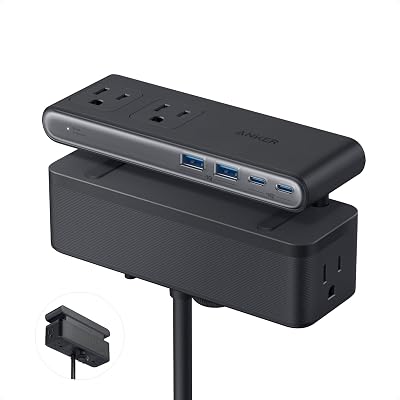

Whether you are building a minimalist battlestation or a full RGB command center, the accessories below will make your desk cleaner, more comfortable, and genuinely nicer to sit at for those long weekend sessions.
As an Amazon Associate we earn from qualifying purchases. When you buy through links on this page we may earn a small commission at no extra cost to you, which helps us keep testing and reviewing gaming gear.
Quick Comparison of Our Top Desk Accessories
Before we dig into each category, here is a fast side-by-side look at five accessories that consistently earn a spot on well-organized gaming desks in 2026. Use it to spot the type of upgrade that fits your setup and budget, then read the deeper sections below for the why.
| Product | Type | Best For | Approx Price |
|---|---|---|---|
| Under-Desk Cable Management Tray | Cable management | Hiding power strips and cable clutter | $30 |
| Aluminum Monitor Riser with USB Hub | Monitor riser | Raising screens and adding ports | $55 |
| Weighted Headset Stand with USB-C | Headset stand | Displaying and charging headsets | $35 |
| Flexible Mouse Bungee | Mouse cord manager | Eliminating wired mouse drag | $20 |
| XXL RGB Desk Mat | Desk mat | Full-desk coverage and lighting | $40 |
Cable Management: The Upgrade You Feel Every Day
Nothing drags down an otherwise clean battlestation faster than a rat’s nest of cables. Cable management is the single most cost-effective desk upgrade you can make, and it pays off every time you glance down or reach for a port. Start with an under-desk cable tray or a raceway that mounts to the back edge of your desk. These metal or plastic baskets hold your power strip, excess cable length, and even a small power brick, keeping everything off the floor and out of sight.
For the cables that still have to travel, adhesive clips, hook-and-loop straps, and braided cable sleeves do the heavy lifting. Route your monitor, peripheral, and power cables together, sleeve them into a single tidy run, and anchor them with a couple of clips. The difference is dramatic: a desk that once looked cluttered suddenly reads as intentional and clean. If you are planning a broader overhaul, our complete guide to gaming desk setups walks through cable routing from the ground up.
What to look for
- Under-desk trays with a no-drill clamp option if you rent or do not want to make holes
- Reusable hook-and-loop straps rather than single-use zip ties so you can re-route later
- Braided sleeves in a diameter that matches your bundle, with a lay-flat split seam for easy insertion
- A surge-protected power strip that fits inside the tray you choose
Monitor Risers and Under-Desk Space
A monitor riser does two jobs at once: it lifts your screen to a healthier eye level and it reclaims the space underneath for a keyboard, a controller, or a small speaker. The best 2026 risers add a built-in USB hub, so the shelf that raises your monitor also becomes the most convenient set of ports on your desk. Aluminum models look premium and stay cool, while wood-tone options suit warmer, cozier setups.
Do not forget the space below the desk, either. Under-desk hooks and adhesive holders are cheap, install in seconds, and give your headset, bag, or controller cables a home that is completely out of the way. Pairing a riser above with a couple of hooks below is one of the easiest ways to double your usable desk area without buying a bigger desk. If ergonomics are your priority, cross-reference our best ergonomic gaming chairs roundup so your monitor height and seating actually line up.
Headset Stands, Mouse Bungees, and Controller Holders
These three small accessories punch far above their price. A weighted headset stand keeps your cans off the desk surface, protects the headband, and turns your gaming headset into a display piece. Many now include a passthrough USB-C or USB-A hub, so the stand also charges your phone or a wireless controller while it holds your headset.
A mouse bungee is the secret weapon of competitive players who still run a wired mouse. It suspends the cable in a springy arm so the cord never catches on the edge of your desk mat, giving you drag-free, wireless-like movement with zero latency. If you play shooters, this is a genuine performance upgrade, not just a tidiness one. For a deeper look at pointer gear, see our gaming mouse buying guide.
Controller holders finish the trio. Whether you main an Xbox pad, a DualSense, or a fight stick, a simple under-desk or on-desk holder keeps controllers charged, visible, and off the floor where they get stepped on. Look for holders with a soft-touch cradle so they do not scuff your controller’s finish.
Why these matter for performance and longevity
- Headset stands prevent earpad crushing and cable kinks that shorten a headset’s life
- Mouse bungees remove cord drag, letting you use a lighter cable tension for faster flicks
- Controller holders keep batteries topped up so you never grab a dead pad mid-session
Desk Mats, USB Hubs, and LED Lighting
An XXL desk mat is the fastest way to make a setup look cohesive. It gives your mouse a consistent, low-friction surface across the whole desk, protects the wood or laminate underneath, and hides minor scratches. RGB-bordered mats add a soft glow that ties your lighting together, while plain stitched-edge mats keep things understated and professional.
A powered USB hub belongs on every gaming desk. Modern motherboards still never seem to have enough front ports, and a good hub with USB-C, high-speed USB-A, and independent power lets you plug in a capture card, a stream deck, a webcam, and a charging cable without diving behind the tower. For lighting, adhesive LED strips run along the back edge of the desk or under a monitor shelf add bias lighting that reduces eye strain during late-night sessions and makes the whole rig pop. If you want your lighting to sync with your rig, check our RGB ecosystem compatibility guide before buying.
Verdict: Building the Perfect 2026 Gaming Desk
If you only buy one thing, make it cable management, because it improves every other accessory you own by giving them clean power and clutter-free routing. From there, a monitor riser with a USB hub delivers the biggest quality-of-life jump, followed closely by a weighted headset stand that doubles as a charging point. Competitive players should add a mouse bungee, and everyone benefits from an XXL desk mat to tie the surface together.
The beauty of desk accessories is that they are affordable, incremental, and reversible. You can start with a $30 tray this month and add a riser, stand, and mat over the next few paychecks, ending up with a battlestation that looks and feels far more expensive than the sum of its parts. Prioritize the upgrades that fix your biggest daily annoyance first, and your desk will reward you every time you sit down to play.
Frequently Asked Questions
What is the most important gaming desk accessory to buy first?
Cable management should be your first purchase. An under-desk tray plus a few hook-and-loop straps costs around $30 and instantly makes your setup look cleaner while giving every other accessory a tidy place to route power and data cables. It is the foundation everything else builds on.
Do I really need a monitor riser if I already have a monitor arm?
If you have a good monitor arm, you already get the height and positioning benefits, so a riser is less essential. However, many gamers still add a low-profile shelf riser specifically for the built-in USB hub and the storage space it creates for a keyboard or controller when not in use. Choose based on the features you want, not just the height.
Are RGB desk mats worth it, or is plain better?
It comes down to aesthetics and budget. RGB-bordered mats add a soft glow that ties a lit setup together and usually cost about $10 to $15 more than a plain equivalent. If your rig already has synchronized lighting, an RGB mat completes the look. If you prefer a clean, professional desk, a stitched-edge plain mat performs identically as a mouse surface for less money.
Will a mouse bungee actually improve my aim?
For wired mice, yes, in a practical sense. A bungee suspends the cable so it never drags on your desk or catches the mat edge, which lets the mouse glide with almost no resistance, similar to a wireless mouse but with zero latency. Competitive shooter players notice smoother, more consistent flick and tracking motions, though it will not replace practice or aim training.

















