

- Top Pick: Logitech MK295 Full Size Silent Wireless Keyboard Mouse Combo – Graphite
- Best Value: Wireless Keyboard and Mouse Combo, Full Size Silent Ergonomic Keyboard and Mouse, Long Battery Life, Optical Mouse, 2.4G Lag-Free Cordless Mice Keyboard for Computer, Mac, Laptop, PC, Windows
- Premium Choice: Wireless Keyboard and Mouse Combo, Full-Size Silent Ergonomic Keyboard and Optical Mouse, Long Battery Life, 2.4G Lag-Free Cordless Mice Keyboard for Laptop/Mac/PC/Windows(2 Packs
If you share a room, work late into the night, or simply can’t stand the machine-gun clatter of a mechanical board, a silent wireless mouse and keyboard combo is one of the cheapest upgrades you can make to your desk. In 2026 the “quiet” category has matured well past the mushy membrane sets of a few years ago. Modern silent combos use dampened scissor-switch keys, cushioned rubber domes, and specially tuned mouse micro-switches that cut click noise by up to 90% while still giving you a satisfying, tactile response. For anyone typing next to a sleeping partner, streaming in a shared apartment, or grinding out a ranked match at 2 a.m., that difference is the line between comfortable and getting told off.
- What Makes a Wireless Keyboard and Mouse Combo Silent?
- Top Silent Wireless Combos Compared
- 2.4GHz vs Bluetooth: Which Connection Should You Choose?
- Battery Life and Charging: Replaceable vs Rechargeable
- Ergonomics, Layout, and Full-Size vs Compact
- Verdict: The Best Silent Wireless Combo for Most People
- Related Guides
- Frequently Asked Questions
- Related Guides
- Related Articles
- Related Guides
Silent does not have to mean cheap or flimsy. Brands like Logitech, TECKNET, seenda, Arteck, and Jelly Comb have all leaned into low-noise designs, layering acoustic engineering onto reliable 2.4GHz and Bluetooth wireless. You get long battery life, clean cable-free desks, and in several cases full-size layouts with a number pad, all without the racket. The tricky part is that “silent” is a marketing word everyone uses, so the real question is which combos genuinely stay quiet under heavy use and which just feel muted for the first week.
As an Amazon Associate we earn from qualifying purchases at no extra cost to you.


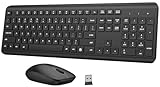


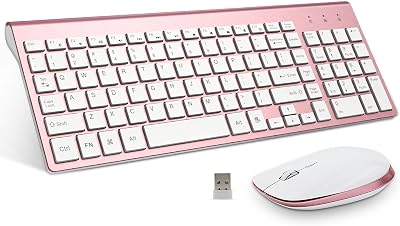
This guide breaks down the best silent wireless mouse and keyboard combos in 2026, what actually makes a set quiet, how connection type affects reliability, and which model fits your desk. Whether you want a full-size office set or a compact combo for a dorm, there’s a quiet option below that will keep the peace.
As an Amazon Associate we earn from qualifying purchases…
🛒 Best Price Today on Amazon
Prime members get fast, free shipping on everything above, plus member-only deals. New members get a 30-day free trial — cancel anytime.
What Makes a Wireless Keyboard and Mouse Combo Silent?
The noise on a keyboard comes from two places: the switch bottoming out and the keycap slapping against the plate. Silent membrane and scissor-switch boards attack both. They use a softer rubber dome or a dampened scissor mechanism so the key travels a shorter distance and lands on a cushioned stop instead of hard plastic. The result is a low, muffled “thock” rather than a sharp clack. Logitech’s MK295, for example, markets its “SilentTouch” technology as delivering roughly 90% noise reduction versus a comparable standard combo, and in practice it is dramatically quieter than a typical office keyboard.
On the mouse side, the noise villain is the click switch. Silent mice swap the standard Omron-style clicker for a dampened micro-switch that removes the audible “snap.” You still feel the tactile bump so you know the click registered, but the sound is reduced to a faint tap. Some combos, like several seenda and Jelly Comb sets, also add quiet scroll wheels with rubberized rims. If total silence is your goal, look specifically for the words “silent click” on the mouse and “quiet” or “whisper” typing on the keyboard, because a silent keyboard paired with a loud clicky mouse defeats the purpose.
- Dampened dome or scissor switches reduce the keycap impact sound.
- Silent micro-switch mouse buttons remove the sharp click snap.
- Shorter key travel means less bottom-out noise on fast typists.
- Rubberized scroll wheels cut the ratcheting sound during scrolling.
Top Silent Wireless Combos Compared
Here are five of the strongest silent wireless mouse and keyboard combos worth buying in 2026, spanning budget compact sets to full-size office powerhouses. Prices are approximate US street prices and shift with sales, so treat them as a ballpark rather than a fixed number.
| Combo | Connection | Battery Life | Best For | Approx Price (USD) |
|---|---|---|---|---|
| Logitech MK295 Silent | 2.4GHz USB | Up to 36 mo (kb) / 18 mo (mouse) | Quietest overall, home office | $45 |
| Logitech MK540 Advanced | 2.4GHz Unifying | Up to 36 mo (kb) / 18 mo (mouse) | Ergonomics + productivity | $60 |
| TECKNET Silent Combo | 2.4GHz USB | Up to 24 mo | Budget full-size value | $28 |
| seenda Rechargeable Silent | 2.4GHz + Bluetooth | Rechargeable, ~2-3 wks/charge | Multi-device switching | $40 |
| Jelly Comb / Arteck Compact | 2.4GHz USB | Rechargeable / up to 6 mo | Dorms, small desks, travel | $33 |
The Logitech MK295 remains the benchmark for pure quiet and is the set most people should start with. The MK540 steps up to a more ergonomic, contoured keyboard with a comfortable palm rest and a full-size mouse, ideal if you spend all day at the desk. TECKNET is the value champion, delivering a silent full-size layout for well under $30. seenda’s rechargeable dual-mode set is the pick if you juggle a laptop, tablet, and desktop. Compact Jelly Comb and Arteck sets trade the number pad for a smaller footprint that fits cramped dorm desks. For readers building out a fuller setup, our guide to quiet gaming peripherals pairs well with any of these.
2.4GHz vs Bluetooth: Which Connection Should You Choose?
Almost every combo here uses one of two wireless standards, and the right choice depends on how you work. A 2.4GHz connection uses a tiny USB dongle (nano receiver) that plugs into your PC. It is essentially plug-and-play, offers rock-solid low-latency performance, and never needs pairing. That reliability is why most silent combos, including the Logitech MK295, TECKNET, and Arteck sets, ship as 2.4GHz-only. The downside is you sacrifice a USB port and you need a full-size or adapter-friendly port to use it.
Bluetooth skips the dongle entirely, connecting directly to laptops, tablets, and phones. It is the better pick if your device is short on USB ports or if you want to type on a tablet. The trade-off is a slightly higher chance of connection hiccups and marginally more input lag, which is a non-issue for office work but worth noting for fast gaming. Dual-mode combos like the seenda set give you both: use the dongle at your desk and Bluetooth on the go. If you want the deeper technical breakdown, see our wireless connectivity explainer. For most home office buyers, a 2.4GHz combo is the simplest, most trouble-free choice.
Battery Life and Charging: Replaceable vs Rechargeable
Battery life is where silent combos genuinely shine, but the approach splits into two camps. Logitech’s MK-series and TECKNET use replaceable AA/AAA batteries and lean hard on power efficiency, quoting keyboard life measured in years (up to 36 months on the MK295 keyboard) and mouse life around 18 months. You almost never think about charging, and swapping a battery takes seconds. The catch is the ongoing, if tiny, cost of batteries and the environmental footprint.
Rechargeable combos, common with seenda and some Jelly Comb models, use built-in lithium cells you top up over USB-C. You’ll typically get a couple of weeks to a month per charge, and you never buy batteries again. The downside is remembering to charge and the fact that after a few years the internal battery degrades. Neither approach is wrong; pick replaceable for maximum “set and forget” convenience, or rechargeable if you dislike buying disposable batteries. If you’re kitting out a full battery-conscious setup, our low-power desk accessories roundup is a useful companion read.
Ergonomics, Layout, and Full-Size vs Compact
Silence is only half the comfort equation. If a combo saves your ears but wrecks your wrists, it’s a bad buy. Full-size sets like the MK295, MK540, and TECKNET include a dedicated number pad, arrow cluster, and often media keys, which is essential for spreadsheet work, accounting, and data entry. The MK540 in particular adds a curved key layout and a cushioned palm rest that reduces strain during long sessions, making it the ergonomic standout of the group.
Compact combos from Jelly Comb and Arteck drop the number pad to shrink the footprint, which brings the mouse closer to your typing position and reduces shoulder reach, a subtle but real ergonomic win for smaller desks. They’re also lighter and easier to slip into a bag, perfect for students moving between dorm and library. Consider the mouse too: a slightly larger, contoured mouse suits bigger hands, while low-profile compact mice work better for travel. Match the layout to your actual workflow rather than defaulting to whatever’s cheapest.
Verdict: The Best Silent Wireless Combo for Most People
For the majority of buyers, the Logitech MK295 Silent Combo is the easy recommendation. It delivers the most convincing noise reduction in the category, years of battery life, a reliable 2.4GHz connection, and a full-size layout, all around $45. If you want better ergonomics and a premium feel, spend a little more on the MK540. Budget shoppers should grab the TECKNET set, which gets you genuinely quiet typing for under $30. Multi-device users should take the seenda dual-mode combo, and anyone with a tight dorm desk will be happiest with a compact Jelly Comb or Arteck set. Whichever you choose, moving to a silent combo is one of those upgrades you notice every single day, especially after dark.
Frequently Asked Questions
Are silent keyboards actually silent or just quieter?
They are much quieter, not literally silent. A good silent combo like the Logitech MK295 reduces click and typing noise by around 90% compared to a standard set, so keystrokes become a soft muffled tap instead of a sharp clack. In a quiet room you’ll still hear a faint sound, but it won’t carry across the room or disturb someone sleeping nearby.
Do silent wireless combos work for gaming?
They work well for casual and late-night gaming where noise matters more than millisecond latency. A 2.4GHz combo like the MK295 or TECKNET has low enough input lag for most single-player and strategy titles. Competitive twitch shooters still benefit from a dedicated gaming mouse, but for quiet evening sessions in a shared space, a silent combo is a great compromise.
Is 2.4GHz or Bluetooth better for a silent combo?
For a desktop setup, 2.4GHz with a USB dongle is more reliable and truly plug-and-play, which is why most silent combos use it. Bluetooth is better if you’re short on USB ports or want to type on a tablet or laptop. Dual-mode sets like the seenda combo let you use both, giving you the reliability of a dongle and the flexibility of Bluetooth.
How long do the batteries last on these combos?
Replaceable-battery models are exceptional; Logitech quotes up to 36 months for the keyboard and 18 months for the mouse on the MK-series. Rechargeable models like some seenda and Jelly Comb sets last roughly two weeks to a month per USB-C charge. Either way, you’ll spend very little time thinking about power once the combo is set up.
Related Guides
- Best Redragon Keyboards and Mice in 2026
- Best Gaming Handheld Accessories in 2026
- Best Gaming Keyboards for Mac in 2026

















