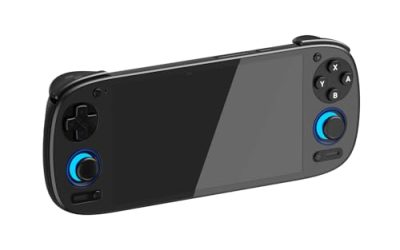
A gaming desk fills up with USB gear faster than most people expect. A keyboard, mouse, headset dongle, controller receiver, capture card, external SSD and a phone cable can easily outnumber the ports on a PC case, and a modern laptop may offer only two USB-C ports for everything. A good USB hub fixes both problems by moving your connections to one reachable spot, but hubs are not all built for the same job: a slim travel hub, a high-speed hub for external drives and a powered desktop station behave very differently.
This guide compares five hubs covering the main desk scenarios: a compact USB-C hub with a card reader for laptop users, a 10Gbps hub for fast storage, a simple four-port expander, and two powered desktop hubs for setups with many drives and peripherals. Each pick lists manufacturer-stated speeds and power figures so you can match the hub to your gear.
As an Amazon Associate, we earn from qualifying purchases.
How to Choose a USB Hub
Count the ports, then check the mix
Start by counting everything you plug in now, then add one or two spare ports for future gear. Just as important is the port mix. Most gaming peripherals and older accessories still use USB-A, while newer phones, SSD enclosures and laptops lean on USB-C. A hub with only USB-A ports can strand a USB-C drive, and a hub with only USB-C ports forces adapters for a mouse receiver. Mixed hubs solve both problems, and some include a 2-in-1 host connector that fits either port type on the computer.
Data speed: 5Gbps vs 10Gbps
Hubs are commonly rated by the manufacturer at up to 5Gbps (USB 3.0 / USB 3.2 Gen 1) or up to 10Gbps (USB 3.2 Gen 2). For keyboards, mice, headsets, webcams and controllers, 5Gbps is far more than enough, because those devices use very little bandwidth. The faster rating matters when you move large files to an external SSD or run several storage devices at once. Keep in mind that all ports on a hub share the bandwidth of the single connection back to the computer, so one fast drive can use most of the pipe while other devices wait.
Powered vs bus-powered
A bus-powered hub draws all of its energy from the computer’s port. That is fine for low-draw gear like receivers, keyboards and flash drives, but it can fall short when several 2.5-inch drives spin up at once, causing dropouts. A powered hub includes its own wall adapter, giving every port a stable supply, and is the safer choice for multiple drives and charging duties. If your desk has two or more external drives, choose a powered model.
Individual switches and LEDs
Desktop hubs with a power switch and LED for each port let you turn a device off without unplugging it. That is handy for a backup drive, a USB light, or a peripheral that needs a quick power cycle. LEDs also show at a glance which ports are live, which helps when troubleshooting under a desk.
Cable length and placement
Many slim hubs have a short attached cable, sometimes around half a foot, which suits a laptop on a desk but will not reach a tower PC on the floor. For an under-desk or floor-standing PC, look for a hub with a longer or detachable cable, and plan where it will sit: on the desk for flash drives, or mounted underneath for permanent peripherals. A hub dangling from a laptop port also strains the connector, so give it a resting spot.
Extras: card readers, video and pass-through charging
Some USB-C hubs add SD and microSD card readers, valuable for streamers and creators moving camera or console footage. Others add an HDMI output and a power delivery input that passes charging through to the laptop, turning the hub into a small docking station. Those extras raise the cost and complexity, so pay for them only if your workflow uses them.
Anker 341 USB-C Hub (7-in-1)

| Spec | Detail |
|---|---|
| ASIN | B07ZVKTP53 |
| Model | A8346 |
| Host connection | USB-C |
| Ports | 1 USB-C data, 2 USB-A data, HDMI, SD slot, microSD slot, USB-C power delivery input |
| Data speed | Up to 5Gbps (manufacturer stated) |
| Power delivery | Up to 85W pass-through charging to the laptop (manufacturer stated) |
| Video output | HDMI up to 4K at 30Hz (manufacturer stated) |
| Power source | Bus-powered, with PD input for laptop charging |
The Anker 341 is the classic laptop companion: one USB-C plug turns into two USB-A ports, a USB-C data port, an HDMI output and a pair of card readers. For a gaming laptop setup, a mouse, keyboard and headset can stay connected while the SD slot handles footage from a camera or handheld console. The power delivery input passes up to 85W through to the laptop per Anker’s specifications, so one cable carries both data and charging at the desk.
The trade-offs are reach and raw speed. The attached cable is short, which suits a laptop beside the hub but not a tower under the desk, and the 5Gbps rating targets everyday peripherals rather than sustained SSD transfers. Buyers who mainly need ports, a card reader and one-cable laptop docking will find it well matched; buyers building a permanent desktop station should look at the powered models below.
Anker USB-C Data Hub (11-in-1, 10Gbps)
| Spec | Detail |
|---|---|
| ASIN | B0CQSPMKF4 |
| Model | A8308 |
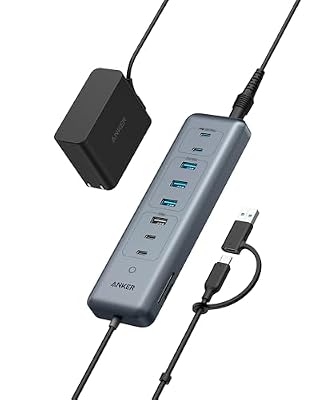
| Host connection | USB-C with 2-in-1 USB-A adapter connector |
| Ports | 4 USB-A data, 4 USB-C data, USB-C power delivery input |
| Data speed | Up to 10Gbps (manufacturer stated) |
| Power delivery | 100W PD input (manufacturer stated) |
| Included adapter | 65W wall adapter included |
| Power source | Powered via included adapter |
Where the 341 focuses on laptop docking extras, this Anker hub is a pure data expander built for speed. Its eight data ports split evenly between USB-A and USB-C, and every one of them is rated by Anker at up to 10Gbps, which suits fast external SSDs, high-speed capture gear and large game library drives. The 2-in-1 host connector flips between USB-C and USB-A, so the same hub works with a new laptop and an older desktop.
Anker includes a 65W wall adapter in the box, which keeps power-hungry drives stable and feeds the 100W-rated PD input for pass-through charging. There is no card reader or video output here, so it complements a gaming desk rather than replacing a dock. For a setup with several fast drives and a mix of old and new connectors, this is the most future-ready hub in the group.
UGREEN USB-C to USB-A Hub with 4 USB 3.0 Ports

| Spec | Detail |
|---|---|
| ASIN | B07PY87TBD |
| Model | 70336 |
| Host connection | USB-C |
| Ports | 4 USB-A 3.0 |
| Data speed | Up to 5Gbps (manufacturer stated) |
| Cable length | 0.5 ft attached cable |
| Power source | Bus-powered |
| Form factor | Slim, portable |
The UGREEN hub is the straightforward answer when a laptop simply needs more USB-A sockets. Four USB 3.0 ports rated at up to 5Gbps cover a mouse, keyboard, headset dongle and flash drive, and the slim shell slips into a laptop bag without adding bulk. It is a natural fit for a work-and-play setup that moves between a desk and a couch or classroom.
Because it is bus-powered with a short half-foot cable, it is not the right tool for running several drives at once or reaching a tower PC. Treat it as a peripherals expander rather than a storage hub. Buyers who want one tidy way to restore the USB-A ports their laptop lost will be well served by it.
SABRENT 10-Port 60W USB 3.0 Hub (HB-BU10)

| Spec | Detail |
|---|---|
| ASIN | B0797NZFYP |
| Model | HB-BU10 |
| Host connection | USB-A |
| Ports | 10 USB-A 3.0 |
| Data speed | Up to 5Gbps (manufacturer stated) |
| Switches | Individual power switch and LED for each port |
| Power source | 60W 12V/5A power adapter included |
| Best for | Large permanent desktop setups |
The Sabrent HB-BU10 is a desktop station for people whose port count keeps growing: ten USB-A 3.0 ports, each with its own power switch and LED indicator. The included 60W adapter means external drives, an audio interface and a stack of peripherals can all run at once without depending on the PC’s port for power. Switching a backup drive or USB fan off at the hub, instead of reaching behind the machine, is a small convenience that adds up daily.
The limits are format rather than function. All ten ports are USB-A at 5Gbps, so USB-C drives need adapters and fast SSDs will not stretch their legs. It is also a stay-on-the-desk device with a power brick to hide. For a big, mostly USB-A gaming and streaming rig, though, it offers the most ports and the most control in this roundup.
TP-Link UH720 Powered USB Hub

| Spec | Detail |
|---|---|
| ASIN | B00SCX6I8A |
| Model | UH720 |
| Host connection | USB-A |
| Ports | 7 USB 3.0 data ports, 2 smart charging ports |
| Data speed | Up to 5Gbps (manufacturer stated) |
| Charging ports | 2 smart charging ports, up to 2.4A each (manufacturer stated) |
| Power source | 12V/4A power adapter included |
| Extras | Power on/off button |
The TP-Link UH720 splits the difference between a data hub and a charging station. Seven USB 3.0 data ports handle the usual desk peripherals and drives, while two smart charging ports deliver up to 2.4A each per TP-Link’s specifications, suiting a phone, tablet or controller that needs a top-up. The included 12V/4A adapter keeps everything supplied, and one power button shuts the hub down at night.
Like the Sabrent, the UH720 is USB-A only and rated at 5Gbps, so it targets established desktop setups rather than USB-C laptops. Its smaller footprint makes it the tidier option when seven data ports are enough and device charging happens at the desk anyway. It suits a shared gaming desk where phones and controllers compete for outlets.
Frequently Asked Questions
Is a 10Gbps hub worth it over a 5Gbps hub?
It depends on what you plug in. Keyboards, mice, headsets and controllers use so little bandwidth that both ratings feel identical. The 10Gbps rating earns its keep with external SSDs and large file transfers, where a faster hub can move game installs and video files in noticeably less time. If your hub only serves peripherals, a 5Gbps model is the smarter spend.
Can a USB hub add lag to a gaming mouse or keyboard?
A hub adds no meaningful delay for gaming peripherals, because mice and keyboards send tiny amounts of data. What matters more is bandwidth sharing: a drive copying files at full speed on the same hub can crowd the connection. Keeping storage on a separate hub or a direct motherboard port avoids that contention entirely.
Do I need a powered hub for external hard drives?
One bus-powered drive usually runs fine from a laptop port, but two or more drives, especially 2.5-inch hard drives spinning up together, can exceed what a single port supplies and cause disconnects. A powered hub with its own adapter gives each drive a stable supply and is the reliable choice for backup drives, game library drives and any storage that stays connected permanently.
Will a USB-C hub work with a desktop that only has USB-A ports?
Only if the connector matches or adapts correctly. Some hubs, like the Anker 11-in-1 above, include a 2-in-1 connector for both port types. A plain USB-C hub can sometimes connect through a USB-A adapter, but speed and features such as video output may not carry over, since USB-A lacks DisplayPort alt mode. Check the host requirement before buying.
Product and ASIN Reference
| Product | ASIN |
|---|---|
| Anker 341 USB-C Hub (7-in-1) | B07ZVKTP53 |
| Anker USB-C Data Hub (11-in-1, 10Gbps) | B0CQSPMKF4 |
| UGREEN USB-C to USB-A Hub with 4 USB 3.0 Ports | B07PY87TBD |
| SABRENT 10-Port 60W USB 3.0 Hub (HB-BU10) | B0797NZFYP |
| TP-Link UH720 Powered USB Hub | B00SCX6I8A |