

- Top Pick: GPD Official Win 5 External Battery Replacement – 80.04Wh / 5170mAh Modular Power Pack – High-Voltage 15.48V Li-ion Battery Win 5 Handheld Gaming PC (Model: 5.054BAG)
- Best Value: H5 Retro Gaming Console, 5.0 Inch IPS HD Screen Handheld Game Console, 256GB TF Card Build-in 40000+ Classic Games, Portable Video Arcade Support 34+ Emulators with 4000mAh Battery, Black
- Premium Choice: JYGamhanbil Travel Carrying Case Bag for GPD Win 5 Portable Handheld Game7
This guide breaks down the accessory categories that actually matter in 2026, with practical buying advice for each. Whether you just unboxed your first handheld or you are a veteran looking to optimize your rig, this is where you find what is worth your money and what to skip.
- Quick Comparison: Top Handheld Accessories in 2026
- Docks: Turning Your Handheld Into a Desktop
- Power Banks and Charging: Beating the Battery Wall
- Cases and Screen Protectors: Protecting Your Investment
- Grips, Cooling, and Storage: The Comfort and Performance Upgrades
- Controllers and Stands: The Home Setup
- The Verdict: What to Buy First
- Related Guides
- Frequently Asked Questions
- Related Guides
- Related Articles
As an Amazon Associate we earn from qualifying purchases. Prices and availability are accurate as of publication and may change.
Related guide: Retro gaming consoles
As an Amazon Associate we earn from qualifying purchases at no extra cost to you.






🛒 Best Price Today on Amazon
Prime members get fast, free shipping on everything above, plus member-only deals. New members get a 30-day free trial — cancel anytime.
Quick Comparison: Top Handheld Accessories in 2026
| Accessory | Type | Compatibility | Best For | Approx Price |
|---|---|---|---|---|
| JSAUX ModCase Docking Station | USB-C Dock | Steam Deck, ROG Ally, Legion Go, Claw | Desktop / TV play | $45 |
| tomtoc Explorer Hardshell Case | Carrying Case | Universal 7″-8″ handhelds | Travel protection | $32 |
| Baseus 20,000mAh 100W Power Bank | Power Bank | Any USB-C PD handheld | All-day battery | $59 |
| SanDisk Extreme 512GB microSD (A2) | Storage | Steam Deck, Legion Go, Claw | Expanding game library | $48 |
| amFilm OLED Tempered Glass Protector | Screen Protector | Steam Deck OLED, ROG Ally X | Scratch defense | $13 |
Docks: Turning Your Handheld Into a Desktop
A quality dock is the single most transformative accessory you can buy. It converts your handheld into a living-room console or a productivity workstation with one cable. The essentials to look for are HDMI 2.0 (for 4K/60Hz output), Gigabit Ethernet for lag-free downloads, USB-A ports for a keyboard, mouse, or wired controller, and USB-C Power Delivery passthrough of at least 60W so the device charges while you play.
Avoid the temptation to grab the cheapest no-name dock on the marketplace. Underpowered docks are notorious for dropping the display signal when the system draws peak power, and some cannot deliver enough wattage to charge under load, meaning your battery slowly drains even while plugged in. Spend the extra $15 on a model with a dedicated power input. If you also game on a laptop, our guide to the best budget gaming monitors under $200 pairs perfectly with a docked handheld for a big-screen setup.
Do you need the first-party dock?
Valve, ASUS, and Lenovo all sell official docks, and they work flawlessly, but they are typically $20-40 more than third-party alternatives that offer identical or better port selection. Unless you specifically want guaranteed firmware compatibility, a reputable third-party dock is the smarter value.
Power Banks and Charging: Beating the Battery Wall
Battery life remains the Achilles heel of high-performance handhelds. Push a ROG Ally X at 25W TDP and you are looking at 90 minutes to two hours of real-world play. A USB-C Power Delivery power bank is non-negotiable for travel. The sweet spot in 2026 is a 20,000mAh unit rated for at least 65W PD output, which is enough to charge most handhelds at near-full speed while you keep gaming.
Two specs matter most. First, output wattage: aim for 65W minimum, 100W ideal, so the bank can both power the device and top up the internal battery simultaneously. Second, pass-through charging, which lets you charge the bank and the handheld at the same time from a single wall outlet. Watch airline restrictions too, since anything above 27,000mAh (100Wh) is banned from carry-on luggage. For airport-friendly picks, see our roundup of the best travel tech for gamers.
Cases and Screen Protectors: Protecting Your Investment
Handhelds are expensive, and they travel. A hardshell carrying case with a semi-rigid EVA shell protects the joysticks and screen from crushing in a backpack, and the good ones include elastic loops for a charger, spare microSD cards, and a USB dongle. Look for a case with a raised interior lip so the thumbsticks never press against the lid, since sustained pressure can cause stick drift over time.
Screen protectors are the cheapest insurance you will ever buy. Tempered glass at 9H hardness resists scratches from keys and grit far better than PET film, and it preserves touch sensitivity. If you own a Steam Deck OLED or ROG Ally X, get a protector specifically cut for that panel, since generic sizes leave ugly gaps or block the ambient light sensor. Wet-apply kits with a dust-removal frame produce a bubble-free result on the first try. Pair a good case with our advice on how to prevent stick drift on modern controllers to keep your device pristine for years.
Grips, Cooling, and Storage: The Comfort and Performance Upgrades
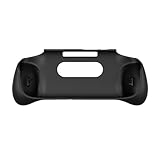
Ergonomic grips address the flat, slippery back of most handhelds. Snap-on textured grips add contour and a rubberized surface that dramatically reduces hand fatigue during long sessions, and premium sets include cooling channels that improve airflow around the vents. They are inexpensive, usually $15-25, and easily the best comfort-per-dollar upgrade available.
Cooling fans and coolers
Clip-on active coolers with a Peltier plate or a high-RPM fan can drop CPU package temperatures by 10-15C, which directly reduces thermal throttling and keeps clock speeds high during demanding titles. They are most useful in hot rooms or for summer travel, though they do require their own power via a second USB-C port. For most players, simply repasting or cleaning the intake vents matters just as much.
microSD cards and storage
Modern games are enormous, and internal SSDs fill up fast. A UHS-I A2-rated microSD card is the easiest expansion for Steam Deck, Legion Go, and MSI Claw. The A2 rating matters because it guarantees higher random read/write performance for smoother game loading. A 512GB card around $48 hits the value sweet spot in 2026, while 1TB cards have finally dropped under $90. Stick to name brands like SanDisk, Samsung, or Lexar to avoid the counterfeit cards that plague budget listings.
Controllers and Stands: The Home Setup
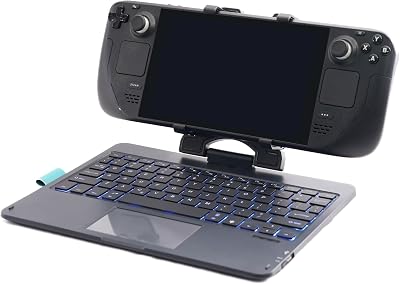
When docked, you want a proper controller. Any Bluetooth or 2.4GHz gamepad works, but an Xbox Wireless Controller or 8BitDo Ultimate offers the best compatibility across SteamOS and Windows. An adjustable tabletop stand with a built-in cooling gap lets you play tabletop-style at a desk without holding the weight, and the better stands double as a charging cradle. These are small quality-of-life additions that make the difference between a handheld you occasionally dock and one that becomes your primary battlestation.
The Verdict: What to Buy First
If you can only buy three accessories, start with a tempered glass screen protector and a hardshell case to protect the device, then add a high-wattage USB-C power bank to eliminate battery anxiety. From there, a quality dock unlocks big-screen and desktop use, and a 512GB microSD card ends your storage worries for good. Grips and coolers are excellent secondary upgrades once the essentials are covered. Prioritize protection and power first, performance and comfort second, and your handheld will stay fast, safe, and genuinely portable for years.
Frequently Asked Questions
Do handheld accessories work across different devices like Steam Deck and ROG Ally?
Many do, especially universal accessories like USB-C docks, power banks, and microSD cards, since they rely on standardized ports. However, cases, screen protectors, and snap-on grips are cut to specific device dimensions, so always confirm the listing matches your exact model, including OLED versus LCD variants.
What size power bank should I buy for a gaming handheld?
A 20,000mAh unit with at least 65W USB-C Power Delivery output is the practical sweet spot. It roughly doubles your play time and can charge the device under load. Stay at or below 27,000mAh (100Wh) if you plan to fly, since larger capacities are prohibited in carry-on luggage.
Is a tempered glass screen protector worth it over cheaper film?
Yes. Tempered glass at 9H hardness resists scratches and minor drops far better than PET film, and it maintains the touchscreen’s clarity and responsiveness. At roughly $13 it is inexpensive insurance for a device that often costs $500 or more.
Will a cooling fan actually improve my frame rate?
Indirectly, yes. By lowering CPU and GPU temperatures, an active cooler reduces thermal throttling, which lets the chip sustain higher clock speeds for longer. The benefit is most noticeable in hot environments or during extended sessions with demanding AAA titles; in a cool room the gains are smaller.
Related Guides
- Best Steam Deck Alternatives in 2026: Top Handheld Gaming PCs
- Best Mini Retro Console in 2026: Plug-and-Play Classics Ranked
- Best Anbernic Handheld in 2026: Every Top Model Ranked

















