🛒 Best Price Today on Amazon
Prime members get fast, free shipping on everything above, plus member-only deals. New members get a 30-day free trial — cancel anytime.
- The Best Gaming Mousepads in 2026: XXL, Cloth & RGB Compared
- Gaming Mousepad Sizes Explained: Standard, Large & XXL Deskmats
- Cloth vs Hard Gaming Mousepads: Which Surface Wins?
- Speed vs Control Surfaces: Tuning Your Aim
- RGB Edge-Lit Mousepads: Worth the Money?
- Best Gaming Mousepads 2026: Comparison Table
- Brand Breakdown: QcK, MM, Goliathus, G840 & Fury
- Stitched Edges & Base Grip: The Details That Last
- Verdict: Which Gaming Mousepad Should You Buy?
- Related Guides
- Frequently Asked Questions
- Related Articles
The Best Gaming Mousepads in 2026: XXL, Cloth & RGB Compared
Your mouse is only as accurate as the surface it glides on. In 2026, a good gaming mousepad is no longer an afterthought bundled in a starter kit — it is a precision instrument that dictates how consistently your sensor tracks, how far you can flick, and how many years your desk survives sweaty grand-final sessions. Whether you are running an 8,000Hz esports mouse at 400 DPI or a lightweight wireless model for casual play, the pad underneath it changes everything about your aim.
As an Amazon Associate we earn from qualifying purchases at no extra cost to you.





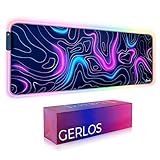

This guide breaks down the surfaces that matter (cloth, hybrid, and hard), the size classes from compact to full XXL extended deskmats, and the increasingly popular RGB edge-lit models that double as desk centerpieces. We have handled and researched the heavy hitters — SteelSeries QcK, Corsair MM series, Razer Gigantus and Goliathus, Logitech G840, and HyperX Fury — to help you match a pad to your grip, your game, and your setup.

Prime
Best Seller
SteelSeries QcK Gaming Mouse Pad – XXL Cloth – Peak Tracking and Stability – Esports Mousepad – Never-Slip – Full Desk Coverage

Prime
Editor's Pick
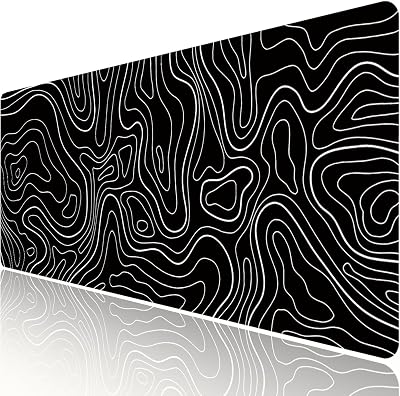
Rinaze Extra Large Gaming Mouse Pad with Black Topographic, XXL Mousepad, Big Mouse Mat Desk Pad, Non Slip Keyboard Pad for Gaming Computer Laptop PC Office Desk Accessories
Prime
Limited Time
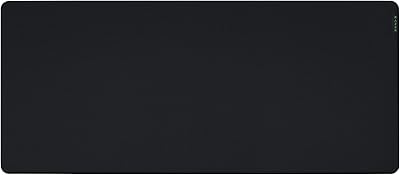
Razer Gigantus V2 Cloth Gaming Mouse Pad (XXL): Thick, High-Density Foam – Non-Slip Base – Classic Black

If you are the type who plays claw-grip Valorant one night and relaxed strategy games the next, don’t worry: there is a mousepad here for every hand and every price. Let’s find yours.
As an Amazon Associate we earn from qualifying purchases. This means we may receive a small commission when you buy through the links on this page, at no extra cost to you. It helps us keep testing gear and publishing guides like this one.
Gaming Mousepad Sizes Explained: Standard, Large & XXL Deskmats
Size is the first decision, and it depends heavily on your mouse sensitivity. Low-sensitivity players (common in tactical shooters) make huge arm sweeps and need real estate; high-sensitivity players barely move their wrist and can live on a compact pad.
- Standard / Medium (approx. 320 x 270 mm): Fits a mouse and little else. Great for high-DPI players, small desks, or LAN travel where a compact footprint matters.
- Large (approx. 450 x 400 mm): The sweet spot for most FPS gamers. Enough room for wide low-sens flicks without swallowing the whole desk.
- Extended / XXL Deskmat (approx. 900 x 400 mm): Covers keyboard and mouse together for one seamless surface. This is the go-to for streamers, low-sens shooter players, and anyone who wants a unified, clutter-free look.
- Full Desk XXL (up to 1200 x 600 mm): Blankets nearly the entire desktop. Protects the surface, dampens keyboard noise, and gives a clean canvas for RGB or custom art.
If you are still assembling your battlestation, a full deskmat pairs beautifully with a lightweight competitive mouse and a low-profile board. For help picking the pointer that will live on it, see our companion guide on the best lightweight gaming mice for FPS before you commit to a size.
Cloth vs Hard Gaming Mousepads: Which Surface Wins?
The single biggest feel difference comes down to material. Neither is objectively “better” — they serve different players.
Cloth Mousepads
Cloth (fabric) pads like the SteelSeries QcK and Razer Goliathus dominate the market for good reason. The woven micro-textured surface offers controllable friction, so your mouse stops where you want it. Cloth is quieter, kinder to your mouse feet, machine-washable on most models, and far more forgiving for tracking. The trade-off is that dynamic gliding feels slightly slower, and cloth can absorb sweat and oils over time.
Hard Mousepads
Hard pads (plastic, glass, or aluminum) deliver an ultra-fast, consistent glide with almost no dynamic friction. Speed-demons and arcade players love them because the mouse feels nearly frictionless. The downsides: they are louder, they wear down mouse feet faster, they can feel harsh, and dust or debris is more noticeable. Glass pads in particular are polarizing — blisteringly fast but requiring specialized skates.
For the majority of players in 2026, a quality cloth pad is the safe recommendation. Hard surfaces are a specialist choice for those who have already dialed in their sensitivity and crave maximum speed. If you’re upgrading your whole loadout, our roundup of the best mechanical gaming keyboards covers the board that will sit next to (or on top of) that new pad.
Speed vs Control Surfaces: Tuning Your Aim
Within the cloth category, manufacturers tune the weave to favor either “speed” or “control.” Corsair’s MM series makes this explicit with dedicated variants, and it is worth understanding before you buy.
- Control surfaces: A rougher, higher-friction weave that helps you stop on a dime. Ideal for tactical shooters like Valorant and Counter-Strike where micro-corrections and precise stopping matter more than raw speed.
- Speed surfaces: A smoother, tightly-woven weave that reduces friction for fast swipes and repositioning. Favored by players who make large, rapid movements or run higher sensitivities.
- Hybrid / balanced: Most flagship pads (Logitech G840, HyperX Fury, standard QcK) aim for a middle ground that suits the broadest range of games.
A practical tip: if you keep overshooting targets, move toward a control surface; if you feel like you’re fighting the pad to reposition, go faster. Many players own one of each and swap depending on the game.
RGB Edge-Lit Mousepads: Worth the Money?
RGB pads add a glowing edge-lit border that syncs with the rest of your ecosystem — Razer Chroma, Corsair iCUE, Logitech LIGHTSYNC, or SteelSeries GG. Beyond aesthetics, the practical wins are a hard-stitched frame, a USB passthrough on some models, and a premium feel.
The caveats are real, though: RGB deskmats cost significantly more, require a cable running to your PC, and add nothing to tracking performance. If you stream or care about a cohesive lighting setup, they are fantastic. If you are a pure competitor who unplugs everything for LANs, save the money and buy a larger plain cloth pad instead. For a fully synced desk, check our overview of building a clean RGB battlestation.
Best Gaming Mousepads 2026: Comparison Table
| Mousepad | Size | Surface | Best For | Approx Price (USD) |
|---|---|---|---|---|
| SteelSeries QcK Heavy XXL | XXL Extended (900 x 400 mm) | Thick cushioned cloth (control-leaning) | Overall value & comfort | $35 |
| Logitech G840 XL | Large/XL (900 x 400 mm) | Balanced cloth | All-round FPS play | $40 |
| Corsair MM350 Pro Extended XL | XXL Extended (930 x 400 mm) | Cloth, control weave | Tactical shooters & durability | $45 |
| Razer Goliathus Chroma Extended | XXL Extended (920 x 295 mm) | Cloth, RGB edge-lit | RGB desks & streamers | $60 |
| HyperX Fury S Pro (L) | Large (450 x 400 mm) | Cloth, speed-balanced | Budget large pad | $25 |
Brand Breakdown: QcK, MM, Goliathus, G840 & Fury
Each of the major players has a signature feel, and knowing them shortcuts your decision.
- SteelSeries QcK: The industry benchmark cloth pad. The QcK Heavy adds a plush 6mm base that soaks up an uneven desk and feels premium. Consistent, durable, endlessly recommendable.
- Corsair MM series: Ranges from the affordable MM100 to the anti-fray, spill-resistant MM350 Pro. Corsair leans into a control weave and reinforced stitched edges that resist peeling.
- Razer Gigantus & Goliathus: The Gigantus V2 is a clean, no-frills textured cloth pad in multiple sizes; the Goliathus Chroma is the flagship RGB option with Chroma sync.
- Logitech G840: A massive, moderately-thick balanced cloth mat that is a favorite for players who want one uniform surface with a rubber base that stays planted.
- HyperX Fury: Reliable, affordable, with dependable stitched edges. The Fury S Pro is one of the best value large pads you can buy.
Stitched Edges & Base Grip: The Details That Last
Two features separate a pad that lasts three years from one that frays in three months. Stitched (anti-fray) edges are essential on cloth pads — they stop the border from peeling and lifting after repeated wrist contact. Every pad in our table above includes them. Base grip matters just as much: a dense, textured natural-rubber base keeps the pad locked during aggressive low-sens swipes. Cheaper pads use thin, slick rubber that slides around and ruins your consistency. When in doubt, heavier and thicker almost always means more stable.
Verdict: Which Gaming Mousepad Should You Buy?
For most players, the SteelSeries QcK Heavy XXL is the easiest recommendation in 2026 — it nails comfort, durability, and value while covering keyboard and mouse in one clean surface. Competitive FPS players who want a slightly more balanced, planted feel should look at the Logitech G840 or the ultra-durable Corsair MM350 Pro. If a glowing, synced desk is the goal, the Razer Goliathus Chroma delivers the RGB without compromising cloth feel. And if you’re on a budget but still want size, the HyperX Fury S Pro punches well above its price.
Whatever you pick, prioritize a stitched-edge cloth pad in a size that matches your sensitivity, and you’ll feel the difference the first time you flick. Once your surface is sorted, round out the setup with our guide to the best gaming mouse for every budget and you’ll be tracking targets like never before.
Frequently Asked Questions
What size gaming mousepad is best for FPS games?
For most FPS players, a Large (around 450 x 400 mm) or an XXL extended deskmat (around 900 x 400 mm) is ideal. Lower-sensitivity players who make big arm sweeps benefit most from XXL sizes, while high-sensitivity players can comfortably use a standard or large pad.
Are cloth or hard mousepads better for gaming?
Cloth pads are the better choice for the vast majority of gamers because they offer controllable friction, quieter operation, and are gentler on mouse feet. Hard pads deliver a faster, more consistent glide but wear down skates quicker and feel harsher — they suit speed-focused players who have already dialed in their sensitivity.
Do RGB mousepads improve gaming performance?
No, RGB lighting is purely aesthetic and does not affect mouse tracking or your aim. However, many RGB pads come with premium features like stitched edges and USB passthrough, and they let you sync your lighting for a cohesive setup. Buy one for the look, not for a competitive edge.
How do I clean a cloth gaming mousepad?
Most cloth mousepads can be hand-washed with mild soap and lukewarm water, or gently machine-washed on a cold, delicate cycle for smaller pads. Air-dry it flat and never put it in a dryer, as heat can warp the rubber base. Regular cleaning restores the surface glide and extends the pad’s lifespan.
Ready to decide? Our #1 pick for 2026 is the SteelSeries QcK Heavy XXL.
Live price & availability on Amazon.