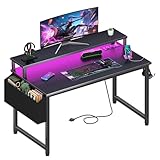
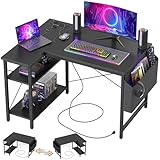
- Top Pick: Lufeiya Gaming Desk with Power Outlets and LED Lights, 40 Inch Gamer Desk Table with Charging Station, Home Office Computer Desks with Monitor, Black
- Best Value: ODK 53" L Shaped Gaming Desk with Shelves, LED & Outlets, Black | Hook for headset, bag for gear. Shelves for books & supplies. LED for gaming nights. Reversible. Home office computer desk.
- Premium Choice: Furologee 47" Gaming Desk with LED Lights & USB-C Port, Carbon Fiber Black | Reversible Computer Desk with 2 Fabric Drawers & Monitor Shelf, Storage Shelves, Hooks for Gaming Working Studying Dorm Table
A spending cap of under 150 dollars changes what a gaming desk can be. You are not shopping for a motorized standing frame or a solid-wood slab. You are choosing among powder-coated steel frames, laminate tops and clever add-ons such as shelves, hooks and LED strips, and the real question is which of those extras you will actually use every night. Listing figures move, so confirm the current figure against your cap before you commit.
This roundup is written for students, first-time PC builders and anyone refreshing a bedroom setup in 2026. Ten desks are compared, from a 31.5-inch single-monitor table to a 53-inch L-shaped corner unit, with attention to width, outlet access, storage and the places where lower-tier desks tend to wobble or run short on surface.
Quick Picks
As an Amazon Associate we earn from qualifying purchases at no extra cost to you.




| Product | Best for | Key spec from the title |
|---|---|---|
| Lufeiya 40 Inch | Plug-in convenience | Power outlets, LED lights, charging station |
| ODK 53″ L Shaped | Biggest surface | 53 inch, shelves, reversible |
| Furologee 47″ | USB-C and drawers | USB-C port, 2 fabric drawers |
| TIQLAB 40 Inch L Shaped | Corner with shelf | Power outlets, bookshelf |
| HLDIRECT 32 Inch | Tiny rooms | 200 lb capacity, steel base |
| Homall L Shaped | Monitor height | 50.5 inch, large monitor riser |
| DUMOS 31.5 Inch | Single-screen setups | Reinforcement structure |
| Sweetcrispy 40-Inch | Simple metal frame | X-shaped frame, 40 inch |
| HLDIRECT 40 Inch | Cable control | A-shaped, carbon fiber surface |
| DurayLoly 39.3″ | Tower and monitor stand | Outlet, LEDs, CPU stand |
How to Choose
Match the width to your screens
A single 24 to 27 inch monitor sits comfortably on a 31.5 to 40 inch top. Two monitors, or one monitor plus a laptop and a mouse pad large enough for low-sensitivity aiming, push you toward 47 inches and above. Leave roughly two feet of depth for a monitor and keyboard to coexist. L-shaped desks such as the 50.5 and 53 inch models add a second surface, but they also demand a corner and a chair that rolls freely.
Check the frame, not the lighting
LED strips are decoration. Stability comes from the base, so favor titles that mention steel frames, reinforcement structures, X-shaped bracing or a stated weight capacity. A desk that shakes when you flick a mouse across a pad hurts more than any missing RGB effect.
Count what you need to plug in
List your gear: monitor, PC, speakers, charger, headset hub. Built-in outlets and USB ports reduce the cords that reach the wall, but they still depend on one plug. A USB-C port helps if you charge a phone or a modern handheld, while cable management trays matter more for keeping a tower and monitors tidy.
Know where lower-tier desks cut corners
Carbon-fiber-style tops are a printed surface, not real carbon fiber. Thin tops can flex under a heavy monitor arm, and reversible L-shaped units usually ship with many small screws. Plan for an hour of assembly, tighten every bolt a second time after a week of use, and keep the weight of any heavy gear near the legs.
The 10 Best Options
Lufeiya Gaming Desk 40 Inch
Lufeiya’s 40-inch black desk lists power outlets, LED lights and a charging station, which reads as a ready-to-plug setup. The title also describes it as a home office computer desk with monitor support, so it targets players who want one tidy rig without buying a separate power strip or lighting kit, and who are happy with a single main screen.
- Built-in outlets and charging station reduce cord clutter
- LED lighting gives the desk a gaming look out of the box
- Trade-off: 40 inches limits room for a dual-monitor spread
Skip it if you want a wide L-shaped surface or a bare, unlit top.
ODK 53″ L Shaped Gaming Desk
The ODK is the largest here at 53 inches, with an L-shaped layout, shelves, LED lighting and outlets. A hook for a headset and a bag for gear are named in the listing, and the reversible design lets you put the extension on either side of the room. Shelves for books and supplies make it a study-and-play station as much as a gaming one.
- Large L-shaped surface can hold two monitors and a laptop
- Shelves and headset hook keep gear off the desktop
- Trade-off: needs a corner and a lot of floor space
Skip it if your room is compact or your chair has limited clearance.
Furologee 47″ Gaming Desk
Furologee lists a USB-C port, LED lights, two fabric drawers, a monitor shelf and storage shelves on a 47-inch reversible top with a carbon fiber black finish. That is a lot of organization for one desk, and the hooks suit headsets and controllers. The wording on the listing also names gaming, working, studying and dorm life, so it aims at mixed use.
- USB-C port suits modern phones and accessories
- Fabric drawers and shelves hide small gear
- Trade-off: fabric drawers are not as sturdy as metal ones
Skip it if you prefer a clean, bare top with nothing to assemble.
TIQLAB 40 Inch L Shaped Desk
TIQLAB combines a 40-inch L-shaped corner layout with power outlets, a bookshelf and a reversible design. It aims at players who need a small second surface and a place for books or a console without moving up to a full-size corner unit. The word “small” in the title is the honest summary: this is a compact answer to a corner problem.
- Compact L-shape fits smaller corners
- Built-in outlets and bookshelf add utility
- Trade-off: the corner extension is modest in size
Skip it if you want a straight, wide table for two monitors side by side.
HLDIRECT 32 Inch Small Gaming Desk
This 32-inch desk uses an A-shaped design with a carbon fiber surface, an ergonomic curved edge, a 200 lb weight capacity and a dual-frame steel base. It is the clearest pick here for a bedroom corner with one monitor and a keyboard, and the curved edge is meant to ease pressure on the forearms during long sessions.
- Stated 200 lb capacity and dual-frame steel base
- Curved edge is easier on the forearms
- Trade-off: the narrow top leaves little room for speakers
Skip it if you use a large mouse pad plus two screens.
Homall L Shaped Gaming Desk
Homall’s 50.5-inch black corner desk includes a large monitor riser stand and is described as a sturdy writing workstation. The riser lifts the screen closer to eye level and frees space under it for a keyboard or notebook, while the L-shape gives you a separate zone for homework, streaming gear or a laptop beside the main PC.
- Monitor riser helps with screen height
- L-shape gives separate gaming and writing zones
- Trade-off: no outlets or LEDs are listed
Skip it if you want built-in charging or lighting.
DUMOS 31.5 Inch Computer Desk
DUMOS offers a 31.5-inch black desk with a reinforcement structure, billed for study, crafts and gaming. Its simple shape makes it easy to place in a small bedroom or beside a bed, and the extra bracing points to stability over decoration. The modern writing-table look blends in when the monitor is off.
- Reinforcement structure targets wobble
- Small footprint fits tight rooms
- Trade-off: no storage or power features are listed
Skip it if you need shelves, drawers or a second monitor.
Sweetcrispy 40-Inch Desk
Sweetcrispy lists a 40-inch black desk with a sturdy metal frame, X-shaped support and a compact modern design. It reads as a straightforward work-and-play table for a bedroom, with no outlet strip or lighting to distract from the basics. At this width a monitor, a laptop and a mouse pad can share the surface.
- Metal frame with X-shaped brace
- 40-inch top suits one monitor and a laptop
- Trade-off: no outlet, LED or storage extras
Skip it if you want integrated lighting, power or shelves.
HLDIRECT 40 Inch A-Shaped Desk
The larger HLDIRECT keeps the A-shaped frame and carbon fiber surface at 40 inches and adds cable management to the feature list. The curved front edge is described as ergonomic, and the listing names bedrooms, dorms and apartments as fits, making it the roomier sibling of the 32-inch model for a single-monitor desk.
- Cable management helps hide cords
- Wider top than its 32-inch sibling
- Trade-off: no built-in power or lighting is listed
Skip it if you want a bundled charging station or shelves.
DurayLoly 39.3″ Gaming Desk
DurayLoly bundles a power outlet, LED lights, an adjustable monitor stand, a fabric drawer and a CPU stand into a 39.3-inch desk. The CPU stand is handy for a tower that you want off the floor, and the listing names bedrooms, studying and small spaces, so it suits a cramped room that needs everything in one footprint.
- CPU stand and monitor stand organize the workspace
- Outlet and LEDs are included
- Trade-off: many features share a modest top
Skip it if you want an uncluttered surface.
Which One Fits Your Situation
Dual monitors in a corner
The ODK 53″ L Shaped has the surface to hold two screens with shelves above them, assuming you have the room. The Homall 50.5-inch is the alternative when you want a monitor riser to lift both the screen and a notebook zone.
A small bedroom with one screen
Choose the HLDIRECT 32 Inch for its stated weight capacity and steel base, or the DUMOS 31.5 Inch if you prefer a plainer top. Either one leaves floor space for a chair and a small bookcase.
You hate visible cords
The Lufeiya 40 Inch brings outlets and a charging station onto the desk, while the HLDIRECT 40 Inch lists cable management. The DurayLoly 39.3″ adds a CPU stand so the tower stays off the carpet.
Lots of small gear
The Furologee 47″ brings drawers, shelves, hooks and a USB-C port into one desk, which suits headsets, controllers and chargers. Anyone who dislikes assembling fabric drawers should look at the Sweetcrispy 40-Inch instead.
Common Mistakes
- Paying attention to LED strips instead of frame bracing
- Buying an L-shaped desk without measuring the corner and chair clearance
- Forgetting that built-in outlets still need one wall plug
- Expecting a printed carbon-fiber surface to behave like the real material
- Loading a monitor arm onto a thin top without checking the weight limit
Related guides
- Battery Operated Smoke And Carbon Monoxide Detectors
- Combination Smoke And Carbon Monoxide Detectors
- Aio Liquid Coolers For High Performance Gaming
Frequently Asked Questions
What width is enough for a gaming setup?
For one monitor, 31.5 to 40 inches works. Two monitors or a large mouse pad are more comfortable at 47 inches or more.
Are L-shaped desks worth it?
They are if you have a corner and want a second surface for a laptop or console. Otherwise a straight desk wastes less floor space.
Do LED lights matter?
They are cosmetic. A stable frame and enough width matter more for daily use, and many players switch the strip off anyway once the room lights are down.
Can a desk like this hold a PC tower?
Some list a CPU stand or a stated weight capacity. Check those figures, and place heavy items near the legs.