

- Top Pick: Razer RZ01-01050100-R3M1 Naga Left-Handed – Ergonomic MMO Gaming Mouse with 12 Programmable Thumb Buttons – 8,200 Adjustible DPI
- Best Value: Razer DeathAdder Essential – Left-Handed Esports Ergonomic Gaming Mouse – 3,500 Adjustible DPI
- Premium Choice: Logitech G PRO 2 Lightspeed Ambidextrous Wireless Gaming Mouse – Black
If you’re a left-handed gamer, you already know the frustration: walk into any store, browse any online catalog, and you’ll find a wall of “ergonomic” gaming mice sculpted exclusively for the right hand. Thumb rests, contoured side buttons, angled shells — all of it built for righties. Finding a genuinely left-handed gaming mouse in 2026 can feel like hunting for a unicorn. The good news is that you have more options than the sparse dedicated-lefty shelf suggests. Between the handful of true left-hand ergonomic shapes still in circulation and the growing category of high-performance ambidextrous mice, southpaws can absolutely find a comfortable, competitive pointer. This guide breaks down what actually works for left-handers, why the pickings are so slim, and which specific models are worth your money.
- Why True Left-Handed Gaming Mice Are So Rare
- True Left-Hand Shape vs. Ambidextrous Mouse: What’s the Difference?
- What to Look For in a Left-Handed Gaming Mouse
- Wired vs. Wireless for Left-Handed Gamers
- Top Picks: The Best Left-Handed and Ambidextrous Gaming Mice
- Related Guides
- Frequently Asked Questions
- Related Articles
As an Amazon Associate we earn from qualifying purchases. Prices and availability are accurate as of the date/time indicated and are subject to change.
As an Amazon Associate we earn from qualifying purchases at no extra cost to you.






🛒 Best Price Today on Amazon
Prime members get fast, free shipping on everything above, plus member-only deals. New members get a 30-day free trial — cancel anytime.
Why True Left-Handed Gaming Mice Are So Rare
The short answer is market size. Roughly 10% of the population is left-handed, and only a fraction of those are PC gamers who care enough about ergonomics to seek out a hand-specific shape. For a manufacturer, tooling a dedicated left-handed mold, sourcing left-oriented components, and maintaining a separate SKU through the supply chain is expensive — and the sales volume rarely justifies it. Right-handed ergonomic mice sell by the millions; a left-hand variant might sell in the thousands. That math is why even iconic products get discontinued.
The most famous example is the Razer DeathAdder Left-Handed Edition, a mirror-image build of one of the best-selling gaming mice of all time. It became legendary precisely because it was so hard to get — periodically produced in limited runs, frequently sold out, and often commanding inflated resale prices when stock dried up. Its cult status among left-handed gamers tells you everything about the state of the market: when a genuinely good left-hand ergonomic shape appears, demand vastly outstrips supply.
Because dedicated shapes are unreliable to find, the smarter long-term strategy for most southpaws is to embrace ambidextrous designs. That shift has actually worked out well, because the ambidextrous category has become the home of some of the lightest, fastest, most competitive mice ever made.
True Left-Hand Shape vs. Ambidextrous Mouse: What’s the Difference?
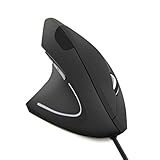
These two terms get used loosely, so it’s worth being precise. A true left-hand ergonomic mouse is sculpted as a mirror image of a right-handed ergonomic shell. The hump sits under your palm, the sides are contoured to cradle a left hand specifically, and the thumb buttons live on the right side of the mouse — where your left thumb naturally rests. It’s built for one hand and one hand only.
An ambidextrous mouse, by contrast, has a symmetrical shell with no hand-specific sculpting. The peak of the hump sits down the centerline, and both flanks are shaped identically. Ambidextrous mice come in two flavors that matter enormously to lefties:
Side Buttons on Both Sides vs. Right Side Only
Some ambidextrous mice put programmable side buttons on both flanks, which is theoretically ideal — but in practice you’ll often disable the buttons under your ring and pinky finger to avoid accidental presses. Others put buttons only on the left side (useless for a left-hander), while the truly lefty-friendly ones either offer buttons on both sides or let you remap so the right-side buttons are the active ones. When shopping, this is the single most important spec to verify: a symmetrical shape means nothing if the side buttons only exist where your left thumb can’t reach them.
What to Look For in a Left-Handed Gaming Mouse
Beyond the shape question, a few technical factors separate a good southpaw pick from a compromise:
- Symmetrical shell: A perfectly symmetrical body ensures the mouse feels the same in your left hand as it would in anyone’s right. Avoid shells that look symmetrical but have a subtle right-hand lean.
- Side button placement: As covered above — you need functional buttons where your left thumb sits (the right side of the mouse), or buttons on both sides.
- Weight: Modern competitive mice range from ultralight (under 60g) to mainstream (roughly 80–90g). Lighter mice reduce fatigue during long sessions and enable faster flicks, which is why esports-focused ambidextrous mice have trended so light.
- Sensor: Any flagship from a major brand in 2026 ships with a high-end optical sensor offering 20,000+ DPI, 1:1 tracking, and no smoothing or acceleration. Don’t overthink raw DPI numbers — tracking accuracy and consistency matter far more than a headline figure you’ll never use.
Grip Styles for Left-Handers
Your grip style should guide your choice as much as your handedness. Palm grip users want a taller hump and a longer body to fill the whole hand — this is where a true left-hand ergonomic shape shines, because ambidextrous mice sometimes feel flat under the palm. Claw grip and fingertip grip users, who rest less of their hand on the shell, generally get along beautifully with lightweight symmetrical ambidextrous mice, since precise fingertip control doesn’t depend on hand-specific sculpting. Left-handed claw and fingertip players are, honestly, the best-served southpaws in 2026 — the entire ultralight ambidextrous category is effectively built for them.
Wired vs. Wireless for Left-Handed Gamers
Handedness doesn’t change the wired-versus-wireless calculus much, but it’s worth a note. Modern wireless gaming mice using dedicated 2.4GHz dongles are effectively indistinguishable from wired in latency, so there’s no performance penalty for going cordless. Wireless also removes cable drag, which can be a subtle ergonomic win for anyone. The tradeoffs are the usual ones: higher price, battery management, and slightly more weight from the internal cell. If budget is your priority, a wired ambidextrous mouse gives you the most performance per dollar. If you want the cleanest desk and can pay the premium, wireless is fully viable.
Top Picks: The Best Left-Handed and Ambidextrous Gaming Mice
Here’s how the standout options stack up. This comparison mixes the rare true left-hand model with the ambidextrous flagships that serve southpaws best, plus a budget and a wireless choice.
| Mouse | Best for | Shape | Price range | Rating |
|---|---|---|---|---|
| Razer Viper V3 (Best Overall) | All-round competitive play, claw/fingertip lefties | Ambidextrous, ultralight | $$ | 4.8 / 5 |
| Razer DeathAdder Left-Handed Edition | Palm-grip southpaws wanting a true left-hand shape | True left-hand ergonomic | $$$ | 4.7 / 5 |
| Logitech G Pro X Superlight | Wireless performance, esports | Ambidextrous, wireless | $$$ | 4.7 / 5 |
| Glorious Model O | Budget-conscious, lightweight builds | Ambidextrous, ultralight | $ | 4.5 / 5 |
| Razer Viper Mini | Small hands, budget entry | Ambidextrous, compact | $ | 4.5 / 5 |
The Razer Viper V3 takes Best Overall because it delivers a flawless symmetrical shape, a top-tier sensor, an ultralight body, and side buttons positioned so a left-hander can use it comfortably — all at a mainstream price. The DeathAdder Left-Handed Edition remains the only mainstream true-mirror ergonomic shape and is unbeatable for palm-grip lefties who can find it in stock. The Logitech G Pro X Superlight is the wireless benchmark, symmetrical and featherweight. The Glorious Model O and Razer Viper Mini round out the budget end — both ambidextrous, both genuinely usable in the left hand, and both a fraction of the flagship price.
For deeper dives on individual sensors and switch tech, see our gaming mouse sensor guide and our breakdown of the best lightweight gaming mice. If you’re building around a new pointer, our best gaming mousepads roundup pairs well with any ambidextrous pick, and beginners should start with our gaming mouse buying basics primer.
Frequently Asked Questions
Are there any true left-handed gaming mice still made in 2026?
Yes, but they’re scarce. The Razer DeathAdder Left-Handed Edition is the most prominent true mirror-image ergonomic gaming mouse, produced in periodic limited runs. Because dedicated left-hand molds are expensive to maintain for a small market, most manufacturers skip them entirely, so stock comes and goes. When you see a genuine left-hand ergonomic model in stock, it’s worth grabbing.
Can left-handers use ambidextrous mice comfortably?
Absolutely — and for most southpaws it’s the best path. Ambidextrous mice have symmetrical shells that feel identical in either hand, and the modern ultralight ambidextrous category (Viper, G Pro, Model O) is arguably better engineered than most hand-specific mice. The main thing to check is side button placement: make sure the mouse has usable buttons on the right side (where your left thumb rests) or on both sides.
Why are left-handed gaming mice so rare?
It comes down to economics. Left-handers make up about 10% of people, and only a slice of those are gamers seeking ergonomic gear, so a dedicated left-hand SKU sells a tiny fraction of what its right-handed counterpart does. The tooling, components, and inventory costs rarely justify the low volume, so manufacturers either discontinue left-hand models or never make them, pushing the whole market toward symmetrical ambidextrous designs instead.
What’s the best mouse for a left-handed gamer?
For most left-handers, the Razer Viper V3 is the best all-around choice: symmetrical, ultralight, a superb sensor, and left-usable side buttons at a fair price. Palm-grip players who want a sculpted fit should hunt down the Razer DeathAdder Left-Handed Edition, while budget shoppers do well with the Glorious Model O. If you want wireless, the Logitech G Pro X Superlight is the standard-bearer.

















