- Top Pick: NO CAP, JUST CODE : THE REALEST GUIDE TO FIVEM STREET RP
- Best Value: Diamound RP FIVEM
- Premium Choice: JJ Watts (Rp FiveM Diss) [Explicit]
Grand Theft Auto 5 is over a decade old, yet in 2026 it is more demanding than ever thanks to one thing: roleplay on FiveM. If you have watched a Twitch streamer live out a whole second life as a cop, a paramedic, or a small-business owner in a city like NoPixel, you already know that “GTA 5 RP” barely resembles the base game. FiveM servers stack thousands of custom scripts, high-resolution textures, bespoke vehicles, MLO interiors, and player counts far beyond anything Rockstar shipped. Running that world smoothly while streaming to Twitch at the same time is a genuine hardware challenge, and the wrong prebuilt will leave you staring at blurry textures, stuttering doorways, and a dropped-frame nightmare on stream. This guide breaks down exactly what a gaming PC for GTA 5 RP needs and rounds up the best prebuilt desktops to buy right now.
As an Amazon Associate we earn from qualifying purchases. Prices and availability are accurate as of the date/time indicated and are subject to change.
As an Amazon Associate we earn from qualifying purchases at no extra cost to you.





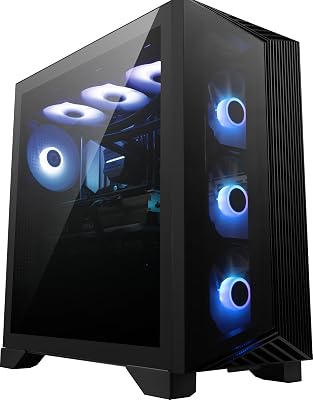


Gaming Desktop PC Computer Liquid Cooled 12-Core Processor, GeForce RTX 4060 GDDR6, 64GB RAM, 512GB NVMe SSD + 1TB HDD, WiFi 6 & BT 5.4, 7× ARGB Fans, 650W PSU, Windows 11
View on Amazon.com
🛒 Best Price Today on Amazon
Prime members get fast, free shipping on everything above, plus member-only deals. New members get a 30-day free trial — cancel anytime.
Why FiveM RP Is So Much Heavier Than Base GTA 5
Vanilla GTA 5 will run on a potato. Modern integrated graphics can push 60 FPS at 1080p. So why do so many people struggle the moment they join a FiveM roleplay server? The answer is that FiveM is not really “GTA 5” anymore — it is a heavily modified platform layered on top of it, and every layer costs memory, CPU cycles, and VRAM.
Custom Textures, Scripts, and Assets Add Up Fast
A busy RP server loads hundreds of custom vehicle models, reskinned pedestrians, replacement weapon textures, custom clothing (EUP), and detailed MLO interiors for buildings that are just empty shells in the base game. Each of those assets has to be streamed into memory as you move around the map. Base GTA 5 was tuned for a fixed, hand-optimized set of assets; FiveM constantly juggles a far larger, less optimized pool. That is why a rig that flies through story mode can choke the second you drive into a densely built custom downtown.
Large Servers and the Dreaded Texture Loss
Popular servers host 100, 200, even 400+ concurrent players, each with their own custom vehicle and outfit that your machine must render. When your graphics card runs out of VRAM, FiveM cannot hold all those textures at once — so it starts dumping them. The result is texture loss: cars turn into flat white or black blobs, character models go untextured, and the world looks like an unfinished demo. Texture loss is overwhelmingly a VRAM-capacity problem, not a raw-speed problem, which is why an older 8GB card can outperform a faster 6GB card in RP specifically.
Spec Targets for a GTA 5 RP & FiveM Gaming PC
Before we get to the picks, here are the component targets that actually matter for FiveM roleplay. Getting these right is the difference between a smooth stream and a slideshow. If you want a deeper primer on choosing parts, our complete PC building guide walks through each component in plain English.
- VRAM — 8GB minimum, 12GB+ ideal. This is the single most important spec for avoiding texture loss on busy servers. An RTX 4060 (8GB) is the realistic entry point; an RTX 4060 Ti 16GB or RTX 4070 (12GB) gives you real headroom for the most asset-heavy cities at 1440p.
- System RAM — 16GB minimum, 32GB strongly recommended. FiveM is famously RAM-hungry because of all those streamed assets, and streaming software plus a browser full of Discord and OBS tabs eats even more. 16GB works for lighter servers; 32GB is the sweet spot the moment you add streaming and heavy mods.
- CPU — a strong 6 to 8 core chip. FiveM leans heavily on the CPU for its scripting engine, and if you are encoding a stream at the same time you want cores to spare. A Ryzen 5 7600, Ryzen 7 7700, or Intel Core i5-14400F/i7 class chip keeps the game logic fed while the GPU handles encoding.
- Storage — an NVMe SSD, always. RP servers download and cache gigabytes of custom assets. Loading those from a hard drive causes long joins and in-world hitching as assets stream in. A fast NVMe SSD dramatically shortens load times and smooths asset pop-in.
Streaming While You Play: Let NVENC Do the Work
The magic ingredient for streaming a gaming PC for GTA 5 RP to Twitch without tanking your frame rate is NVIDIA’s dedicated NVENC encoder. Because NVENC lives on a separate part of the GPU, OBS can encode your stream without stealing performance from the game or hammering your CPU. Every current-generation NVIDIA card, from the humble RTX 4060 up, includes the excellent latest-gen NVENC encoder — which is a big reason we lean toward NVIDIA prebuilts for streamers over the AMD equivalents. Set OBS to the NVENC (HEVC or AV1) encoder, cap your game at a stable frame rate, and you can play and broadcast on one machine comfortably.
1080p vs 1440p: Pick Your Tier Honestly
At 1080p, an RTX 4060 with 8GB and 32GB of system RAM will hold high frame rates on most RP servers while you stream — this is the value sweet spot and where most new RP streamers should start. Stepping up to 1440p sharpens the whole experience but raises the VRAM and GPU demands significantly, so you want a 4060 Ti 16GB or 4070-class card with 32GB of RAM to keep textures loading and frames stable. Do not buy a 1440p monitor and pair it with an 8GB budget card expecting flawless RP — the extra resolution is exactly what pushes VRAM over the edge into texture loss. Our 1080p vs 1440p explainer covers the trade-offs in more detail.
Best Prebuilt Gaming PCs for GTA 5 RP & FiveM in 2026
These are best-selling prebuilt gaming desktops that hit the spec targets above, ordered from our overall top pick down through budget, streaming, high-end, and value options. Availability and pricing shift constantly, so treat the ranges as a guide. For hand-picked configurations across every budget, see our best prebuilt gaming PCs roundup.
| PC | Best for | Key spec | Price range | Rating |
|---|---|---|---|---|
| Skytech Nova (RTX 4070 / Ryzen 7 7700) — Best Overall | Smooth 1440p RP + streaming | RTX 4070 12GB, 32GB DDR5, 1TB NVMe | $1,300–$1,500 | (4.8) |
| CyberPowerPC Gamer Xtreme (RTX 4060) | Budget 1080p entry into RP | RTX 4060 8GB, 16GB DDR5, 1TB NVMe | $800–$950 | (4.4) |
| iBUYPOWER Y40 Streaming Build (RTX 4060 Ti 16GB) | Streaming-focused with texture headroom | RTX 4060 Ti 16GB, 32GB DDR5, 1TB NVMe | $1,150–$1,350 | ½ (4.6) |
| Skytech Prism II (RTX 4070 Ti / i7) | High-end 1440p max settings | RTX 4070 Ti 12GB, 32GB DDR5, 2TB NVMe | $1,700–$2,000 | ½ (4.7) |
| ABS Cyclone (RTX 4060 / Ryzen 5 7600) | Best value price-to-performance | RTX 4060 8GB, 32GB DDR5, 1TB NVMe | $950–$1,100 | (4.5) |
Our top pick is the Skytech Nova because it nails the exact recipe FiveM RP wants: a 12GB card to hold custom textures, 32GB of RAM for heavy servers plus OBS, a modern 8-core Ryzen for the scripting engine and encoding, and a fast NVMe for quick joins. The ABS Cyclone earns the value spot by pairing an 8GB 4060 with a full 32GB of RAM — a smarter RP balance than many pricier builds that skimp on memory. Whichever you choose, confirm the RAM is 32GB before checkout; it is the cheapest, highest-impact upgrade for roleplay. If you would rather assemble your own, our RTX 4070 build guide lists a comparable parts list.
Before You Buy: Match the PC to Your Kind of RP
Not every FiveM player loads the same city. A quiet county server with a few dozen players asks far less of a PC than a dense downtown grid full of custom cars, interiors and emergency-service scripts. Use this decision table before comparing individual models, because it tells you which spec actually deserves your money for the way you play.
| Your main use | CPU priority | Graphics and VRAM | Memory | Storage note |
|---|---|---|---|---|
| Casual RP at 1080p | Modern 6-core or better | 8GB VRAM is workable | 32GB recommended | Install FiveM and GTA 5 on the SSD |
| Busy city RP at 1440p | Strong 8-core single-thread speed | 12GB to 16GB VRAM preferred | 32GB recommended | Leave generous free SSD space for cache growth |
| RP plus live streaming | 8-core with headroom for encoding | 12GB or more, NVIDIA encoder helps | 32GB strongly recommended | A second drive for recordings is useful |
| RP plus clip recording | Fast single-core speed | 12GB or more | 32GB recommended | Budget extra capacity for saved footage |
The pattern is consistent: FiveM punishes weak memory and storage choices sooner than it punishes a mid-tier graphics card. A balanced build with plenty of RAM, a fast SSD and healthy VRAM will feel smoother in a crowded city than a lopsided build that spends everything on the GPU and cuts corners everywhere else.
Setup and Care: Getting FiveM Running Cleanly
A few setup habits prevent most of the problems players blame on hardware. Install both GTA 5 and the FiveM client on the fastest SSD in the system, never on a mechanical hard drive, because the client constantly streams map assets while you drive. Connect the PC to your router with a wired Ethernet cable if at all possible; roleplay servers are sensitive to packet loss, and a wired link removes one whole category of stutter and disconnects.
Inside the graphics settings, raise the extended texture budget slider gradually rather than jumping straight to maximum, and keep texture quality matched to your VRAM. If buildings start turning invisible after long sessions, clearing the FiveM cache and restarting the client is the standard first fix, since a bloated cache is a common cause. Keep graphics drivers current, close memory-hungry browser sessions before a long patrol or shift on a server, and clean dust from case filters every few months so clocks stay stable during summer sessions. Treat the PC like a tool you maintain, and long RP sessions stay far more consistent.
Common Mistakes That Cause Texture Loss
The most frequent buying mistake is choosing 16GB of system memory to save money. FiveM, the game, a voice client and a browser together can push well past that, and the shortfall shows up as stutter exactly when a server gets busy. The second mistake is buying a graphics card on raw speed while ignoring VRAM; custom vehicles and interiors consume video memory quickly, so capacity matters as much as frame rate. A third mistake is judging a prebuilt by its case lighting while skipping the power supply wattage, which decides whether a future graphics upgrade is even possible. Finally, many players install the game on a nearly full drive. FiveM cache files grow over time, and a cramped SSD slows asset streaming for everything.
Who Should Skip These Prebuilts
Skip this class of prebuilt if you only play story mode or light modded single player, because a far simpler PC covers that comfortably. Skip it if you plan to compete in fast-paced shooters at very high refresh rates, where a build tuned for esports frame rates makes more sense. And skip the prebuilt route entirely if you already own a recent graphics card and power supply, since a targeted CPU, memory and storage upgrade will usually deliver the same FiveM gains for less waste.
More Picks Worth Considering
Skytech Gaming King 95 Desktop PC, Ryzen 7 9800X3D, NVIDIA RTX 5070 Ti 16GB, 1TB Gen4 NVMe SSD, 32GB DDR5 RAM, 850W Gold PSU, 360mm ARGB AIO, Wi-Fi, Windows 11

This King 95 configuration pairs the Ryzen 7 9800X3D with an RTX 5070 Ti, and that combination reads like it was specified for FiveM. The X3D cache design is well suited to script-heavy servers that lean on the CPU, while 16GB of VRAM gives custom textures real headroom at 1440p. The 32GB of DDR5 memory and 850W Gold power supply leave room for streaming software and a future upgrade, and the 360mm liquid cooler suits long sessions. Choose it if you play on busy cities and stream at the same time. Skip it if your RP is casual 1080p play, where this level of hardware is more than the servers will ever ask for, or if a large liquid-cooled tower does not fit your space.
HyperX OMEN MAX 45L Gaming Desktop GT24-0050 PC, Intel Core Ultra 7, 32GB RAM, 1TB SSD, NVIDIA GeForce RTX 5070, Windows 11 Home, Shadow Black Glass
The OMEN MAX 45L is the pick for buyers who want a major-brand support network behind a FiveM machine. Its Core Ultra 7 processor and RTX 5070 with 12GB of video memory cover busy 1440p roleplay comfortably, and the 32GB of memory matches what demanding servers want. The 45L chassis is built around strong airflow and straightforward access for cleaning and upgrades, which suits owners who keep a PC for many years. Choose it if warranty handling and a polished, quieter enclosure matter to you. Skip it if you play on the most texture-heavy cities and want the extra VRAM cushion of a 16GB card, since 12GB is the one specification here that heavy custom content can pressure over time.
Lenovo Legion Tower 5 Gaming Desktop, NVIDIA GeForce RTX 5070 Ti, Ryzen 7 9800X3D, 32GB Memory, 1TB Storage, Windows 11 Home, Eclipse Black
Lenovo takes a different route to the same FiveM recipe: a Ryzen 7 9800X3D for server scripting loads, an RTX 5070 Ti with 16GB of VRAM for texture headroom, and 32GB of memory, all in the comparatively restrained Legion Tower 5 case. That makes it a strong fit for players who want top-tier RP performance without an oversized or heavily lit tower in a shared room. Legion Coldfront cooling is designed for sustained loads, which matches marathon evening sessions on a single server. Choose it if you value the X3D and 16GB pairing from an established PC maker. Skip it if you record and keep large amounts of footage, because the 1TB drive will fill quickly once clips start accumulating.
Frequently Asked Questions
What PC do I need for GTA 5 RP and FiveM?
For smooth FiveM roleplay you want a modern 6-to-8-core CPU (Ryzen 5 7600 or better), an NVIDIA RTX 4060 or higher with at least 8GB of VRAM, 32GB of system RAM, and an NVMe SSD. That combination handles busy servers, avoids texture loss, and leaves enough headroom to stream to Twitch at the same time using the GPU’s NVENC encoder.
Why do I get texture loss on FiveM?
Texture loss — cars and characters turning into flat white or untextured blobs — happens when your graphics card runs out of VRAM and starts unloading textures it cannot hold. Busy RP servers with hundreds of custom vehicles and outfits demand far more VRAM than base GTA 5. Upgrading to an 8GB card at 1080p, or a 12GB–16GB card at 1440p, is the direct fix.
How much RAM and VRAM do I need for FiveM RP plus streaming?
Aim for 32GB of system RAM and at least 8GB of VRAM if you plan to stream while you play. FiveM alone is memory-hungry, and adding OBS, a browser, and Discord pushes a 16GB machine to its limit. For 1440p RP with streaming, a 12GB or 16GB VRAM card gives you the texture headroom to keep the world rendering cleanly on stream.
Can a budget PC run FiveM roleplay?
Yes — a budget prebuilt with an RTX 4060, 16GB of RAM (ideally upgraded to 32GB), and an NVMe SSD will run most RP servers well at 1080p, and can stream lightly thanks to NVENC. You may need to avoid the very largest 300+ player cities at max settings, but for the vast majority of servers a well-chosen budget build delivers a genuinely smooth roleplay experience.