

As an Amazon Associate we earn from qualifying purchases. Prices and availability are accurate as of the date/time indicated and are subject to change.
🛒 Best Price Today on Amazon
Prime members get fast, free shipping on everything above, plus member-only deals. New members get a 30-day free trial — cancel anytime.
Related guide: Cachyos gaming
As an Amazon Associate we earn from qualifying purchases at no extra cost to you.


As an Amazon Associate we earn from qualifying purchases at no extra cost to you.

Why a Laptop Stand Matters for a Gaming Laptop
Desktop gaming rigs get big cases, tower coolers, and mesh side panels precisely because heat is the enemy of sustained performance. Gaming laptops fight the same battle with a fraction of the room. Every modern gaming laptop draws its cool air from vents on the underside of the chassis. When you place that laptop flat on a table, those intake vents sit only a couple of millimeters above the surface, and the fans have to work overtime to pull air through a narrow gap. Put it on a soft surface — a bed, a blanket, your lap — and you can block the intakes almost completely, which is when temperatures spike toward the throttle ceiling.



Thermals and Cooling: The Number One Reason
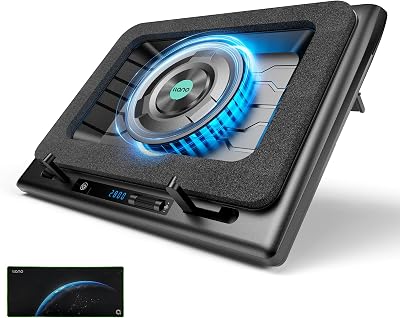
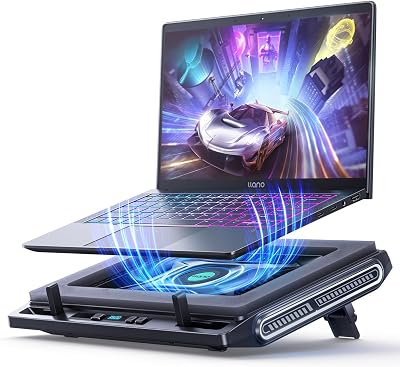
Lifting the rear of the laptop even 40 to 60 millimeters transforms airflow. It opens the intake gap, angles hot exhaust away from the screen hinge, and lets convection do free work for you. An active cooling-fan stand goes further, blowing fresh air directly at the underside vents. In practice, gamers routinely report CPU and GPU temperatures dropping anywhere from 3°C to 12°C once a laptop is elevated and fed clean air — enough, on many high-TDP machines, to hold a higher sustained boost clock and avoid the stutter of thermal throttling during long raids or ranked matches. If you want to understand how those temperatures translate into real frame rates, our guide to laptop thermal throttling and fps loss walks through the full picture.
Ergonomics and Neck Strain
The second reason is your body. A laptop screen sits far below eye level, which forces you to crane your neck downward for hours. A riser that raises the display closer to eye height keeps your spine neutral and your shoulders relaxed. The trade-off is that once the screen goes up, the built-in keyboard becomes awkward to type on — so a proper stand almost always pairs with an external keyboard and mouse, which is no hardship for gamers who already prefer a mechanical board and a low-latency mouse anyway.
Airflow, Stability, and Weight Capacity
Not every stand is built for a gaming laptop. A 17-inch machine with a metal chassis and a big battery can weigh 3 to 3.5 kilograms, and a flimsy folding stand designed for an ultrabook will flex, wobble, or tip. Look for a stated weight capacity comfortably above your laptop’s weight, a wide non-slip base, and rubber or silicone contact pads that grip the chassis. Stability matters most on a couch or in bed, where the surface underneath the stand is already soft and uneven.
The Four Types of Laptop Stand — and Which Use Case Each Wins
Adjustable Desk Riser (Best for a Desk Setup)
The workhorse category. An adjustable aluminum riser like the Nexstand or the Rain Design mStand lifts the laptop into a fixed or foldable elevated position on your desk. Aluminum models double as passive heatsinks, drawing warmth away from the chassis, and the open under-body design keeps intake vents unobstructed. These are the go-to choice for a permanent battlestation where the laptop feeds an external monitor, keyboard, and mouse. If you are building out a full desk, see our gaming laptop desk setup checklist for the accessories that pair best with a riser.
Active Cooling-Fan Stand (Best for Maximum Heat Management)
When your laptop runs genuinely hot — thin-and-light gaming machines and high-TDP flagships especially — an active cooling pad with built-in fans is the answer. Brands like KLIM and Havit build stands with multiple fans that push air straight into the underside vents, powered over USB. Most offer adjustable height on the rear legs, so you get airflow and ergonomics together. This is the category to prioritize if your gaming laptop already flirts with the throttle point during demanding titles.
Lap Desk and Bed Tray (Best for Gaming in Bed)
Gaming in bed is where laptops overheat the fastest, because bedding smothers the intakes. A rigid lap desk with a hard flat deck — often with a raised lip, a cushioned underside, and sometimes small built-in fans — creates a solid, ventilated platform above the mattress. It keeps the vents clear, gives your mouse a surface to track on, and stops the hot chassis from resting against your legs. For a deeper look at safe bed gaming, our best accessories for gaming in bed roundup covers trays, cooling, and posture.
Floor and Couch Stand (Best for the Living Room)
The most flexible category. A foldable overbed or sofa stand with a wide floor base and an adjustable, tilting arm lets you position the laptop over your lap on the couch or beside an armchair. Height, angle, and reach all adjust, so you can dial in a comfortable viewing position without the machine ever touching a cushion. Premium versions use a gas-spring or multi-joint arm for near-monitor-arm flexibility.
How to Choose: Heat, Stability, and Adjustability
Heat management for high-TDP laptops. If your laptop’s combined CPU-plus-GPU power draw is high — think 150 watts or more under load — lean toward an active cooling-fan stand or an open aluminum riser. Solid plastic risers that partly enclose the base can actually trap heat, so prioritize open frames and direct airflow.
Stability and weight capacity. Check the rated capacity and compare it against your laptop’s real weight, not the marketing figure. A 17-inch gaming laptop needs a wider, heavier base than a 14-inch ultraportable. On soft surfaces, a low center of gravity and a broad footprint keep the machine from tipping.
Height and angle adjustability. Fixed-height risers are simpler and more rigid; adjustable ones let you match the screen to your eye line and switch between desk, couch, and bed. If you move your laptop between rooms, a foldable adjustable stand earns its keep. For the full trade-off between fixed and adjustable designs, our laptop cooling and ergonomics explainer goes into detail.
Comparison: The Best Gaming Laptop Stands in 2026
| Stand | Type | Best for | Price range | Rating |
|---|---|---|---|---|
| KLIM Cool+ / Ultimate Cooling Stand — Best Overall | Active cooling-fan stand | High-TDP gaming laptops that run hot at a desk | $30–$55 | 4.6/5 |
| Nexstand K2 Adjustable Riser | Foldable aluminum desk riser | Portable desk ergonomics + passive airflow | $35–$45 | 4.7/5 |
| Rain Design mStand | Fixed aluminum desk riser | Premium single-height desk setup + heatsink effect | $45–$60 | 4.8/5 |
| Havit HV-F2056 / Lap Desk Cooling Tray | Lap desk / bed tray with fans | Gaming in bed or on the sofa | $20–$35 | 4.4/5 |
| Foldable Overbed / Couch Stand (adjustable arm) | Floor / couch stand | Living-room and hands-free couch gaming | $40–$80 | 4.3/5 |
The KLIM active cooler takes Best Overall because it solves the problem that hurts gaming laptops most — heat — while still offering rear-leg height adjustment for ergonomics. The Nexstand and Rain Design risers are the picks for a clean permanent desk, the Havit tray is the value champion for bed and couch, and the foldable arm stand is the answer for anyone who wants a truly hands-free living-room position.
Frequently Asked Questions
Do laptop cooling stands actually lower temperatures?
Yes, meaningfully. By elevating the chassis and feeding clean air to the underside intake vents, a cooling stand improves airflow and, with active fans, blows fresh air directly at the hottest components. Real-world results vary by laptop and ambient temperature, but drops of roughly 3°C to 12°C on CPU and GPU are common — often enough to keep a high-TDP gaming laptop from thermal throttling during long sessions and to hold a higher sustained clock speed.
What is the best laptop stand for gaming in bed?
A rigid lap desk or bed tray with a hard, ventilated deck is the safest and most comfortable option. Something like the Havit lap desk gives your laptop a flat surface that keeps the intake vents clear of bedding, provides a spot for your mouse, and insulates your legs from the hot chassis. Avoid resting a gaming laptop directly on a duvet or pillow — soft surfaces block the vents and cause the fastest overheating of any scenario.
Do gaming laptops really need a stand?
They benefit more than any other laptop type. Gaming laptops push far more heat than office machines, and that heat is the primary limiter on their sustained performance. A stand improves cooling, reduces fan noise, protects your neck and posture over long sessions, and — when paired with an external keyboard and mouse — turns a portable machine into a proper battlestation. It is one of the highest-value, lowest-cost upgrades you can make.
Adjustable riser or cooling-fan stand — which should I get?
It depends on your bottleneck. If your laptop stays cool but sits too low and hurts your neck, an adjustable aluminum riser gives you ergonomics plus passive heatsink cooling with no fan noise. If your laptop runs hot and throttles under load, an active cooling-fan stand is the better choice because it delivers forced airflow to the vents. Many gamers with genuinely hot machines choose a fan stand that also offers height adjustment, getting the best of both categories.
















