- Top Pick: Laptop Desk for Bed with Cooling Fan, SAIJI Lap Desk Tray Table | Height & Angle Adjustable Laptop Stand for Bed, Lightweight Foldable Portable Computer Table for Couch Sofa Chair Floor Desk
- Best Value: LAPGEAR Home Office Pro Lap Desk – Black Carbon, Fits 15.6” Laptops | Built-In Mouse Pad & Phone Slot, Wide Cushioned Wrist Rest, Dual-Bolster Microbead Cushion, Carry Handle
- Premium Choice: MAX SMART Laptop Lap Pad Laptop Stand with Attached Mouse Pad, Cushion and USB Cooling Fan, Non-Slip Heat Shield Tablet Computer Stand for Sturdy Work Station for Home, Office, Bed Sofa, Couch and Car
A laptop on your thighs gets uncomfortable fast. The base warms up, the vents sit against fabric, and the screen angle is never quite right for typing. That is the problem a cooling lap desk is meant to solve: a rigid surface that lifts the machine off your legs, and in many designs adds a USB-powered fan or a heat shield between the chassis and your lap. If you game, edit video or just keep forty browser tabs open on the couch, this is the accessory that decides how long you can stay put.
The seven products below cover two camps. Four of them list a built-in cooling fan, while three rely on cushioning, a heat shield or a wide platform instead. Each one is judged strictly from the details in its title and left out a dedicated laptop cooling pad, since that is a stand with fans rather than a lap desk. Read the buying advice first, because the right pick depends on whether you work in bed, on a sofa or in a car seat. A desk that suits a quiet reading session can feel wrong for a gaming laptop that spins its fans up, so match the design to the workload you actually run.
Quick Picks
As an Amazon Associate we earn from qualifying purchases at no extra cost to you.




| Product | Best for | Key spec from the title |
|---|---|---|
| SAIJI Laptop Desk for Bed | Bed and couch use | Cooling fan, adjustable height and angle |
| LAPGEAR Home Office Pro | Long typing sessions | Fits 15.6″ laptops, wrist rest, microbead cushion |
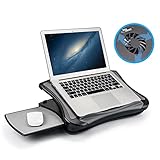
| MAX SMART Lap Pad | Travel and car use | USB cooling fan, attached mouse pad, heat shield |
| MUJOO Lap Desk | Multi-purpose bed table | Cooling fan, USB ports, drawer, cup holder |
| JELNER Bamboo Laptop Desk | Writing and drawing | Bamboo, cooling fan, tilting top |
| AboveTEK Portable Lap Desk | Left- or right-handed mouse users | Retractable mouse pad tray, heat shield |
| HUANUO Laptop Lap Desk | Students | Fits up to 15.6″, pillow cushion, anti-slip strip |
How to Choose
Decide between an active fan and passive cushioning
A fan-equipped desk pulls power from a USB port and moves air around the underside of the laptop, which suits a machine with bottom intake vents. A cushioned or shielded desk does nothing active but keeps heat from reaching your legs and lets vents breathe. If your laptop runs hot during games, favor the fan models. If you mostly browse and type, a cushion or heat shield is simpler and has no cable to manage.
Match the surface to your laptop size
Check the stated maximum screen size. Two products here list a 15.6 inch limit, so a 17-inch gaming laptop will overhang the edges. Look for a wide, stable platform and a lip or ridge that stops the machine from sliding, especially if you use the desk on a bed where the legs flex under you.
Think about posture and adjustability
Height and tilt matter more than they seem. A flat tray forces your wrists upward and your neck down, while an adjustable top lets you find a typing angle that does not tire you out. If the title mentions a tilting top or adjustable angle, that is a genuine ergonomic gain. Wrist rests and mouse pads attached to the desk help too, but only if you use a mouse.
Check portability and what you really need on the tray
Foldable legs and carry handles make a desk easy to move between rooms, yet they add weight or hinges that can wobble. Extras such as cup holders, drawers and USB hubs are convenient but use up surface area. Budget models often cut corners on hinge strength and tray thickness, so favor a design with fewer moving parts if you rarely adjust it. Also look at how far the legs fold flat, because a desk that does not tuck away tends to end up propped against a wall and ignored.
The 7 Best Options
SAIJI Laptop Desk for Bed
SAIJI combines a tray table with a cooling fan and lets you change both height and angle. The title describes a lightweight, foldable, portable design for beds, sofas, chairs and the floor, so it aims to be the all-rounder of this group. It makes sense for someone who moves between the bed in the evening and the sofa on weekends.
- Strength: adjustable height and angle let you switch from reading to typing without rebuilding your setup.
- Strength: the cooling fan is built in alongside the folding frame, which keeps everything in one unit.
- Trade-off: the title gives no size limit for the laptop, so check the tray dimensions against your machine.
Skip it if you want a soft pillow-style desk with no legs to unfold.
LAPGEAR Home Office Pro
The LAPGEAR focuses on comfort and posture. A built-in mouse pad, phone slot, wide cushioned wrist rest and dual-bolster microbead cushion are all listed, with a carry handle for moving it around. It fits laptops up to 15.6 inches. The design reads like a home office desk shrunk down to fit on your lap, which suits people who type for hours rather than browse.
- Strength: the cushioned wrist rest and mouse pad support long typing sessions.
- Strength: the dual-bolster cushion sits comfortably on your legs and holds its position.
- Trade-off: the title lists no fan, so any cooling comes only from lifting the laptop off your lap.
Skip it if your laptop runs warm and you want active airflow.
MAX SMART Laptop Lap Pad
This lap pad is part cushion, part stand. The title lists an attached mouse pad, a cushion, a USB cooling fan and a non-slip heat shield surface, and it names the car among its use cases alongside home, office, bed and sofa. That range of use cases makes it the most flexible soft option, especially for people who work wherever they happen to be sitting.
- Strength: the USB fan and heat shield cover both active and passive ways of keeping heat away.
- Strength: the attached mouse pad keeps a mouse within reach without a separate tray.
- Trade-off: a pad-style build gives a less rigid base than a full tray table.
Skip it if you need a tall tray for eating or writing in bed.
MUJOO Lap Desk for Laptop
MUJOO tries to pack the most into one frame: an adjustable lap table with a cooling fan, USB ports, a storage drawer, a cup holder and a light. It folds for storage and is pitched at writing as well as laptop work. Think of it as a small bedside workstation rather than a simple tray.
- Strength: USB ports and a built-in light turn the desk into a small workstation.
- Strength: the drawer and cup holder keep a pen, a charger and a drink within reach.
- Trade-off: every added feature uses surface space, so a large laptop may feel crowded.
Skip it if you want a minimal tray without built-in electronics.
JELNER Adjustable Bamboo Laptop Desk
The JELNER swaps plastic for bamboo and adds a cooling fan, a tilting top and a drawer. The title mentions breakfast, writing and drawing, so it doubles as a bed tray as well as a laptop stand. That versatility appeals to people who want a single piece of furniture for meals, notes and screen time.
- Strength: the tilting top suits sketching and handwriting as well as typing.
- Strength: bamboo gives a natural look that fits most bedrooms.
- Trade-off: a wooden tray with a drawer is likely to be heavier than a foam or plastic design.
Skip it if you want the lightest possible carry for travel.
AboveTEK Portable Lap Desk
AboveTEK highlights a retractable mouse pad tray that works on the left or right side, along with a non-slip heat shield surface and a sturdy work platform. It targets bed, sofa, couch and travel use. Buyers who switch between a mouse and a trackpad, or who share the desk with a left-handed family member, will notice the flexible layout.
- Strength: the retractable tray suits left-handed users as well as right-handed ones.
- Strength: the heat shield surface adds a barrier between the laptop base and your legs.
- Trade-off: the title lists no cooling fan, so airflow is up to your laptop vents alone.
Skip it if you want USB ports or a drawer built into the desk.
HUANUO Laptop Lap Desk with Cushion
HUANUO is the simplest design here: a woodgrain platform on a pillow cushion with an anti-slip strip and some storage function. It fits laptops up to 15.6 inches and is aimed at students and home office users. It makes the most sense for light schoolwork, streaming and general browsing where a stable base matters more than extra features.
- Strength: the pillow cushion and anti-slip strip keep the laptop steady on your legs.
- Strength: the listing mentions no cables or hinges to manage, which keeps the setup simple.
- Trade-off: no fan or tilt adjustment is listed, so it offers little beyond a stable base.
Skip it if you game on your lap and need dedicated airflow.
Which One Fits Your Situation
You work from bed most evenings
The SAIJI Laptop Desk for Bed gives adjustable height and angle plus a fan, which suits long stretches against the pillows.
You need a desk that goes in the car or on trips
The MAX SMART Laptop Lap Pad lists car use directly and bundles a fan, a mouse pad and a heat shield in a soft format.
You write, draw or sketch as often as you type
The JELNER Adjustable Bamboo Laptop Desk offers a tilting top and a drawer, which is handy for pens and notebooks.
You are a student with a 15.6 inch laptop
The HUANUO Laptop Lap Desk keeps things simple and stable, while the LAPGEAR Home Office Pro adds a wrist rest for longer sessions.
Common Mistakes
- Buying a fan desk without checking whether you have a free USB port for it.
- Ignoring the maximum laptop size and ending up with a machine that overhangs the tray.
- Assuming a heat shield and a cooling fan do the same job.
- Choosing a desk with many extras when you only need a flat, stable surface.
- Blocking the laptop vents with a blanket or cushion while using the desk on a bed, which cancels out the benefit of lifting the machine at all.
Related guides
- Battery Operated Smoke And Carbon Monoxide Detectors
- Combination Smoke And Carbon Monoxide Detectors
- Aio Liquid Coolers For High Performance Gaming
Frequently Asked Questions
Does a lap desk with a fan actually need a power source?
Fan models listed here draw power over USB, so they connect to a laptop port. That uses a port and a little battery, so plug your charger in when you plan a long session.
Will a lap desk fit a 17-inch laptop?
Only some will. Two of the listings state a 15.6 inch limit, so larger laptops need a desk with a bigger stated platform or one that does not name a size cap.
Is a cushion better than a hard tray?
A cushion is comfortable on the legs and conforms to your posture, while a hard tray gives a flatter, more stable typing surface. Choose based on whether comfort or stability matters more to you in 2026.
Can I use one of these on a sofa or couch?
Yes, most of these are designed for exactly that. Look for a non-slip strip, a stable base and a cushion that stops the desk from tipping when the couch cushions compress.