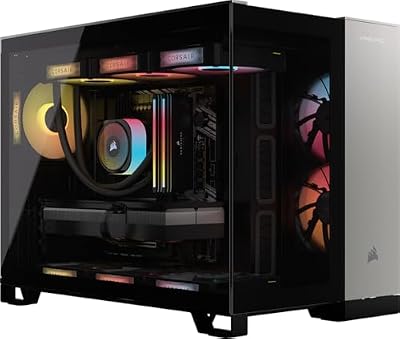
At the top of the prebuilt market, the question stops being whether a system can run your games and becomes how well it handles everything around them: a high-refresh 4K monitor, a stream in the background, a video export queued up after the session. This budget tier is where builders fit flagship-class graphics cards, liquid cooling and fast Gen4 storage into one warranty-backed box, and small spec differences matter here, because two systems in this tier can look identical on a store page while behaving very differently on your desk.
This roundup compares five current flagship prebuilts by role: a balanced all-rounder, a 4K high-refresh pick, a creator build, a cooling-first build and an upgrade-first build. For the short version of this tier, start with the flagship tier hub; this page is the deeper prebuilt-only comparison.
As an Amazon Associate, we earn from qualifying purchases.
Quick Answer
Choose the Corsair Vengeance i7500 if you want one answer: its Core i7-14700KF, GeForce RTX 4080 Super, 32GB of DDR5 memory, 2TB SSD and liquid cooling cover 4K gaming, streaming and everyday creation without a weak point. Pick the i5100 for maximum 4K headroom, the Skytech Prism for creator memory, the O11V for cooling, and the iBUYPOWER Y60 for upgrade room.
Table of Contents
- Best Overall: Corsair Vengeance i7500
- Best for 4K High-Refresh: Corsair Vengeance i5100
- Best for Creators: Skytech Prism
- Best Cooling and Quiet: Skytech O11V
- Best Upgrade Headroom: iBUYPOWER Y60
- How to Choose
- When to Move Up or Down a Tier
- Who Should Skip
- FAQ
- Final Verdict
Best Overall: Corsair Vengeance i7500
The Vengeance i7500 is the easiest system in this tier to recommend because nothing in its spec list needs an apology. The Core i7-14700KF brings a hybrid core layout that handles gaming and background work at the same time, the GeForce RTX 4080 Super is a genuine 4K graphics card with DLSS support, and the 32GB of Vengeance RGB DDR5 is the amount this tier should start at rather than aspire to. Corsair builds the system with its own liquid cooler, memory and storage, so the parts list reads like a single ecosystem instead of a parts-bin lottery.
Specs:
- CPU: Intel Core i7-14700KF
- GPU: NVIDIA GeForce RTX 4080 Super, 16GB GDDR6X
- Memory: 32GB Corsair Vengeance RGB DDR5
- Storage: 2TB M.2 NVMe SSD
- Cooling: Corsair liquid CPU cooler
- Operating system: Windows 11 Home
- Model: CS-9050086-NA
Best for 4K High-Refresh: Corsair Vengeance i5100
Where the i7500 balances, the i5100 pushes. The Core i9-14900KF is Intel’s flagship consumer chip in this generation, with more cores and higher boost clocks than the i7, and that headroom is what a 4K high-refresh monitor actually uses: high frame rates at 4K ask as much of the processor as the graphics card. The RTX 4080 Super returns here, paired with 32GB of Corsair’s Dominator Titanium RGB DDR5, a 2TB M.2 SSD and a 360mm iCUE LINK H150i liquid cooler inside a dual-chamber 2500X case. If your display is a fast-refresh 4K panel and you mix competitive titles with big single-player releases, this is the configuration aimed at you.
Specs:
- CPU: Intel Core i9-14900KF
- GPU: NVIDIA GeForce RTX 4080 Super, 16GB GDDR6X
- Memory: 32GB Corsair Dominator Titanium RGB DDR5
- Storage: 2TB M.2 NVMe SSD
- Cooling: Corsair iCUE LINK H150i 360mm liquid cooler
- Case: Corsair 2500X dual-chamber
- Model: CS-9030016-NA
Best for Creators: Skytech Prism
Most systems in this tier stop at 32GB of memory; the Skytech Prism doubles it. That 64GB of DDR5 is the reason creators should start here: timeline scrubbing with large footage, big Photoshop documents, virtual machines and a browser full of research tabs all eat memory in ways games alone do not. The rest of the build supports that role rather than fighting it, with a Core i7-14700K (the K chip carries integrated graphics, useful as a backup output and for Quick Sync in supported editors), an RTX 4080 Super for GPU-accelerated exports and 3D work, a 2TB Gen4 NVMe SSD for active projects, and a 1000W Gold ATX 3.0 power supply that leaves electrical headroom for future cards.
Specs:
- CPU: Intel Core i7-14700K, 3.4 GHz base
- GPU: NVIDIA GeForce RTX 4080 Super, 16GB GDDR6X
- Memory: 64GB DDR5 RGB
- Storage: 2TB NVMe Gen4 SSD
- Power supply: 1000W Gold, ATX 3.0
- Connectivity: Wi-Fi
- Operating system: Windows 11 Home
- Model: ST-PRISM3-1156-RE-AM
Best Cooling and Quiet: Skytech O11V
A flagship graphics card under a long 4K session makes heat, and heat makes fan noise. The Skytech O11V attacks that problem with the largest cooling setup in this roundup: a 360mm ARGB liquid cooler for the Core i7-14700K, mounted in a Lian Li O11 Vision case designed around airflow and glass. Big radiators move heat with slower, quieter fans, and the case gives the RTX 4080 Super room to breathe. The supporting specs stay at tier standard — 32GB of DDR5 5600 RGB memory, a 2TB Gen4 SSD and a 1000W Gold ATX 3.0 supply — so choosing cooling here does not mean giving up performance elsewhere.
Specs:
- CPU: Intel Core i7-14700K, 3.4 GHz base, up to 5.5 GHz boost
- GPU: NVIDIA GeForce RTX 4080 Super, 16GB GDDR6X
- Memory: 32GB DDR5 5600 RGB
- Storage: 2TB Gen4 NVMe SSD
- Cooling: 360mm ARGB liquid cooler
- Case: Lian Li O11 Vision
- Power supply: 1000W Gold, ATX 3.0
- Model: ST-O11V-1152-B-AM
Best Upgrade Headroom: iBUYPOWER Y60
The iBUYPOWER Y60 starts one graphics step down from the rest of this list, and that is its strategy. The Ryzen 9 7900X sits on AMD’s AM5 platform, which AMD has committed to supporting across multiple processor generations, so a future CPU swap does not force a new motherboard. The HYTE Y60 case is a standard, roomy panoramic chassis that takes off-the-shelf parts, and the RTX 4070 Ti Super still brings 16GB of video memory — the same capacity as the cards above it — so it holds up at 1440p and entry 4K now while the platform, case and 2TB of storage stay ready for a bigger card later. Buy this one if your plan is to upgrade in steps rather than replace the whole machine.
Specs:
- CPU: AMD Ryzen 9 7900X
- GPU: NVIDIA GeForce RTX 4070 Ti Super, 16GB
- Memory: 32GB DDR5 RGB 5200 MHz
- Storage: 2TB NVMe SSD
- Case: HYTE Y60, tempered glass
- Connectivity: Wi-Fi ready
- Operating system: Windows 11 Home
- Model: Y60BA9N47TS03
How to Choose
Start with the graphics card, because it decides your resolution. Every system here except the Y60 carries an RTX 4080 Super, the card that makes 4K with high settings and ray tracing realistic; the Y60’s RTX 4070 Ti Super is a 1440p-first card that can visit 4K with DLSS help. Next, match the processor to your second job: pure gaming is well served by the i7 chips, sustained exports and heavy multitasking reward the i9 in the i5100 or the Ryzen 9’s cores, and memory should follow the same logic — 32GB is the gaming standard, while the Prism’s 64GB is a creator specification, not a gaming one.
Then check the parts buyers forget. A 1000W Gold ATX 3.0 power supply, as fitted in both Skytech systems, gives a future graphics upgrade real room; a 360mm liquid cooler, as in the O11V and i5100, keeps a flagship chip quiet under long loads. Finally, treat storage as a library decision: 2TB fills faster than expected, so note which systems make adding a second drive easy. Always check the current price on the Amazon product page before ordering, since pricing in this tier moves often and the exact configuration in the listing is what ships.
When to Move Up or Down a Tier
Move down when your monitor tops out at 1440p. The tiers below this one run that resolution at high refresh rates for noticeably less commitment, and they give up mainly 4K headroom, memory capacity and cooling size rather than everyday smoothness. The shorter flagship tier overview sets this tier against its neighbors if you are still deciding where to land. Move up — or sideways into building — when you already know a single part matters more than the whole: the live same-tier build guide shows what this tier buys part by part, and the top-tier build guide makes sense when you want a top-end graphics card, maximum storage and hand-picked cooling. A prebuilt in this tier buys back your time and consolidates the warranty; a build buys control.
Who Should Skip
Skip this tier if you play at 1080p or 1440p on a standard-refresh monitor, because the graphics hardware here would spend most of its life underused and a lower tier would feel just as fast. Skip it if you plan to replace the graphics card within a year, since you would be paying for flagship performance twice. Skip it if your desk or room cannot handle a full-size tower’s heat and footprint, and skip prebuilts in general if picking every part yourself is the part you enjoy — the build guides linked above will suit you better.
FAQ
Is an RTX 4080 Super enough for 4K high-refresh gaming?
For most current games, yes, with DLSS doing part of the work in the most demanding titles. Native 4K at maximum settings with full ray tracing still taxes any card, so expect to use DLSS quality mode or frame generation in the heaviest releases.
Should I choose 32GB or 64GB of memory in this tier?
Choose 32GB for gaming, streaming and general use; it is not the bottleneck in this tier. Choose 64GB, as in the Skytech Prism, when the machine also handles video editing, 3D work or virtual machines.
Does the processor platform matter for future upgrades?
Yes. The iBUYPOWER Y60’s AM5 socket is the strongest upgrade story here because AMD has supported that platform across generations, while the Intel systems use the final LGA1700 generation, so a future processor change there also means a new motherboard. Graphics, memory and storage upgrades remain open on all five systems.
What should I verify in the listing before ordering?
Confirm the exact graphics card model, memory amount and storage size in the listing’s configuration selector, because builders sell several variants under one product page. Check the power supply wattage and the case dimensions against your space, then confirm the configuration shown at checkout matches the specs you chose.
Final Verdict
This tier is about removing compromises, and the five systems here remove different ones. The Corsair Vengeance i7500 is the default answer for most buyers: balanced, liquid-cooled and strong at everything. The Vengeance i5100 adds flagship processor headroom for 4K high-refresh play, the Skytech Prism is the creator’s pick with doubled memory, the Skytech O11V keeps the same performance class coolest and quietest, and the iBUYPOWER Y60 trades one graphics step today for the clearest upgrade path tomorrow. Match the machine to the job you run most, verify the exact configuration on the product page, and any of the five will serve as a long-lived flagship.