Our Short List of 3

- Best for: Dorm rooms where desk space and noise matter more than lighting.
- CPU: Intel Core Ultra 7 265F
- GPU: NVIDIA GeForce RTX 5060 Ti, 8GB
- RAM: 16GB DDR5, 5600 MHz
- Storage: 1TB SSD

- Best for: Students who mostly play competitive and esports titles at 1080p.
- CPU: Intel Core i5-13400F 2.5 GHz
- GPU: NVIDIA GeForce RTX 4060 8GB GDDR6X
- RAM: 16GB DDR4 3200
- Storage: 1TB NVMe SSD

- Best for: Creative and technical degrees that mix coursework software with 1440p gaming.
- CPU: Intel Core i7-13700F 2.1GHz
- GPU: GeForce RTX 4060 Ti 16GB
- RAM: 16GB DDR5
- Storage: 1TB NVMe SSD
All 4 Picks at a Glance
| Product | Specs | Action |
|---|---|---|
| Lenovo Legion Tower 5i (90YA005BUS) |
| Check price on Amazon |
| Skytech Nebula (ST-NEBULA-0819-B-AM) |
| Check price on Amazon |
| CyberPowerPC Gamer Xtreme VR (GXiVR8040A14) |
| Check price on Amazon |
 Alienware Aurora ACT1250 (DACT1250-7377BLK-PUS) |
| Check price on Amazon |
A student gaming PC has to pass two tests that pull in opposite directions. It needs to sit quietly through lecture notes, essays and late-night study sessions in a shared room, then switch to modern games without sounding like a hair dryer or hogging the whole desk. The real decision is not raw speed; it is how much performance fits inside a compact, quiet tower that leaves space and budget for a monitor, keyboard and the rest of student life.
This guide is for first-time buyers outfitting a dorm room, students who split time between coursework and competitive titles, and anyone replacing an ageing laptop before a new term. Every pick below is a prebuilt tower sold on Amazon US, chosen from the product names and specification lists on its Amazon page: processor, graphics card, memory, storage and power supply, with case size and cooling treated as first-order factors rather than fine print.
Quick Picks
As an Amazon Associate we earn from qualifying purchases
| Product | Best for | Key spec from title |
|---|---|---|
| Lenovo Legion Tower 5i (90YA005BUS) | Small dorm desks and quiet rooms | RTX 5060 Ti with 16GB DDR5 |
| Skytech Nebula (ST-NEBULA-0819-B-AM) | Esports players on a single 1080p screen | RTX 4060 with 600W Gold PSU |
| CyberPowerPC Gamer Xtreme VR (GXiVR8040A14) | Creative and technical coursework | RTX 4060 Ti 16GB with Core i7 |
| Alienware Aurora ACT1250 (DACT1250-7377BLK-PUS) | Buyers who want big-brand support | RTX 5060 Ti with 500W Platinum PSU |
| CyberPowerPC Gamer Xtreme VR (GXiVR8060A24) | First gaming PC for 1080p play | RTX 4060 with 1TB Gen4 SSD |
How to Choose
Start with case size and noise, not the graphics card
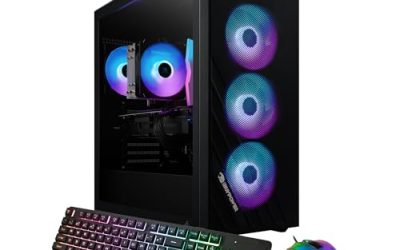
A dorm desk is shared territory: monitor, textbooks, a lamp and usually a roommate’s patience. Measure the space under and on your desk before you fall for a full-size tower, and favour mid-towers or compact designs like the Legion Tower 5i. Cooling matters just as much. Larger, slower-spinning fans and a mesh front panel move air with less noise than small fans at full tilt, and liquid cooling is not automatically quieter once pump and radiator fans are counted. If your study sessions run late, a restrained case with a plain side panel also keeps fan lighting out of a dark room.
Match the graphics card to your monitor
Most student monitors are 1080p or 1440p panels, and the graphics card should follow that, not the other way round. An RTX 4060 or RTX 5060 class card drives esports titles and most AAA games at 1080p high settings, while an RTX 4060 Ti or 5060 Ti adds headroom for 1440p and for creative software that uses GPU acceleration. Card memory matters too: 8GB suits 1080p today, but 16GB versions of the same card hold textures better at 1440p and age more gracefully over a three- or four-year degree.
Give coursework the same weight as gaming
Your degree will ask more of this machine than your game library will. Sixteen gigabytes of memory is the working minimum for a browser full of research tabs, a word processor, chat apps and a game launcher running together; check whether the memory ships as two sticks, because a single stick leaves performance on the table and an empty slot is your cheapest future upgrade. One terabyte of SSD storage fills faster than expected once two or three large games sit beside project files, so favour NVMe drives and a spare M.2 slot.
Check the upgrade path before you need it
A prebuilt bought in your first year should not be a dead end by your third. Standard ATX or micro-ATX layouts with a name-brand power supply of 600W or more leave room for a stronger graphics card later, while compact proprietary designs can restrict which boards and supplies fit. Confirm the basics on the listing: free memory slots, a second M.2 or drive bay, and enough USB ports on the back for a headset dongle, external drive and printer. Wi-Fi on the board matters too, because many dorm rooms place the only Ethernet socket across the room.
The 5 Best Options
Lenovo Legion Tower 5i (90YA005BUS)
- Best for: Dorm rooms where desk space and noise matter more than lighting.
- CPU: Intel Core Ultra 7 265F
- GPU: NVIDIA GeForce RTX 5060 Ti, 8GB
- RAM: 16GB DDR5, 5600 MHz
- Storage: 1TB SSD
Dorm rooms where desk space and noise matter more than lighting.
The graphics card in this configuration carries 8GB of memory; check the listing carefully if you were expecting the 16GB version of the RTX 5060 Ti.
The Legion Tower 5i is the easiest pick to live with in a small room. Its tower is noticeably slimmer than the big RGB cases in this roundup, the Core Ultra 7 265F brings twenty cores to heavy coursework multitasking, and the RTX 5060 Ti covers 1080p gaming with room to try 1440p. Sixteen gigabytes of DDR5 and a 1TB SSD are the sensible student baseline, and Lenovo’s Legion branding means a proper support network behind the machine if something fails mid-term.
Skytech Nebula (ST-NEBULA-0819-B-AM)
- Best for: Students who mostly play competitive and esports titles at 1080p.
- CPU: Intel Core i5-13400F 2.5 GHz
- GPU: NVIDIA GeForce RTX 4060 8GB GDDR6X
- RAM: 16GB DDR4 3200
- Storage: 1TB NVMe SSD
Students who mostly play competitive and esports titles at 1080p.
The listing notes the graphics card brand may vary, and the DDR4 platform caps your future CPU upgrade options.
The Nebula is the balanced all-rounder of this group: a Core i5-13400F and RTX 4060 pairing that runs competitive titles at high frame rates and handles everyday coursework without drama. The 600W Gold power supply is a quiet plus at this level, leaving modest headroom for a later graphics card swap, and the plain black case will not light up the room during a roommate’s early night. It uses DDR4 memory, which keeps the specification honest and simple rather than chasing the newest platform.
CyberPowerPC Gamer Xtreme VR (GXiVR8040A14)
- Best for: Creative and technical degrees that mix coursework software with 1440p gaming.
- CPU: Intel Core i7-13700F 2.1GHz
- GPU: GeForce RTX 4060 Ti 16GB
- RAM: 16GB DDR5
- Storage: 1TB NVMe SSD
Creative and technical degrees that mix coursework software with 1440p gaming.
Measure your space first — this is a full-size tower, and confirm the exact configuration against the model number when ordering.
Choose this one when the degree itself is demanding. The Core i7-13700F and the 16GB version of the RTX 4060 Ti give you the strongest creative pairing here for video editing, 3D coursework, CAD exercises and game development tools, alongside comfortable 1440p gaming. Sixteen gigabytes of DDR5 and a 1TB NVMe drive keep projects and game installs moving quickly. It is a full-size tower, so it suits a student house or a dorm with a generous desk rather than the tightest rooms.
Alienware Aurora ACT1250 (DACT1250-7377BLK-PUS)
- Best for: Students who value manufacturer support and a tidy, ready-to-run setup.
- CPU: Intel Core Ultra 7 265F
- GPU: NVIDIA GeForce RTX 5060 Ti
- RAM: 16GB DDR5
- Storage: 1TB M.2 PCIe NVMe SSD
Students who value manufacturer support and a tidy, ready-to-run setup.
The 500W power supply and Alienware’s compact proprietary layout leave less room for a future high-end graphics card than the standard towers here.
The Aurora is the polished, set-it-and-forget-it option. You get a Core Ultra 7 265F, an RTX 5060 Ti and a 500W Platinum-rated power supply in Dell’s clear-panel Aurora case, backed by a large manufacturer’s support operation — useful when a deadline week is the worst possible time for a hardware fault. Air cooling keeps the internals simple, and the specification is squarely aimed at high-refresh 1080p and capable 1440p play between study sessions.
CyberPowerPC Gamer Xtreme VR (GXiVR8060A24)
The second CyberPowerPC in this list is the straightforward entry point: a Core i5-13400F with an RTX 4060, DDR5 memory and a 1TB Gen4 SSD. That combination is squarely aimed at 1080p gaming — esports titles, older AAA games and modern releases at sensible settings — while the DDR5 platform and standard tower layout keep later memory and storage upgrades simple. For a first gaming PC bought alongside textbooks and a monitor, it covers the essentials without overspecifying parts you will not use.
Specs
- CPU: Intel Core i5-13400F 2.5GHz
- GPU: GeForce RTX 4060 8GB
- RAM: 16GB DDR5
- Storage: 1TB PCIe Gen4 SSD
- Wireless: Wi-Fi ready
- OS: Windows 11 Home
- Model: GXiVR8060A24
Best for: First-time buyers who want dependable 1080p gaming on a standard, upgradeable tower.
Watch out for: CyberPowerPC sells several similar Gamer Xtreme variants — match the model number GXiVR8060A24 exactly so the specification you receive is the one listed here.
ASIN: B0DCMPRRFD
Which One Fits Your Situation
Your desk is small and your roommate sleeps early
Start with the Lenovo Legion Tower 5i. Its slimmer tower fits where full-size cases crowd everything else out, and its cooling is designed to stay composed under load. Desk choice matters just as much: our guide to the best gaming desks for students covers compact options that leave room for textbooks beside the monitor. Position any tower on the floor beside the desk rather than inches from your pillow.
You play competitive titles between classes
Either CyberPowerPC GXiVR8060A24 or the Skytech Nebula will serve you well. Both pair a capable Intel processor with an RTX 4060, which is the sweet spot for high frame rates in esports games at 1080p, and both keep the rest of the specification simple: 16GB of memory and a 1TB SSD. Pick the Nebula if you prefer its Gold-rated power supply; pick the CyberPowerPC if DDR5 memory matters more for your upgrade plans.
Your coursework is heavier than your gaming
Look at the CyberPowerPC Gamer Xtreme VR GXiVR8040A14 first. Its Core i7 processor and 16GB RTX 4060 Ti are the strongest pairing here for editing timelines, rendering coursework and running development tools, and they still deliver comfortable 1440p gaming after hours. The Alienware Aurora is the alternative if manufacturer support matters more than the extra graphics memory.
You want one PC to last the whole degree
Split the difference with the Lenovo Legion Tower 5i or the Alienware Aurora. Both use current-generation Intel processors and DDR5 memory, so the platform underneath stays relevant longer, and both come from manufacturers with established support networks. Budget a memory upgrade to 32GB in a later year rather than overbuying graphics power now.
Common Mistakes
- Buying the largest tower on the page, then discovering it swallows the dorm desk or blocks the only power socket.
- Matching a high-end graphics card to a basic 1080p 60Hz monitor, leaving the card’s headroom unused all year.
- Ordering a near-identical variant with less memory or a smaller drive because the model number was not checked digit by digit.
- Forgetting the network: choosing a tower without Wi-Fi for a room where the Ethernet socket sits behind a roommate’s bed.
- Spending the whole hardware allowance on the PC and leaving nothing set aside for a monitor, keyboard and headset.
Frequently Asked Questions
Is 16GB of RAM enough for a student gaming PC?
For most students, yes. Sixteen gigabytes handles modern games alongside a browser, documents and chat apps, and every pick here starts there. If your coursework involves virtual machines, large datasets or heavy video timelines, plan a move to 32GB later — which is why free memory slots matter more than a flashy case.
Can a gaming PC handle coursework like coding, CAD and video editing?
Yes — the same hardware that drives games suits coursework software. Multicore processors speed up compiling and rendering, the graphics card accelerates video timelines and 3D viewports, and an SSD keeps large project files loading quickly. The CyberPowerPC GXiVR8040A14 is the strongest pick here for that mix.
How loud will a gaming PC be in a dorm room?
At idle and during study tasks, a modern tower is close to silent. Under a gaming load the fans become audible, which is why case design and placement matter: a mesh-front tower on the floor beside the desk is far easier to live with than a small case screaming on the desktop. Headphones solve the rest.
Should a student choose a desktop or a gaming laptop?
Choose the desktop if the machine will live in one room: you get stronger parts, better cooling and real upgrade options. Choose the laptop only if you genuinely need to game and study in several places each week. Most students in halls get more from a desktop plus an inexpensive notebook for lectures.