Fortnite asks your mouse to do two opposite jobs. In a build fight you are whipping the camera through full turns, placing walls and floors in every direction and editing at arm’s length speed. Two seconds later you are tracking a gliding opponent with an assault rifle, then holding a sniper scope on a head that occupies a few pixels. No single sensitivity is perfect for both, which is why the DPI question in Fortnite is really three questions: what DPI to set on the mouse, what X and Y sensitivity to run in the game, and how to scale the aiming down sights values so your close aim stays calm while your building stays fast.


This guide answers all three with ranges rather than one magic number, because the right setting depends on your pad size, your grip and whether you aim mostly with your wrist or your arm. It also includes three mice that make this kind of tuning easy, chosen because they offer fine DPI steps, reliable sensors at low DPI and onboard storage, so your settings travel with the mouse. The settings advice applies to any modern gaming mouse, including the one already on your desk.
Disclosure: As an Amazon Associate, this site may earn from qualifying purchases made through links in this article, at no additional cost to you.
The short answer: DPI, eDPI and the ranges that work
Set your mouse to 800 DPI. It is the value the largest share of strong Fortnite players use, it behaves identically in menus and on the desktop, and every modern sensor is fully consistent there. A smaller group plays at 400 DPI for maximum calm in scoped aim, and another group plays at 1,600 DPI and halves the in game values to reach the same place. What matters is not the DPI alone but the eDPI it produces with your in game sensitivity.
Fortnite players calculate eDPI by multiplying DPI by the X or Y sensitivity slider value and dividing by 100. At 800 DPI with the X and Y sliders at 8.0, your eDPI is 64. Most competitive Fortnite players land between roughly 32 and 80 eDPI, with the densest cluster around 45 to 70. Builders who edit aggressively tend to sit in the upper half of that band. Players who lean on rifles and sniping tend to sit in the lower half. If you are starting from nothing, 800 DPI with X and Y at 7.0, an eDPI of 56, is the most forgiving middle of the road setting in the game.
Quick picks: mice that make DPI tuning easy
- Logitech G Pro X Superlight 2 Wireless Gaming Mouse, Black – ASIN: B09NBWL8J5 – fine DPI steps in G Hub, onboard memory and a sensor that stays consistent at low DPI.
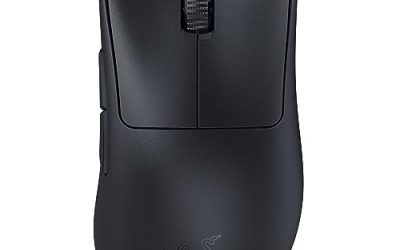
- Razer Viper V3 Pro Wireless Esports Gaming Mouse, Black – ASIN: B0CW25XR5R – a dedicated DPI control underneath, granular sensitivity stages and high polling for smooth tracking.
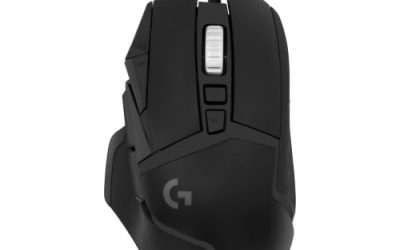
- Logitech G502 HERO Wired Gaming Mouse – ASIN: B07GBZ4Q68 – the tuner’s mouse: a DPI shift button for instant low sensitivity while scoped, five onboard profiles and adjustable weight.
Logitech G Pro X Superlight 2
Best for: players who want one set-and-forget DPI stage, stored on the mouse, with nothing to adjust mid game.
For Fortnite, the Superlight 2’s appeal is stability. Its HERO 2 sensor tracks consistently across the low DPI values this game is played at, with no smoothing or acceleration to blur the relationship between hand and camera, and G Hub lets you set DPI in fine steps so you can land exactly on 800 rather than near it. Save a single stage to the onboard memory and the mouse comes up at your DPI on any PC, with no software argument before a tournament or a session at a friend’s desk. At 60 grams it is light enough for the fast resets building demands, and its LIGHTFORCE hybrid clicks give a clean stop for shotgun timing.
Points to consider: There is no dedicated DPI shift button, so scoped sensitivity changes must come from the in game ADS settings rather than from the mouse. Players who like to drop sensitivity with a held button should look at the G502 HERO below.
View on Amazon – ASIN: B09NBWL8J5
Razer Viper V3 Pro
Best for: fingertip and claw players who build and edit at high speed and want sensitivity stages within reach.
The Viper V3 Pro pairs its Focus Pro 35K sensor with a physical DPI button on the underside, so stages cannot be changed by an accidental click mid fight – a thoughtful detail for a game where a stray sensitivity change ruins a box fight. Razer Synapse offers granular stage control, and the mouse’s true 8K wireless polling keeps slow tracking movement smooth, which helps the low eDPI half of Fortnite: rifle tracking and scoped holds. At 54 grams it is the lightest mouse here, and that lightness is part of its settings story, because a light mouse stays controllable at the upper eDPI values aggressive builders use.
Points to consider: The underside DPI button is safe but slow to reach, so treat stages as something you set between matches, not during them. As with any high polling mouse, battery life falls as polling rises, so most players will run a lower polling rate day to day.
View on Amazon – ASIN: B0CW25XR5R
Logitech G502 HERO
Best for: players who want two sensitivities on one mouse, with a held DPI shift for scoped calm and a fast base setting for building.
The G502 HERO is the oldest design here and still the most flexible for sensitivity work. Its HERO 25K sensor covers 100 to 25,600 DPI, and the mouse carries a dedicated DPI shift thumb button: hold it and the mouse drops to a second, lower DPI you set in G Hub, release it and you are back to building speed. That single feature solves Fortnite’s two jobs problem in hardware. Eleven programmable buttons, five onboard profiles and a dual mode scroll wheel add flexibility, and the adjustable weight system – five 3.6 gram weights – lets you slow the mouse down physically if you find a light mouse too twitchy at your chosen eDPI.
Points to consider: At 121 grams before weights, it is heavy by current esports standards, and fast builders who flick all day may feel that mass by the end of a session. It is wired, which some players prefer for zero charging and others have moved past. It is also a large, right handed shape that suits palm grips best.
View on Amazon – ASIN: B07GBZ4Q68
Setting X, Y, ADS and scope sensitivity
X and Y sensitivity. Start with X and Y equal. Most players run them matched between 6.0 and 10.0 at 800 DPI. A minority raise Y slightly for faster vertical building, but matched axes are easier to learn because diagonal mouse movement maps to diagonal camera movement at the same rate. Change one thing at a time, in steps of 0.5, and play several matches before judging; sensitivity changes feel wrong for the first hour even when they are right.
Targeting (ADS) sensitivity. The targeting slider scales your base sensitivity while aiming down sights, and it is expressed as a portion of the base value. Settings in the 40 to 60 range on that slider are the common competitive band: low enough to steady rifle tracking, high enough to follow a jumping opponent at mid range. If your ADS aim feels shaky, lower this before touching your base sensitivity, because your building speed probably does not need to change.
Scope sensitivity. Scoped weapons magnify the view, so the same hand movement covers far more visual distance. The scope slider commonly sits a little below the targeting value, in the 35 to 55 range for most players. Snipers who hold long angles go lower; players who quick scope in build fights go higher. Set it by testing on a stationary target at range: you want to be able to make a one body width correction in a single small movement without passing the target.
Look and building multipliers. Fortnite also exposes separate sensitivity multipliers for building mode and edit mode on some input setups. Keep them at the default relationship to your base sensitivity while you are learning; the fastest builders in the game mostly win on consistency, not on exotic multiplier stacks. Raise the building multiplier only if your base aim is settled and your edits, not your shots, are what feel slow.
How to find your own best DPI for Fortnite
Use the turn test. In a creative map or a quiet landing spot, place your mouse at the left edge of your usable pad space and swipe to the right edge while watching how far your character turns. A full pad swipe that produces roughly one full turn, or a little more, is a healthy baseline for Fortnite: enough range to build in every direction without lifting the mouse constantly, and slow enough to aim. If a full swipe spins you twice, your eDPI is likely too high for controlled rifle work. If you cannot complete a half turn without lifting, it is likely too low for building.
Then use the tracking test. Follow a moving target – a gliding player, a vehicle, a friend jogging in creative – and watch where your crosshair sits. Consistently behind the target means raise sensitivity slightly. Consistently ahead, with the crosshair oscillating around the target, means lower it slightly. Adjust in small steps and give each step a day. Sensitivity is a skill setting, not an equipment spec: the best DPI for Fortnite is the one your hand has practised at, inside the ranges above, and changing it weekly resets the learning that makes it work.
Two environment settings matter as much as the number. Turn off the Windows pointer acceleration option and leave the Windows pointer speed at its neutral middle setting, so desktop time reinforces the same hand distances as game time. And keep your mouse polling rate at a stable value your PC handles easily; a steady 1,000 Hz beats a higher rate that fluctuates under load.
FAQ
Is 400 or 800 DPI better for Fortnite?
Both are proven at the highest level. At 400 DPI you double the in game slider values to reach the same eDPI, and scoped aim can feel a touch calmer. At 800 DPI the desktop cursor is easier to live with and the sliders sit in finer relative steps. Choose by eDPI and comfort, not by the DPI figure alone.
What eDPI do most good Fortnite players use?
The common competitive band is roughly 32 to 80 eDPI, with many players between 45 and 70. Aggressive builders lean higher for faster edits and turns; rifle and sniper focused players lean lower for steadier tracking. If you are outside the band in either direction, there is usually a specific reason tied to your pad size or play style.
Should my ADS sensitivity match my base sensitivity?
No. Aiming down sights magnifies targets and slows the pace of the fight, so a targeting value around half of your base feel – the 40 to 60 slider range – gives steadier tracking without making mid range fights sluggish. Scope sensitivity usually sits slightly below the targeting value.
Does a higher DPI make aim smoother?
A higher DPI sends finer position data, and at very low in game values the combination can feel marginally smoother, which is why a small group plays 1,600 DPI with halved sliders. In practice, sensor quality and a stable polling rate matter far more, and 800 DPI remains the standard because it is simple and consistent everywhere.
How often should I change my sensitivity?
As rarely as possible. Small refinements of 0.5 on a slider are fine when a test shows a consistent problem, but wholesale changes reset your muscle memory for building and editing as well as aiming. Settle inside the proven ranges, then let practice do the work.
Conclusion
The best gaming mouse DPI for Fortnite is 800 for most players, paired with X and Y sliders that put your eDPI between about 45 and 70, a targeting value in the 40 to 60 range and a scope value just below it. Builders should start at the upper end of the band, aim focused players at the lower end, and everyone should change one number at a time. If you are also choosing hardware, pick a mouse with fine DPI steps and onboard storage – the Superlight 2 for set and forget consistency, the Viper V3 Pro for light, fast building, or the G502 HERO if a hardware DPI shift button fits the way you scope.