Clicking fast is less about raw hand speed than about how quickly each press turns into a signal. A mechanical switch has metal contacts that bounce on impact, so the mouse waits a few milliseconds — the debounce delay — before it trusts the click. Optical switches remove the problem at the source: a beam of light registers the press, so there is no contact bounce and no debounce delay to add. The result is a click that lands the moment your finger moves, which is exactly what rapid clicking rewards.


Competitive shooter players, Minecraft PvP players chasing higher clicks per second, and anyone who fires semi-automatic weapons or spams abilities will feel the difference first. The five mice below were picked from their Amazon listings: every one uses optical switches with a stated fast actuation, and each suits a different grip, hand size or play style.
Quick Picks
As an Amazon Associate we earn from qualifying purchases.
| Product | Best for | Key spec from title |
|---|---|---|
| Razer Viper V3 Pro | Competitive FPS and fast repeated clicks | Gen-3 optical switches, 54g, 8K polling |
| Razer DeathAdder V3 Pro | Palm-grip players who click fast for hours | Gen-3 optical switches, 63g, 90-hour battery |
| Razer Cobra | Lightweight wired clicking on a compact shell | Gen-3 optical switches, 58g, wired |
| Pulsar X2H Mini | Claw-grip players who tune debounce | Optical switches, 52g, debounce down to 2 ms |
| Razer Basilisk V3 Pro | Button-heavy games with fast main clicks | Gen-3 optical switches, 11 programmable buttons |
How to Choose
Switch type sets the speed limit
Start with the switch, because nothing else in the mouse can undo a slow one. Mechanical switches rely on metal contacts that bounce when they meet, so the firmware adds a debounce delay of several milliseconds to stop one press from registering twice. Optical switches actuate with light instead, so there is no bounce to filter and no delay to add — Razer lists its Gen-3 optical switches at 0.2 ms actuation with no debounce delay. Pulsar takes a different route: its software lets you adjust debounce time as low as 2 ms, so you can tune that trade-off. Either way, the listing should name the switch type; if it does not, treat the click speed as unknown.
Weight and shape decide how long fast clicking lasts
A light mouse takes less effort to lift, reposition and stop, which matters when fast clicking goes hand in hand with fast aiming. The mice here run from 52 g to 63 g, apart from the button-heavy Basilisk, and every gram counts over a long session. Shape matters just as much: a high hump supports a claw grip, a long ergonomic shell supports a palm grip, and a small symmetrical shell suits smaller hands and fingertip grips. A mouse that forces your fingers to stretch for the main buttons will slow your clicks no matter how good its switches are, so match the shell to your hand before you commit.
Polling rate and connection
Polling rate sets how often the mouse reports its position, and a higher rate means each click and movement reaches the game sooner. Most wireless gaming mice report at 1,000 Hz, or once per millisecond, which is fast enough for nearly everyone. The Viper V3 Pro goes further with true 8,000 Hz wireless polling through its included HyperPolling dongle, cutting the report interval to one eighth of a millisecond. Wired mice skip the wireless link entirely, which some players prefer for simplicity. Either route works for fast clicking; what matters is that the listing states the polling rate rather than leaving it vague.
Click feel: force, travel and tuning
Two clicks can register at the same speed and still feel completely different. A light actuation force lets you press again sooner, and short travel means your finger covers less distance on every press. Listings rarely state force in grams, so look for the clues they do give: optical actuation, a stated actuation time, and software controls such as adjustable debounce. The Pulsar X2H Mini is the most tunable mouse here, with debounce adjustable down to 2 ms, while the Razer mice fix the delay at zero by design. If you click with a heavy hand, a firmer switch can prevent accidental presses; if you jitter click, lighter is better.
The 5 Best Options
Razer Viper V3 Pro
The Viper V3 Pro is the most complete fast-clicking mouse here. Its Gen-3 optical switches actuate in 0.2 ms with no debounce delay, and the 54 g symmetrical shell keeps the mouse easy to lift and reposition between bursts of clicks. True 8,000 Hz wireless polling through the included HyperPolling dongle means each click reaches the game with barely any wait, and the Focus Pro 35K sensor tracks cleanly at high speed. With up to 95 hours of battery, it also survives long sessions without a cable. It suits claw and fingertip grips best, and players who want one mouse for competitive play.
Specs
- Switches: Razer Gen-3 optical switches, 90-million click lifecycle, 0.2 ms actuation, no debounce delay
- Sensor: Focus Pro 35K Optical Sensor Gen-2, up to 35,000 DPI
- Weight: 54 g
- Polling: true 8,000 Hz wireless with HyperPolling dongle included
- Battery: up to 95 hours
- Buttons: 8 programmable buttons
Best for: Competitive FPS players who click in fast bursts.
Watch out for: The symmetrical shell is compact, so large palm-grip hands should check the fit first.
Razer DeathAdder V3 Pro
The DeathAdder V3 Pro brings the same Gen-3 optical switches to a right-handed ergonomic shell, which makes it the pick for palm-grip players who click fast over long sessions. The 63 g body is light for an ergonomic mouse, and the Focus Pro 30K sensor tracks on glass as well as cloth pads. Battery life runs up to 90 hours, so a weekend of play needs no recharge. The shape fills the hand and keeps the index finger resting naturally on the main button, which helps when every click has to land in rhythm. Five programmable buttons keep the layout simple.
Specs
- Switches: Razer Gen-3 optical switches, 90-million click lifecycle, 0.2 ms actuation, no debounce delay
- Sensor: Focus Pro 30K Optical Sensor, up to 30,000 DPI
- Weight: 63 g
- Battery: up to 90 hours
- Buttons: 5 programmable buttons
- Connection: HyperSpeed wireless, USB-C charging
Best for: Palm-grip players who want fast clicks in long sessions.
Watch out for: The right-handed shape does not suit left-handed players.
Razer Cobra
The Cobra is the wired pick for players who want fast clicks without thinking about batteries or wireless settings. At 58 g it is light enough for quick repositioning, and its Gen-3 optical switches give the same 0.2 ms actuation and zero debounce delay as the flagship Razer mice. The 8,500 DPI optical sensor covers the sensitivity range most players actually use, and the Speedflex cable keeps drag low. Chroma RGB underglow and 100% PTFE feet round out a small shell that fits most grip styles, including smaller hands.
Specs
- Switches: Razer Gen-3 optical switches, 90-million click lifecycle, 0.2 ms actuation, no debounce delay
- Sensor: 8,500 DPI optical sensor
- Weight: 58 g
- Connection: wired, Speedflex cable
- Feet: 100% PTFE mouse feet
- Lighting: Chroma RGB with underglow
Best for: Players who want light, fast wired clicks on a compact shell.
Watch out for: The 8,500 DPI ceiling is lower than the wireless picks here, so high-sensitivity players should check their settings.
Pulsar X2H Mini

The X2H Mini is the tuner’s choice. Its optical switches use light-based actuation to avoid double-clicking, and Pulsar’s software lets you adjust debounce time as low as 2 ms, so you can set the click response to your own style. At 52 g it is the lightest mouse here, and the high-hump symmetrical shape supports aggressive claw grips with solid palm contact. The PAW3395 sensor reaches 26,000 DPI with 650 IPS tracking, and the 2.4 GHz wireless link holds a steady 1 ms report rate. It is the smallest shell in this group, so it suits smaller hands best.
Specs
- Switches: optical switches, light-based actuation
- Sensor: PixArt PAW3395, up to 26,000 DPI, 650 IPS, 50G
- Weight: 52 g (1.83 oz)
- Debounce: adjustable as low as 2 ms in software
- Connection: 2.4 GHz wireless, 1 ms report rate; wired mode included
- Battery: up to 90 hours
- Buttons: 5
Best for: Claw-grip players who want to tune debounce themselves.
Watch out for: The mini size can feel cramped for large hands; the standard X2H is the larger version.
Razer Basilisk V3 Pro
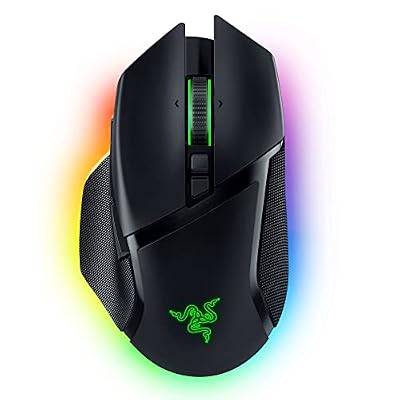
The Basilisk V3 Pro is for players whose games need more than two fast buttons. Its Gen-3 optical switches give the same 0.2 ms actuation with no debounce delay as the other Razer mice here, while 11 programmable buttons and a HyperScroll Tilt Wheel put abilities, items and weapon swaps under the thumb. The Focus Pro 30K sensor tracks on glass, and the battery runs up to 150 hours. It is the largest and most button-rich mouse in this guide, so it fits palm-grip players who want fast main clicks without giving up controls.
Specs
- Switches: Razer Gen-3 optical switches, 90-million click lifecycle, 0.2 ms actuation, no debounce delay
- Sensor: Focus Pro 30K Optical Sensor, up to 30,000 DPI
- Buttons: 11 programmable buttons
- Wheel: HyperScroll Tilt Wheel
- Battery: up to 150 hours
- Lighting: Chroma RGB, 13-zone
Best for: Palm-grip players who need many buttons with fast main clicks.
Watch out for: The large ergonomic shell suits palm grips best and can feel bulky for small hands.
Which One Fits Your Situation
You play competitive shooters and click in bursts
Pick the Viper V3 Pro. Its 54 g shell, 8,000 Hz polling and Gen-3 optical switches are built for the stop-start rhythm of competitive shooters, where a burst of clicks follows every flick. The symmetrical shape works for claw and fingertip grips, and the long battery means the mouse is ready for a full evening of matches without a cable in the way.
You palm-grip and play for hours
Pick the DeathAdder V3 Pro. The ergonomic shell fills the hand and keeps the index finger in a natural clicking position, so fast clicking stays comfortable deep into a session. You get the same Gen-3 optical switches as the Viper V3 Pro, with up to 90 hours of battery and a shape that supports the whole hand instead of asking your fingers to do the work.
You want the smallest, lightest clicks you can tune
Pick the Pulsar X2H Mini. At 52 g it is the lightest mouse here, and its software lets you set debounce as low as 2 ms, which suits players who jitter click or who want the click response tuned to their own hand. The high-hump shape locks in a claw grip. If your hands are large, the Cobra gives similar light clicks on a slightly roomier wired shell.
You need extra buttons without slowing your main clicks
Pick the Basilisk V3 Pro. Its 11 programmable buttons and HyperScroll Tilt Wheel cover abilities and item swaps, while the Gen-3 optical switches keep the main clicks just as quick as the lighter mice here. It suits palm-grip players in MOBAs, MMOs and shooters with heavy keybinds, where the main buttons still have to fire fast.
Common Mistakes
- Buying on maximum DPI alone: DPI sets sensitivity, not click speed, and the switch type decides how fast a press registers.
- Assuming a heavier mouse clicks just as fast: extra weight tires the hand sooner and slows repositioning between clicks.
- Ignoring grip fit: a shell that stretches your fingers or cramps your palm will cost you clicks whatever the switches do.
- Setting debounce to the lowest value without testing: too little debounce can turn one press into two, so lower it in steps and check for double-clicks.
- Forgetting the cable or battery: a stiff cable drags on fast movements, and a dead battery ends a session, so check the cable type and battery life on the listing.
Frequently Asked Questions
Do optical switches really click faster than mechanical switches?
Yes, in the way that matters for rapid clicking. Mechanical switches need a debounce delay to filter contact bounce, which adds milliseconds to every press. Optical switches actuate with light, so there is no bounce and no delay — Razer lists its Gen-3 optical switches at 0.2 ms actuation with no debounce delay.
What debounce setting is best for fast clicking?
The lowest setting that never double-clicks. Optical-switch mice need no debounce at all, which is why Razer lists zero debounce delay on its Gen-3 switches. On a mouse with adjustable debounce, such as the Pulsar X2H Mini, start at 2 ms and raise it one step if single presses ever register twice.
Does polling rate change how fast clicks register?
Polling rate sets how often the mouse reports to the computer, so a higher rate shortens the wait between a click and the game seeing it. A 1,000 Hz mouse reports every millisecond, which is fast enough for most players. The Viper V3 Pro reports at 8,000 Hz, cutting that interval to one eighth of a millisecond.
Is a lighter mouse better for clicking fast?
Usually, yes. A lighter mouse takes less effort to move and stop, so your hand tires more slowly during long sessions of rapid clicking. The mice here range from 52 g to 63 g, apart from the button-heavy Basilisk. Shape still matters: a light mouse that does not fit your grip will not click faster than a comfortable one.