Choosing inside the Legion range is not about finding a gaming laptop, it is about deciding how much graphics power, screen quality and cooling headroom you actually need, because a Legion 5, a Pro 5i, a 7i and a Pro 7i can share a badge while behaving very differently in sustained play. The real decision is which tier matches your games, your desk setup and your upgrade plans.
This guide serves buyers who have already settled on Lenovo and want the tiers compared honestly, from a portable 15.1-inch model to a flagship that stays plugged in. Every pick below was chosen from the model names and specifications printed on its Amazon product page, including processor, graphics, display, memory, storage and warranty wording.
Quick Picks
As an Amazon Associate we earn from qualifying purchases
| Product | Best for | Key spec from title |
|---|---|---|
| Lenovo Legion 5 Gen 10 15.1-inch | Players who want OLED colour and a lighter bag for daily carry | NVIDIA RTX 5060 8GB |
| Lenovo Legion Pro 5i Gen 10 16-inch | Players who want a larger OLED screen and double memory as standard | Intel Core Ultra 7 255HX |
| Lenovo Legion 7i Gen 10 16-inch | Players who want a slimmer premium chassis with a stronger graphics step | NVIDIA GeForce RTX 5070 |
| Lenovo Legion Pro 7i Gen 10 16-inch | Players who want flagship graphics for a fixed desk setup | NVIDIA GeForce RTX 5080 16GB |
How to Choose
Check the graphics power limit, not just the GPU name
Two laptops can both list an RTX 5060 or RTX 5070 and still perform differently, because the total graphics power, often shortened to TGP, sets how hard the chip is allowed to run. Legion models are generally configured toward the higher end of each chip’s range, and some listings state the figure directly, such as 115W on the 15.1-inch Legion 5 in this guide. Where a listing does not print a wattage, treat that as a question to resolve on the product page before ordering, not as a detail to assume from the model name alone.
Match the display tier to how you actually play
Legion buyers choose between fast IPS panels and OLED panels, and the trade is practical rather than cosmetic. The 16-inch Legion 5 configuration sold with a WQXGA IPS screen pushes refresh to 240Hz, which suits competitive play where motion clarity matters most. OLED Legion models in this guide run at 165Hz or 240Hz with 2560 x 1600 resolution and, on the Pro 7i, a stated 500 nits brightness. OLED brings stronger contrast and colour for story-driven games and video work. Decide first whether your priority is the fastest panel or the richest one, then pick the tier.
Count the memory and storage slots on the exact model
Upgradeability is a Legion strength, but it is stated per configuration, not per brand. The Legion 7i listing in this guide describes its memory as two 16GB SO-DIMM modules, which tells you both slots are filled as sold and a memory upgrade means replacing modules rather than adding one. Storage formats also differ, with some models using a compact M.2 2242 drive and the Pro 7i using a Gen 5 NVMe drive. Before buying, confirm the slot count, the drive size already fitted and the maximum memory the listing states for that exact configuration.
Compare ports, cooling design and warranty cover
A Legion that lives on a desk needs different connections from one that travels. Check for Thunderbolt 4 or USB4, HDMI 2.1 for an external monitor, a wired Ethernet port for stable online play and enough USB-A ports for a mouse, headset and external drive without a hub. Cooling design separates the tiers too, with Pro models built for longer sustained loads. Finally, read the warranty line on the listing itself: cover ranges from a standard one-year courier or carry-in warranty to Legion Ultimate Support on the flagship configuration below, and reseller configurations can split cover between seller and manufacturer.
The 4 Best Options
Lenovo Legion 5 Gen 10 15.1-inch

This is the entry point into the current Legion line for buyers who still carry their laptop every day. Its AMD processor and RTX 5060 graphics are paired with an OLED screen, a combination that suits players mixing competitive titles with story-driven games and coursework or office work on the same machine. The listing states a graphics power of 115W, so the chip is not a low-power variant, and the wired Ethernet port means online play does not have to depend on wireless signal strength at home or in shared housing.
Specs
- Processor: AMD Ryzen 7 260
- Graphics: NVIDIA GeForce RTX 5060 Laptop GPU 8GB GDDR7, Boost Clock 2497MHz, TGP 115W
- Display: 15.1-inch WQXGA OLED, 2560 x 1600, 165Hz, G-SYNC
- Memory: 16GB DDR5
- Storage: 1TB SSD
- Camera: 5MP webcam
- Connectivity: Wi-Fi 7, RJ45 Ethernet
- Keyboard: 24-Zone RGB Backlit
- Operating system: Windows 11 Home
- Colour: Eclipse Black
Best for: Students and commuters who want one OLED Legion for play and everyday work
Watch out for: Memory is 16GB as sold, so confirm the upgrade path on the listing if you plan to run heavy multitasking or virtual machines later.
ASIN: B0FPFP4T1R
Lenovo Legion Pro 5i Gen 10 16-inch
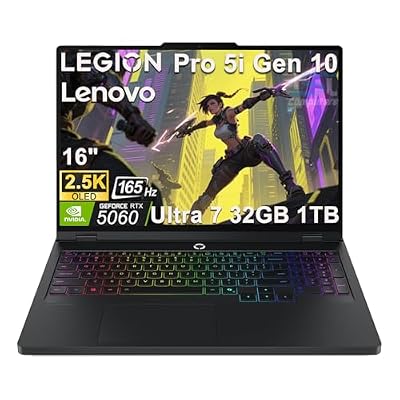
The Pro 5i is the step up for buyers who found the 15.1-inch screen tight and want memory headroom from day one. This configuration doubles the memory to 32GB and moves to a 16-inch OLED panel while keeping the RTX 5060, so it fits players who keep a browser, chat and capture tools open alongside a game, and creators who edit video or large photo sets between sessions. The larger chassis also gives the Pro cooling design more room to work during long sessions than the slimmer standard Legion 5 body allows.
Specs
- Processor: Intel Core Ultra 7 255HX
- Graphics: NVIDIA GeForce RTX 5060 8GB
- Display: 16-inch, 2560 x 1600, OLED, G-SYNC, 165Hz
- Memory: 32GB DDR5
- Storage: 1TB SSD
- Camera: 5MP webcam
- Connectivity: Wi-Fi 7, Bluetooth, 3 USB 3.0 ports listed
- Keyboard: 24-Zone RGB Backlit
- Operating system: Windows 11 Home
- Colour: Eclipse Black
- Weight: 5.36 pounds
- Dimensions: 14.34 x 10.55 x 0.85 inches
Best for: Players who want a bigger OLED screen and 32GB of memory without jumping to flagship graphics
Watch out for: The listing does not state a graphics wattage, so confirm the RTX 5060 power limit on the product page before comparing it against other 5060 laptops.
ASIN: B0FSS784KL
Lenovo Legion 7i Gen 10 16-inch

The Legion 7i is the premium thin option in this lineup, aimed at buyers who want a cleaner, slimmer machine that still plays at high settings on its built-in screen. It steps graphics up to the RTX 5070 and pairs it with the Core Ultra 9 processor and an OLED display rated at 500 nits in the listing title. Its memory is fitted as two 16GB SO-DIMM modules, a detail worth knowing before purchase. In Glacier White with a notably thin profile for a 16-inch gaming laptop, it suits a shared living space or office desk better than the heavier Pro models.
Specs
- Processor: Intel Core Ultra 9 275HX, P-cores up to 5.40 GHz, E-cores up to 4.60 GHz
- Graphics: NVIDIA GeForce RTX 5070 Laptop GPU 8GB GDDR7
- Display: 16-inch WQXGA OLED, 500 nits, non-touch
- Memory: 32GB DDR5-5600MT/s, 2 x 16GB SO-DIMM
- Storage: 1TB SSD M.2 2242 PCIe Gen4 TLC
- Keyboard: Per-key RGB
- Operating system: Windows 11 Home
- Colour: Glacier White
- Dimensions: 14.24 x 10.37 x 0.63-0.70 inches
- Warranty: One Year Courier or Carry-in Warranty, extendable on registration with Lenovo according to the listing
Best for: Buyers who want a slim premium Legion with RTX 5070 graphics and an OLED screen for a tidy desk
Watch out for: Both memory slots are already filled and the fitted drive uses the shorter M.2 2242 format, so check replacement sizes carefully before planning upgrades.
ASIN: B0FWVFBB81
Lenovo Legion Pro 7i Gen 10 16-inch
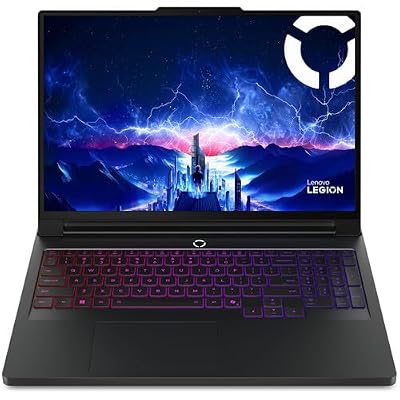
The Pro 7i is the flagship choice for a fixed setup, and it is the natural laptop counterpart for readers also weighing a prebuilt from our guide to the best Lenovo Legion gaming PCs. Its RTX 5080 carries 16GB of graphics memory, double the other picks here, which matters for high-resolution textures and for driving an external monitor. The 240Hz OLED panel, Gen 5 storage and 24-core processor make it the pick for players who run the most demanding releases at native 2560 x 1600 and also render, compile or stream from the same machine.
Specs
- Processor: Intel Core Ultra 9 275HX, 24 cores
- Graphics: NVIDIA GeForce RTX 5080 16GB
- Display: 16.0-inch WQXGA OLED, 240Hz, 500 nits
- Memory: 32GB RAM
- Storage: 1TB Gen 5 NVMe SSD
- Model number: 83F50053US
- Operating system: Windows 11 Home
- Colour: Eclipse Black
- Warranty: One Year Legion Ultimate Support
Best for: Desk-based players who want flagship graphics, a 240Hz OLED screen and the strongest warranty in this guide
Watch out for: This is a large, power-focused machine, so confirm the charger and bag fit your routine if you ever need to move it between rooms or buildings.
ASIN: B0FL4HLJ56
Which One Fits Your Situation
You carry your laptop to class, work or a library most days
Choose the 15.1-inch Legion 5. It is the smallest and most portable model here, its OLED screen works well for documents and video as well as games, and the stated 115W graphics configuration means you are not trading away gaming performance for the smaller body. The Ethernet port is a useful bonus in dorms, shared houses and campus accommodation with unreliable wireless coverage.
You play at a desk and keep several apps open while gaming
Choose the Legion Pro 5i. The 16-inch OLED screen gives you more room for split windows, and 32GB of memory as standard removes the most common multitasking bottleneck in this class. It is the balanced pick if the flagship graphics of the Pro 7i would rarely be used at this screen resolution during your typical gaming sessions each week.
You want the machine to look at home in an office or shared room
Choose the Legion 7i in Glacier White. The slim profile and per-key RGB keyboard that can be toned down make it the least aggressive-looking option here, while the RTX 5070 and 500-nit OLED panel keep it fully capable for evening play, presentations and for colour-sensitive creative work during the day.
You are replacing a desktop and the laptop will rarely move
Choose the Legion Pro 7i. With 16GB of graphics memory, a 240Hz OLED display and Gen 5 storage, it is built for a permanent desk with an external keyboard and monitor attached. The Legion Ultimate Support warranty also fits a machine your whole gaming and work setup depends on every single day.
Common Mistakes
- Comparing Legion models by GPU name alone and ignoring the graphics power limit printed, or missing, on each listing.
- Assuming every Legion has the same slots, when memory layout and drive format change between the 5, Pro 5i, 7i and Pro 7i.
- Buying an OLED model for bright-room competitive play without checking the stated brightness and refresh rate for that exact panel.
- Choosing a 16-inch Pro model for daily commuting without checking its listed weight and dimensions against your bag.
- Overlooking the warranty wording on reseller configurations, where cover for upgraded parts can sit with the seller rather than Lenovo.
Frequently Asked Questions
Is the Legion 5 enough, or do most buyers need a Pro model?
For 2560 x 1600 play in popular competitive and story-driven titles, the Legion 5 configurations here are a sensible starting point. Step up to a Pro model when you want a larger screen, more memory as standard, stronger cooling for long sessions, or, on the Pro 7i, the RTX 5080 with 16GB of graphics memory.
Can you upgrade RAM and storage on a Legion gaming laptop?
On the models in this guide, memory uses SO-DIMM modules and storage uses M.2 drives, but the exact layout differs by configuration. The Legion 7i listing, for example, states two 16GB modules and an M.2 2242 drive. Always confirm slot count and drive size on the listing for the exact model you are ordering.
Does an OLED Legion screen suit competitive gaming?
It can, depending on the panel. The Pro 7i in this guide pairs OLED with a 240Hz refresh rate, while the Legion 5 and Pro 5i OLED models run at 165Hz. Competitive players who prioritise the highest refresh above contrast should compare those figures directly and choose the panel that matches their games.
What warranty should you expect with a Legion bought on Amazon?
It depends on the configuration and seller. The Legion 7i listing here states a one-year courier or carry-in warranty, extendable on registration, while the Pro 7i configuration states one year of Legion Ultimate Support. Read the warranty line on the specific listing before ordering, especially on reseller-configured machines.