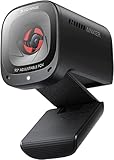
- Top Pick: BenQ Camera ideaCam S1 Pro Webcam Document Camera 15x Zoom Built-in Ring Light Handheld 8 Megapixel Live Demonstration Remote Meeting Noise Cancelling Microphone EnSpire Auto Focus
- Best Value: Logitech Brio 101 Full HD 1080p Webcam for Streaming and Meetings – Black
- Premium Choice: OBSBOT Meet 2-4K Webcam for PC with 1/2" Sensor, AI Framing & Autofocus
BenQ has carved out a distinctive niche in the webcam market by focusing on something most competitors ignore: the demonstration and document-camera use case. Rather than chasing the crowded streaming space, BenQ’s ideaCam lineup targets educators, remote workers, and product demonstrators who need to show physical objects clearly on camera.
This review examines BenQ’s webcam offerings, centered on the versatile ideaCam S1 series, and puts them in context alongside a few popular mainstream alternatives. We’ll explore what makes BenQ’s approach unique, how the ideaCam performs, and whether it’s the right camera for your needs.
As an Amazon Associate we earn from qualifying purchases at no extra cost to you.


Updated October 2026 – BenQ webcam facts rechecked against the maker listing and published reviews.
BenQ Webcam Quick Answer
The BenQ webcam to look at is the ideaCam S1 Pro: a handheld 8-megapixel webcam and document camera with a 15x zoom lens, a built-in ring light and a noise-cancelling microphone. It is built for teachers, presenters and product demos, not for face-on streaming. If you only need clean video calls, a standard webcam such as the Logitech Brio 101 costs far less.
- Best for: teaching, document sharing and showing small objects on camera
- Key specs: 8 MP sensor · 15x zoom · ring light · noise-cancelling mic · handheld design
- Trade-offs: image quality rated average in published reviews · some features need BenQ EnSpire software
How we chose: this page is research-based. We compared the maker listing, published reviews and buyer feedback, and we do not claim personal use of the camera.
🎮 Get More From Your Setup — Free
Prime Gaming gives you free PC games every month, in-game loot, and a free Twitch channel sub — plus fast free shipping on all the gear above. New members get a 30-day free trial.
Watch: BenQ Webcam — Video Review
Design & Build
BenQ’s ideaCam webcams stand apart with a design built around flexibility. The ideaCam S1 Pro and S1 Plus feature a handheld, articulating form factor with a 15x zoom lens, letting you lift the camera off its mount to inspect and demonstrate objects up close, something a fixed webcam simply can’t do. The S1 Pro adds a built-in ring light for even illumination during demos. Published reviews describe the build as solid and purpose-driven, with a sturdy stand and a modular design. Compared to conventional webcams like the Logitech Brio 101, BenQ’s designs prioritize versatility and demonstration over simple face-forward video, which is exactly their appeal.
Performance
The ideaCam’s strength is its intended use. The S1 Pro lists 8-megapixel capture with EnSpire auto focus, a 15x zoom, and a noise-cancelling microphone, which suits live demonstrations, document sharing, and product inspection during remote meetings. The macro capability and handheld design let teachers and presenters show textures, small parts, and documents up close in a way fixed webcams cannot. Published reviews are more mixed on pure image quality: several describe it as average for a camera at this price, and some features such as the control puck and auto orientation depend on the optional BenQ EnSpire software. Buyers wanting a pure meeting or streaming camera should consider the alternatives here. The Logitech Brio 101 offers reliable full HD with auto light correction, while the OBSBOT Meet 2 brings a large sensor with AI framing and autofocus that follows you around the frame. Each serves a different priority, but for anyone who needs to demonstrate physical objects, BenQ’s ideaCam is one of very few cameras built for that job.
Pros & Cons
- Unique demonstration ability: Handheld design and 15x zoom excel at showing objects and documents.
- Built-in ring light: The S1 Pro provides even illumination for clear demos.
- High-resolution capture: 8-megapixel sensor with auto focus delivers sharp detail.
- Noise-cancelling mic: Built in for meetings and presentations.
- Niche focus: Best for demos and documents rather than pure streaming.
- Premium pricing: The specialized design costs more than a basic webcam.
- Overkill for simple calls: Casual users may not need the zoom and macro features.
Who Should Buy the BenQ ideaCam S1 Pro
The BenQ ideaCam S1 Pro suits three groups: teachers who want to show worksheets and objects live, remote workers who demonstrate hardware or products, and hobbyists who document small builds. For these uses the handheld lens and zoom matter more than raw sensor quality.
- Teachers and tutors: point the camera at paper, a whiteboard or a small experiment without a separate document camera.
- Sales and support teams: show a product from several angles during a call.
- Makers and repair techs: use the 15x zoom to show solder joints or small parts.
Anyone who mainly wants a face camera for meetings or streaming should skip it and choose a standard webcam instead.
BenQ ideaCam Software and Limits
Published reviews raise two recurring points. First, several reviewers rate the video as average rather than class-leading, noting that cheaper webcams such as the Logitech Brio 300 can match it for plain video calls. Second, some features, including the control puck and auto orientation, rely on the optional BenQ EnSpire software, which reviewers called finicky. Check current software updates before buying, because most of the reviews are a couple of years old.
BenQ Webcam vs Other Cameras at a Glance
| Camera | Type | Key specs from the listing | Best for |
|---|---|---|---|
| BenQ ideaCam S1 Pro | Handheld webcam and document camera | 8 MP · 15x zoom · ring light · noise-cancelling mic | Demos and teaching |
| IPEVO V4K | Document camera | 8 MP · USB · Mac, Windows, Chromebook | Classroom paper sharing |
| INSWAN INS-1 | Document camera and webcam | 8 MP · auto focus · built-in LED and mic | Low-cost teaching |
| Logitech Brio 101 | Webcam | Full HD 1080p · auto light correction · built-in mic | Basic video calls |
| OBSBOT Meet 2 | Webcam | 4K · 1/2 inch sensor · AI framing · autofocus | Calls with auto framing |
| Insta360 Link 2 | PTZ webcam | 4K · 1/2 inch sensor · AI tracking · HDR | Premium calls and streaming |
How to Choose
Start with the job. If you need to show physical objects, the BenQ ideaCam S1 Pro or a dedicated document camera is the right tool. If you mainly appear on camera, a webcam with a larger sensor such as the OBSBOT Meet 2 or Insta360 Link 2 gives better results for the money. If you do both and want a single device, the BenQ is the only option here that handles both well enough, at the cost of average image quality.
Check three things before buying: the lens (zoom range and macro focus for objects), lighting (a built-in ring light removes the need for a desk lamp), and software (confirm whether the features you want need extra apps).
Alternatives to Consider
If your main goal is demonstrating objects, sharing documents, or teaching, the BenQ ideaCam S1 Pro is the clear choice thanks to its zoom, ring light, and handheld flexibility. For standard video meetings, the Logitech Brio 101 offers dependable full HD quality at a lower price. If you want smart AI framing that keeps you centered during calls and streams, the OBSBOT Meet 2 with its large sensor is an excellent modern alternative.
Related Guides
- Best Drawing Tablet for Gaming and Streaming in 2026: Top 5 Picks for Creators
- Best 60 Gaming Keyboard (2026)
- Best Bluetooth Speaker in 2026: Complete Buyer's Guide
- Best Budget Friendly Gaming Keyboard (2026)
BenQ Webcam Alternatives: Document Cameras and PTZ Webcams
If the handheld BenQ design is more than you need, these three alternatives cover the two jobs it targets: showing documents and looking good on calls.
IPEVO V4K – Best Dedicated Document Camera
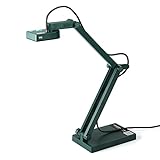
The IPEVO V4K is a fixed-arm USB document camera for teachers who mainly share paper and objects.
- 8 MP ultra high definition sensor
- USB connection for Mac OS, Windows and Chromebook
- Made for live demos, web conferencing and distance learning
Pros: stable arm, simple setup, classroom focus. Cons: not handheld, not a face camera. Skip it if you want one camera for both documents and meetings.
INSWAN INS-1 – Best Budget Document Camera and Webcam

The INSWAN INS-1 Classic combines a document camera with a webcam at a lower tier than the BenQ.
- 8 MP sensor with auto focus
- Built-in LED and microphone
- Plug and play on Windows, Mac and Chromebook
Pros: low cost, built-in light. Cons: no zoom lens or ring light like the BenQ. Skip it if you need to inspect very small parts.
Insta360 Link 2 – Best AI Webcam for Calls

The Insta360 Link 2 is the pick when meeting video quality matters more than demonstrations.
- PTZ 4K webcam with a 1/2 inch sensor
- AI tracking and HDR
- AI noise-canceling microphone
- Gesture control
Pros: tracking, 4K video, strong mic. Cons: costs more than most webcams and has no handheld mode. Skip it if you need a document camera.
BenQ Webcam: More Questions
Is the BenQ ideaCam S1 Pro worth it?
It is worth it if you teach or demonstrate objects on camera and value the handheld 15x zoom. For plain video calls, cheaper webcams give similar or better picture quality.
Does the BenQ ideaCam work as a document camera?
Yes. BenQ sells it as a webcam and document camera, and the handheld design lets you aim it at paper or small objects.
Do I need BenQ EnSpire software?
Basic webcam use does not require it, but features such as the control puck and auto orientation depend on the optional EnSpire software.
What is the best cheaper alternative to the BenQ ideaCam?
The INSWAN INS-1 is a lower-cost document camera and webcam, and the Logitech Brio 101 is the budget pick for video calls only.
Frequently Asked Questions
What makes the BenQ ideaCam different?
Its handheld, articulating design with 15x zoom lets you lift the camera to demonstrate objects and documents up close, a capability standard fixed webcams can’t offer.
Is the BenQ ideaCam good for regular video calls?
Yes, it works as a regular webcam, but reviewers rate its image quality as average, and its real strength is demonstration and document sharing, so it is best if you need those features.
Does the ideaCam have a built-in light?
The S1 Pro includes a built-in ring light for even illumination during demos.
Should I buy a BenQ or a regular webcam?
Choose BenQ if you teach, present, or demonstrate physical objects. For simple video calls, a conventional webcam like the Logitech Brio 101 offers great value and quality.
Verdict
The BenQ ideaCam is a standout for a specific but valuable use case, demonstrating objects and documents up close, which ordinary webcams cannot do. The ideaCam S1 Pro is our top pick for educators and presenters, thanks to its zoom, ring light, and macro versatility. If you only need standard video calls, though, a mainstream option like the Logitech Brio 101 or OBSBOT Meet 2 may serve you better for less.