

Affiliate disclosure: As an Amazon Associate we earn from qualifying purchases. This post contains affiliate links — if you buy through them we may earn a small commission at no extra cost to you. This never affects our recommendations.
As an Amazon Associate we earn from qualifying purchases at no extra cost to you.








If you spend any serious time creating gaming content, you already know the grind behind a polished stream. It is not just about playing well — it is the custom overlays you designed at 1 a.m., the thumbnail that made someone click, the channel art that turned a lurker into a subscriber. Gamers who double as digital artists, video editors, and content creators occupy a very specific niche, and a quality drawing tablet is one of the most underrated tools in that workflow.
The question we hear constantly is: “Can I use a drawing tablet for gaming?” The short answer is no — a drawing tablet will not improve your aim in Valorant or help you build faster in Fortnite. It is a content creation tool, not a peripheral for in-game play. But if you stream on Twitch or YouTube, create your own graphics, edit thumbnails in Photoshop, or animate custom assets for your channel, a good tablet can completely change how fast and how well you work.
In this guide, we break down the five best drawing tablets for gaming content creators in 2026. We evaluated pressure sensitivity, pen latency, active area, display quality, software bundles, and price-to-value ratio — everything that matters to a streamer or digital artist who wants a reliable tool without overspending.
In a hurry? See the top-rated Drawing Tablet for Gaming and Streaming deals available right now:
🛒 Check Drawing Tablet For Gaming And Streaming Prices on Amazon →🛒 Best Price Today on Amazon
Prime members get fast, free shipping on everything above, plus member-only deals. New members get a 30-day free trial — cancel anytime.
Start 30-Day Prime Free Trial →See Today’s Amazon DealsThe 5 Best Drawing Tablets for Gaming Content Creators in 2026
1. Wacom Intuos Pro M — Best Overall for Serious Creators
The Wacom Intuos Pro M has held the top spot in the professional drawing tablet market for years, and 2026 has done nothing to change that reputation. With 8,192 levels of pressure sensitivity and a pro-grade pen that registers tilt and rotation, it delivers the kind of nuanced input that professional illustrators and photo retouchers expect. For gaming content creators, that precision translates directly into cleaner thumbnail linework, sharper overlay graphics, and faster, more accurate editing in tools like Photoshop and Clip Studio Paint.
One of the most underrated features for streamers is the multi-touch surface. You can pinch to zoom, rotate the canvas with two fingers, and scroll through a timeline the same way you would on a trackpad — without ever picking up your pen. This keeps your workflow fluid when you are toggling between art software and OBS or your video editor. Bluetooth connectivity also means one fewer cable on an already-crowded desk.
The Intuos Pro M is a non-display tablet, meaning you draw on the tablet and look at your monitor. This takes some adjustment if you are new to tablets, but most creators adapt within a few sessions. The active area of 8.7 x 5.8 inches is generous without being unwieldy, and it maps comfortably to a standard 16:9 monitor. The build quality is exceptional — this tablet will outlast most of the other hardware on your desk.
At around $250, the Intuos Pro M is the most expensive non-display option on this list. But for streamers who create content at a high volume and need a tool they can rely on for years, it is the right investment.
Pros: Industry-standard precision, multi-touch, Bluetooth, exceptional build quality, wide software compatibility
Cons: No built-in display, learning curve for beginners, premium price point
2. Huion Kamvas 13 Gen 3 — Best Display Tablet Under $200
If you want to draw directly on screen without breaking the bank, the Huion Kamvas 13 Gen 3 is the most compelling display tablet in this price range. It features a 13.3-inch fully laminated IPS display with 8,192 levels of pressure sensitivity, and the lamination makes a meaningful difference — the gap between the glass and the display surface is eliminated, which means your pen tip feels like it is touching the actual canvas rather than drawing on a layer of air above it.
Color accuracy is one of the Kamvas 13 Gen 3’s strongest selling points. The display covers 145% sRGB, which is more than adequate for streaming thumbnails, social media graphics, and channel branding assets. If you are creating assets intended for print, you will want to calibrate carefully, but for digital content creation — which is what most gaming creators are doing — the out-of-box colors are excellent.
The 8,192-level pen performs without a battery, which removes the annoyance of pen charging from your workflow. Pen latency is low enough that it does not interrupt the drawing experience, and the textured surface gives just enough friction to feel like paper without wearing down your nibs excessively. The express keys are functional, and Huion’s driver software has improved significantly in recent years, though it still lags behind Wacom’s in terms of polish and customization depth.
At approximately $200, the Kamvas 13 Gen 3 offers an enormous amount of display tablet for the money. If you are a gaming content creator who finds non-display tablets awkward, this is the most affordable way to get a proper pen display that holds up professionally.
Pros: Laminated display, vibrant color, no-battery pen, great value for a display tablet
Cons: 13″ may feel small for detailed work, driver software less refined than Wacom
3. XP-Pen Deco 01 V2 — Best Budget Pick for Beginners
Not every streamer needs a $200 tablet before they have figured out whether digital art fits their content workflow. The XP-Pen Deco 01 V2 makes an exceptionally strong case for starting cheap and upgrading later — or never upgrading at all if your needs stay modest.
The Deco 01 V2 has a 10 x 6.25-inch active area, which is larger than you might expect at this price point and maps well to a widescreen monitor. It supports 8,192 levels of pressure sensitivity with a passive, battery-free stylus that competes meaningfully with tablets costing twice as much. Pen tilt recognition (up to 60 degrees) is included, which matters for brush strokes and shading techniques that beginners may not explore immediately but will appreciate as their skills develop.
The eight express keys on the left side are programmable and placed where your thumb naturally rests when holding the tablet. For a streaming creator who needs quick access to undo, zoom, and layer toggles, these keys genuinely speed up the workflow. The USB-C connection is stable, and the tablet works across Windows, macOS, and even Android — a nice bonus if you ever want to sketch on a tablet or use it with a mobile streaming setup.
Where the Deco 01 V2 shows its budget origins is in the build quality and driver software. The plastic body feels less premium, and the XP-Pen driver, while functional, occasionally needs reinstalling after OS updates. These are acceptable trade-offs for a $60 tablet, but worth knowing before you buy.
For gaming content creators who want to dip into digital art without committing serious money, the Deco 01 V2 is the clearest recommendation on this list.
Pros: Large active area for the price, 8192-level pressure, 8 express keys, USB-C, Android support
Cons: Budget build quality, driver can be finicky, no Bluetooth
Check Price on Amazon

4. Wacom One M — Best for Beginners Who Want a Premium Brand
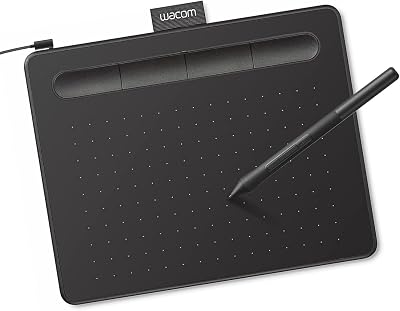
The Wacom One M occupies an interesting position in the lineup: it is Wacom’s entry-level offering, but it is built with the same quality standards that define the brand, and it includes Bluetooth — something that competing budget tablets often omit. At around $100, it bridges the gap between the budget XP-Pen options and the professional Intuos Pro M.
Pressure sensitivity sits at 8,192 levels, which matches every other tablet on this list and is more than sufficient for content creation workflows. The pen does not require a battery and tracks accurately with minimal latency. The active area at the medium size gives you comfortable room to work without overwhelming desk space, and the surface texture strikes a good balance between grip and smoothness.
What distinguishes the Wacom One M from its budget competitors is the software bundle. Wacom includes a generous trial of Clip Studio Paint and access to Wacom’s creative software marketplace, which gives new creators a clear path into digital art without spending extra on applications. The driver software is Wacom’s — which is the most stable and feature-rich in the industry, with detailed customization for pressure curves, express buttons, and pen settings.
Bluetooth connectivity is a genuine differentiator at this price. If you are working on a streaming setup where cable management is a constant battle, being able to tuck the tablet away and pair it wirelessly is a quality-of-life upgrade that the XP-Pen and Huion budget tablets cannot match. Battery life on Bluetooth is solid enough for a full workday of creation.
Pros: Wacom build quality, Bluetooth, excellent driver software, strong software bundle, beginner-friendly
Cons: Non-display only, slightly smaller active area than XP-Pen Deco 01 V2 at same price tier
5. Huion Inspiroy Dial 2 — Best for Streamers Who Want Workflow Speed
The Huion Inspiroy Dial 2 is the most distinctive tablet on this list, and also the most purpose-built for creators who prioritize speed and workflow efficiency over raw drawing precision. The headline feature is the dual touch ring and dial control system, which lets you bind zoom, rotation, brush size, timeline scrubbing, and layer opacity to physical controls that your non-dominant hand operates while you draw or edit with the other.
For a streamer who is simultaneously managing OBS scenes, editing clips, and creating graphics under time pressure, that physical control layer is not a gimmick — it meaningfully reduces the number of keyboard shortcuts you have to memorize and execute during a session. The 10 x 6.25-inch active area matches the XP-Pen Deco 01 V2, and the 8,192-level pressure sensitivity performs reliably across compatible applications.
The Inspiroy Dial 2 is wireless, connecting via USB dongle with a battery life that Huion rates at approximately 26 hours of continuous use. In practice, you are unlikely to run it dead during a typical streaming or creation session. The eight programmable express keys supplement the dial controls, giving you a full suite of physical shortcuts without touching the keyboard.
At around $80, the Inspiroy Dial 2 positions itself as a mid-budget option with a standout feature set. If you are the kind of creator who has spent time mapping custom shortcuts and wishes you had a hardware knob for brush size, this is built for you. If you are newer to digital art workflows, the Wacom One M or Deco 01 V2 might offer a simpler entry point.
Pros: Dual dial controls for workflow speed, wireless, 8 express keys, generous active area
Cons: Dial controls have a learning curve, driver customization less deep than Wacom

Comparison Table
| Tablet | Type | Pressure Levels | Active Area |
|---|---|---|---|
| Wacom Intuos Pro M | Non-display | 8,192 | 8.7 x 5.8 in |
| Huion Kamvas 13 Gen 3 | Display (13.3″) | 8,192 | 11.7 x 6.5 in |
| XP-Pen Deco 01 V2 | Non-display | 8,192 | 10 x 6.25 in |
| Wacom One M | Non-display | 8,192 | Medium |
| Huion Inspiroy Dial 2 | Non-display | 8,192 | 10 x 6.25 in |
Display Tablet vs Non-Display: Which Do You Need?
This is the question most first-time buyers wrestle with, and the answer depends almost entirely on your workflow and your budget — not on which type is objectively better.
Non-display tablets (like the Wacom Intuos Pro M, Wacom One M, XP-Pen Deco 01 V2, and Huion Inspiroy Dial 2) require you to look at your monitor while your hand moves on the tablet surface. The disconnect between hand and eye feels unnatural at first, but most creators adjust within two to five hours of practice. The long-term advantage is that your monitor can be positioned ergonomically at eye level while the tablet sits flat on your desk, which is easier on your neck and shoulders during long sessions. Non-display tablets are also significantly cheaper for equivalent quality, and they do not add display cable management complexity to your desk setup.
Display tablets (like the Huion Kamvas 13 Gen 3) let you draw directly on the screen, which is the most intuitive input method for creators coming from traditional art or from drawing on a phone. The hand-eye coordination is immediate, which makes detailed line control more accessible for beginners. The trade-off is price — a good display tablet costs considerably more than a comparable non-display model — and the ergonomic challenge of drawing on a flat or slightly angled screen for hours at a time.
For gaming content creators specifically, the recommendation leans toward non-display tablets unless your workflow involves a lot of detailed illustration or you find the non-display learning curve too frustrating. If you are creating thumbnails, basic overlays, and channel graphics, a non-display tablet at the $60–$100 range delivers everything you need. If you are doing serious digital illustration or animating custom assets, a display tablet justifies the additional investment.
One practical note: if your desk is already full of a gaming monitor, mic arm, keyboard, and capture card, a non-display tablet adds almost no footprint. A display tablet adds another screen to position and cable.
Final Verdict
For most gaming content creators, the XP-Pen Deco 01 V2 is the smartest starting point. It costs $60, delivers professional-grade pressure sensitivity, and has enough active area and express keys to support a real content creation workflow. If you outgrow it, you will know exactly what you need in your next tablet.
If you are ready to invest in a tool that will last for years without compromise, the Wacom Intuos Pro M is the clearest recommendation for non-display quality. The multi-touch, Bluetooth, and industry-leading driver software justify the $250 ask for creators who work in their tablets daily.
For creators who specifically struggle with the non-display learning curve and want to draw on screen, the Huion Kamvas 13 Gen 3 delivers genuine display tablet quality at a price that makes sense. The laminated screen and color accuracy are well above what you would expect at $200.
One thing to keep in mind as you shop: every tablet on this list shares the same 8,192 levels of pressure sensitivity, which is more than most creators will ever use at full depth. The differences come down to form factor, build quality, software ecosystem, and workflow-specific features like the Inspiroy Dial 2’s physical controls. Match the tablet to how you actually work, not to the highest spec sheet, and you will get the most out of your investment.
Disclosure: This article contains affiliate links. As an Amazon Associate, gamingpcguru.com earns from qualifying purchases at no additional cost to you.
Frequently Asked Questions
How is a drawing tablet useful for streamers?
Streamers and content creators use drawing tablets to make custom emotes, overlays, channel art, and thumbnails. Some also use them as a precise input device or to annotate during streams.
Do I need a screen tablet or a regular drawing tablet?
A regular pen tablet is affordable and great for digital art with practice. A display tablet lets you draw directly on the screen, which is more intuitive but costs significantly more.
Can a drawing tablet be used to play games?
Some games, especially rhythm titles, play well with a tablet. For most games a mouse or controller is better, so tablets shine for the creative work around streaming.
What size drawing tablet should a streamer get?
A medium tablet suits most creators, balancing desk space and drawing room. Small tablets are portable and cheap, while large ones suit detailed professional artwork.
Related Articles
Looking for more on this topic? Browse the hand-picked guides below — each one applies the same scoring rubric used in this review.
















