A portable monitor turns a console into a travel setup: a laptop-sized screen, one HDMI cable from the console, and a USB power lead. It works in a hotel room, a dorm or a shared living room where the main TV is busy. The catch is that this market is built for laptops first, and that creates one trap that matters more than any panel specification.


That trap is the input. Many portable monitors are USB-C-only: they expect a laptop or phone with DisplayPort Alt Mode over USB-C. A PlayStation 5, an Xbox Series X or Series S, and a Nintendo Switch dock do not send video that way. They send video over HDMI. A USB-C-only screen therefore shows nothing from a console, no matter how good its panel is. Every pick in this guide has an HDMI input — full-size or Mini HDMI — because that is the non-negotiable requirement for console use. If a model you are considering lists only USB-C ports, it is a laptop screen, not a console screen, and it should be ruled out before you compare anything else.
As an Amazon Associate we earn from qualifying purchases.
What actually matters for console play
Refresh rate has a ceiling. The PS5 and Xbox Series consoles top out at 120 Hz output, and only in games that offer a 120 fps performance mode. A 120 Hz portable monitor can show everything a current console can send. A 144 Hz panel is still useful — it will run at 120 Hz with a console and keeps its full rate for a PC or handheld — but anything above 120 Hz brings no extra benefit on console alone. A 60 Hz panel remains a sensible choice for story-driven games, sports titles and 4K play, where most console games target 30 or 60 frames per second anyway.
Resolution is a trade-off at portable sizes. At 15.6 to 17.3 inches, 1080p already looks sharp at desk distance and is the resolution at which consoles most easily hold high frame rates. A 1440p panel adds clarity and matches the 1440p output modes both current consoles support. A 4K panel matches headline console output, but at this size the extra pixels are about fine detail in menus and slow-paced scenes — and 4K portable panels here run at 60 Hz.
VRR and FreeSync. Variable refresh rate smooths out frame-rate dips by matching the panel to the game. Xbox consoles support FreeSync over HDMI, and the PS5 supports VRR over HDMI 2.1 within a defined range. On portable monitors, the honest picture is mixed: some models list FreeSync, some list none at all, and makers rarely publish a VRR range for these screens. Treat a listed FreeSync badge as a plus for Xbox use, do not assume PS5 VRR will behave exactly as it does on a TV, and do not pay extra for sync claims a maker does not actually make.
Power is the second cable. HDMI carries picture and sound, not power. Every monitor here also needs USB power while a console is connected: a wall adapter, a power bank, or sometimes a console USB port, though console ports may not supply enough for larger panels at full brightness. Packing the adapter the maker specifies is part of a reliable travel kit. None of these monitors has a built-in battery.
Speakers and stands decide how self-contained the kit is. Built-in speakers are small — typically a pair of 1-watt drivers — but they remove the need for a separate speaker in a hotel setup, and a 3.5 mm jack, where fitted, covers headsets. A kickstand or folding cover matters too, because there is no desk mount in a travel bag. For a wider look at portable screens in a desk-and-travel setup, see our guide to the best portable PC and console screens for 2026.
The picks
1. ARZOPA Z1FC 16.1-inch 144 Hz — the 120 Hz console sweet spot
The Z1FC is the most direct answer for a PS5 or Xbox owner who plays performance-mode games on the move. Its 16.1-inch IPS panel runs at up to 144 Hz, so a console’s 120 Hz output sits comfortably inside its range, and its 1080p resolution is the one at which the widest range of console games actually offer 120 fps modes. ARZOPA’s own specification table lists 300 nits of brightness and, notably, lists FreeSync as not supported — so this is a fixed-refresh screen, and frame-rate dips will show as judder rather than being smoothed by VRR. That honesty makes it easier to place: it suits fast, stable-frame-rate games, and buyers who need VRR should look at the UPERFECT models below instead.
Connection is by Mini HDMI 2.0 for the console, with two full-function USB-C ports handling power and laptop video. The aluminium body weighs 1.72 lb, the kickstand is built in, and the maker rates power draw at 10 W, so a modest USB adapter is enough. Built-in speakers are a 2 x 1 W pair.
Specs
- Size and panel: 16.1-inch IPS, matte
- Resolution: 1920 x 1080
- Refresh rate: up to 144 Hz (120 Hz with current consoles)
- Brightness: 300 nits (maker specification)
- Ports: 1 x Mini HDMI 2.0, 2 x USB-C (power delivery and DisplayPort)
- VRR: None — maker lists FreeSync as not supported
- Speakers: Built-in, 2 x 1 W
- Power: 10 W rated; USB-C power required alongside HDMI
- Weight: 1.72 lb
Best for: PS5 and Xbox players who want 120 Hz performance modes in a light, simple travel screen and do not need VRR.
2. UPERFECT UGame C2 16-inch 2K 120 Hz — exactly the console ceiling, with FreeSync
The UGame C2 pairs a 16-inch 2560 x 1600 IPS panel with a 120 Hz refresh rate over HDMI — precisely the highest rate a current console can use — plus FreeSync for variable refresh and HDR support. The 16:10 shape is slightly taller than a TV’s 16:9; console games render in 16:9, so expect the image framed within that taller panel rather than stretched. In return, the higher resolution gives sharper text and menus than 1080p, and the panel is a strong second screen for a laptop outside gaming.
UPERFECT lists 400 nits of brightness, a 1200:1 contrast ratio and 100 percent sRGB coverage. Inputs are Mini HDMI and two full-function USB-C ports, there are dual 1 W speakers and a 3.5 mm jack, and the back carries 75 x 75 mm VESA holes — unusual in this class, and useful if the screen also lives on a small desk arm at home. The smart cover doubles as a stand for travel. Rated power is 12 W, and the maker bundles an 18 W PD adapter.
Specs
- Size and panel: 16-inch IPS, matte, 16:10
- Resolution: 2560 x 1600
- Refresh rate: 120 Hz over HDMI
- Brightness: 400 nits (maker specification)
- Ports: 1 x Mini HDMI, 2 x USB-C (full-function), 3.5 mm audio
- VRR: AMD FreeSync
- Speakers: Built-in dual speakers, 1 W each
- Power: 12 W rated; 18 W PD adapter included by maker
- Extras: VESA 75 x 75 mm, smart cover stand
Best for: Console players who want FreeSync, a sharper-than-1080p image and a screen that doubles as a laptop display.
3. UPERFECT 17.3-inch 2K 144 Hz — the biggest screen here
This UPERFECT model stretches the portable format to 17.3 inches with a 2560 x 1440 IPS panel at up to 144 Hz. With a console it runs at up to 120 Hz in 1440p output modes, which both the PS5 and Xbox Series consoles support, and FreeSync is on the maker’s feature list. The larger panel is the point: at hotel-desk distance it feels noticeably closer to a small TV than the 15.6-inch class, while still sliding into a large laptop bag.
The maker’s manual lists 400 nits brightness, HDR400, dual 1 W speakers, a 3.5 mm jack and 75 x 75 mm VESA mounting. Power is the trade-off for the size: the manual specifies a minimum 18 W USB-C PD supply, with rated power around 12 to 13 W, and the maker includes a PD adapter and a Mini HDMI to HDMI cable in the box. Plan on wall power for this one rather than borrowing a console USB port.
Specs
- Size and panel: 17.3-inch IPS, matte
- Resolution: 2560 x 1440
- Refresh rate: up to 144 Hz (up to 120 Hz with current consoles)
- Brightness: 400 nits (maker specification)
- Ports: 1 x Mini HDMI, 2 x USB-C (full-function), 3.5 mm audio
- VRR: AMD FreeSync
- Speakers: Built-in, 2 x 1 W
- Power: Minimum 18 W USB-C PD supply (maker manual); adapter included
- Extras: VESA 75 x 75 mm, stand included
Best for: Players who want the largest practical travel screen and 1440p at 120 Hz, and who travel with wall power available.
4. KYY K3 15.6-inch 1080p 60 Hz — the simple, light travel screen

The K3 is the straightforward option: a 15.6-inch 1080p IPS panel at 60 Hz, Mini HDMI and two USB-C ports, dual speakers, and a smart cover that protects the screen in a bag and folds into a stand on arrival. At about 1.7 lb and 0.3 inches thick, it is built to live in the same sleeve as a laptop and come out when a console needs a screen.
Sixty hertz is the deliberate compromise: it rules out 120 fps modes, so competitive players should choose a screen above. For 30 and 60 fps games — still most single-player console releases — it shows the full frame rate on offer, and HDR support and 178-degree viewing angles keep co-op play comfortable. No VRR is listed, consistent with its role as a simple second screen rather than a performance display.
Specs
- Size and panel: 15.6-inch IPS
- Resolution: 1920 x 1080
- Refresh rate: 60 Hz
- Ports: 1 x Mini HDMI, 2 x USB-C (full-function)
- VRR: None listed
- Speakers: Built-in dual speakers
- Power: USB-C power required alongside HDMI
- Extras: Smart cover that folds into a stand; about 1.7 lb, 0.3-inch profile
Best for: Travellers and Switch or last-generation console owners who value light weight and simplicity over high refresh rates.
5. G-STORY 15.6-inch 4K for Xbox Series S — the console-integrated design
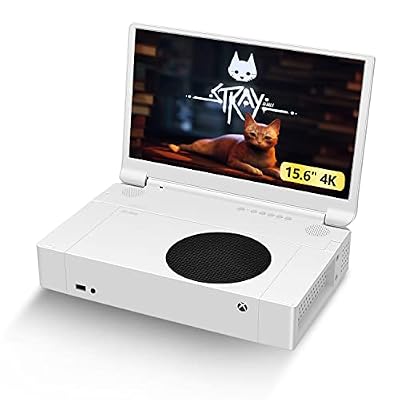
G-STORY builds portable monitors that integrate with a specific console, and this model is shaped for the Xbox Series S: the console mounts with the screen in a laptop-style clamshell that closes for travel. That integration is the reason to choose it over a generic panel — the two travel as one unit instead of a screen, a stand and a console packed separately.
The panel is a 15.6-inch IPS display at 3840 x 2160 and 60 Hz, with HDR and FreeSync, and — distinctively in this group — two full HDMI ports rather than Mini HDMI, so a second device can stay connected. Dual built-in stereo speakers and dual 3.5 mm audio jacks are fitted. The 60 Hz ceiling means no 120 fps modes; this screen is aimed at 4K detail in story-driven and cinematic games on the Series S, played at the console’s smaller, travel-friendly scale. Note that the integration is model-specific: it is a Series S design, not a universal stand.
Specs
- Size and panel: 15.6-inch IPS
- Resolution: 3840 x 2160 (4K UHD)
- Refresh rate: 60 Hz
- Ports: 2 x HDMI, 3.5 mm audio jacks
- VRR: FreeSync
- Speakers: Built-in dual stereo speakers
- Power: External power required; no built-in battery
- Extras: Integrated clamshell design for Xbox Series S (console not included), Game Mode with crosshair function
Best for: Xbox Series S owners who want a single integrated travel unit and 4K detail rather than high refresh rates.
How to choose among them
Start with the games you play. If your library includes 120 fps performance modes, shortlist the ARZOPA Z1FC for fixed-refresh simplicity, or either UPERFECT for FreeSync — the 16-inch C2 if the screen also works with a laptop, the 17.3-inch model if size matters most. If you mostly play single-player games at 60 fps, the KYY K3 covers the need with the least weight and fuss, and the G-STORY is the specialised pick when a Series S travels with you and 4K detail is the priority.
Then check the unglamorous details: confirm the box includes a Mini HDMI to HDMI cable where the monitor needs one, confirm an adapter that meets the maker’s stated wattage — especially for the 17.3-inch UPERFECT — and confirm the stand works on any table.
One last expectation: no portable monitor here replaces a TV for HDR impact or sound. Brightness runs from 300 to 400 nits by maker specification and speakers are small — fine for a personal screen at arm’s length, wherever the console happens to be.