Extended sitting changes what a gaming chair needs to do. A chair that feels fine for a short match can become a problem over a long raid night, a ranked grind, or a workday that flows straight into gaming at the same desk. Pressure builds under the thighs, the lower back loses its curve, shoulders creep forward, and small annoyances — an armrest at the wrong height, a headrest that pushes instead of supports — turn into the reason you keep shifting around instead of focusing.


The best gaming chair for extended sitting is therefore not simply the tallest or softest chair. It is the chair whose support you can adjust to your body, whose cushion or mesh suits how warm your room runs, and whose lumbar system still helps after you have changed posture several times. This guide compares four chairs currently listed on Amazon US: a padded fabric gaming chair with built-in lumbar adjustment, a streamlined chair with an integrated lumbar arch, and two mesh ergonomic chairs with multi-zone lumbar systems for players who split their time between work and play.
As an Amazon Associate we earn from qualifying purchases
What matters most for extended sitting
Lumbar support you can position, not just lean against
For long sessions, the key question is whether lumbar support meets your lower back where your curve actually is. Fixed padding can work if it happens to match you, but adjustable systems — an internal mechanism, a dynamic multi-zone back, or an integrated arch — give you more chances to get the fit right and to change it when you switch from an upright keyboard posture to a relaxed controller posture.
Cushion, mesh, and heat
Padded foam seats spread pressure and feel familiar to most gaming chair buyers, while mesh seats and backs allow more airflow and avoid that warm, compressed feeling some people notice after hours in a closed room. Neither is automatically better: fabric and mesh suit warm rooms, while dense foam suits players who like a defined seat shape and a head pillow for leaning back between matches.
Armrests, head support, and recline
Armrests should let your shoulders stay relaxed while your hands reach keyboard, mouse, or controller. Head support matters most when you recline to watch cutscenes and streams. Recline is not a luxury either: changing your back angle periodically is one of the simplest ways to vary the load on your body during a long day.
Fit before features
Always check the listing for the size variant and configuration before ordering, because several of these chairs are sold in multiple sizes, colours, and footrest configurations that share similar names. A support feature in the wrong size will not help you.
Comparison table
| Chair | ASIN | Seat and back style | Lumbar approach | Armrests and head support | Best for |
|---|---|---|---|---|---|
| Secretlab Titan Evo (Black, Fabric) | B0B3RH59X8 | Padded gaming chair in fabric | 4-way lumbar support | 4D armrests, magnetic head pillow | Players who want a padded gaming chair with dialled-in back support |
| Razer Iskur V2 X NewGen (Quartz) | B0GFPZ343R | High-density foam cushions, Gen-2 EPU leather finish | Built-in lumbar arch | 2D armrests, recline up to 152 degrees as listed | Players who prefer a simpler setup with integrated support |
| Hbada E3 Pro (Black, No Footrest) | B0DXKTMDYZ | Mesh ergonomic chair | 3-zone dynamic lumbar support | 6D adjustable armrests, 4D adjustable headrest | Hybrid work-and-gaming desks that need maximum adjustment |
| Hbada E3 Air (Grey, With Footrest) | B0DXKTN6MN | Mesh ergonomic chair with footrest | 3-zone dynamic lumbar support | Adjustable armrests, 3D adjustable headrest | Long mixed sessions that include leaning back with legs supported |
The picks in detail
1. Secretlab Titan Evo, Black, Fabric — padded support with 4-way lumbar adjustment
The Secretlab Titan Evo listing used here is the Black3 fabric version, ASIN B0B3RH59X8, described on Amazon as a reclining, ergonomic gaming chair with 4D armrests, a magnetic head pillow, and 4-way lumbar support. That combination is well suited to extended sitting because the main comfort controls are built into the chair itself rather than relying on loose cushions you have to keep repositioning throughout the day.
The 4-way lumbar system is the headline for long sessions. Instead of a separate pillow that can slide out of place, the support is part of the backrest, so once set it stays where you left it after a break. The magnetic head pillow follows the same logic: it attaches to the chair rather than hanging from straps, making small position changes simpler.
Choose fabric if your room runs warm or you prefer it over leatherette during long sessions. Set the 4D armrests so your elbows rest lightly while your shoulders stay down, and resist setting the lumbar support to its strongest setting on day one — gentle, consistent contact usually works better than aggressive pressure.
See the Secretlab Titan Evo on Amazon
2. Razer Iskur V2 X NewGen, Quartz — integrated lumbar arch and a simpler setup
The Razer Iskur V2 X NewGen listing, ASIN B0GFPZ343R, describes built-in lumbar support, high-density foam cushions, an adjustable recline of up to 152 degrees, 2D armrests, and an ultra-wide base design, finished in Gen-2 EPU leather with a Quartz colour option. Razer describes the built-in lumbar arch as encouraging a neutral sitting position and minimising back fatigue over long periods, which is exactly the job this part of a chair has to do.
This is the pick for players who do not want a long list of adjustments to manage. The lumbar support is integrated rather than multi-directional, and the armrests adjust in fewer directions than the other chairs here, so setup is mostly seat height, recline angle, and armrest height and rotation. In exchange, there is less to drift out of position.
The wide seat base suits players who like to shift position or alternate between keyboard play and a controller in their lap. Use the generous recline for breaks between matches rather than active play: leaning back with the lumbar arch still in contact with your back is a useful posture change, while fine aiming and typing are easier upright.
See the Razer Iskur V2 X NewGen on Amazon
3. Hbada E3 Pro, Black, No Footrest — mesh flexibility for work and gaming
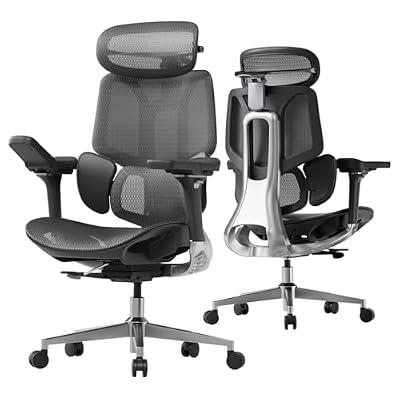
The Hbada E3 Pro listing, ASIN B0DXKTMDYZ, is a big and tall ergonomic chair with 3-zone dynamic lumbar support, a 4D adjustable headrest, and 6D adjustable armrests, in a black configuration without a footrest. Although it is styled as an office chair rather than a racing-style gaming chair, its adjustment range makes it a serious option for a desk that hosts both a workday and an evening of gaming.
The 3-zone dynamic lumbar concept addresses a real problem: your back does not stay in one shape all day. Support that responds across zones of the lower and mid back can stay useful as you move between typing, leaning in for a tense match, and sitting back to watch a stream. The highly adjustable armrests help too, because the ideal arm position for a keyboard rarely matches the ideal position for a controller.
Pick this configuration if you do not want a footrest and prefer an open, airy mesh feel. Spend the first session setting it up properly: headrest first, then lumbar contact, then armrests for each main activity. That effort is the trade-off for this much adjustability.
See the Hbada E3 Pro on Amazon
4. Hbada E3 Air, Grey, With Footrest — mesh support plus a proper lean-back mode
The Hbada E3 Air listing used here is the grey version with a footrest, ASIN B0DXKTN6MN, described with 3-zone dynamic lumbar support, a 3D adjustable headrest, and adjustable armrests. It shares the E3 family’s multi-zone approach to back support, but the footrest changes how the chair fits into a long day.
With the footrest extended and the chair reclined, this becomes the break chair as well as the work and gaming chair: useful for watching streams or reading patch notes without moving to a sofa and setting up again. For players whose sitting mixes focused play with relaxed media time in the same spot, that flexibility can matter more than a wider adjustment range elsewhere.
Choose this version over the E3 Pro if the footrest suits your room, and the Pro instead if you prioritise armrest and headrest adjustment. Check the exact configuration in the listing title before ordering, because E3 variants are sold with and without footrests and with different specifications.
See the Hbada E3 Air on Amazon
Setting up any chair for a long session
Start with your feet flat on the floor and the seat height set so your thighs are not pressed hard against the seat edge. Bring the lumbar support into gentle contact with your lower back while upright, then check it again in your gaming posture, which is often slightly more reclined. Set armrests so your shoulders can relax, and position your monitor so head support is something you use when leaning back, not something pushing your head forward.
Your desk surface matters too. A larger mat keeps keyboard, mouse, and elbows moving smoothly as you shift position, and our guide to an extended mousepad setup explains how that extra space changes a long-session desk. Finally, build posture changes into the session: use the recline between matches, and stand during loading and queue times.
Which chair suits which need?
If you want a traditional padded gaming chair and the most deliberate lumbar setup, choose the Secretlab Titan Evo in fabric. If you want integrated support with the least setup and a wide seat for shifting positions, choose the Razer Iskur V2 X NewGen. If your desk is shared between long work hours and gaming and you value adjustment above styling, choose the Hbada E3 Pro. If your long sessions blend play with reclined media time, choose the Hbada E3 Air with footrest.
FAQ
Is mesh or foam better for extended sitting?
Mesh usually feels cooler and avoids heat build-up, while dense foam gives a more shaped, cushioned feel. The listings above include both approaches, so choose based on your room temperature, clothing, and whether you prefer a firm defined seat or a more suspended one.
Do I need adjustable lumbar support for long gaming sessions?
It helps most players, because it lets the support meet your own back curve and stay in place as you change posture. Integrated arches are simpler, while internal multi-way and dynamic multi-zone systems offer more fine-tuning. What matters is consistent, comfortable contact, not maximum pressure.
How long should I sit in a gaming chair at once?
No chair removes the need to move. Even in a well-adjusted chair, change your back angle regularly, use recline and footrest positions for breaks where available, and stand up between matches or tasks. Treat the chair as support for good habits, not a substitute for them.
Which size or configuration should I order?
Check the exact listing variant before buying. These chairs are sold in different sizes, finishes, and footrest configurations under similar names, and the ASINs in this guide refer to the specific configurations described in each section.
Verdict
For extended sitting, the winning formula is support that fits you, stays in place, and lets you change posture without a fight. The Secretlab Titan Evo leads for padded comfort with built-in 4-way lumbar support, the Razer Iskur V2 X NewGen keeps things simple with its integrated arch and wide base, and the two Hbada E3 models bring mesh airflow and multi-zone support to desks that work as hard as they play. Match the chair to your hours, set it up carefully, and it will repay you every session.