Short answer: yes, for most players — but “Keychron” covers two very different kinds of keyboard, and only one of them is built for gaming first. The regular V and K series are enthusiast typing boards that happen to game well when you connect them the right way. The Hall effect (HE) models and the Lemokey gaming sub-brand are the ones with rapid trigger, adjustable actuation and the polling behaviour competitive players actually ask about. Which group a specific model falls into matters far more than the logo on the case.

As an Amazon Associate we earn from qualifying purchases.
The short verdict, by player type
- Casual and single-player gaming: almost any Keychron board works, even over Bluetooth, because story games and strategy titles do not punish a slower report rate.
- Online multiplayer at a normal level: a V Max or K Max board on its 2.4 GHz receiver, or any wired model, is genuinely fine. Keychron publishes a 1,000 Hz polling rate for those connections, which matches what most dedicated gaming boards offered for years.
- Competitive FPS and rhythm games: look at the HE models or Lemokey. Rapid trigger and per-key actuation adjustment change how movement keys behave in ways a standard mechanical switch cannot copy, and that is where Keychron’s gaming claim becomes real rather than marketing.
Regular Keychron lines: what the specs actually say
The V series started as wired-only, QMK/VIA-programmable boards, and the K series as Bluetooth-first boards for Mac and multi-device desks. The current Max versions of both lines converge on the same connection package: a 2.4 GHz receiver, Bluetooth 5.1, and USB-C wired. Keychron’s published polling figures for the Max boards are 1,000 Hz on the 2.4 GHz receiver and on the cable, and 90 Hz over Bluetooth.
That Bluetooth number is the single most important spec in this article. A 90 Hz report rate is perfectly comfortable for typing and for slow-paced games, but it is the wrong tool for shooters: keystrokes are simply reported less often than on the other two connections. The fix costs nothing — plug in the cable or the 2.4 GHz dongle when you play, and keep Bluetooth for the workday multi-device switching it is good at. Anyone who judges a Keychron board’s gaming performance while it is paired over Bluetooth is judging the one mode Keychron never aimed at games.
The rest of the regular-line package suits a mixed work-and-play desk well:
- Switches: hot-swappable mechanical switches (Gateron Jupiter on the Max boards), so a linear red-style switch can be fitted for gaming even if the board shipped with tactile switches.
- Layouts: everything from 65% to full-size, which matters because a smaller board leaves more mouse room — a real gaming consideration, not just an aesthetic one.
- Platform support: a physical macOS/Windows toggle, keycaps for both systems in the box, and QMK/VIA or the Keychron Launcher web app for remapping and macros. Linux users are covered by the QMK firmware and wired/Bluetooth connections.
- What is missing: standard mechanical switches have a fixed actuation point and a fixed reset point. There is no rapid trigger, no per-key actuation adjustment and no analogue input. For most genres that costs nothing; for high-level FPS movement it is the whole ballgame.
The HE models: where Keychron gets serious
Keychron’s HE keyboards replace the mechanical contact switch with a Gateron double-rail magnetic switch read by a Hall effect sensor. Because the board measures key position continuously instead of waiting for a contact to close, Keychron can offer three features the regular lines cannot:
- Adjustable actuation, set per key — on the Lemokey P1 HE, Keychron publishes a range of 0.2 to 3.8 mm.
- Rapid trigger, which resets a key the moment it starts moving back up rather than at a fixed reset point, so repeated strafes and counters in shooters register faster.
- Dynamic keystroke and last-key prioritisation (SOCD handling), which let one key carry multiple actions at different depths and resolve opposing movement keys cleanly.
Polling on the wireless HE models is published at 1,000 Hz over wired and 2.4 GHz connections, with Bluetooth at 125 Hz on the P1 HE — better than the 90 Hz of the regular Max boards, but still the mode to avoid for competitive play. In other words, the HE boards do not win on raw polling rate against wired-only esports boards that advertise higher figures; they win on switch behaviour plus the freedom to stay wireless at 1,000 Hz.
Lemokey: the gaming sub-brand
Lemokey is Keychron’s gaming-focused line, and the split is worth understanding before buying. The mechanical Lemokey boards (such as the original P1) are wired, 1,000 Hz, CNC aluminium boards with gaming layouts and macro columns. The HE models — P1 HE, P2 HE, P3 HE, L1 HE and the wired-only L5 HE — carry the magnetic-switch feature set described above. The wired-only L-series HE models go further on polling, with selectable rates up to 8,000 Hz published for the L5 HE, at the cost of giving up wireless entirely.
One caution applies to every HE board in both brands: magnetic switches are not interchangeable with standard MX mechanical switches, and Keychron’s two magnetic ecosystems (Gateron double-rail and Lemokey’s own Ultra-Fast Lime switches) should not be assumed cross-compatible either. Buy an HE board for what it is, not as a hot-swap project.
Three examples that show the range
Keychron V1 Max — the regular line, done right
The V1 Max is the board to picture when someone says “a Keychron for work and gaming.” Used on its receiver or cable, it delivers everything a non-esports player needs; used on Bluetooth, it demonstrates exactly why connection mode matters.
Specs
- Layout: 75%, with knob version available
- Switches: Gateron Jupiter mechanical, hot-swappable
- Connectivity: 2.4 GHz receiver, Bluetooth 5.1, USB-C wired
- Polling rate: 1,000 Hz (2.4 GHz and wired), 90 Hz (Bluetooth), per Keychron’s published specs
- Battery: 4,000 mAh
- Firmware/software: QMK/VIA
- Platform support: macOS, Windows, Linux, with system toggle and keycaps for both main systems
- Dimensions: 328.5 x 148.7 mm; weight 770 g
Keychron K2 HE — magnetic switches in the classic K shape
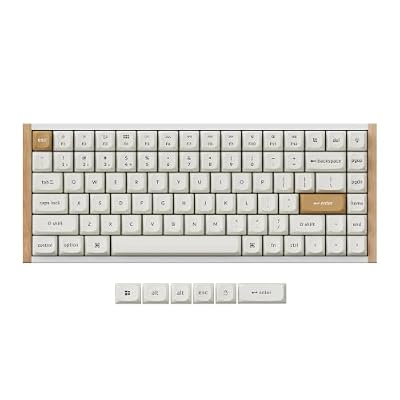
The K2 HE keeps the familiar 75% K-series form and Mac-friendly presentation, but the Gateron double-rail magnetic switches add rapid trigger and adjustable actuation. It is the natural upgrade path for someone who likes Keychron’s regular boards and wants the gaming features without moving to a gaming-branded product.
Specs
- Layout: 75%
- Switches: Gateron double-rail magnetic (Hall effect), rapid trigger, adjustable actuation
- Connectivity: 2.4 GHz, Bluetooth 5.2, USB-C wired
- Polling rate: 1,000 Hz (wired and 2.4 GHz), per Keychron’s published specs
- Firmware/software: QMK, Keychron Launcher
- Frame: aluminium with wood accents on the listed version
- Platform support: macOS, Windows, Linux
Lemokey P1 HE — the purpose-built gaming pick
The P1 HE is the clearest answer Keychron makes to a dedicated esports board: an exploded 75% aluminium chassis, magnetic switches with the full rapid-trigger feature set, and a knob and macro-friendly layout — while keeping 2.4 GHz and Bluetooth for the hours when it is a work keyboard. If you are comparing it against other wireless options, our guide to wireless gaming keyboards puts it in the wider field.
Specs
- Layout: exploded 75%, CNC aluminium case, knob version
- Switches: Gateron double-rail magnetic, pre-lubed, 40 gf actuation / 60 gf bottom-out per published figures
- Actuation range: 0.2 to 3.8 mm, adjustable per key, with rapid trigger and dynamic keystroke
- Connectivity: 2.4 GHz, Bluetooth 5.2, USB-C wired
- Polling rate: 1,000 Hz (wired and 2.4 GHz), 125 Hz (Bluetooth), per published specs
- Battery: 4,000 mAh
- Firmware/software: QMK, Keychron Launcher web app
- Platform support: macOS, Windows, Linux
So, are they good for gaming?
Yes — with the model and the connection mode chosen correctly. A regular V or K board on Bluetooth is a typing keyboard being asked to do a gaming job, and it will feel like one. The same board on its 2.4 GHz receiver or a cable is a legitimate gaming keyboard for the large majority of players, with better customisation software than most gaming brands offer. And the HE models and Lemokey boards close the remaining gap with rapid trigger and adjustable actuation, which are the features that actually separate modern esports keyboards from ordinary mechanical ones. Pick the tier that matches how competitively you play, connect it the fast way, and a Keychron is a sound gaming choice.