The Razer Kiyo Pro Ultra is Razer’s boldest webcam yet, built around an unusually large image sensor in pursuit of a look that rivals a dedicated camera. Its pitch is simple but ambitious: give streamers and creators genuinely cinematic depth, low-light clarity, and 4K detail from a single plug-and-play USB device, no mirrorless rig required.
That ambition comes at a premium, so the real question is whether the Kiyo Pro Ultra earns its place over cheaper, still-excellent alternatives. We put its standout features in context against the wider Razer lineup and Logitech’s flagship to see who should actually buy it.
As an Amazon Associate we earn from qualifying purchases at no extra cost to you.





🎮 Get More From Your Setup — Free
Prime Gaming gives you free PC games every month, in-game loot, and a free Twitch channel sub — plus fast free shipping on all the gear above. New members get a 30-day free trial.
Watch: Razer Kiyo Pro Ultra 4K Webcam — Video Review
Design & Build
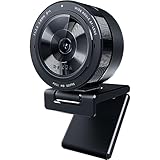
The Kiyo Pro Ultra is a substantial, well-made unit dominated by that large 1/1.2-inch sensor, one of the biggest ever fitted to a consumer webcam. It includes a built-in microphone and a physical privacy shutter, a genuinely useful touch that many rivals still omit. The mount is sturdy and adjusts easily on a monitor or tripod. It’s larger and heavier than the compact Kiyo V2 and V2 X, but the extra bulk is the direct result of the optics and sensor that define its image quality.
Performance
This is where the Kiyo Pro Ultra separates itself. The large sensor gathers far more light, producing cleaner low-light footage and a natural background separation, that shallow-depth-of-field look, that smaller webcams can’t replicate. It shoots up to 4K at 30fps with strong detail and accurate color. The trade-off is the frame rate: unlike the 60fps Kiyo Pro and the fast-motion-friendly V2 X, the Ultra prioritizes resolution and sensor size over high-frame-rate smoothness. For talking-head streams, podcasts, and calls where image quality is paramount, it’s exceptional; for high-action face-cam over fast gameplay, a 60fps option may suit better.
Pros & Cons
- Large sensor delivers class-leading low-light performance
- Natural background blur for a premium, camera-like look
- Sharp 4K detail with accurate color reproduction
- Built-in mic and physical shutter add convenience and privacy
- Premium price that outpaces most webcams
- Capped at 30fps at 4K, unlike some 60fps rivals
- Large footprint compared with compact alternatives
Alternatives to Consider
If the Ultra’s price is steep, the Razer Kiyo V2 offers 4K 30fps in a smaller, more affordable body, while the Kiyo V2 X trims cost further with 1440p 60fps for smoother motion. The original Kiyo Pro remains a strong 1080p 60fps performer with an adaptive light sensor and HDR. Creators who want a comparable premium alternative should weigh the Logitech MX Brio, which delivers excellent 4K image quality and collaboration features. Match the pick to whether you prioritize sensor-driven image quality or high frame rates.
Related Guides
- Best CPU Budget Gaming PC (2026)
- Best Gaming Desk with Drawers (2026)
- Best Gaming Motherboard UK 2026: AM4 B550 & B450 Picks
- Best L-Shaped and Storage Gaming Desks in 2026
- Yeyian Yumi vs Skytech Nebula: 2026 Verdict
Frequently Asked Questions
Is the Razer Kiyo Pro Ultra worth the price?
If image quality is your top priority, yes. Its large sensor produces low-light and depth-of-field results no standard webcam matches. Casual users who don’t need that look will be well served by cheaper options like the Kiyo V2.
Does the Kiyo Pro Ultra shoot 4K at 60fps?
No. It shoots 4K at 30fps, prioritizing sensor size and resolution. For 60fps motion, consider the Kiyo Pro at 1080p or the Kiyo V2 X at 1440p instead.
Does it have a privacy shutter and microphone?
Yes. It includes a built-in microphone and a physical privacy shutter, so you can block the lens when not in use without unplugging the camera.
Do I need special software to use it?
It works plug-and-play over USB with apps like OBS, Zoom, and Teams. Razer’s Synapse software unlocks additional tuning such as image adjustments, but it isn’t required for basic use.
Verdict
The Razer Kiyo Pro Ultra is the webcam to buy when image quality matters more than anything else, delivering sensor-driven low-light performance and a natural, camera-like look that justifies its premium for serious streamers and creators. If you need higher frame rates or a smaller footprint, the Kiyo V2 or V2 X make more sense. But for the best-looking picture from a plug-and-play webcam, the Ultra stands alone.