

- Top Pick: Thrustmaster T.16000M FCS Flight Stick
- Runner-up: Thrustmaster TWCS Throttle
- Also consider: Thrustmaster TFRP Flight Rudder Pedals
Flight simulation is one of the few genres where Linux players get a flagship title built for their operating system. Laminar Research ships X-Plane with a real Linux version, and the open-source FlightGear project has treated Linux as a first-class platform for decades. Set against that, the two biggest names in the genre, Microsoft Flight Simulator and DCS World, are Windows programs that reach Linux through Proton, each with friction points around installers, accounts and updates.
This catalogue covers the games themselves: which simulators run natively, which run through Proton, and what breaks along the way. The hardware half of the hobby has its own coverage elsewhere on this site, and sibling catalogues handle truck and train simulators. What follows is the software map for virtual pilots on Linux.
As an Amazon Associate, we earn from qualifying purchases.
Quick answer
Linux flight simulation splits cleanly in two. X-Plane 12 runs natively, with Laminar Research officially supporting Ubuntu LTS, and the open-source FlightGear is native as well. Microsoft Flight Simulator 2020 holds a Gold rating on ProtonDB, Microsoft Flight Simulator 2024 sits at Silver and needs tweaks, and DCS World rates Gold on its Steam edition with no anti-cheat in the way.
The native shelf
X-Plane 12
X-Plane 12 is the strongest native flight simulator on Linux, full stop. Laminar Research publishes one product for Windows, macOS and Linux, and its own requirements page lists Linux among the supported operating systems, with Ubuntu LTS as the distribution it officially tests. The Linux build is the real simulator, not a cut-down port: the same flight model, default aircraft fleet and scenery system as the Windows version, rendered through Vulkan. Laminar’s driver rules are specific: NVIDIA cards need the proprietary driver, AMD cards need Mesa at version 22.0 or newer, and the minimum graphics bar is a Vulkan 1.3-capable card.
Two honest caveats belong here. First, official support means Ubuntu LTS; the simulator generally runs on other distributions, but Laminar only commits to the one it tests. Second, the add-on ecosystem is not perfectly portable: aircraft shipped as native X-Plane plug-ins usually work, while a minority of third-party products built around Windows-only helper programs cannot load in the Linux build. X-Plane 11 also shipped with a native Linux build and remains a lighter option for older machines. Laminar offers a free demo whose performance it states matches the full version exactly, which makes pre-purchase checking unusually honest.
FlightGear
FlightGear is the genre’s open-source institution: a free, community-developed simulator that has run natively on Linux for as long as it has existed anywhere. There is no store page and no account. You install it from your distribution’s repositories or the project’s own builds, and fly community aircraft over scenery assembled from open data. Flight models vary by aircraft because each is a community project of its own, and the visuals sit a generation behind the commercial simulators. In exchange you get a simulator that is entirely native, endlessly modifiable and happy on modest hardware.
GeoFS, briefly
GeoFS deserves a mention for completeness: a flight simulator that runs entirely in a web browser, so on Linux it needs nothing installed. The trade is depth: a light, accessible simulator, best treated as casual flying.
The Proton shelf
Microsoft Flight Simulator 2020
The 2020 simulator is a Windows game, and its Linux route is the Steam edition through Proton, where it holds a Gold rating on ProtonDB: playable, with known workarounds. The install is the first hurdle. Steam downloads only a small launcher, and the simulator’s own installer then pulls down the bulk of the content from Microsoft’s servers, a long second download inside the game, with an Xbox account sign-in in that process. Once installed, the documented community tips are modest: a FastLaunch launch option skips the intro logos, and the in-sim marketplace and streamed scenery generally work. The weak point is add-ons: scenery and aircraft inside the simulator’s folders usually behave, while products running their own external Windows programs are the ones that fail.
Microsoft Flight Simulator 2024
The 2024 edition is the roughest ride in this catalogue. ProtonDB rates it Silver: playable with real tinkering, with reports commonly involving Proton Experimental or a GE-Proton build, and patience with a content-streaming model that downloads aircraft and scenery on demand. One documented install quirk is that the process can temporarily hold downloaded content twice, so the drive fills faster than the final install size suggests. There is no anti-cheat to blame; the friction is the launcher and update churn. Two boundary facts matter before buying. Only the Steam edition is a practical local install on Linux, because Microsoft Store and Game Pass installations cannot be fed through Proton, and owning the sim on those stores does not grant a Steam copy. And Microsoft supports none of this: a simulator update can change the picture without warning.
DCS World
DCS World, Eagle Dynamics’ combat flight simulator, rates Gold on ProtonDB in its Steam edition and carries no anti-cheat, which removes the usual Linux blocker entirely. Its copy protection is account-based module licensing: the aircraft and maps you buy are tied to your Eagle Dynamics account, and that system works through Proton. The community documentation is unusually deep, and its honest summary is that DCS runs reasonably well with slightly reduced performance compared with Windows. Expect some setup: community guides document a one-time component install into the Proton prefix for shader compilation, plus the warning that the Steam and standalone builds take turns breaking after updates. Multiplayer servers run integrity checks, so modified files can fail server checks even though single-player tolerates them. For combat flying and helicopters, DCS is the only serious option in this catalogue, and on Linux it is a workable one.
Matching the sim to the flying
General aviation and study-level airliners point to X-Plane 12, the default recommendation. Scenery tourism and casual VFR flying point to Microsoft Flight Simulator 2020, the more settled Microsoft title under Proton. The 2024 edition suits patient tinkerers. Combat, helicopters and formation multiplayer point to DCS World. FlightGear suits pilots who want a native, open simulator, and GeoFS suits a browser window and ten spare minutes.
The hardware half, briefly
Every simulator above reads standard USB flight hardware through the kernel, and this site’s flight stick and HOTAS coverage handles drivers and configuration in depth. The five products below are the short version.
Thrustmaster T.16000M FCS Flight Stick

The mid-range stick most Linux pilots start with. Hall effect sensors keep the axes accurate without calibration software, and the ambidextrous grip suits left-handed pilots and dual-stick setups.
Specs:
- H.E.A.R.T Hall effect magnetic sensors on the stick axes
- 16 action buttons and an 8-way point-of-view hat
- Twist rudder axis in the grip
- Ambidextrous design with swappable grip modules
- USB connection, standard HID device on Linux
- Item model number 2960773
Thrustmaster TWCS Throttle
The matching standalone throttle, built around a sliding rail instead of a pivot, giving it a long, precise travel that suits airliner thrust management as much as combat flying.
Specs:
- 5 axes, plus 3 more when the TFRP pedals connect
- 14 action buttons and an 8-way point-of-view hat
- S.M.A.R.T sliding rail system with adjustable friction
- Rear RJ12 connector for Thrustmaster rudder pedals
- USB connection, standard HID device on Linux
Thrustmaster TFRP Flight Rudder Pedals
The pedal set that completes the Thrustmaster ecosystem. Pedals free the stick twist axis and matter most in DCS helicopters and taildraggers.
Specs:
- 3 axes: rudder plus differential toe brakes
- S.M.A.R.T sliding rail design for smooth travel
- Connects through the TWCS throttle by RJ12, or to a PC with the included USB adapter
- Standard HID axes once connected, no driver install on Linux
Thrustmaster HOTAS Warthog
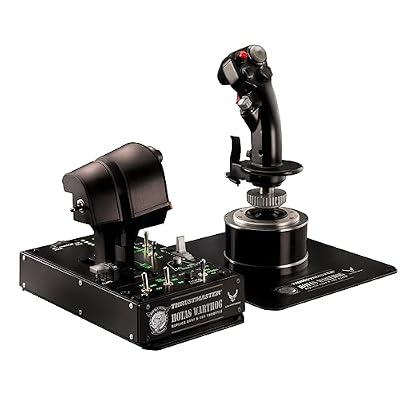
The premium tier: a heavy metal replica of the A-10C control set, and the natural partner for DCS, whose flagship module is that same aircraft.
Specs:
- Replica A-10C joystick and dual throttle unit in metal
- Hall effect sensors on the joystick axes
- Dual independent throttles with detents
- USB connection; the T.A.R.G.E.T programming suite is Windows-only, the hardware reports as standard HID
Logitech G Extreme 3D Pro

The budget entry point that has introduced two decades of pilots to the hobby. One unit carries stick, throttle lever and twist rudder: everything FlightGear or X-Plane needs to get off the ground.
Specs:
- 12 programmable buttons and an 8-way hat switch
- Rapid-fire trigger and twist-handle rudder control
- Built-in throttle lever
- USB connection, standard HID device on Linux
- Item model number 963290-0403
How to choose
Start with the type of flying, not the store page. For airliners, general aviation systems or flight training concepts, X-Plane 12 is the only choice that is both serious and native, and its demo settles the hardware question before money moves. For the planet itself, Microsoft Flight Simulator 2020 is the scenery simulator and the more stable Proton title; choose the 2024 edition only if its newer platform matters more than install friction. For combat, DCS World is the single answer, and its free base game makes the Proton experiment easy to test. Check your specific add-ons before committing: the pattern across every title here is that the simulator runs, and the Windows-only companion programs are what fail. Finally, match the hardware tier to the sim: an Extreme 3D Pro covers casual flying, the T.16000M and TWCS pair covers most enthusiasts, and pedals plus a Warthog are DCS-grade commitments.
Who should skip
Skip this catalogue if your flying depends on a specific Windows-only add-on program, a virtual-reality setup a publisher supports only on Windows, or an external dispatch and traffic suite; those layers are where Linux flight simulation still breaks. Skip Microsoft Flight Simulator 2024 if you have no patience for Proton version swapping after updates, and DCS World if you want a simulator that simply installs and flies with no prefix tinkering. Skip the premium hardware tier until a simulator here has earned it: the games decide the gear, not the other way round.
FAQ
Does Microsoft Flight Simulator work on Linux?
The Steam editions run through Proton. The 2020 edition holds a Gold ProtonDB rating and is the safer pick; the 2024 edition rates Silver and commonly needs Proton Experimental or a GE-Proton build. Microsoft Store and Game Pass editions cannot be installed this way, and Microsoft supports none of it.
Is X-Plane 12 really native on Linux?
Yes. Laminar Research builds X-Plane 12 for Linux alongside Windows and macOS, and publishes Linux in its official system requirements. The main limits are that official support covers Ubuntu LTS specifically, and that a minority of third-party add-ons built around Windows-only programs cannot load in the Linux build.
Does DCS World have anti-cheat that blocks Linux?
No. DCS World carries no anti-cheat of the kind that blocks Proton games. Its protection is account-based module licensing, which works through Proton; multiplayer servers run file integrity checks instead. ProtonDB rates the Steam edition Gold.
Do flight sticks and throttles need drivers on Linux?
Mainstream sticks and throttles are standard USB HID devices the Linux kernel handles with no driver install, and the simulators here read them directly. What stays on Windows is the vendors’ programming software, so advanced button layering is done inside each simulator’s own control settings instead.
Final verdict
Linux is a genuinely good flight simulation platform, more than most genres can claim. X-Plane 12 gives it a native flagship with publisher support, FlightGear a native open-source institution, and Proton carries the rest: Microsoft Flight Simulator 2020 at Gold for the scenery pilots, DCS World at Gold for the combat pilots, and Microsoft Flight Simulator 2024 at Silver for the patient. Buy the simulator that matches your flying, verify your add-ons before your hardware, and the Linux cockpit is fully open.










