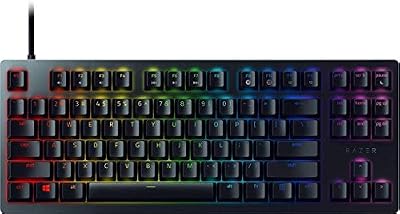
- Top Pick: Razer DeathAdder V3 Pro with HyperPolling Wireless Dongle
- Runner-up: Razer Basilisk V3 Pro
- Also consider: Pulsar X2H Mini
Roblox is not one game but thousands of them, and each one asks something different from your mouse. A fast shooter like Arsenal or BedWars rewards quick flicks and steady tracking, an obby demands precise small movements and reliable clicks, and a building game like Bloxburg is far easier when extra buttons sit under your thumb.
A good mouse for Roblox therefore needs a light body that stays comfortable across long sessions, a precise sensor, and a shape that fits your grip. Every mouse in this roundup is wireless with a low-latency connection, so no cable drags across your desk while you play. Here are five picks that cover the main ways people play Roblox.
As an Amazon Associate, we earn from qualifying purchases.
Quick Answer
The Razer Viper V3 Pro is the best mouse for Roblox for most players, thanks to its 54-gram body, precise Focus Pro 35K sensor, and 8,000 Hz wireless polling. Players who want an ergonomic shape should pick the DeathAdder V3 Pro bundle, while the Basilisk V3 Pro suits builders who want extra buttons. The Pulsar X2H Mini and Lamzu Maya X cover small hands and ultralight fans.
1. Razer Viper V3 Pro
The Razer Viper V3 Pro, a premium pick, is the best all-round mouse for Roblox because it does the fundamentals better than anything else here. At 54 grams, it feels almost weightless in the hand, which makes fast camera turns in shooters and quick repositioning in obbies feel effortless. The symmetrical shape suits claw and fingertip grips, and it works just as well for relaxed palm grips on medium hands. The Focus Pro 35K optical sensor tracks at up to 35,000 DPI with clean, consistent movement, and the included HyperPolling dongle pushes wireless polling to 8,000 Hz for low-latency response. Gen-3 optical switches click fast with almost no debounce delay, so shots and jumps land the moment you decide to make them. Battery life reaches up to 95 hours, and eight programmable buttons cover camera controls, tools, and item slots.
Specs
- Weight: 54 grams
- Sensor: Razer Focus Pro 35K optical, up to 35,000 DPI
- Polling rate: Up to 8,000 Hz wireless with included HyperPolling dongle
- Buttons: 8 programmable buttons
- Switches: Razer Gen-3 optical switches
- Battery life: Up to 95 hours
- Connectivity: HyperSpeed wireless, wired USB-C
- Shape: Symmetrical, suited to claw and fingertip grips
2. Razer DeathAdder V3 Pro with HyperPolling Wireless Dongle

The Razer DeathAdder V3 Pro, a premium pick, is the comfort pick in this roundup, and it suits players who spend hours in Roblox without a break. Its right-handed ergonomic shape fills the palm and supports the hand during long building sessions or extended rounds of a shooter, while the lightweight 63-gram body keeps flicks quick. The Focus Pro 30K optical sensor delivers up to 30,000 DPI of accurate tracking, and Gen-3 optical switches give the main buttons a crisp, fast click. This bundle includes the HyperPolling Wireless Dongle, which raises wireless polling to 8,000 Hz for smoother cursor movement during fast camera turns. Battery life runs up to 90 hours, and five programmable buttons handle the essentials without crowding the shell.
Specs
- Weight: 63 grams
- Sensor: Razer Focus Pro 30K optical, up to 30,000 DPI
- Polling rate: Up to 8,000 Hz wireless with included HyperPolling dongle
- Buttons: 5 programmable buttons
- Switches: Razer Gen-3 optical switches
- Battery life: Up to 90 hours
- Connectivity: HyperSpeed wireless, wired USB-C
- Shape: Right-handed ergonomic, suited to palm and claw grips
3. Razer Basilisk V3 Pro
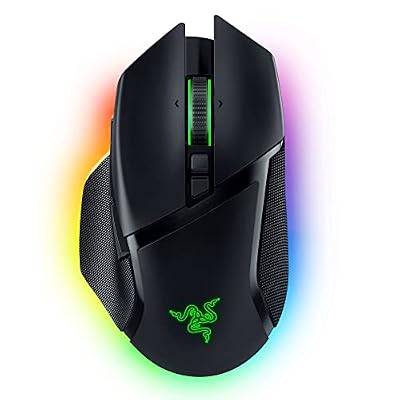
The Razer Basilisk V3 Pro, a premium pick, is the pick for Roblox players who want their mouse to do more than aim. Its 13 programmable controls put tool swaps, emotes, building shortcuts, and camera commands at your fingertips, which suits Bloxburg builders and players who juggle lots of items. The right-handed ergonomic shape includes a thumb rest that supports the hand during long sessions, and the HyperScroll tilt wheel spins freely for fast scrolling through menus and inventories, then switches to a tactile mode for deliberate selection. The Focus Pro 30K optical sensor tracks at up to 30,000 DPI, and Gen-3 optical switches actuate with almost no debounce delay. With 13 zones of Chroma RGB lighting and onboard profile storage, it is the most customizable mouse here, with up to 90 hours of battery life over HyperSpeed wireless.
Specs
- Weight: 112 grams
- Sensor: Razer Focus Pro 30K optical, up to 30,000 DPI
- Polling rate: Up to 1,000 Hz wireless, higher with optional HyperPolling dongle
- Buttons: 13 programmable controls
- Switches: Razer Gen-3 optical switches
- Battery life: Up to 90 hours over HyperSpeed wireless
- Connectivity: HyperSpeed wireless, Bluetooth, wired USB-C
- Lighting: 13-zone Chroma RGB with underglow
- Extra: HyperScroll tilt wheel, onboard profile storage
4. Pulsar X2H Mini

The Pulsar X2H Mini, a mid-range pick, is the small-hand specialist of this roundup, and it fills a gap the other mice leave open. At 52 grams with a compact symmetrical shell, it suits younger players and anyone with smaller hands, as well as fingertip and claw grippers who want full control over the mouse. The higher rear hump gives the palm extra support compared with the standard X2, while the narrower waist makes the mouse easy to lift and reposition during fast camera work. The PixArt PAW3395 sensor tracks at up to 26,000 DPI with clean, accurate movement, and optical switches avoid double-clicking issues while staying fast. Battery life is rated for up to 70 hours over lag-free 2.4 GHz wireless, and the mouse is ready for 4,000 Hz polling with a compatible Pulsar dongle.
Specs
- Weight: 52 grams
- Sensor: PixArt PAW3395, up to 26,000 DPI
- Polling rate: 1,000 Hz wireless, 4,000 Hz ready with optional Pulsar dongle
- Buttons: 6 buttons including 2 side buttons
- Switches: Optical switches
- Battery life: Up to 70 hours
- Connectivity: 2.4 GHz wireless, wired
- Shape: Symmetrical with high hump, suited to claw and palm claw grips
- Extra: Pulsar Blue Encoder, grip-friendly narrow waist
5. Lamzu Maya X
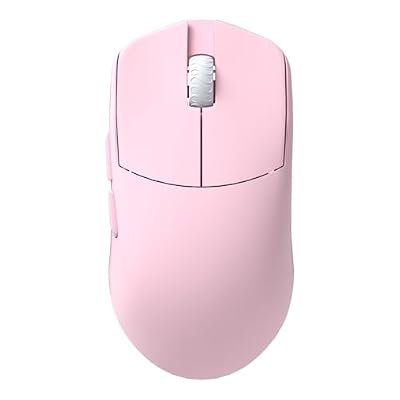
The Lamzu Maya X, a mid-range pick, is the lightest mouse in this roundup at just 47 grams, and that featherweight body changes how Roblox feels. Flicks become almost effortless, repositioning the mouse after a big swipe takes less effort, and your wrist stays fresher across a long evening of obbies and shooters. Despite the low weight, the symmetrical shape still offers a solid grip, with a centered hump that suits claw and fingertip players and relaxed palm grips on medium to large hands. Inside, the PixArt PAW3950 sensor tracks at up to 30,000 DPI, holding tracking through fast swipes and stopping cleanly. Wireless polling reaches up to 8,000 Hz for low latency in rapid camera turns, and optical switches give the main buttons a crisp click. Grip tape, a velvet carry bag, and the 8K-capable wireless receiver are included in the box.
Specs
- Weight: 47 grams
- Sensor: PixArt PAW3950, up to 30,000 DPI
- Polling rate: Up to 8,000 Hz wireless
- Buttons: 6 buttons including 2 side buttons
- Switches: Optical switches
- Connectivity: 2.4 GHz wireless, wired USB-C
- MCU: Nordic 52840
- Dimensions: 124 x 64 x 40 mm
- Extra: Dust-proof encoder, 8K wireless receiver included, grip tape included
How to Choose the Best Mouse for Roblox
Start with weight and shape, because those two factors shape every minute you spend in a game. Lighter mice make flicks and camera turns easier, which suits shooters and fast-paced obbies, while a comfortable ergonomic shape matters more in long building or roleplay sessions. The Lamzu Maya X and Viper V3 Pro are the lightest options here, while the DeathAdder V3 Pro and Basilisk V3 Pro trade some lightness for comfort and extra buttons. If your hands are on the smaller side, the Pulsar X2H Mini is the natural fit.
Next, think about how many buttons you actually use. Most Roblox games need only the two main buttons and a couple of side buttons for tools and items, so five or six buttons cover the essentials. Builders and players who run lots of shortcuts will get more from the 13 controls on the Basilisk V3 Pro. Every mouse here has a capable sensor, so weigh polling rate and battery life instead: 1,000 Hz is already responsive, and the 8,000 Hz options add a small edge during very fast movements.
Who Should Skip These Mice
Players who prefer a wired-only mouse with no battery to manage should look at dedicated wired options instead, since every mouse here is built around wireless play. Very large-handed palm grippers may find the Pulsar X2H Mini and Lamzu Maya X too small, and should lean toward the DeathAdder V3 Pro or Basilisk V3 Pro. Finally, if you play mostly with a controller or only dip into Roblox occasionally, any capable mouse you already own will serve you well.
Frequently Asked Questions
What DPI should I use for Roblox?
Most players do well with a DPI setting between 800 and 1,600, paired with an in-game sensitivity that lets them turn the camera comfortably without lifting the mouse too often. Lower settings favor precise aiming in shooters, while higher settings suit fast camera turns in obbies and exploration games. Pick a combination that lets you do a full camera turn with one arm movement, then stick with it.
Do I need 8,000 Hz polling for Roblox?
No, 8,000 Hz polling is not required for Roblox. A polling rate of 1,000 Hz is already responsive enough for smooth, accurate aiming and camera control in every Roblox game. Higher polling rates can feel slightly smoother during very fast turns, but they also use more battery. Treat 8,000 Hz as a nice bonus rather than a must-have.
Is a lightweight mouse better for Roblox?
A lightweight mouse helps with fast flicks and reduces wrist fatigue over long sessions, which is why the lightest mice here are popular with competitive players. That said, some players aim more steadily with a slightly heavier mouse, especially in an ergonomic shape like the DeathAdder V3 Pro or Basilisk V3 Pro. If you can, try both styles before committing.
Are wireless mice reliable enough for Roblox?
Yes. Modern wireless gaming mice use low-latency connections that are effectively indistinguishable from wired play for most players. All five mice here use proven wireless technology, and each one can also be used wired over USB-C while charging.
Final Verdict
The Razer Viper V3 Pro is the best mouse for Roblox for most players, combining a 54-gram body, a precise sensor, and 8,000 Hz wireless polling in a shape that suits almost any grip. If comfort matters most, the Razer DeathAdder V3 Pro bundle is the natural alternative, while the Razer Basilisk V3 Pro is the pick for builders who want extra buttons. Smaller-handed players will get the most from the Pulsar X2H Mini, and players chasing the lightest possible mouse should pick the Lamzu Maya X.