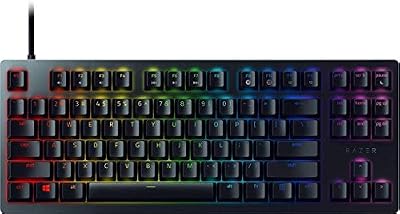
- Top Pick: Logitech G PRO X Superlight 2
- Runner-up: Razer Basilisk V3 Pro
- Also consider: ASUS ROG Gladius III Wireless AimPoint
Grand Theft Auto V asks a lot from a mouse. One minute you are lining up a headshot in a firefight, the next you are steering a car through Los Santos traffic or guiding a plane toward a landing strip. The game mixes third-person shooting, driving, flying, and long stretches of open-world exploration, so the best mouse for GTA 5 is one that stays comfortable for hours, tracks reliably at any sensitivity, and keeps its buttons exactly where your thumb expects them.
A lightweight wireless mouse with a strong sensor and a shape that suits your grip covers nearly everything the game throws at you. Extra side buttons help with weapon switching, while long battery life means fewer interruptions. The five mice below suit different hands, grips, and budgets.
As an Amazon Associate, we earn from qualifying purchases.
Quick Answer
For most GTA 5 players, the Logitech G PRO X Superlight 2 is the best overall pick thanks to its light 60-gram body, precise HERO 2 sensor, and clean symmetrical shape. If you want more buttons and a palm-filling ergonomic grip, the Razer Basilisk V3 Pro is the better choice, while the ASUS ROG Gladius III Wireless AimPoint offers strong value with hot-swappable switches and long battery life.
1. Logitech G PRO X Superlight 2

The Logitech G PRO X Superlight 2 is the safest all-round pick for GTA 5. Its symmetrical shape works with palm, claw, and fingertip grips, and at 60 grams it stays easy to move during long driving and shooting sessions. The HERO 2 sensor tracks cleanly across a wide sensitivity range, so it suits players who switch between precise aiming and fast camera movement while exploring the map.
With only five programmable buttons, this mouse keeps things simple. That suits GTA 5, where most actions live on the keyboard and the mouse mainly handles aiming, looking around, and firing. LIGHTSPEED wireless keeps the connection responsive, and the battery lasts up to 95 hours, so charging rarely interrupts a session.
Specs
- Sensor: Logitech HERO 2 optical, up to 44,000 DPI
- Polling rate: Up to 8,000 Hz
- Weight: 60 grams
- Buttons: 5 programmable buttons
- Switches: LIGHTFORCE hybrid optical-mechanical
- Connectivity: LIGHTSPEED wireless, wired USB-C
- Battery life: Up to 95 hours
- Extras: PTFE feet, POWERPLAY wireless charging support, grip tape included
- Tier: Premium
2. Razer Basilisk V3 Pro
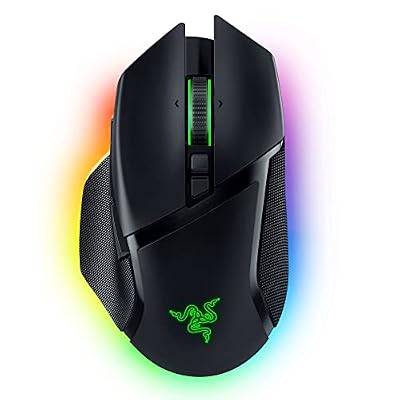
The Razer Basilisk V3 Pro is the best choice for players who want more controls under their thumb. Its ergonomic right-handed shape fills the palm, and the extra programmable buttons are handy for weapon switching, using snacks and armor, or triggering quick actions without reaching for the keyboard. The HyperScroll tilt wheel adds another way to scroll through weapons or menus.
The Focus Pro 30K optical sensor delivers steady tracking for shooting sections, and the mouse connects over HyperSpeed wireless, Bluetooth, or wired USB. Battery life reaches up to 90 hours. At 109 grams it is heavier than the ultralight options here, but the weight suits players who prefer a planted, controlled feel.
Specs
- Sensor: Razer Focus Pro 30K optical, up to 30,000 DPI
- Polling rate: Up to 4,000 Hz wireless with HyperPolling support
- Weight: 109 grams
- Buttons: 13 programmable controls
- Switches: Razer Optical Switches Gen-3
- Connectivity: HyperSpeed wireless, Bluetooth, wired USB-C
- Battery life: Up to 90 hours
- Extras: HyperScroll tilt wheel, 13-zone Chroma RGB, onboard profile storage
- Tier: Premium
3. ASUS ROG Gladius III Wireless AimPoint

The ASUS ROG Gladius III Wireless AimPoint is the value pick in this lineup. Its right-handed ergonomic shape is comfortable for long sessions, and the 36,000 DPI ROG AimPoint sensor handles everything from careful aiming to fast camera sweeps. Tri-mode connectivity covers low-latency 2.4 GHz wireless, Bluetooth for up to three devices, and wired USB play while charging.
The standout feature is the Push-Fit Switch Socket II, which lets you swap the mouse switches without soldering. That suits players who like to fine-tune click feel or want an easy repair path if a switch wears out. Battery life runs up to 119 hours over 2.4 GHz wireless and up to 143 hours over Bluetooth, making it one of the longest-lasting mice here.
Specs
- Sensor: ROG AimPoint optical, up to 36,000 DPI
- Polling rate: 1,000 Hz
- Weight: 79 grams
- Buttons: 6 programmable buttons
- Switches: ROG Micro Switches, hot-swappable Push-Fit Switch Socket II
- Connectivity: 2.4 GHz RF, Bluetooth 5.1, wired USB-C
- Battery life: Up to 119 hours over RF, up to 143 hours over Bluetooth
- Extras: ROG Paracord cable, PTFE feet, grip tape, Aura Sync RGB
- Tier: Budget
4. Logitech G PRO X Superlight 2 DEX

The Logitech G PRO X Superlight 2 DEX takes the same high-end internals as the standard Superlight 2 and puts them in a sculpted right-handed shell. If the symmetrical Superlight 2 feels too flat or too narrow, the DEX shape offers a more supportive palm rest and a thumb rest for long sessions. It keeps the same 60-gram weight, so the added shape does not add bulk.
Performance matches the standard model: the HERO 2 sensor reaches up to 44,000 DPI, polling goes up to 8,000 Hz, and LIGHTSPEED wireless keeps input lag low. Five programmable buttons keep the layout clean, and battery life reaches up to 95 hours. This is the pick for right-handed players who want flagship tracking in a more ergonomic body.
Specs
- Sensor: Logitech HERO 2 optical, up to 44,000 DPI
- Polling rate: Up to 8,000 Hz
- Weight: 60 grams
- Buttons: 5 programmable buttons
- Switches: LIGHTFORCE hybrid optical-mechanical
- Connectivity: LIGHTSPEED wireless, wired USB-C
- Battery life: Up to 95 hours
- Extras: PTFE feet, POWERPLAY wireless charging support, grip tape included
- Tier: Premium
5. Lamzu Maya X
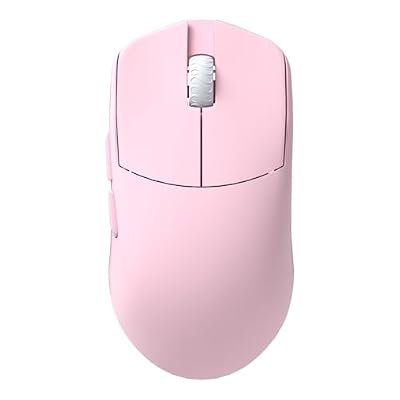
The Lamzu Maya X is a lightweight option for players who want flagship sensor performance in a larger shell. At 47 grams it is the lightest mouse in this roundup, yet its 124.4 mm body suits medium and large hands better than most ultralight mice. The PAW3950 sensor tracks up to 30,000 DPI with polling up to 8,000 Hz, so aiming and fast camera movement stay smooth.
Its symmetrical shape works for palm and claw grips. Connectivity is 2.4 GHz wireless or wired USB-C, with no Bluetooth mode, so it suits players who keep a dedicated receiver plugged in. Battery life reaches up to 80 hours at 1,000 Hz polling. The Maya X is a strong mid-range pick for players who want a featherweight mouse without a cramped shape.
Specs
- Sensor: PixArt PAW3950 optical, up to 30,000 DPI
- Polling rate: Up to 8,000 Hz
- Weight: 47 grams
- Buttons: 5 programmable buttons
- Switches: Optical switches
- Connectivity: 2.4 GHz wireless, wired USB-C
- Battery life: Up to 80 hours at 1,000 Hz polling
- Extras: Nordic 52840 MCU, dust-proof encoder, symmetrical shape
- Tier: Mid-range
How to Choose the Best Mouse for GTA 5
Start with shape and grip. GTA 5 sessions run long, and a mouse that fits your hand matters more than any sensor number. Palm grip players usually prefer ergonomic right-handed shapes like the Basilisk V3 Pro, the Gladius III, or the Superlight 2 DEX. Claw and fingertip players often prefer symmetrical shapes like the standard Superlight 2 or the Maya X.
Next, think about buttons. GTA 5 does not demand a mouse with a dozen side buttons, since driving, flying, and most actions use the keyboard. Five or six well-placed buttons cover weapon switching and quick actions, while the Basilisk V3 Pro suits players who want to map more functions to the mouse.
Sensor quality and polling rate come third. Any modern flagship sensor tracks well beyond what GTA 5 needs, so focus on reliability rather than chasing the highest DPI number. A polling rate of 1,000 Hz is smooth for this game. Finally, weigh battery life and weight: lighter mice reduce fatigue over long sessions, and a battery that lasts 80 hours or more makes charging a rare chore.
Who Should Skip These Mice
Players who mainly play GTA 5 with a controller can skip this list entirely, since the game was designed around gamepad driving and aiming and a mouse adds little for them. Left-handed players should also look elsewhere, because four of these five mice are right-handed or symmetrical shapes tuned for right-hand use, and only the symmetrical models work comfortably in the left hand.
Budget-focused casual players may not need a premium wireless mouse at all. A simpler wired mouse covers GTA 5 well, since the game does not punish a basic sensor the way a competitive shooter would. Players who want a full side-button grid for other games should also skip these picks, since none of the five is built around a large thumb grid.
Frequently Asked Questions
What DPI should I use for GTA 5?
Most players do well between 800 and 1,600 DPI with in-game sensitivity set to a comfortable middle value. Lower sensitivity gives steadier aim in shootouts, while higher sensitivity helps with fast camera movement while driving. Start at 800 DPI and adjust in small steps.
Is a wireless mouse good enough for GTA 5?
Yes. Modern wireless mice with low-latency receivers perform on par with wired mice for GTA 5, and all five picks here use fast wireless connections. Keep the receiver close to the mouse and wireless play feels identical to wired play.
Do I need extra side buttons for GTA 5?
No, extra side buttons are helpful but not required. Five or six buttons cover weapon switching and a couple of quick actions, and most GTA 5 controls live on the keyboard. The Basilisk V3 Pro is the pick here if you want to map more functions to the mouse.
Does mouse weight matter in GTA 5?
Weight matters for comfort more than for performance in GTA 5. A lighter mouse causes less fatigue during long sessions of driving and exploring, which is why the 47-gram Maya X and the 60-gram Superlight models stand out. Players who prefer a planted feel may still like the heavier Basilisk V3 Pro.
Final Verdict
The Logitech G PRO X Superlight 2 is the best mouse for GTA 5 for most players, pairing a light body, a top-tier sensor, and a shape that suits nearly every grip. Players who want more buttons and a palm-filling shape should pick the Razer Basilisk V3 Pro, while right-handed players who find symmetrical mice uncomfortable will prefer the Superlight 2 DEX. The ASUS ROG Gladius III Wireless AimPoint is the best value pick thanks to its hot-swappable switches and long battery life, and the Lamzu Maya X is the lightest option for bigger hands. Any of the five handles shooting, driving, and flying in Los Santos, so let hand size and grip decide.