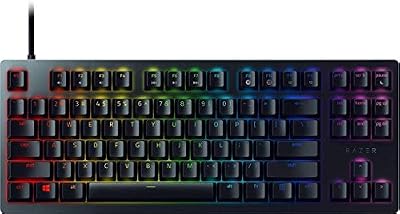
- Top Pick: Corsair K70 RGB PRO
- Runner-up: SteelSeries Apex Pro Mini
- Also consider: Logitech G PRO X TKL Lightspeed
Microsoft Flight Simulator is flown with a yoke, a stick, or a throttle quadrant, and the keyboard plays a supporting role around those controls. It handles autopilot modes, flaps and trim, landing gear, lights, ATC replies, camera views, and checklists, so a good board is judged on clear legends and reliable key presses.
That supporting role shapes what to look for. Full-size boards offer a numpad and a complete function row for binding views and systems, while compact boards free up desk space for a yoke and throttle. The five keyboards below cover that range, from a full-size workhorse to compact magnetic-switch boards.
As an Amazon Associate, we earn from qualifying purchases.
Quick Answer
For most sim pilots, the Corsair K70 RGB PRO is the safest pick, with a full-size layout, numpad, dedicated media controls, and programmable keys covering the widest set of Flight Simulator bindings. If desk space is tight beside a yoke, the SteelSeries Apex Pro Mini and HyperX Alloy Rise 75 are strong compact alternatives, while the Logitech G PRO X TKL adds wireless freedom.
1. Corsair K70 RGB PRO

The Corsair K70 RGB PRO is the full-size option here, and that size is its main advantage for Flight Simulator. With a numpad, a complete function row, and dedicated media keys, it leaves room for a generous set of bindings without forcing awkward key combinations. The aluminum frame feels solid on the desk, and the included soft-touch palm rest helps on longer sessions.
This model uses CHERRY MX Speed RGB Silver switches with a short actuation distance, which makes repeated presses for trim, flaps, and view changes feel quick and light. Per-key RGB backlighting can highlight autopilot, gear, lights, and camera shortcuts in a dim room. The iCUE software supports custom macros, key remaps, and onboard storage for up to 50 profiles.
Specs
- Switches: CHERRY MX Speed RGB Silver, linear, short actuation distance
- Layout: Full-size, 104 keys with numpad
- Frame: Aluminum frame with soft-touch palm rest
- Backlighting: Per-key RGB
- Connectivity: Wired, detachable USB Type-C cable
- Software: iCUE for macros, remaps, and lighting profiles
- Onboard storage: Up to 50 profiles
- Extras: Dedicated media keys, aluminum volume roller, tournament switch
- Tier: Premium
2. SteelSeries Apex Pro Mini

The SteelSeries Apex Pro Mini takes the opposite approach: a compact 60% form factor that leaves plenty of desk space for a yoke, throttle quadrant, and rudder pedals. Side-printed secondary functions keep the full range of commands available through a function layer, so the missing keys are still reachable once you learn the layout.
Its OmniPoint 2.0 adjustable HyperMagnetic switches are the headline feature. Actuation can be adjusted for a light touch on frequent view changes or a firmer feel for commands you do not want to trigger by accident, and Rapid Trigger support helps with repeated presses. The board also supports 2-in-1 action keys, letting one key perform one action on a light press and another on a deeper press.
Specs
- Switches: OmniPoint 2.0 adjustable HyperMagnetic switches with Rapid Trigger
- Layout: Compact 60% form factor
- Keycaps: PBT keycaps with side-printed secondary functions
- Backlighting: RGB
- Connectivity: Wired, USB-C
- Features: Adjustable actuation, 2-in-1 action keys
- Tier: Premium
3. Logitech G PRO X TKL Lightspeed

The Logitech G PRO X TKL Lightspeed is a tenkeyless board that balances size and function for sim pilots who want wireless freedom. Dropping the numpad saves desk space beside flight controls while keeping the function row, arrow keys, and navigation cluster that carry most Flight Simulator bindings. LIGHTSPEED wireless, Bluetooth, and USB connections give you three ways to connect.
This model uses GX Brown tactile switches, which give a small bump on each press without a loud click, a good middle ground when you want feedback for keybinds without distracting noise. Dual-shot PBT keycaps are built for long-term use, LIGHTSYNC RGB lighting can mark out sim controls, and programmable keys, media controls, and a volume roller cover the everyday controls around a flight.
Specs
- Switches: GX Brown tactile switches
- Layout: Tenkeyless, no numpad
- Keycaps: Dual-shot PBT keycaps
- Backlighting: LIGHTSYNC RGB
- Connectivity: LIGHTSPEED wireless, Bluetooth, and USB
- Features: Programmable keys, media controls, volume roller, game mode
- Tier: Mid-range
4. HyperX Alloy Rise 75

The HyperX Alloy Rise 75 is a compact 75% layout board that keeps arrow keys, navigation keys, and the function row while trimming the numpad, a sensible compromise for a flight sim desk. Its hot-swappable design lets you change switches without soldering, so you can try a different feel for the keys you press most often without replacing the whole board. A gasket-mounted design and pre-lubed HyperX Linear switches aim for a smooth, comfortable feel on long sessions.
An ambient light sensor adjusts RGB backlighting to match the lighting in your room, which helps legends stay readable in daylight or in a dark room. The board supports an 8k polling rate, stores up to 10 profiles in onboard memory, and uses pre-installed HyperX PBT keycaps.
Specs
- Switches: Pre-lubed HyperX Linear switches, hot-swappable, rated for up to 80 million keypresses
- Layout: 75% form factor with dedicated arrow, navigation, and function keys
- Mounting: Gasket mounted
- Keycaps: Pre-installed HyperX PBT keycaps
- Backlighting: Per-key RGB with ambient light sensor
- Connectivity: Wired, USB-C to USB-A braided cable
- Polling rate: 8000Hz
- Onboard memory: 10 profiles
- Tier: Mid-range
5. Keychron Q1 HE Wireless

The Keychron Q1 HE Wireless is the most customizable board here, built around Hall Effect magnetic switches and QMK firmware. Its Gateron Double-Rail Magnetic switches support Rapid Trigger and fine sensitivity adjustment, so you can set a very light actuation for keys you tap often and a deeper actuation for commands that should need a deliberate press. That level of control suits sim pilots who like to tune their bindings precisely.
The full aluminum body gives the board a heavy, planted feel that stays put beside a yoke, and the 75% layout keeps the function row and arrow keys while saving space. Wireless connectivity covers 2.4 GHz and Bluetooth 5.2 alongside a wired Type-C connection. QMK support opens up layers, macros, and remaps well beyond most stock software, a genuine advantage for a dedicated sim layer for autopilot, views, and ATC.
Specs
- Switches: Gateron Double-Rail Magnetic Hall Effect switches, hot-swappable, Rapid Trigger
- Layout: 75% layout, 82 keys, with function row and arrow keys
- Body: Full aluminum body
- Backlighting: RGB
- Connectivity: 2.4 GHz wireless, Bluetooth 5.2, and wired Type-C
- Battery: 4000 mAh rechargeable battery
- Polling rate: 1000Hz wired and 2.4 GHz wireless
- Firmware: QMK for layers, macros, and remaps
- Tier: Premium
How to choose
Start with your desk and your flight controls, because those decide the layout before anything else. A full-size board suits a wide desk where the numpad can hold view, autopilot, and systems bindings. A tenkeyless or 75% layout board suits a tighter rig where a yoke and throttle need the space, and a 60% form factor board suits the smallest desks, as long as you are comfortable using a function layer for the keys it omits.
Next, think about switches and feel. Light linear switches suit frequent presses for trim, views, and camera work, while tactile switches give clearer feedback for single commands such as gear, flaps, and lights.
Programmability matters more in Flight Simulator than in many games, because the sim has so many commands worth binding. Look for onboard profiles, macro support, and software that lets you remap keys and save a sim-specific layout. Per-key lighting can mark autopilot, ATC, camera, and systems keys so they stand out in a dark room. A solid frame, durable PBT keycaps, and a palm rest all pay off on long flights.
Who should skip
A new keyboard is not the right upgrade for every sim pilot. If you fly mainly with a yoke, throttle, and rudder pedals and rarely touch the keyboard beyond a handful of commands, your current board is probably fine. Similarly, if you already own a reliable mechanical keyboard with a layout you know well, switching boards means relearning bindings, and that familiarity is worth more than a new set of switches.
Compact boards deserve a pause as well. A 60% form factor board saves space, but it hides the function row and numpad behind a layer, which can slow you down if you rely on those keys for views and autopilot. Pilots who use the numpad heavily should stick with a full-size or tenkeyless layout instead.
Frequently Asked Questions
Do I need a special keyboard for Microsoft Flight Simulator?
No, any reliable keyboard works, because the sim accepts standard keybinds and the flying itself is done with a yoke, stick, or throttle. A keyboard earns its place through layout, programmability, and comfort: enough keys for the bindings you use and a size that fits beside your flight controls.
Is a full-size keyboard better than a compact one for flight sim?
A full-size board is better if you bind many commands to the numpad and function row, while a compact board is better if desk space beside a yoke is limited. Tenkeyless and 75% layout boards are a common middle ground, keeping the function row and arrow keys.
What should I bind to the keyboard first?
Start with the commands you use on every flight: autopilot engage and mode changes, flaps, landing gear, trim, lights, ATC replies, and camera views. Once those feel natural, add checklist, pause, and screenshot shortcuts.
Are magnetic or Hall Effect switches worth it for flight sim?
They can be, if you like fine control over actuation and use Rapid Trigger for repeated presses. Adjustable switches let you set a light touch for view changes and a firmer feel for commands you do not want to hit by accident. They are a nice advantage, not a requirement.
Final verdict
The keyboard will never replace a yoke or a stick in Microsoft Flight Simulator, and the best board is the one that supports your flying without getting in the way of your controls. For most sim pilots, the Corsair K70 RGB PRO is the strongest all-round pick: its full-size layout, numpad, media controls, and programmable keys cover the widest range of bindings. If your desk is crowded, the HyperX Alloy Rise 75 and the Logitech G PRO X TKL Lightspeed both save space while keeping the keys that matter.
For pilots who enjoy tuning every detail, the Keychron Q1 HE Wireless offers the deepest customization, with Hall Effect switches and QMK layers that can shape the board around a specific aircraft or flying style. Whichever board you choose, map the bindings you use on every flight first and give yourself a few flights to learn the layout.