As an Amazon Associate we earn from qualifying purchases.
A cool PC case should do more than look good in photos. It also needs to fit your motherboard, graphics card, cooler, and power supply without forcing awkward cable bends or blocked intakes. This guide focuses on cases with a distinctive look — panoramic glass, dual-chamber layouts, and wood accents — while keeping the practical checks front and center.
Before choosing, confirm four things from the manufacturer listing: motherboard form factor support, maximum graphics card length, radiator and fan mounts, and front I/O. Those published figures are the starting point. Real clearance can shrink once you add a front radiator, thick fans, or a long power supply, so leave margin instead of planning to the last millimeter.
For a broader side-by-side of mainstream towers, see our best PC case compared guide and then use the picks below when style is the priority.
Quick picks
- Best panoramic showcase: HYTE Y60 — three-piece glass with an included PCIe 4.0 riser cable for vertical GPU mounting.
- Best glass-heavy dual chamber: Lian Li O11 Vision — three-sided tempered glass with support for up to two 360mm radiators per the listing.
- Best compact dual chamber with fans included: NZXT H6 Flow RGB — three RGB fans and panoramic panels in a smaller footprint.
- Best furniture-friendly look: Fractal Design North — genuine wood front slats with two 140mm fans included.
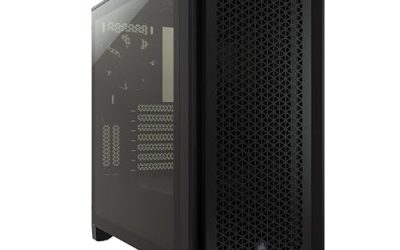
- Best understated airflow tower: Corsair 4000D Airflow — perforated front panel and a straightforward ATX layout.
1. HYTE Y60
ASIN: B09TPZ5R6B
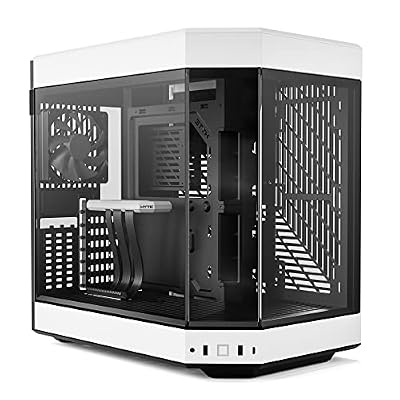
The HYTE Y60 is built around display. Its three-piece panoramic tempered glass design puts the graphics card on show, and the included PCIe 4.0 riser cable supports a vertical GPU mount without a separate purchase. The dual-chamber layout moves the power supply and much of the cabling behind the main chamber, which helps the visible side stay tidy.
Check the fit carefully before you commit. Vertical mounting changes how much space the card and its cooler need, and half-height cards behind the riser area have their own limits. Confirm your motherboard size, GPU length, and radiator placement against the official dimensions, and plan fan positions so intake air reaches both the GPU and the CPU cooler. This is a style-first case that rewards planning.
2. Lian Li O11 Vision

ASIN: B0CPKYTP94
The Lian Li O11 Vision (O11VX.US) uses three-sided tempered glass and a dual-chamber design for a clean, open view of the build. The listing states support for up to two 360mm radiators and graphics cards up to 455mm, with a removable motherboard tray to simplify assembly.
Those headline numbers are manufacturer figures, not a guarantee for every combination of parts. A thick radiator plus fans on one mount can reduce space elsewhere, so map your loop or AIO layout on paper first. Also confirm which fan mounts you will actually use, how the power supply sits in the rear chamber, and whether your front I/O needs match the ports provided. Builders who want a glass showcase with flexible cooling layouts will find a lot to like here.
3. NZXT H6 Flow RGB

ASIN: B0C89S5PC5
The NZXT H6 Flow RGB takes the dual-chamber idea and shrinks it. The listing highlights three RGB fans, panoramic glass panels, and dedicated cable management in a compact mid-tower. Having fans included matters: you can finish a build without immediately buying a separate fan set, then add more later if your thermals or noise targets demand it.
Because the chassis is compact, measure twice. Check GPU length with your chosen front or side fan arrangement, CPU cooler height, and power supply length including cable bend room. Compact dual-chamber cases often trade drive space for looks, so count your storage devices before ordering. If you want a bright, tidy build that does not dominate the desk, this format is worth a close look.
4. Fractal Design North

ASIN: B09Y9FJDG9
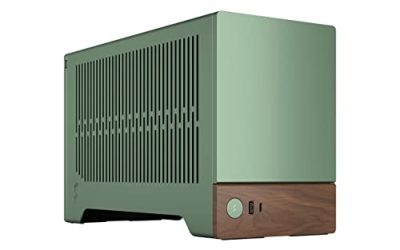
Not every cool case needs full glass. The Fractal Design North in Chalk White with tempered glass pairs a genuine oak wood front with a glass side panel, two 140mm Aspect PWM fans, and a USB Type-C front port, per the listing. It reads more like furniture than a gaming tower, which suits living-room and office setups.
The trade-off is airflow tuning. Wood slats and fine mesh look calm, but you should still plan intake and exhaust paths deliberately. Confirm radiator support and GPU clearance with a front radiator installed, since that combination is where clearance drops fastest. Check cooler height and power supply length as well. For builders who want a distinctive front panel without giving up a windowed side, the North is the most different pick in this list.
5. Corsair 4000D Airflow

ASIN: B08C7BGV3D
The Corsair 4000D Airflow is the restrained option: a tempered glass side panel, a perforated front for intake, two included 120mm fans, and a cable management system in an ATX mid-tower layout. It will not turn heads like a panoramic case, but its clean lines and airflow-first front panel age well.
Use it as the control pick. If your parts list is long, your cooler is tall, or you simply want a conventional layout with fewer surprises, start here and compare the flashier cases against it. As with every pick, verify motherboard support, GPU and cooler clearance, radiator mounts, and front I/O on the official specification page before you buy, and keep the warranty terms from the manufacturer page for your region.
How to choose without regrets
Start with the parts you already own. Write down motherboard size, GPU length, CPU cooler height or radiator size, power supply length, and drive count. Then match those numbers to the case specification sheet, leaving extra room for cables and fan thickness. Manufacturer dimensions describe the chassis; your finished build adds connectors, tubing, and sag brackets that consume space.
Next, decide how the case will breathe. Glass-heavy designs look striking, but intake still needs a path. Note where fans can mount, which mounts you will populate on day one, and whether dust filters cover those intakes. Finally, check the details that are easy to miss: front USB ports, audio jack placement, power supply shroud cutouts, and how panels come off for cleaning.
A cool case is the one you still enjoy looking at after the build is finished — and that still fits, cools, and cleans easily a year later. Pick the style you love, verify the numbers twice, and the result will look intentional rather than improvised.