

If they already own the Deck, the three safest gifts are a 512GB or 1TB A2 microSD card, a padded hardshell case with room for accessories, and a 45W USB-C PD power bank. Add a Steam gift card if you are unsure. Skip docks unless they own a TV setup.
- Gifts for Steam Deck Owners at a Glance
- Storage: The Gap Almost Every Owner Hits First
- Carrying and Protection
- Docks and TV Play
- Comfort for Long Sessions
- Audio Without the Lag
- Charging and Battery Life on the Road
- Cleaning and Maintenance
- Budget Tier to Best Pick
- What to Avoid Buying
- Frequently Asked Questions
Buying for someone who already has the handheld is a different problem. The console is solved; everything around it is not. The library outgrew the internal drive, the bag does not fit the charger, the battery dies on a flight. This guide is organised by those gaps rather than by product category, so you can match the gift to the person.


Gifts for Steam Deck Owners at a Glance
The “skip it if” column matters more than the “who it suits” column, because the most common mistake here is buying something the recipient already owns or will never plug in.
| Gift | Price band | Who it suits | Skip it if |
|---|---|---|---|
| 512GB–1TB A2 microSD card | Budget to mid | Almost everyone, especially 256GB and 512GB owners | They already run a 1TB card and a 1TB internal drive |
| Hardshell travel case with accessory room | Budget to mid | Commuters, frequent flyers, anyone who carries it daily | They never leave the couch with it |
| 45W–65W USB-C PD power bank | Mid | Travellers, long-haul flyers, campers, hospital or clinic waits | They only play plugged in at a desk |
| Dock or USB-C hub with HDMI and Ethernet | Budget to mid | People who want big-screen play or a desktop setup | No spare TV or monitor input to use |
| Ergonomic grip or back-shell | Budget | Large hands, three-hour sessions, wrist or thumb fatigue | They already run a case that will not fit around a grip |
| Tempered glass screen protector | Budget | LCD owners, bag-carriers, anyone with kids or pets nearby | They have the anti-glare etched OLED screen |
| Low-latency wireless earbuds or headset | Mid to premium | Shared rooms, flights, late-night play | They already have a 2.4GHz headset they like |
| 2230 NVMe SSD upgrade | Mid to premium | Tinkerers who are comfortable reimaging the system | The recipient has never opened a device in their life |
| Steam gift card | Any | Anyone, and the only truly safe blind buy | Never a bad gift, just not a memorable one on its own |
Storage: The Gap Almost Every Owner Hits First
Modern games are enormous, and a 256GB Deck realistically holds three or four big installs, which makes a microSD card the highest-hit-rate gift on this list. The detail most buyers get wrong: the Deck’s card reader runs at UHS-I speeds, so a UHS-II or V90 card aimed at cinema cameras buys nothing. Get a reputable A2-rated U3/V30 card in 512GB or 1TB and spend the savings elsewhere.
Capacity beats speed here. Games load a few seconds slower from a card than from the internal SSD but run the same once loaded, so between a fast 256GB card and a sensible 1TB one, take the 1TB. Counterfeits are common on marketplaces, so buy from a major retailer. Our notes on picking a microSD card for handheld gaming go deeper on the ratings and what they actually control.
The internal SSD question
The Deck takes an M.2 2230 NVMe drive, not the 2280 stick a desktop uses, and that single fact rules out most SSDs on a shelf. A 1TB or 2TB 2230 drive is a genuinely transformative upgrade, but it is not a wrap-and-hand-over gift: the recipient has to open the unit, swap the drive, and reimage SteamOS from a USB stick. Give it only to someone who enjoys that sort of afternoon, and pair it with a USB-C flash drive so they can build the recovery media. If you are buying for a first-timer, the card is the better present and an SSD upgrade can wait for a birthday when they have asked for it.
Carrying and Protection
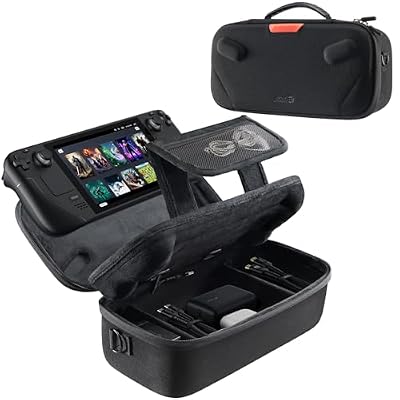
Every Deck ships with a carrying case, so a second case is only a gift if it beats the one in the box: a slimmer profile that fits a backpack, a hard shell that survives being packed under a laptop, or elastic loops for the charger, a spare card and earbuds. That last point is the real sell, because the stock case has no room for the power brick.
Screen protection splits by model. On the LCD Deck, tempered glass is cheap insurance and an easy win. On the OLED model with the etched anti-glare glass, sticking a plain protector on top undoes the coating the owner paid extra for, so either buy a protector specifically made to preserve the matte finish or skip it entirely. Confirm which screen they have before you buy, because this is the single most common return in the category.
Docks and TV Play
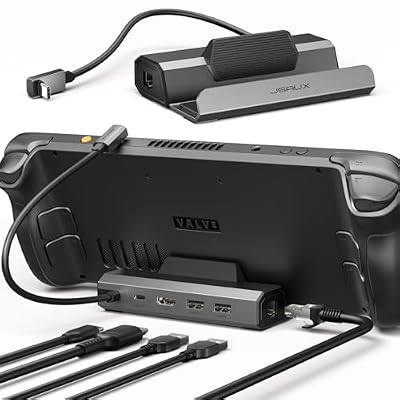
A dock turns the handheld into a small console, and for the right person it doubles how much the machine gets used. It only works if there is somewhere to dock it, so check for a free HDMI input first. A dock with HDMI, Ethernet and a couple of USB-A ports covers the realistic uses: couch play, wired downloads, and keyboard and mouse in desktop mode.
Two warnings. The dock must support power passthrough and be paired with a 45W charger, or the Deck slowly drains while it plays. And a cheap unbranded hub is the wrong economy: flaky hubs cause dropped video and USB disconnects that get blamed on the console. If they already own a laptop hub, a dock is duplicated spend and a wireless controller for couch play is better value.
Comfort for Long Sessions
The Deck is comfortable for its size but it is still a 1.4-pound slab held at arm’s length. Larger hands, and anyone doing three-hour sessions, benefit from a back grip that deepens the handles and shifts weight into the palm. Check case compatibility first, since most grips will not fit inside the stock case.
Thumbstick caps are the smallest useful gift on this list: a few dollars for more grip and a taller throw, which helps in shooters. Gel or silicone caps also take the wear that would otherwise land on the stock sticks. If the owner has already complained about drift, caps will not fix it; that is a hardware issue covered in our guide to fixing controller stick drift, and a repair kit or a warranty claim is the honest answer.
Audio Without the Lag
Bluetooth earbuds are a tempting gift and a frequent disappointment, because standard Bluetooth adds enough delay to make action games feel soft. The OLED revision has a newer radio and handles low-latency codecs noticeably better than the original LCD model. For an LCD owner, a headset with a 2.4GHz USB-C dongle is safer: near-wired latency, no pairing rituals, and it works on their PC too. The catch is that the dongle takes the only USB-C port. Wired earbuds with a 3.5mm plug remain the zero-risk option. Our gaming headset comparison covers the latency trade-offs in more detail.
Charging and Battery Life on the Road
Battery is the complaint you hear most on a long trip, and a power bank fixes it only if it is the right kind. The Deck charges properly from a USB-C PD bank delivering around 45W at 20V; a 20W phone bank trickle-charges at best and may only slow the drain while playing. Look for 20,000mAh with 45W or 65W PD, and note the 100Wh carry-on limit: 20,000mAh is fine, 30,000mAh usually is not.
A second, cheaper gift in the same lane is a compact 65W GaN charger with a long braided USB-C cable. It replaces the bulky stock brick, charges a laptop and phone too, and takes up less bag space. For someone who travels often, that is more useful day to day than another peripheral, and it slots neatly alongside other PC gaming gift ideas if you are building a bundle.
Cleaning and Maintenance
Unglamorous and genuinely appreciated. A handheld collects fingerprints, dust in the fan intake and grime around the sticks. A kit with microfiber cloths, screen-safe fluid, soft brushes and a bulb blower costs very little. Prefer a bulb blower to canned air, which can spin the fan too fast. On a machine two or more years old, a thermal pad and paste kit is a thoughtful gift for a confident owner and a terrible one for anyone else.
Budget Tier to Best Pick
If you want one decision rather than nine, work down this table by what you plan to spend. It holds up at any time of year, which matters because handheld accessories see their steepest discounts during holiday sales and mid-year sale events, and the right gift does not change just because the calendar did.
| Budget tier | Best single pick | Why it wins | Runner-up |
|---|---|---|---|
| Under $25 | Thumbstick caps plus a cleaning kit | Used constantly, impossible to already own too many | Tempered glass screen protector (LCD only) |
| $25–$50 | 512GB A2 microSD card | Solves the most common frustration immediately | Ergonomic back grip |
| $50–$100 | 1TB A2 microSD card or a hardshell travel case | Capacity or portability, whichever they complain about more | 65W GaN charger with long cable |
| $100–$150 | 45W+ USB-C PD power bank | Directly extends play time away from an outlet | Dock with HDMI and Ethernet |
| $150+ | 1TB or 2TB 2230 NVMe SSD | Biggest real upgrade, if they will do the install | Low-latency 2.4GHz wireless headset |
What to Avoid Buying
Some categories look like gifts and are not. Phone-style cooling clamps do little for a device with its own active cooling. Generic accessory bundles pad the box with stickers and adapters nobody uses. Charging cradles not rated for the right wattage cause more headaches than they solve. An external hard drive is a poor fit, because the single USB-C port is needed for power. If nothing above fits, a Steam gift card genuinely is the better gift, and pairing it with a note about a specific game stops it feeling like a cop-out. If you are shopping for the whole setup rather than the handheld alone, our gaming desk setup ideas cover the surrounding gear.
Frequently Asked Questions
What is the best gift for someone who already owns a Steam Deck?
A 512GB or 1TB A2-rated microSD card is the highest-hit-rate present, because storage is the constraint nearly every owner runs into within a few months. If you know they already have plenty of space, a 45W USB-C power bank or a hardshell case with room for the charger are the next safest choices, and neither depends on knowing which model they own.
Do I need to know whether they have the LCD or OLED model?
For most gifts, no. Cards, cases, grips, power banks and docks work across both models, since the external dimensions and ports are effectively the same. The exception is the screen protector: the OLED model with the premium etched anti-glare glass should not have a standard protector applied over it, because that cancels the matte coating. Ask before you buy anything that sticks to the display.
Is a microSD card really better than an external SSD?
For this device, yes, in almost every case. The handheld has one USB-C port that is also the charging port, so an external drive means either playing untethered or juggling a hub. A card sits flush, draws negligible power, and loads games fast enough that the difference is a few seconds at launch rather than anything you feel while playing.
How much should I spend on a power bank for handheld gaming?
Expect to spend more than you would on a phone bank. The key spec is USB-C Power Delivery output around 45W at 20V, not the milliamp-hour figure alone, because a high-capacity bank with only 18W output will barely keep pace while a game is running. A 20,000mAh bank with 45W to 65W PD is the sweet spot and stays under airline carry-on limits.
Are docks worth buying as a gift, or should I let them choose?
Buy one only if you know they have a free TV or monitor input and want to play on it. A dock is excellent for the person who wants a console-plus-desktop setup and dead weight for someone who only plays in bed. If you are unsure, a good charger or a case gets used daily regardless of how they play, and costs less to get wrong.
















