

Short answer: For most people the standard Xbox Wireless Controller is still the right buy – it is the cheapest route to flawless console and PC compatibility. Step up to the Elite Series 2 only if you will genuinely use the paddles. If stick drift is your real fear, buy a third-party pad with hall-effect or TMR sticks.
- Xbox Controller 2026: What Actually Changed
- The Standard Xbox Wireless Controller: The Default, And Its Gaps
- Elite Series 2: Is The Price Actually Justified?
- Third-Party Pro Controllers: Where They Beat First-Party
- Wired Vs 2.4 GHz Dongle Vs Bluetooth
- Hall-Effect And TMR Sticks: The Real Answer To Drift
- PC Compatibility Quirks Worth Knowing
- Batteries, Warranty And Support Reality
- Full Comparison Table
- Your Situation, Your Pick
- Frequently Asked Questions
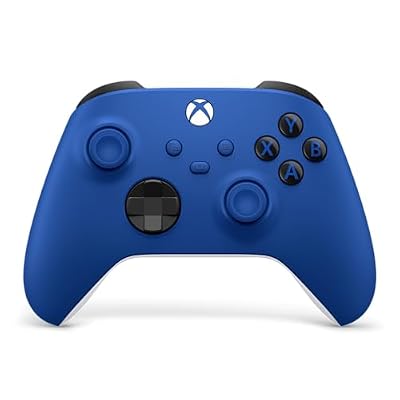


Quick answer: Our top pick in 2026 is the Xbox Wireless Controller — our #1 rated choice. See the full ranked comparison, alternatives and buying advice below.
Xbox Controller 2026: What Actually Changed
The pad in the box has barely moved in five years. What changed is everything around it. Licensed third-party controllers now ship with magnetic sensor sticks, four or more remappable back buttons, swappable stick tops, hair-trigger stops and high polling rates over a 2.4 GHz dongle – features neither first-party Xbox pad offers.
So the question in 2026 is not “Elite or standard?” but “where on the ladder do I get off?” There are four rungs: the standard pad, the Elite Series 2, licensed third-party pro controllers, and cheap wired pads. Each solves a different problem, and paying more only helps if you have that problem. Our guide to building a gaming PC covers where a controller fits into the wider budget.
The Standard Xbox Wireless Controller: The Default, And Its Gaps
This is the pad Microsoft ships with every Series X and Series S, and it is still the most compatible controller on the planet. It speaks the proprietary Xbox Wireless protocol to consoles, Bluetooth to PCs and phones, and USB-C when plugged in. Windows, Steam, Game Pass, cloud streaming and virtually every PC game treat it as the reference device – no driver hunting, no “unsupported controller” prompt. That is worth more than most spec-sheet features.
What it lacks is specific. No back paddles. No trigger stops, so shooters demand a full trigger pull where a shorter throw would be faster. The sticks are conventional potentiometer units, so they wear and can eventually drift. It runs on two AA batteries – no internal cell, no cradle. And there is no tuning beyond basic remapping in the Xbox Accessories app. For couch co-op, single-player games and anything that is not a competitive shooter, none of that matters.
Elite Series 2: Is The Price Actually Justified?
The Elite Series 2 is a genuinely different object. Four metal paddles clip into the back, the thumbsticks swap between three heights and have adjustable tension, the triggers have three physical lock positions, and an internal rechargeable battery rated around 40 hours charges on the included dock. Profiles are stored on the controller, so your paddle map follows you to a friend’s console.
Two caveats decide whether it is worth it. Paddles are a skill investment – if you never learn to jump or crouch without leaving the stick, you have bought an expensive standard controller. And reliability: early Elite Series 2 units earned a reputation for stick drift and bumper failure, enough that Microsoft extended the warranty to one year and faced a US class-action complaint. Later runs are better, but the sticks are still conventional. You are paying premium money for a pad that can still drift.
The cheaper Core version drops the carry case, dock and extra components. If you want the ergonomics and paddles and already own a USB-C cable, Core is the smarter buy. Read our notes on fixing controller stick drift before you assume a drifting pad is dead.
Third-Party Pro Controllers: Where They Beat First-Party
Is The GameSir G7 Pro Good For Xbox?
Yes, with one structural caveat. The G7 Pro is an officially licensed Xbox controller built around TMR thumbsticks and hall-effect triggers, with four back buttons, swappable stick tops and an app for deadzones and curves – on paper it out-specs the Elite Series 2 for well under Elite money. The caveat is connection: licensed third-party pads generally connect to an Xbox console over USB-C, with the dongle and Bluetooth reserved for PC and mobile. If you need wireless on the console, that is disqualifying; at a desk it is irrelevant.
Razer Wolverine V3 Pro: Wired Vs Wireless
Razer sells the Wolverine V3 in two tiers, and the difference is the single most searched question about it. The Tournament Edition is wired-only and cheaper. The V3 Pro adds Razer’s HyperSpeed 2.4 GHz wireless with a USB dongle, plus mecha-tactile face buttons, six remappable extra inputs and hair-trigger mode. Practically: on Xbox you will be plugged in either way; the Pro’s wireless mode is for PC, where it runs at high polling rates without Bluetooth’s jitter. Buy the Pro if you play on PC from a couch, buy the Tournament Edition if your Xbox sits two feet from your hands. Check the exact SKU’s stick technology on the box – Razer’s newer revisions have been moving to magnetic sensors, and older stock on shelves may not have them.
Turtle Beach And PowerA
Turtle Beach’s Stealth Ultra is the kitchen-sink option: a small Command Display on the controller face for remapping without an app, a swappable power pack, four back buttons and a 2.4 GHz transmitter. It is heavy and expensive, but the on-pad screen removes real friction. PowerA sits at the opposite end – wired pads with paddles and a price that makes a spare painless. That is the right answer for kids and guest controllers.
Wired Vs 2.4 GHz Dongle Vs Bluetooth
These three are not interchangeable. USB-C wired is the lowest and most consistent latency, needs no charging and never drops out – the reason tournament pads are wired. A 2.4 GHz dongle is close behind and is what you want for wireless play on PC. Bluetooth is the most convenient and worst performing: higher latency, more variance, more interference. On console, Xbox Wireless sits between the two and is fine for everything short of ranked shooters. The same logic applies to wireless versus wired gaming mice.
Hall-Effect And TMR Sticks: The Real Answer To Drift
Traditional sticks use potentiometers – physical contacts wiping across a resistive track. That track wears, the reading drifts, and your character walks on its own. Hall-effect sticks replace contact with a magnet and a sensor, so nothing rubs and there is nothing to wear out. TMR (tunnelling magnetoresistance) sticks are the newer evolution: same contactless principle, finer resolution and lower power draw, which matters in a wireless pad.
This is the single most important spec on a 2026 controller and the one Microsoft still does not offer on either first-party pad. If longevity is what you are buying, that alone pushes you toward a magnetic-stick third-party pad. It is not a gimmick – it removes the most common failure mode outright.
PC Compatibility Quirks Worth Knowing
Current Xbox controllers – model 1914 and the Series X|S pad – include Bluetooth and pair with Windows directly. The original Xbox One controllers, models 1537 and 1697, have no Bluetooth radio and require the Xbox Wireless Adapter for Windows. If a used controller refuses to appear over Bluetooth, that is why, not a fault. Third-party pads with their own dongle sidestep the issue entirely, and Steam’s controller layer remaps anything that enumerates as an Xbox device – handy when picking a PC controller or using our Steam Deck controller notes.
Batteries, Warranty And Support Reality
First-party pads take AAs, which is a downside or a feature depending on your view – a dead pad is fixed in ten seconds with two cells from a drawer. Rechargeable NiMH cells are the cheapest long-term fix; the Play & Charge Kit adds a sealed pack; the Elite has an internal cell and dock. An internal battery is a wear item you cannot replace without opening the shell, which is a real argument for AAs in a pad you plan to keep for years.
On support: Microsoft’s US hardware warranty runs one year and its RMA process is straightforward but slow. Third-party warranties are typically one to two years, and quality varies more by brand than by price – the larger brands have functioning support channels, smaller ones often do not. Keep receipts.
Full Comparison Table
| Controller | Connection | Sticks | Paddles | Battery | PC support | Best for |
|---|---|---|---|---|---|---|
| Xbox Wireless Controller | Xbox Wireless, Bluetooth, USB-C | Potentiometer | None | 2x AA | Native (BT or adapter) | Almost everyone |
| Xbox Elite Series 2 | Xbox Wireless, Bluetooth, USB-C | Potentiometer, adjustable tension | 4 metal | Internal, ~40h, dock | Native | Paddle users on console |
| Elite Series 2 Core | Same as Elite | Same as Elite | Sold separately | Internal, no dock | Native | Elite feel on a budget |
| GameSir G7 Pro | USB-C on Xbox; 2.4 GHz / BT on PC | TMR | 4 | Internal (wireless modes) | Dongle or Bluetooth | Drift-proofing at a fair price |
| Razer Wolverine V3 Pro | 2.4 GHz HyperSpeed, USB-C | Check SKU | 6 extra inputs | Internal | Dongle, high polling | Competitive shooters |
| Razer Wolverine V3 TE | USB-C wired only | Check SKU | 6 extra inputs | None (wired) | Wired | Desk-bound tournament play |
| Turtle Beach Stealth Ultra | 2.4 GHz transmitter, USB-C | Standard | 4 | Swappable power pack | Dongle | On-pad remapping, no apps |
| PowerA Fusion / Enhanced Wired | USB-C wired | Standard | 2-4 (Fusion) | None (wired) | Wired | Spares, kids, second pads |
Your Situation, Your Pick
| Your situation | Buy this | Why |
|---|---|---|
| You just want a controller that works everywhere | Standard Xbox Wireless Controller | Nothing else matches its compatibility per dollar |
| You play ranked shooters on console | Elite Series 2 or Wolverine V3 | Paddles plus trigger stops are a measurable advantage |
| You have had two pads drift already | A TMR or hall-effect pad (e.g. GameSir G7 Pro) | Contactless sticks remove the failure mode entirely |
| You play PC at a desk | Any wired pro controller | Wired is the lowest latency and cheapest tier |
| You play PC from the couch | Dongle-based wireless, not Bluetooth | 2.4 GHz avoids Bluetooth jitter and dropouts |
| You need a second pad for guests | PowerA wired | Costs a fraction, and nobody cries when it breaks |
| You hate configuration apps | Turtle Beach Stealth Ultra | Remapping happens on the controller’s own screen |
Whichever you land on, pair it with a decent cable and a headset you can stand for three hours – our gaming headset picks and Game Pass on PC guide cover the rest of the setup.
Frequently Asked Questions
Do I need the Xbox Wireless Adapter for Windows?
Only if your controller has no Bluetooth radio. The Xbox Series X|S pad and the later Xbox One model 1914 pair with Windows over Bluetooth directly. The original Xbox One controllers, models 1537 and 1697, have no Bluetooth at all and need the adapter or a USB cable. The adapter also supports more simultaneous controllers and chat audio than Bluetooth does, which matters for local multiplayer.
Is the GameSir G7 Pro good for Xbox specifically?
It is a strong choice if you are happy playing wired on the console. It is officially licensed, so it works without workarounds, and its TMR sticks and hall-effect triggers are technically ahead of anything Microsoft sells. The limitation is that licensed third-party pads typically connect to the Xbox itself over USB-C, with wireless modes reserved for PC and mobile. Desk players lose nothing; couch players should check before buying.
Should I buy the Razer Wolverine V3 Pro wired or wireless?
Buy the wired Tournament Edition if you sit close to the console or PC, because wired is the lowest-latency connection and you save meaningful money. Buy the V3 Pro if you want HyperSpeed 2.4 GHz wireless for PC play from a sofa, or you simply dislike cables. On an Xbox console you will most likely be plugged in regardless, so the wireless premium mainly buys PC freedom.
Does the Elite Series 2 still get stick drift?
It can. The Elite Series 2 uses conventional potentiometer thumbsticks, the same underlying technology that drifts in every other controller, and early production units had a poor enough record that Microsoft extended the warranty and faced a US class-action complaint. Later units are more reliable and the sticks are user-swappable for tension, but if drift-proofing is your priority, a hall-effect or TMR pad is the safer purchase.
Are hall-effect and TMR sticks worth paying extra for?
For most buyers, yes. Both replace wiping physical contacts with a magnet and sensor, so the most common controller failure mode simply cannot occur through wear. TMR is the newer of the two, offering finer resolution and lower power draw, which helps battery life in wireless pads. The added cost is usually modest, and it often means the controller outlives two conventional ones.
Ready to decide? Our #1 pick for 2026 is the Xbox Wireless Controller.
Live price & availability on Amazon.


