

The best multi-button MMO gaming mouse for most players is a 12-button thumb grid like the Razer Naga V2 Pro or Corsair Scimitar Elite, because a 3×4 grid maps a full hotbar without moving your hand. If you only use 6-8 abilities, a 6-button side panel is faster to learn and far less error-prone.
- How Many Side Buttons Do You Actually Need?
- Why More Buttons Is Not Automatically Better
- Button Quality, Actuation and Switch Feel
- Weight: The Spec MMO Buyers Underrate
- Grip Style and Hand Size Fit
- Wired vs Wireless for MMOs
- Comparison: Multi-Button MMO Mice Worth Buying in 2026
- Software and Per-Game Profile Switching
- Using an MMO Mouse Outside MMOs
- Frequently Asked Questions
The reason people keep searching for a multi button MMO gaming mouse is that the button count on the box is the least useful number in the spec sheet. This guide is organised the way you should actually shop: by how many side buttons you can genuinely reach, hit blind, and remember under pressure.


As an Amazon Associate we earn from qualifying purchases at no extra cost to you.

How Many Side Buttons Do You Actually Need?
Start here, before you look at a single product page. The question is not “how many buttons does this mouse have” but “how many abilities do I press more than once a minute?” Open your MMO, look at your main action bar, and count the keys you press without thinking. That number, plus two, is your target.
| Your play style | Side buttons to target | Layout | Why |
|---|---|---|---|
| Casual MMO, questing, 4-6 core abilities | 2-6 | Standard or 2×3 pad | A normal gaming mouse plus keyboard is fine; a grid is wasted weight |
| Dungeons, rotation of 8-10 abilities | 6-9 | 2×3 or 3×3 | Every button is reachable without shifting grip; muscle memory settles in days |
| Raiding, healing, 12+ abilities plus consumables | 12 | 3×4 thumb grid | Mirrors a hotbar 1-12; shift modifiers give you 24-36 bound actions |
| ARPGs, flight sims, productivity macros | 6-12 | Grid with per-profile software | You want density, but you switch contexts often, so profiles matter more than raw count |
| Competitive FPS on the same mouse | 2-6 | Lightweight, low-profile side | A 12-key grid is a misclick farm when you are flicking and strafing |
The 12-button grid
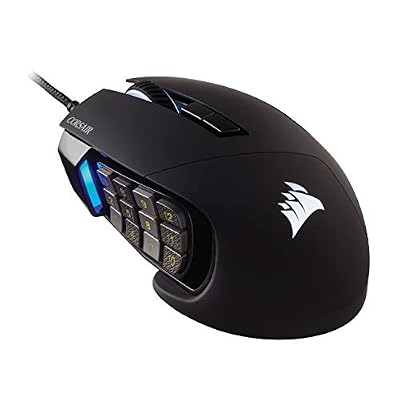
The 3×4 thumb grid is the classic MMO layout, made famous by the Razer Naga line and matched by the Corsair Scimitar. Its real advantage is spatial: your thumb learns rows and columns, not individual keys. The top row is usually your highest-value abilities because it is the easiest to find. The bottom row, closest to the desk, is the hardest to reach and should hold things you press deliberately rather than reflexively, like mounts or consumables.
The 6-button and 9-button layouts
A 2×3 or 3×3 pad is the sweet spot for most people who are not raid-logging. You keep the useful part of the grid, lose the two rows you would fumble, and usually gain 20-40 grams of lightness. The Razer Naga V2 Pro leans into this by shipping swappable side plates (2-button, 6-button and 12-button), which is the single most honest feature in the category: Razer is admitting that 12 is not right for everyone.
Why More Buttons Is Not Automatically Better
Two things go wrong with high button counts, and neither shows up in a spec comparison.
The first is muscle memory debt. A 12-button grid takes roughly one to two weeks of daily play before your thumb stops hunting. During that period you will be slower than you were on keyboard binds. Most people who return an MMO mouse do it inside that window. If you buy one, commit to the adjustment period or you have wasted the money.
The second is misclicks, and they are layout-dependent. Grids with flat, uniformly shaped keys are the worst offenders. Good designs fight this with physical differentiation: Corsair’s Scimitar uses a raised bar between key columns and a Key Slider mechanism that moves the whole grid up to 8mm forward or back to fit your thumb length. Razer’s newer Nagas texture and angle the keys so rows feel different under the thumb. If you can only test one thing in a store, close your eyes and try to find the middle row.
The practical fix is to leave the bottom row empty or fill it with harmless binds for the first month. You get a 12-button mouse with 8-button risk, and you can grow into the rest. The same logic applies when you are choosing sensible DPI settings rather than chasing the highest number on the box.
Button Quality, Actuation and Switch Feel
The main left and right switches on any decent MMO mouse are fine now; optical switches on the Naga V2 Pro and Scimitar Elite Wireless remove double-click failure as a long-term worry. Side buttons are where budget models cut corners. Cheap grids use mushy membrane-backed keys with a long, vague travel, and the result is that you never quite know whether an ability fired. Look for side buttons with a defined click, short travel, and an audible actuation you can feel through a thumb pad.
Actuation force matters more on a grid than on a two-button side panel, because your thumb rests on the grid constantly. Too light and you fire abilities by leaning; too heavy and a long boss fight becomes tiring. Mid-weight tactile keys are the target.
Weight: The Spec MMO Buyers Underrate
MMO mice are heavy. A fully featured wireless 12-button model sits around 110-135g, against 55-70g for a modern lightweight competitive mouse. For a genre where you rarely flick, weight is not a precision problem, it is a fatigue problem. Three hours into a raid night, a 135g mouse being dragged across a mousepad is felt in the wrist and forearm.
This is why the sub-100g models matter. The SteelSeries Aerox 9 Wireless gets a 12-button grid near 89g with a perforated shell; the Razer Naga V2 HyperSpeed runs a single AA battery at roughly 95g. You trade some build density, and on the Aerox some spill resistance, for a mouse you can use all evening.
Grip Style and Hand Size Fit
Almost every MMO mouse is a right-handed palm-grip shape, and that is not an accident: a thumb grid needs a hand resting in a fixed position. If you are a claw or fingertip gripper, your thumb sits further back and the bottom rows become unreachable. Claw grippers should either buy a mouse with an adjustable grid position (Corsair’s Key Slider) or drop to a 6-button layout.
Hand length is the other filter. Under about 17cm, a full-size Naga or Scimitar will force you to stretch for the top row; the smaller Naga X or a 6-button design is the better call. Over about 19cm, the compact models leave your palm unsupported. Measure from wrist crease to middle fingertip before you buy, the same way you would when setting up an ergonomic desk position.
Wired vs Wireless for MMOs
MMOs are the genre where wireless is easiest to justify. You are not making 40cm flick shots, so the marginal latency difference between a good 2.4GHz dongle and a cable is irrelevant to your gameplay. What you gain is no cable drag on a heavy mouse, which directly reduces the fatigue problem above.
The counter-argument is cost and cell weight. A wired Scimitar or Logitech G600 gives you the same grid for less money and never dies mid-pull. With a cable bungee, wired is a rational choice here in a way it is not in competitive wireless shooters.
Comparison: Multi-Button MMO Mice Worth Buying in 2026
| Mouse | Side buttons | Weight | Connection | Sensor | Hand size | Best for |
|---|---|---|---|---|---|---|
| Razer Naga V2 Pro | 2 / 6 / 12 (swappable plates) | ~134 g | Wireless (HyperSpeed + BT) / wired | Focus Pro 30K optical | Medium-large | Players who want to change layouts per game |
| Corsair Scimitar Elite Wireless SE | 12 (Key Slider adjustable) | ~114 g | Wireless (Slipstream + BT) / wired | Marksman 26K optical | Medium-large | Best grid feel and thumb-position fit |
| Razer Naga V2 HyperSpeed | 12 | ~95 g | Wireless (HyperSpeed + BT), AA battery | Focus Pro 30K optical | Medium-large | Long battery life at lower weight |
| SteelSeries Aerox 9 Wireless | 12 | ~89 g | Wireless (2.4GHz + BT) / wired | TrueMove Air optical | Medium | Lightest full grid; long sessions |
| Corsair Scimitar RGB Elite | 12 (Key Slider adjustable) | ~122 g | Wired | 18K optical | Medium-large | Best value 12-button grid |
| Razer Naga X | 12 | ~85 g | Wired | 18K optical | Small-medium | Smaller hands and tighter budgets |
| Logitech G600 | 12 + G-Shift ring finger button | ~133 g | Wired | 8200 DPI optical | Large | Maximum bind count via G-Shift doubling |
| Roccat Kone XP | 4 side + Easy-Shift layer | ~104 g | Wired | Owl-Eye 19K | Medium-large | Players who want density without a grid |
Two picks deserve a caveat. The Logitech G600 is old hardware with a dated sensor and a heavy shell, and only makes sense if you specifically want its G-Shift ring-finger button that doubles every bind. The Aerox 9’s perforated shell is lighter but exposes internals to dust and drink spills, so skip it if you eat at your desk.
Software and Per-Game Profile Switching
A 12-button mouse is only as good as the software driving it, because you will want different maps per game. The three things to check: whether profiles can auto-switch based on the running executable, whether bindings are stored in onboard memory so they survive a reinstall or a different PC, and whether the software can send macros and keystroke combinations rather than just single keys.
Razer Synapse, Corsair iCUE and Logitech G HUB all auto-switch. Onboard memory varies: Razer and Corsair store several profiles on the mouse itself, which matters if you dislike leaving a large RGB utility running. To avoid vendor software entirely, bind the side buttons to F13-F24 and let each game handle it, a trick that also works when building macros on a gaming keyboard.
Using an MMO Mouse Outside MMOs
The grid is genuinely useful beyond raids. ARPGs like Diablo IV and Path of Exile map skills, potions and movement onto the thumb neatly. Flight and space sims turn the grid into a landing-gear, flaps and countermeasures panel. Editing work is where many owners end up using them most: cut, copy, paste, undo, timeline scrub and tool switching in Premiere, Blender or Photoshop each save a reach across the keyboard. If you work and play on the same machine, that dual use is often what justifies the price.
Where it does not belong is competitive FPS. The weight and the grid both work against you, and the mouse you want there is covered in our FPS mouse guide.
Frequently Asked Questions
How long does it take to learn a 12-button MMO mouse?
Expect one to two weeks of daily play before your thumb stops hunting for keys, and roughly a month before the bottom row feels automatic. The fastest way through it is to bind only the top two rows at first, play normally until those are reflexive, then add the third and fourth rows. Trying to learn all twelve at once usually ends with people giving up in the first three days.
Is a heavier MMO mouse actually a problem?
For accuracy, no; MMO aiming is slow and the sensor does the work. For fatigue, yes. A 130g mouse dragged around for a three-hour raid session is noticeably more tiring on the wrist and forearm than a 90g one, especially at low DPI where you move the mouse further. If you play long sessions, prioritise sub-100g models like the Naga V2 HyperSpeed or Aerox 9 over the heaviest flagships.
Should I get wired or wireless for MMO gaming?
Wireless is easy to recommend here because the genre does not need sub-millisecond flick precision, and removing cable drag on a heavy mouse genuinely reduces fatigue. The trade-offs are price and battery weight. If you play at a fixed desk, a wired Corsair Scimitar RGB Elite gives you the same grid for considerably less money and never runs out of charge halfway through a boss encounter.
Can I use an MMO mouse for FPS games too?
You can, but it is the wrong tool. The weight slows flicks, and a 12-key grid sitting under a thumb that needs to move quickly is a reliable source of misclicks mid-fight. If you play both genres seriously, the better answer is two mice, or a model with swappable side plates like the Naga V2 Pro so you can drop to a two-button panel for shooters.
Do I need the manufacturer’s software running all the time?
Usually not. Most modern MMO mice store at least one profile in onboard memory, so your bindings survive a reboot without the utility running. You lose automatic per-game profile switching and RGB sync. A common workaround is to bind the side buttons to F13-F24 in the software once, save to onboard memory, close the utility, and configure the keys inside each game.
















