- Top Pick: Thermalright Assassin X120 Refined SE CPU Air Cooler, 4 Heat Pipes, TL-C12C PWM Fan, Aluminium Heatsink Cover, AGHP Technology, for AMD AM4/AM5/Intel LGA 1150/1151/1155/1200/1700/1851(AX120 R SE)
- Best Value: Thermalright Peerless Assassin 120 SE CPU Cooler, 6 Heat Pipes AGHP Technology, Dual 120mm PWM Fans, 1550RPM Speed, for AMD:AM4 AM5/Intel LGA 1700/1150/1151/1200/1851,PC Cooler
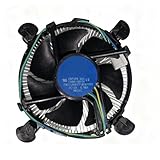
- Premium Choice: i3/i5/i7 LGA115x CPU Heatsink- Compatible with Intel CPU Cooler Aluminum Heatsink for LGA1200 LGA1151 LGA1150 LGA1155 LGA1156- for Intel E97379-003 For Desktop 4-Pin Connector CPU Cooler With Aluminum
Picking a cooler for a Core i5 comes down to two questions that have nothing to do with brand loyalty: which socket does the board use, and how much heat will the chip actually make? An i5 spans many generations, from LGA 1150 and 1155 boards still in service to LGA 1700 and the newer LGA 1851, and the mounting hardware changes along the way. A cooler that fits one generation can be useless on the next.
This guide is for people replacing a noisy boxed heatsink, upgrading an older desktop, or building a new mid-range i5 system in 2026. The list runs from small stock-style aluminum heatsinks to dual-fan towers, and every note comes from what each product listing says, so confirm the socket line on the live page before you order.
Quick Picks
As an Amazon Associate we earn from qualifying purchases at no extra cost to you.






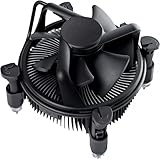


| Product | Best for | Key spec from the title |
|---|---|---|
| Thermalright Assassin X120 Refined SE | Slim single-tower upgrade | 4 heat pipes, PWM fan, LGA 1700 and 1851 listed |
| Thermalright Peerless Assassin 120 SE | Maximum air cooling | 6 heat pipes, dual 120mm PWM fans, 1550RPM |
| LGA115x i3/i5/i7 heatsink | Older 115x boards | Aluminum heatsink, LGA1200 through 1156 |
| LGA1700 i5 cooler | Alder and Raptor Lake i5 | Up to 65W, 12th and 13th gen |
| LGA1151 PWM heatsink | Quiet-minded 115x swap | 4-pin PWM, 3.5-inch fan |
| Intel E97379-003 | Like-for-like stock swap | Sockets 1150/1155/1156, 4-pin connector |
| ID-COOLING SE-903-XT V2 | Compact tower | 3 heatpipes, 150W, 100mm PWM fan |
| Copper-core LGA1200 heatsink | 10th and 11th gen i5 | Copper core, aluminum fins, up to 65W |
| Jonsbo CR-1200 RGB | Low-profile RGB build | 92mm fan, 128mm height, Intel and AMD |
| Gamma A40 ARGB | All-black compact tower | 133mm tower, 100mm PWM fan, 4 heatpipes |
How to Choose
Start with the socket, not the cooler
Find your board’s socket name before anything else. LGA 1700 covers 12th through 14th generation parts, LGA 1200 covers 10th and 11th, and LGA 115x covers the older run. Several listings name only some of these sockets, so a cooler marked for LGA1151 will not suit a 12th generation i5. A tower that lists 1700 and 1851 together is the safer bet for a new build.
Match the cooler to the chip’s heat output
A typical non-K i5 is rated around 65W at base, and two of the plain heatsinks here advertise exactly that ceiling. Unlocked K-series chips can draw considerably more under load, and for those a tower with several heat pipes makes more sense. The ID-COOLING lists 150W, which gives clear headroom for a mid-range i5 under sustained work.
Check height and fan size against your case
Towers need vertical room. The Jonsbo lists 128mm of height and the Gamma lists 133mm, while dual-fan designs add width and may collide with tall memory modules. Measure the clearance from the CPU socket to the side panel, and confirm the first memory slot is not blocked by the fan.
Fans, noise, and what to ignore
A 4-pin PWM fan can slow down at idle, which keeps a desktop quieter than a fixed-speed one. Larger fans generally move the same air at lower speed. Ignore RGB when you compare cooling, because lighting adds no cooling, and be careful with listings that mention a socket family but never state a power limit.
The 10 Best Options
Thermalright Assassin X120 Refined SE
A single-tower design with four heat pipes, AGHP technology, a TL-C12C PWM fan, and an aluminium heatsink cover. The title lists AMD AM4 and AM5 along with Intel LGA 1150, 1151, 1155, 1200, 1700, and 1851, which spans nearly every i5 generation. That breadth means one cooler can follow you from an older board to a new one if you rebuild later.
- Strength: Wide Intel socket list suits both old and new boards.
- Strength: A PWM fan lets the speed follow load.
- Trade-off: Four heat pipes are fewer than the larger Peerless Assassin.
Skip it if you want dual fans or a stack of extra heat pipes.
Thermalright Peerless Assassin 120 SE
This is the heavyweight of the list, with six heat pipes, AGHP technology, and dual 120mm PWM fans spinning up to 1550RPM. Intel LGA 1700, 1150, 1151, 1200, and 1851 are named alongside AMD AM4 and AM5. Buyers who want the quietest operation at a given load often prefer two large, slower fans over one small one, and this is the design that allows it.
- Strength: Dual fans and six heat pipes give it the most cooling hardware here.
- Strength: Good fit for an overclocked or K-series i5.
- Trade-off: The dual-fan layout needs more clearance around memory and the case panel.
Skip it if your case is small or your i5 is a modest 65W part.
Plain LGA115x i3/i5/i7 heatsink
An unbranded aluminum heatsink listed for LGA1200, 1151, 1150, 1155, and 1156, described as an Intel E97379-003 style with a 4-pin connector. It is aimed at older desktops where the original cooler died or got lost. It is a repair part more than an upgrade, and it makes sense for a basic office or media machine.
- Strength: Covers five Intel sockets in one listing.
- Strength: Simple aluminum construction with no extras to fail.
- Trade-off: The title gives no wattage or fan speed, so heavy loads are a guess.
Skip it if you have an unlocked chip or plan a 12th generation board.
LGA1700 i5 cooler for Alder and Raptor Lake
Written for LGA1700, this aluminum heatsink with a copper element targets 12th generation i3 and i5 and 13th generation parts, with the i5-12400 named directly. The title states up to 65W and a 12V 0.60A fan. That makes it a direct answer for anyone who bought a locked, non-K i5 and wants a clean replacement for a failed boxed unit.
- Strength: The socket and wattage are spelled out clearly.
- Strength: Naming the i5-12400 removes guesswork about intended use.
- Trade-off: Capped at 65W, leaving little room for unlocked chips.
Skip it if your i5 is a K-series part or you want quiet operation under load.
LGA1151 PWM aluminum heatsink with 3.5-inch fan
An i3/i5/i7 aluminum heatsink in the Intel E97379-003 style for LGA1151, 1150, 1155, and 1156, with a 4-pin PWM 3.5-inch fan. It targets small desktop builds that want a stock-sized replacement. The PWM wire is the useful detail, since a three-pin fan would stay at one speed regardless of temperature.
- Strength: A 4-pin PWM fan allows speed control from the motherboard.
- Strength: Stock-sized dimensions suit small older cases.
- Trade-off: A 3.5-inch fan has to spin faster, so noise can rise under load.
Skip it if your board is LGA1200 or newer, because 1200 is not named.
Intel E97379-003
The named Intel part for Core i3/i5/i7 on sockets 1150, 1155, and 1156, with an aluminum heatsink, a 3.5-inch fan, and a 4-pin connector. It is the most literal stock-style swap in the group. If you are matching a part number from a failed original, this is the entry that lines up most directly.
- Strength: A recognizable part number simplifies matching it to an older board.
- Strength: Designed around the original stock form factor.
- Trade-off: Limited to three older sockets.
Skip it if your system is anything newer than the 1150 to 1156 family.
ID-COOLING SE-903-XT V2
A compact black tower with three direct-touch heatpipes, a 100mm PWM fan, and a 150W figure. The title says it works with Intel and AMD platforms, though it does not list socket names, so check compatibility on the page. Its appeal is the combination of a slim 100mm fan with direct-touch heatpipes, which is a layout used to improve heat transfer from the chip.
- Strength: A 150W figure suits an i5 with room to spare.
- Strength: Direct-touch heatpipes and a PWM fan in a compact body.
- Trade-off: The socket list is not spelled out in the title.
Skip it if you want a mounting guide for LGA1851 confirmed up front.
Copper-core LGA1200 heatsink
A copper core inside an aluminum body, with a fan, for LGA 1200, 1151, 1150, 1155, and 1156, with 10th and 11th generation chips mentioned. The title states up to 65W. It is aimed at buyers who want something more substantial than a thin aluminum block but do not need a full tower.
- Strength: The copper core suits a standard i5 better than all-aluminum designs.
- Strength: Covers five Intel sockets.
- Trade-off: The 65W cap rules out heavy sustained loads.
Skip it if you have a 12th generation or newer board.
Jonsbo CR-1200 RGB
A 92mm RGB fan on a heatsink that stands 128mm tall, listed for Intel LGA 115X, 1200, and 1700 plus AMD AM4 and AM5. The sleek look fits a tidy small-form-factor build, and the RGB fan matches a themed case. Check the 128mm height against your side panel before ordering.
- Strength: Moderate height clears many compact cases.
- Strength: Covers both brands across recent sockets.
- Trade-off: A 92mm fan moves less air per revolution than a 120mm one.
Skip it if you do not want lighting or need LGA1851 support.
Gamma A40 ARGB
An all-black compact tower at 133mm, with a 100mm PWM fan, four 6mm heatpipes, and an ARGB top cover. It supports Intel LGA 115X, 1200, 1700, and 1851 plus AMD AM4 and AM5. The all-black styling lets it blend into a dark case, with the ARGB cover as the one visible accent.
- Strength: Names LGA1851 and the 115X family in one compact tower.
- Strength: Four heatpipes and a PWM fan balance size and capability.
- Trade-off: The ARGB top cover is cosmetic rather than a cooling feature.
Skip it if you want a plain, unlit finish.
Which One Fits Your Situation
A new 12th to 14th generation i5 build
The Thermalright Assassin X120 Refined SE lists LGA 1700 and 1851, so it is the sensible tower for a fresh system.
A hot, unlocked i5 and a roomy case
The Thermalright Peerless Assassin 120 SE brings the most cooling hardware, with six heat pipes and two fans.
An aging office PC with a dead stock fan
The Intel E97379-003 or the LGA1151 PWM heatsink is the like-for-like swap, as long as your socket falls in the 1150 to 1156 range.
A small case with a tidy look
The Gamma A40 ARGB or the ID-COOLING SE-903-XT V2 offer compact towers with 100mm PWM fans.
Common Mistakes
- Buying a cooler for the wrong socket because the chip name says i5 and nothing else.
- Ignoring tower height and then finding the side panel will not close.
- Pairing a 65W-rated heatsink with an unlocked i5 pushed past stock settings.
- Counting RGB as a cooling feature when it adds only lighting.
- Forgetting thermal paste and a mounting backplate check before opening the case.
Related guides
- Combination Smoke And Carbon Monoxide Detectors
- Aio Liquid Coolers For High Performance Gaming
- Graphics Cards For Low Wattage Power Supplies
Frequently Asked Questions
Can I use the same cooler on LGA 1700 and LGA 1200?
Only if the listing names both sockets. Mounting holes differ between the two, so look for a title that lists 1200 and 1700 together.
Is the stock cooler enough for an i5?
For a non-K i5 at default settings it can be adequate. Many buyers upgrade for lower noise rather than for raw cooling.
Does a bigger fan always mean better cooling?
Not always, but a larger fan can move similar airflow at lower speed, which tends to be quieter. Pair it with solid heat pipe contact for the best result.
Do I need new thermal paste?
Many coolers ship with paste or a pre-applied pad, but check the listing. Keep a small tube on hand in case you need to remount.