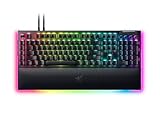
Razer’s BlackWidow line has been the default answer to “what gaming keyboard should I buy” for over a decade, and the 2026 BlackWidow V4 with green clicky switches is the full-size flagship that still anchors the lineup. It’s a big, heavy, unapologetically full-featured board built for players who want tactile feedback you can hear across the room and a chassis that won’t budge during a frantic clutch round.
We’ve spent several weeks typing, gaming, and streaming with this keyboard to see whether it still justifies its price against a much more crowded field of mechanical boards. Here’s where it stands in 2026.
As an Amazon Associate we earn from qualifying purchases at no extra cost to you.




⚡ Save on Your Next PC — Amazon Prime
Prime members get fast free shipping on the systems above, plus early access to Prime Day & Black Friday PC deals. New members get a 30-day free trial.
Watch: Razer BlackWidow V4 Review — Video Review
Design & Build
The BlackWidow V4 uses a top-mounted aluminum alloy plate over a full ANSI layout with dedicated media keys, a multi-function roller, and five macro keys along the left edge. At roughly 1.5 kg, it’s noticeably heavier than most 87-key boards, but that mass translates into a chassis that doesn’t flex or rattle even under hard key-slapping. The plastic used on the top shell still feels a step below the CNC-milled aluminum tops you’ll find on the BlackWidow V4 Pro, and the underside is standard ABS, so this isn’t a premium-metal build top to bottom. Per-key RGB with Razer Chroma is bright and evenly diffused through the doubleshot ABS keycaps, and the included magnetic wrist rest is genuinely comfortable for long sessions, though it doesn’t lock into place as securely as we’d like.
Performance
Razer’s green switches are the star here: a clicky, tactile design rated for roughly 60g of actuation force and a 1.9mm actuation point, with a satisfying, audible click that mechanical keyboard purists will recognize as a modern take on classic clicky switches. Typing feels crisp and precise, and the sound signature is loud enough that open-office use is a bad idea. For gaming, the 8000Hz polling rate (over the included wired connection) keeps input latency low, and the HyperShift feature lets you double up macros without cluttering the layout. The one real gaming-performance gap is the lack of analog or rapid-trigger switches, which competitors now offer at similar price points for faster in-game actuation. If you want that, you’d need to step up to the BlackWidow V4 Pro or look outside the Razer ecosystem entirely.
Pros & Cons
- Satisfying, loud tactile click that feels great for typing and casual gaming
- Sturdy aluminum-plate chassis with minimal flex
- Bright, well-diffused per-key Chroma RGB
- Dedicated media controls and macro keys are genuinely useful day to day
- Comfortable magnetic wrist rest included
- Heavy and large footprint, not ideal for small desks
- No analog/rapid-trigger switch option
- Wired only, no Bluetooth or 2.4GHz option on this model
- Click sound may be too loud for shared spaces
- Premium price relative to boards with hot-swap sockets
Alternatives to Consider
If you want the same switch feel with more portability, the BlackWidow V4 TKL Wireless drops the numpad and adds Bluetooth and 2.4GHz connectivity with orange tactile switches. Competitive players chasing faster actuation should look at the BlackWidow V4 Pro, which adds a command dial and refined build quality alongside yellow linear switches. And if desk space is tight but you still want the full BlackWidow feel, the BlackWidow V4 75% trims the layout without sacrificing the macro keys or media roller.
Frequently Asked Questions
Are the green switches good for gaming, not just typing?
Yes, though they’re better suited to games that don’t demand ultra-fast double-taps. The tactile bump and click add satisfying feedback for FPS and MOBA play, but competitive players chasing frame-perfect inputs may prefer the linear yellow switches on the BlackWidow V4 X or V4 Pro.
Is this keyboard too loud for shared living spaces?
Honestly, yes for some households. The clicky mechanism is audible several feet away, so if you share a room or stream with an open mic, consider the orange tactile switches on the BlackWidow V4 75% or TKL Wireless for a quieter alternative.
Does it support hot-swappable switches?
No, the standard BlackWidow V4 uses soldered switches, so you can’t swap in different mechanisms later. If modding matters to you, that’s a limitation worth weighing against boards in this price range that do offer hot-swap sockets.
Is the wrist rest worth using?
We think so. It attaches magnetically, feels soft without being mushy, and noticeably reduces wrist strain during long sessions, even if it occasionally shifts under heavy use.
Verdict
The Razer BlackWidow V4 with green switches is a well-built, satisfying keyboard for players who value tactile, clicky feedback and a full-size layout with real macro and media controls. It’s not the lightest, quietest, or most cutting-edge board on the market in 2026, and the lack of hot-swap sockets or analog switches will bother enthusiasts who want future flexibility. But for straightforward, reliable performance backed by Razer’s ecosystem and build quality, it remains an easy keyboard to recommend.