Best AIO 420mm Gaming 2026: When a 420mm Liquid Cooler Is Worth It
A 420mm all-in-one liquid cooler is the large end of the mainstream AIO range. It offers more radiator area than a 360mm model, which can mean lower fan speeds, quieter operation and more thermal headroom under load. The trade-offs are case requirements, weight and price. This guide explains when a best AIO 420mm gaming cooler makes sense, what to check before buying and how the main options compare. It is a buying guide built around the product class, and we have not run our own thermal or acoustic tests for this article.
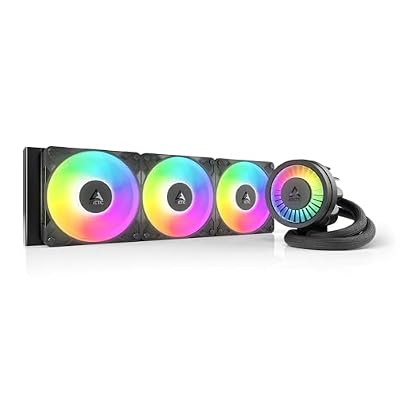
The hero listing was selected for the query “best AIO 420mm gaming” and may be a close match rather than the exact model you choose. Use the card for the current specifications and price, and use the alternatives below to compare options.
What a 420mm Radiator Adds
A 420mm radiator has more surface area than a 360mm radiator, so it can move the same heat with the fans running slower. That is the main reason builders choose it. Lower fan speed usually means lower noise, and the extra area gives more margin for hot processors in long gaming sessions or heavy multi-threaded loads.
The cost is size and support. A 420mm radiator is long and often needs a case that supports it at the front or top. It is also heavier, and the mounting hardware must be secure. Those factors make measuring the case essential before you buy.
Who Should Consider a 420mm AIO
A 420mm cooler suits builders with a large case, a high-end processor and a priority on quiet operation. It is a good fit for a showcase or silent build, and for systems where the CPU runs very hot under sustained load. It is less important for a mainstream processor in a standard mid-tower, where a 360mm AIO usually delivers enough cooling.
If your case does not list 420mm radiator support, look at a 360mm model instead. Forcing a larger radiator into a case that does not support it can cause tube strain, fan clearance problems and mounting issues.
Comparison Table: 420mm and Related Options
The table compares the main choices. Ranges are broad, and you should confirm the exact configuration and price on the live listing.
| Option | Radiator | Best for | Main trade-off | Typical price range |
|---|---|---|---|---|
| Standard 420mm AIO | 420mm, three fans | High-capacity cooling in large cases | Needs 420mm case support | Check current price |
| Quiet-focused 420mm AIO | 420mm, low-speed fans | Silent builds with high headroom | Fan quality and curve drive results | Check current price |
| Display 420mm AIO | 420mm, LCD pump head | Showcase builds | Higher cost and software reliance | Check current price |
| 360mm AIO | 360mm, three 120mm fans | Mainstream mid-tower builds | Less radiator area than 420mm | Check current price |
For the smaller alternative, our best 360mm AIO coolers for Ryzen 9 guide covers the 360mm class in detail. The air vs AIO cooling comparison helps you decide whether liquid is worth the extra complexity at all.
Case Support and Fit
Radiator Mount Position
Many 420mm radiators mount at the front of the case, where the case must support the length. Check the case’s specifications for 420mm front support, and measure the distance from the front panel to the motherboard. Some cases list 420mm top support, but the radiator may then clash with the motherboard’s rear ports or the RAM.
Thickness and Motherboard Clearance
Radiator thickness and fan thickness decide how much space is left between the radiator and the front of the motherboard or the RAM. Measure the full stack. Tall RAM and large VRM heatsinks can conflict with a thick radiator, so check your board before ordering.
Weight and Support
A long radiator adds weight at the front or top of the case. Use the mounting hardware recommended by the manufacturer and the case, and check that the case can carry the weight without strain. Tube tension is a common cause of pump issues, so route the tubes carefully.
Thermal and Noise Expectations
We have not measured any of these coolers for this article. The real results depend on the processor, fan speed, pump speed and case airflow. A 420mm radiator usually offers more headroom than a 360mm model, and it can keep fans slower at a given temperature. The noise result depends on the fans, the pump and the fan curve, so read reviews that measure noise on your platform before buying.
Installation and Maintenance
Install the cold plate with the mounting kit for your socket, and tighten the hardware evenly. Mount the radiator with the fan direction set for intake or exhaust, and route the tubes without kinks. After installation, check that the pump runs and that the fan curve responds to load. Clean the radiator periodically, especially in a dusty room.
For a full build, our step-by-step gaming PC build guide covers the install order. The best mid-tower gaming cases list is a useful reference if you are looking for a case with 360mm or 420mm support.
A 420mm radiator is only one part of a quiet system. The best PSU for gaming guide helps you size the power supply, and the best CPU for gaming article shows which processors benefit from this much cooling. If you are deciding between a big radiator and a big air cooler, the best air CPU coolers for gaming guide gives a direct comparison, and the best CPU cooler for gaming article covers processor matching.
Top Picks for 360mm and 420mm AIO Coolers
Radiator size sets the ceiling for cooling, but fit and noise matter too. These coolers cover budget, mid-range and premium choices at 360mm and 420mm.
Thermaltake TH420 ARGB Sync V2 420mm AIO
A 420mm liquid cooler with three 140mm fans and a mirror waterblock. It is among the lower-cost ways to get a large radiator in a case that supports one.
As an Amazon Associate we earn from qualifying purchases at no extra cost to you.

Corsair Titan 420 RX RGB 420mm AIO
A premium 420mm cooler with a low-noise pump design and support for current Intel and AMD sockets. It targets high-end CPUs that need strong cooling.
Geometric Future Eskimo Pro 420mm AIO
A lower-priced 420mm cooler with three 140mm RGB PWM fans, listed for LGA1700. It is a value route to a big radiator, though the brand is less familiar.

Thermalright FW 360 White ARGB 360mm AIO with LCD
A 360mm cooler with an IPS screen on the pump head. It suits cases that cannot take a 420mm radiator but still want a three-fan layout and a display.

ARCTIC Liquid Freezer III Pro 360 AIO
A 360mm cooler with three 120mm fans and no lighting. It suits builders who want strong cooling on a budget and a clean, plain look.

Check radiator size, tube length and socket support in your case manual before you order a large cooler.
Frequently Asked Questions
Is a 420mm AIO worth it for gaming?
For high-end processors in a case that supports it, a 420mm AIO can run quieter and offer more headroom. For mainstream CPUs in standard cases, a 360mm model is often sufficient and easier to fit.
Do I need a special case for a 420mm radiator?
Usually yes. Many cases do not support 420mm radiators at the front or top. Check the case specifications and measure before buying.
Will a 420mm AIO be louder than a 360mm?
Not necessarily. A larger radiator often lets the fans run slower, which can reduce noise. The fans, pump and fan curve matter just as much as radiator size.
Is a 420mm AIO overkill for a mid-range CPU?
For many mid-range processors, yes. A 360mm AIO usually provides enough headroom at lower cost and with easier fit. A 420mm model makes most sense for hot, high-core-count chips or for silent builds with ample case space.
Final Recommendation
The best AIO 420mm gaming cooler for most buyers is a well-reviewed 420mm model with quality fans, a firm mounting kit and a case that explicitly supports 420mm radiators. It offers the most headroom and the best chance of quiet operation among mainstream AIOs. Before buying, confirm the exact model on the card, check case support and radiator clearance, and read recent noise reports. If the case fits and the processor runs hot, a 420mm AIO is a strong choice. If not, a 360mm model is usually the more practical option.