NZXT Kraken Elite AIO Review 2026: Display Pump Head and 360mm Buying Guide
The NZXT Kraken Elite line is built around one idea that sets it apart from plainer all-in-one coolers: a display on the pump head. That screen can show CPU temperature, pump speed and custom images, and it is the main reason many builders look at the Kraken Elite before a simpler 360mm model. This article reviews the NZXT Kraken Elite AIO as a product class in 2026, explains what the display adds, and sets out the trade-offs in cost, software and value. It is a spec-based buying review, and we have not run our own thermal or acoustic tests for this article.
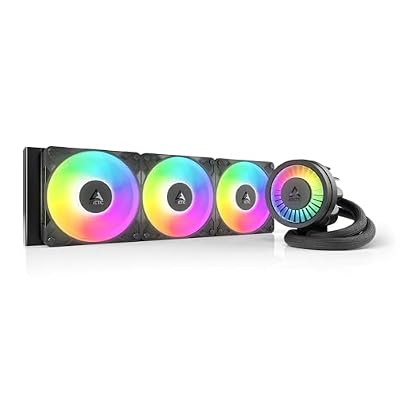
The hero listing was matched to the query “NZXT Kraken Elite AIO” and may be a close match rather than the exact model you have in mind. Check the card for the radiator size, the included fans, the display details and the current price before buying.
What the Display Pump Head Actually Offers
A standard AIO pump head is a small black or silver block with no screen. The Kraken Elite places a color display on the top of the pump head, which can show live readings and images. For many builders the appeal is simple: you can see the CPU temperature and pump status at a glance without opening monitoring software. You can also set an image or animation, which matters if the case has a glass side panel and the cooler is visible.
The display is a convenience feature, not a performance feature. It does not make the cooler cool better, and it adds a small cost and a dependence on the vendor’s software for many of its functions. If you rarely look at the cooler or prefer to keep your monitoring in another tool, a plain AIO with the same radiator may be the better buy.
Software Dependence
The display, lighting and fan profiles are managed through NZXT’s software. That gives you a single place to tune the build, but it also means you need the software installed and running for full control. If you prefer not to run vendor software, check whether the cooler can work with BIOS fan curves and whether the display can be left at a default setting. Those details are worth confirming before you buy.
Who the Kraken Elite Suits
This class fits builders who want a visible cooler in a glass-panel case, a clear temperature readout on the pump and a single software interface for lighting and fans. It also suits users who like to customise the look of their system and who will keep the software installed. It is a good match for mid-to-high-end CPUs in cases with a top or front 360mm mount.
It is less suitable for builders who want the lowest price per radiator area, who run a stripped-down system or who prefer no vendor software. A plain 360mm AIO or an air cooler will often deliver similar cooling at a lower cost.
Comparison Table: Kraken Elite and Alternatives
The table below groups the main cooler types you will see in listings. Ranges are broad, and the exact model and price should be checked on the card before you buy.
| Cooler type | Display | Best for | Main trade-off | Typical price range |
|---|---|---|---|---|
| Kraken Elite style display AIO (this review’s class) | Color LCD on pump head | Visible builds with live readouts | Higher cost and software reliance | Check current price |
| Standard 360mm AIO | None | Value builds with a moderate CPU | No built-in readout | Check current price |
| Standard 240mm AIO | None | Compact cases and lighter CPUs | Less thermal margin than 360mm | Check current price |
| Dual-tower air cooler | None | Low-maintenance builds with no pump | Large footprint; RAM clearance checks | Check current price |
If you are still deciding between a liquid cooler and an air cooler, our air vs AIO cooling comparison covers maintenance, noise and fit. The best air CPU coolers for gaming list is the place to look if you want to skip the pump entirely.
Installation and Case Fit
Radiator Mounting
Confirm the radiator fits the top or front mount in your case, and measure the total thickness including fans. A 360mm radiator with thick fans can crowd the RAM and the front panel. Mount the radiator with the tubes facing a direction that avoids kinking and keeps the pump head clear of the GPU.
Pump Head Position
The display is only useful if you can see it. Check where the pump head will sit relative to the side panel, and plan the tube path so the display faces the viewer. A little test fitting before final tightening saves time and prevents an awkward tube angle.
Thermal and Noise Expectations
We have not measured this cooler’s temperatures or noise for this article. The cooling result depends on the CPU, fan speed, pump speed and case airflow. A 360mm radiator usually gives more thermal margin than a 240mm model, and the fans can run slower for the same temperature. Set a fan curve that keeps the CPU in a comfortable range and avoid running the pump at maximum unless you need it. Read recent user reports for noise on your platform, since pump behaviour varies by unit.
Software, Updates and Long-Term Use
The display, lighting and fan settings are the main reasons to keep the vendor software installed. Keep it updated so the cooler is recognised correctly after operating system or driver updates. Some users report that software changes alter profiles, so save your settings after tuning. Check the warranty terms on the listing, which vary by product and region.
If you are planning a full build, our step-by-step gaming PC build guide covers the install order, and the NZXT H7 Flow review shows how a popular NZXT case handles a 360mm radiator in practice.
Cooler choice also depends on the processor and the case. Our best CPU for gaming guide helps you pick the chip, the best mid-tower gaming cases list covers chassis with 360mm support, and the best budget AIO liquid coolers roundup shows what you can save if the display is not a priority. The complete gaming PC buying guide helps you plan the rest of the system.
Frequently Asked Questions
Does the display make the cooler perform better?
No. The display is a readout and a visual feature. Cooling performance depends on the cold plate, the pump, the radiator and the fans. Judge the cooler by its thermal and noise results, then decide whether the display is worth the extra cost.
Can I use the Kraken Elite without the software?
Basic operation usually works, but display customisation and some fan or lighting controls depend on the vendor software. Check the listing and the product documentation to see what works without it on your setup.
Is a 360mm radiator needed for a display AIO?
No. Display AIOs come in several radiator sizes. A 360mm model gives more headroom for demanding CPUs, while a 240mm model suits smaller cases and lower-power chips.
Is the Kraken Elite good value?
It is good value if you want the display and integrated software. If you only need cooling, a standard AIO with the same radiator size will usually cost less for similar results.
Final Verdict
The NZXT Kraken Elite class is the right choice for builders who want a visible pump head with live readouts and a single software interface for their cooling and lighting. Its strengths are the display, the custom look and the integrated control. Its limits are cost, software dependence and the fact that the display adds no cooling performance. Confirm the exact model, radiator size and price on the card, check case fit, and decide whether you will use the display before you buy. For a visible, well-integrated build, it is a strong option in 2026.