Lian Li GA II AIO 360mm Review: Buying Guide for a Clean 360mm Build
Lian Li builds cases first and cooling second, and that shows in its 360mm all-in-one coolers. The GA II line is aimed at builders who want a tidy, reliable radiator that fits neatly in a showcase case without a lot of fuss. This article reviews the Lian Li GA II AIO 360mm as a product class, explains what to check before buying, and helps you decide whether it suits your build. It is a spec-based buying review. We have not run our own thermal or noise tests for this article.
The hero listing was matched to the query “Lian Li GA II AIO” and may be a close match rather than the exact SKU you want. Confirm the model name, radiator size, fan count and price on the card. The advice on case fit, mounting and tube routing applies regardless of the exact variant.
What Lian Li Brings to a 360mm AIO
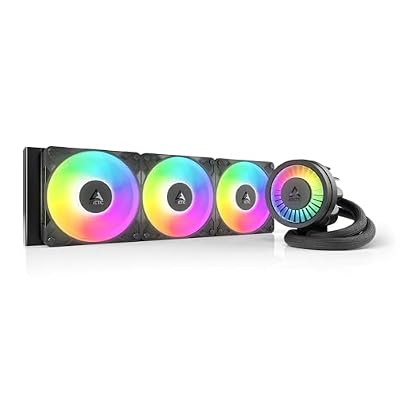
Most 360mm coolers look similar on a spec sheet: a cold plate, a pump, a radiator with three fans and a set of mounting brackets. The difference usually shows up in finish, tubing, fan quality and how neatly the parts fit a real case. Lian Li designs its products with the case builder in mind, so the focus is often on clean routing, consistent styling and tube lengths that suit the company’s own chassis.
That focus is a strength if you already own a Lian Li case or you plan a build where visual order matters. It is less important if you buy a cooler only for performance and plan to use a plain chassis. In that case, pick based on the thermal headroom, the noise level and the warranty rather than on styling.
Fan and Radiator Setup
A 360mm radiator uses three 120mm fans. Many listings in this class include three fans, and some add RGB lighting or a controller. Check whether the fans are PWM and whether the controller is included, since that affects how you set fan curves on your motherboard or through software. Three fans running at moderate speed generally offer a good balance of noise and cooling for gaming CPUs.
Tubing and Cold Plate
Tube length and the position of the pump head determine how easily the cooler fits in your case. Measure the distance from the CPU socket to the radiator mount point, and make sure the tubes can reach without pulling on the cold plate. Cold plate design also matters for contact quality, so look for a mounting system with a firm and even bracket for your socket.
Who the GA II 360mm Suits
This cooler suits builders who want a tidy 360mm radiator for a mid-to-high-end CPU, especially in a case that has top or front 360mm mount support. It also suits people who value consistent styling across their components, because the cooler, fans and case often match. If your case can fit a 360mm radiator, you get more thermal margin than a 240mm model, with the fans able to run slower and quieter.
It is a weaker choice for very compact cases or for buyers who need a display on the pump head. Look at the premium options in the comparison below if a display is a priority.
Comparison Table: 360mm Options for Lian Li Style Builds
The table groups the main choices by use case. Prices are shown as ranges and should be confirmed on the live listing before you buy.
| Option class | Radiator | Best for | Key consideration | Typical price range |
|---|---|---|---|---|
| GA II style 360mm AIO (this review’s class) | 360mm, three 120mm fans | Clean builds with a mid-to-high-end CPU | Check tube length and case mount support | Check current price |
| Value 360mm AIO | 360mm, three fans | Budget builds that still need headroom | Fewer aesthetic extras; verify fan noise | Check current price |
| Display-equipped 360mm AIO | 360mm, RGB fans | Showcase builds with a pump-head screen | Adds software reliance and cost | Check current price |
| Compact 240mm AIO | 240mm, two fans | Small cases and lighter CPUs | Less thermal headroom than 360mm | Check current price |
For a broader look at radiator sizes, our best budget AIO liquid coolers roundup covers value options, and the best CPU cooler for gaming guide compares AIO and air choices for different chips.
Fit Checks Before You Buy
Case Clearance and Radiator Thickness
Radiator thickness, fan thickness and the total depth from the mounting point to the side panel all affect whether the cooler fits. A thick 360mm radiator with fans can take up space that tall RAM or the front panel needs. Measure before buying, and check whether your case lists 360mm support at the top or front.
Memory and Motherboard Clearance
If you plan to mount a top radiator, check the RAM height. Tall DIMM heatsinks can interfere with the radiator fans. Low-profile memory is the simplest fix. Also confirm that the VRM heatsink on your motherboard does not clash with the cold plate, which is more of an issue on boards with large heatsinks.
Thermal and Noise Expectations
We have not measured the thermal performance of this cooler for this article, so do not treat any figure in a listing as our result. In general, a well-mounted 360mm radiator with three fans will outperform a 240mm model under sustained load, and it can run quieter because the fans do not need to spin as fast. Noise depends on fan speed, pump behaviour and case airflow. Set a fan curve that keeps the CPU within a comfortable range and avoid running the fans at full speed unless you need the extra cooling.
Setup and Maintenance Tips
Install the cold plate with the mounting hardware recommended for your socket, and tighten the screws in a cross pattern so the pressure is even. Confirm the pump is running after you power on, and check the software for pump speed and fan curves. A sealed AIO needs little maintenance beyond cleaning the radiator and checking for noise changes over time.
If you are building from scratch, our step-by-step gaming PC build guide walks through the order of installation, and the best mid-tower gaming cases list helps you choose a chassis with room for a 360mm radiator.
If you are still choosing a processor to pair with this cooler, the best CPU for gaming guide and the best CPU for gaming and streaming article list chips that suit different workloads. For a complete parts list, the $1500 gaming PC build guide and the best PSU for gaming article cover the rest of the system, while the best ITX and mini gaming cases list is the place to look if your case is smaller.
Frequently Asked Questions
Is the Lian Li GA II a good cooler for gaming?
It is a reasonable choice for gaming CPUs when the radiator fits your case and the fans are set to a sensible curve. The best way to judge it for your build is to compare the spec and warranty against other 360mm options and read recent user reports.
Do I need a Lian Li case to use this cooler?
No. The cooler works in any case that supports a 360mm radiator. A matching case can make the build look cleaner, but compatibility is based on mounting support and clearance rather than brand.
Can I mix this cooler with other RGB fans?
Often yes, but lighting software and controllers can differ. Check whether your motherboard software or a separate controller can manage all fans in one profile before you mix brands.
Should I choose a 360mm or 240mm radiator?
Choose 360mm if your case supports it and your CPU runs hot under load. Choose 240mm if you have a small case or a lower-power processor that does not need the extra headroom.
Final Recommendation
The Lian Li GA II AIO 360mm class is a sound choice for builders who want a tidy 360mm cooler that fits a well-planned case. Its strengths are neat design, sensible fan and tube setup and good thermal headroom for mid-to-high-end CPUs. Its limits are case clearance and the fact that styling is only one part of the decision. Confirm the exact model on the listing, measure your case and check the warranty. If the fit works, it is a practical option that delivers quiet, tidy cooling for a modern gaming build.