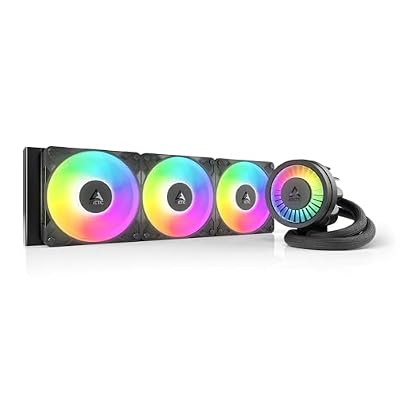
Best Air Cooler Gaming 2026: How to Choose the Right Tower or Dual-Tower Cooler
Air coolers remain one of the best value choices for gaming PCs in 2026. They have no pump, no coolant and very few parts that can fail, and high-end dual-tower designs can match many liquid coolers on performance. This guide explains how to choose the best air cooler for gaming, what specifications matter and how the main categories compare. It is a buying guide built around the product class. We have not run our own thermal or noise tests for this article, so treat any claim in a listing as something to verify.
The hero listing was selected for the query “best air cooler gaming” and may be a close match rather than the exact model you choose. Check the card for the current specifications, fan setup and price, and use the alternatives below to compare options.
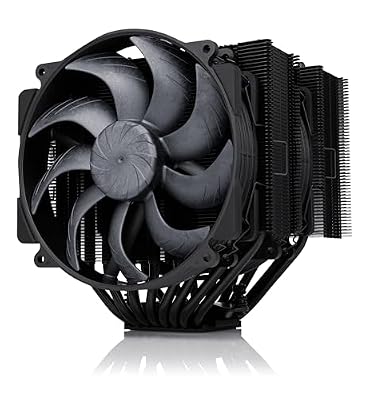
Why Air Cooling Still Makes Sense
An air cooler uses a metal heatsink and one or two fans to move heat away from the processor. There is no pump to fail, no coolant to check and no radiator to fit in the case. For most gaming builds, that means quiet operation at moderate fan speed, simple maintenance and a long service life. Air cooling is also less expensive than a high-end AIO for comparable performance.
The main limit is size. Tower coolers can be tall and wide, and they need clearance above the RAM and inside the case. Before buying, measure the cooler and the case, and check the memory height. Those checks matter more for air coolers than for most liquid options.
What to Check Before You Buy
Cooler Height and Footprint
Compare the cooler height with your case’s CPU cooler limit, including the fan thickness. Dual-tower designs are taller and wider than single towers, so the footprint matters in mid-tower and compact cases alike.
Socket and Mounting Kit
Confirm that the bracket covers your socket. AM4, AM5 and Intel sockets use different mounting hardware, and some listings include only part of the kit. Check the compatibility list before ordering.
Fan Size and Quality
Fan size and bearing quality affect both airflow and noise. Larger fans can move the same air at lower speed, which often reduces noise. Check the listing for the fan count and the speed range, and read user reports about bearing noise.
Thermal Headroom
Look at the cooler’s heatsink mass, the number of heat pipes and the fin area. These features set the thermal capacity of the cooler, and they matter most for hot processors under sustained load. A more capable heatsink gives more headroom, but it also needs more clearance.
Comparison Table: Air Cooler Categories
The table groups air coolers by type. Ranges are broad, so confirm the exact model, height and price on the card.
| Category | Design | Best for | Main trade-off | Typical price range |
|---|---|---|---|---|
| Premium dual-tower air | Two fin stacks, large fans | High-end CPUs and quiet operation | Large footprint and RAM clearance | Check current price |
| Mid-range single-tower air | One large fin stack, one or two fans | Most mainstream gaming builds | Less headroom than dual-tower | Check current price |
| Budget tower air | Simpler tower, one fan | Budget builds with mainstream CPUs | Limited headroom for hot chips | Check current price |
| Compact low-profile air | Short tower or top-blow design | Small cases and HTPCs | Lower thermal capacity | Check current price |
For AIO comparisons, our air vs AIO cooling comparison explains the trade-offs. The best CPU cooler for gaming guide matches coolers to specific processors.
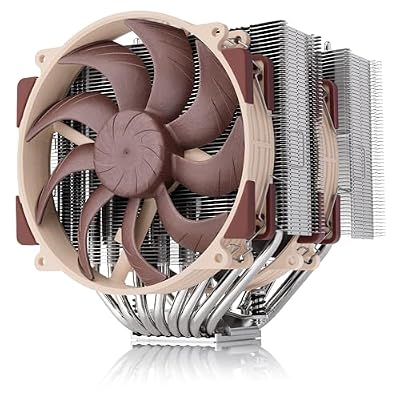
Noctua NH-D15 G2, Quiet High-Performance Dual Tower CPU Cooler | 168mm Height, Ultimate Low-Noise Cooling, 8 Heatpipes, For Intel & AMD, Dual Enthusiast-Grade 140mm Fans, Rich Accessory Kit


As an Amazon Associate we earn from qualifying purchases. Product prices and availability are accurate as of the date/time indicated.
How to Match an Air Cooler to Your CPU
The processor is the main factor in choosing a cooler. Mainstream gaming CPUs run well with a mid-range tower. High-core-count chips and very hot processors benefit from a dual-tower design with large fans. Check the processor’s power draw and thermal guidance, and avoid buying a cooler that is far beyond what you need unless you plan a long life for the build.
Our best CPU for gaming guide helps you pick a processor, and the best CPU for 1440p gaming article covers chips that pair well with mid-range coolers at higher resolutions.
Case Airflow and Build Layout
Air coolers depend on case airflow. A case with a front intake and a rear or top exhaust gives the cooler fresh air and removes the warm air it produces. A cramped case with restricted mesh will make even a large cooler run hotter and louder. Plan the fans so the cooler is in the intake path, and keep the cable routing clear of the fans.
The best mid-tower gaming cases guide lists chassis with good airflow, and the best ITX and mini gaming cases list is useful if you are building small and need a low-profile cooler.
Thermal and Noise Expectations
We have not measured these coolers for this article. Results depend on the processor, the fan speed, the case airflow and the room temperature. A premium dual-tower cooler can handle hot processors well at moderate fan speed. A mid-range tower will be fine for most mainstream gaming chips. Set a fan curve that keeps the CPU comfortable, and read noise reports for your platform before deciding.
Maintenance and Upgrade Path
Air coolers need little maintenance. Clean the fins and fans periodically, and check the mounting for tightness. Reapply thermal paste if temperatures rise over time. When upgrading the processor, confirm the mounting kit supports the new socket, because a cooler that works on one platform may need a separate bracket on the next.
For a full build, our step-by-step gaming PC build guide covers the install order, and the $1500 gaming PC build guide shows how a mid-range cooler fits into a balanced system.
For a full view of the air cooling market, the best air CPU coolers for gaming guide goes deeper on mid-range options. If you are weighing a pump, the best budget AIO liquid coolers roundup is the next stop, and the best 360mm AIO coolers for Ryzen 9 article covers the high-end liquid side. The best gaming PC case guide helps you choose a chassis with room for a large tower.
Frequently Asked Questions
Is an air cooler as good as an AIO for gaming?
A high-end dual-tower air cooler can match many 240mm and 360mm AIOs in thermal performance, with less maintenance. An AIO may suit cases where a tall cooler does not fit or where radiator airflow is preferred.
Which air cooler is best for gaming?
For most builds, a mid-range or premium tower with a large heatsink and a quality fan is the most practical choice. Check the listing for height, socket support and fan setup, then compare reviews for your processor.
Do air coolers clash with RAM?
They can. Tall RAM heatsinks may clash with the fins or fan, especially on dual-tower designs. Check the memory height and the cooler’s clearance before buying.
How often should I clean an air cooler?
In a dusty environment, every few months is a good routine. In a cleaner build, a check every six months is usually enough. Use compressed air and keep the fan from spinning freely while cleaning.
Final Recommendation
The best air cooler for most gaming builds is a well-reviewed tower or dual-tower model with a large heatsink, a quality fan and a mounting kit that supports your socket. It offers strong cooling, low noise at moderate speed and simple maintenance. Before buying, confirm the exact model and height on the card, measure your case and RAM, and check the socket support. For many builders, a premium air cooler is the most sensible way to keep a gaming CPU cool without the complexity of a pump.