Thermaltake MAGFloe 360 AIO Review: Buying Guide for a 360mm Liquid Cooler
The Thermaltake MAGFloe 360 is a 360mm all-in-one liquid cooler in a category that has become crowded. Many brands offer similar radiator sizes at similar prices, so the real decision rests on fit, noise, software and warranty rather than on headline numbers. This article reviews the Thermaltake MAGFloe 360 as a product class, explains what to check before buying and helps you decide whether it suits your build. It is a spec-based buying review, and we have not run our own thermal or acoustic tests for this article.
The hero listing was matched to the query “Thermaltake MAGFloe 360 AIO” and may be a close match rather than the exact model you want. Check the card for the fan count, the included mounting kit, the radiator dimensions and the current price before you order.
What the MAGFloe 360 Design Offers
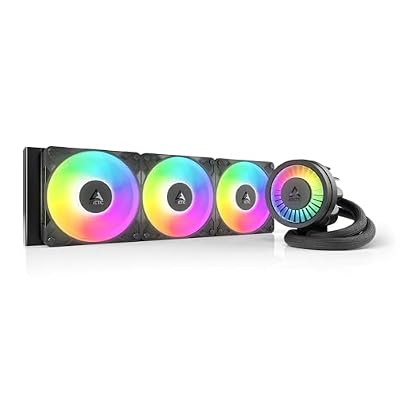
A 360mm AIO consists of a cold plate, a pump, a radiator with three 120mm fan positions and tubing. The MAGFloe name points to a design that uses magnetic fan mounting or a similar quick-attach approach for the fans, which can make fan swaps and cleaning easier. Confirm this on the listing, because fan mounting systems differ between models and the feature may not apply to every variant.
The practical advantage of an easy fan mount is maintenance. If you need to clean the radiator or replace a fan, a quick-release system saves time and reduces the risk of damaging the fan or the radiator. That convenience matters most for builders who expect to service the system regularly or who plan to swap fans for a different look.
Fan and Radiator Configuration
A 360mm radiator usually takes three 120mm fans. Check the listing for the included fan count, the fan speed range and whether a VRM fan is included. A VRM fan can help the motherboard power stages stay cool, but it adds cost and cable routing work. Three fans at a moderate speed usually offer a good balance of noise and cooling.
Cold Plate and Mounting
The cold plate determines how well heat moves from the processor into the coolant. Check the socket support on the mounting kit and confirm that the bracket matches your board. A firm, even mount improves contact and reduces hot spots, so follow the installation guide closely and tighten the hardware in a cross pattern.
Who the MAGFloe 360 Suits
This cooler class suits builders who want a 360mm radiator for a mid-to-high-end processor, value easy fan maintenance and have a case with top or front 360mm support. It works well in clean builds where the radiator is visible and where a good airflow path is planned. It is a reasonable choice for a first 360mm AIO if the case and socket support fit.
It is less suitable for compact cases, for users who want a display on the pump head or for buyers who need the lowest possible price. A 240mm AIO or a dual-tower air cooler may fit better in those cases.
Comparison Table: 360mm AIO Options
The table compares the main 360mm options. Prices are broad ranges, and you should confirm the exact configuration on the live listing.
| Option class | Fan mounting | Best for | Main trade-off | Typical price range |
|---|---|---|---|---|
| MAGFloe 360 class (this review) | Quick-attach fan design (verify on listing) | Easy maintenance and clean builds | Confirm the fan system and mounting kit | Check current price |
| Standard 360mm AIO | Screw-mounted fans | Value builds with a moderate CPU | Fan removal takes more time | Check current price |
| Display 360mm AIO | Screw-mounted or fast-attach fans | Showcase builds with a pump-head screen | Higher cost and software reliance | Check current price |
| Compact 240mm AIO | Two fans | Small cases and lower-power chips | Less thermal headroom | Check current price |
For a broader list of liquid coolers at different budgets, our best budget AIO liquid coolers roundup is a useful reference. The best CPU cooler for gaming guide matches coolers to processor classes.
Fit and Installation Checks
Case Support and Radiator Depth
Measure the radiator thickness with the fans fitted and check your case’s top and front 360mm mount support. A thick radiator can crowd the RAM and the front panel, so check the clearance before mounting. If your case supports only a thinner radiator, consider a slimmer model or a 240mm cooler.
RAM and Motherboard Clearance
If you mount the radiator at the top, confirm the RAM height. Tall heatsinks can touch the fans. Low-profile memory avoids most issues. Also check the VRM heatsink on your motherboard, which can interfere with the cold plate on some boards.
Tube Routing
Route the tubes so they reach the cold plate without tension and do not touch the GPU or fans. Use cable ties to keep the tubing stable. A tidy route reduces vibration and makes the build easier to service.
Thermal and Noise Expectations
We have not measured this cooler’s temperatures or noise for this article. The results depend on the processor, the fan speed, the pump speed and the case airflow. A 360mm radiator usually offers more thermal headroom than a 240mm model, and the fans can run slower at the same temperature. Noise depends on fan quality, pump behaviour and the fan curve, so read user reviews that measure noise on your platform before buying.
Maintenance and Warranty
The sealed loop needs little upkeep. Clean the radiator and fans periodically, and if the fans use a quick-attach design, remove them carefully when cleaning. Listen for changes in pump noise, since a new rattle or whine can signal a mounting or cable issue. Check the warranty terms on the listing, because they vary by product and region.
For a complete build around the cooler, our step-by-step gaming PC build guide covers the install order. The best gaming PC case guide is a good reference if you are still choosing a chassis.
A 360mm AIO works best when the rest of the build is planned around it. The best CPU for gaming article helps you pick a processor, and the best AM5 motherboard for gaming guide covers boards with suitable mounting. The best gaming PC case article is the next stop if your current chassis lacks a 360mm mount, and the air vs AIO cooling comparison helps you decide whether liquid is right at all. If the 360mm size is not right for your case, the best 360mm AIO coolers for Ryzen 9 guide and the best budget AIO liquid coolers roundup list other radiator options.
Frequently Asked Questions
Does the MAGFloe 360 need special fans?
It depends on the variant. Some models use a quick-attach fan system, so check the listing to confirm the fans and mounting method before buying replacements.
Is a 360mm AIO worth it over a 240mm?
For mid-to-high-end processors in a case that supports 360mm, yes. The larger radiator gives more thermal headroom and often runs quieter. A 240mm model is fine for lower-power chips and compact cases.
Can I use this cooler in a small case?
Only if the case supports a 360mm radiator and the thickness and tubing fit. Measure first, and consider a 240mm AIO if the case is tight.
Should I add a VRM fan?
Consider it if your motherboard’s power stages run hot under load or if the board has small heatsinks. Check your board’s VRM design and the cooler’s included fans before deciding.
Final Verdict
The Thermaltake MAGFloe 360 class is a practical 360mm option for builders who want a capable liquid cooler with easy fan maintenance and a clean installation. Its strengths are the 360mm radiator’s thermal headroom, the likely ease of fan service and a competitive position in a crowded market. Its limits are the need to verify the fan system and mounting kit, case clearance and the lack of independent testing in this article. Confirm the exact model on the card, measure your case and check socket support. For a well-planned build, it is a sensible choice.