Case Fans RGB Gaming 2026: How to Pick RGB Case Fans That Cool Well and Look Right
RGB case fans are one of the most visible parts of a gaming build, and they also do real work. A good set moves enough air through the case to keep the CPU, GPU and memory within their comfortable range, while the lighting adds a finished look. The challenge is that a fan with bright lighting is not automatically a good fan. This guide explains how to choose RGB case fans for gaming in 2026, what specifications matter, and how to plan airflow so the lighting does not cost you cooling. It is a buying guide built around the product class, and we have not run our own airflow or acoustic tests for this article.
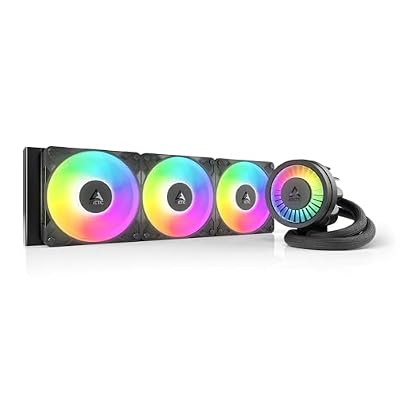
The hero listing was selected for the query “RGB case fans gaming” and may be a close match rather than the exact set you want. Check the card for fan count, size, controller details and current price, and use the alternatives below to compare options.
Airflow Before Lighting
Case fans do two jobs: they move air through the case, and they set the pressure balance that decides where dust enters and how well heat leaves. A fan with strong airflow and a decent static pressure rating is more useful than a fan with bright lighting and weak airflow. Start with the cooling needs of your build, then choose the lighting.
Airflow depends on fan size, blade design, speed and the case’s filters and mesh. A 120mm fan moves less air than a 140mm fan at the same speed, but the larger fan often runs quieter. Check the fan’s specifications for airflow and static pressure, and match them to the radiator or heatsink the fan will serve. Radiators need more static pressure than an open mesh intake.
Intake and Exhaust Planning
A common setup uses front and bottom intake fans with a top and rear exhaust. That creates positive or balanced pressure, which helps the case push air out through the exhaust and reduces dust entering through unfiltered gaps. Some builders prefer negative pressure for a dusty room, but that approach can pull dust in through every gap. Decide your pressure balance first, then count the fans.
Static Pressure and Radiators
If you cool a radiator, choose fans with higher static pressure. A radiator resists airflow, and a fan with poor static pressure will spin hard and move less air through the fins. A standard airflow fan can work well on an open mesh front, but it struggles on a dense radiator.
Lighting and Controllers
RGB lighting is the visible part of the build. Most RGB fans use addressable LEDs, and they are controlled by a hub or by the motherboard’s lighting software. Check the listing for the controller, the cable setup and whether the fans are compatible with your motherboard’s lighting system. A mismatch can leave you with fans that cannot be controlled, which is frustrating in a finished build.
Lighting also affects the fan’s power draw and cable count. Each fan may need a separate lighting connector and a PWM connector for speed control. Plan the header count on your motherboard and any hub before buying.
Comparison Table: RGB Case Fan Options
The table compares the main fan types you will see in listings. Ranges are broad, so confirm the exact fan size, controller and price on the card.
| Fan type | Size | Best for | Main trade-off | Typical price range |
|---|---|---|---|---|
| RGB airflow fan (this class) | 120mm or 140mm | Open mesh intake and exhaust | Less static pressure for dense radiators | Check current price |
| RGB static pressure fan | 120mm or 140mm | Radiators and dense heatsinks | Can be louder at high speed | Check current price |
| RGB fan kit with hub | 120mm, three-pack | Clean builds with one controller | Ties you to the hub’s ecosystem | Check current price |
| Non-RGB PWM fan | 120mm or 140mm | Budget or quiet builds | No lighting | Check current price |
If you are weighing RGB fans for a liquid-cooled system, our best budget AIO liquid coolers guide covers radiator and fan pairings. For a case that suits a large fan layout, the best mid-tower gaming cases list is a good place to start.
Choosing Fan Size and Count
120mm or 140mm
Many cases support both sizes. A 140mm fan can move more air at lower speed, which often reduces noise. A 120mm fan fits more cases and more mounting points. Check the case’s fan mount options before choosing the size, because some cases only support 120mm fans at certain locations.
How Many Fans You Need
A typical gaming build uses three to five case fans, plus any radiator fans. More fans are not always better. Too many fans can create turbulence, and each one adds cost and cable count. Start with a balanced layout and add fans only if temperatures need them.
Cable Management and Build Tidiness
RGB fans produce a lot of cables, and a messy layout can block airflow and hide the lighting effect you wanted. Use the case’s cable routing holes, keep the fan cables close to the mounting points and secure any extra length with ties. A tidy build also makes future upgrades easier.
For a full walkthrough of an install, our step-by-step gaming PC build guide covers cable routing and fan placement. The Corsair 5000D Airflow review shows a popular case with a clear airflow layout.
Noise and Fan Curves
We have not measured these fans for this article. Noise depends on fan speed, bearing quality and the case’s mesh and filters. A fan curve that keeps the fans slow at idle and ramps with CPU and GPU temperature usually gives the best balance. Set the curve in your motherboard software or a fan controller, and check whether the lighting can be controlled from the same tool.
Case fans only work as well as the cooler and the chassis around them. The best gaming PC case guide lists chassis with good fan mount options, and the best mid-tower gaming cases article covers layouts that suit intake and exhaust planning. If you run a radiator, the best budget AIO liquid coolers guide explains how fans and radiators pair, and the best CPU cooler for gaming article matches fans to processors. For the full purchase plan, see the complete gaming PC buying guide, and for installation order the step-by-step build guide shows where fans go during assembly. After fitting new fans, the temperature checking guide shows which readings to compare before and after the change.
Frequently Asked Questions
Do RGB fans cool worse than non-RGB fans?
Not inherently. The lighting does not reduce airflow, but the fan’s design and static pressure do. Compare the airflow and static pressure ratings, not the lighting, when judging cooling performance.
Can I mix RGB brands?
Often yes, but lighting software and controllers can differ. Check whether your motherboard software or a separate hub can manage all fans in one profile before mixing.
Are 140mm fans better than 120mm fans?
Often for quiet operation, because a 140mm fan moves air at lower speed. Choose based on the case’s mount options and the cooling needs of your build.
How many case fans do I need for gaming?
Three to five is common for a gaming build, depending on the case and the cooling demand. Start with a balanced intake and exhaust layout and add fans only if temperatures need them.
Final Recommendation
The best RGB case fan for most gaming builds is one that offers solid airflow, reasonable static pressure and a lighting system that matches your motherboard or hub. Cooling comes first, and lighting is the finishing layer. Before buying, confirm the fan size, count, controller and price on the card, plan your intake and exhaust layout, and check that the case supports the fan positions you want. A balanced set of RGB fans can keep the build cool and make it look right.