
Best AIO 360mm Gaming 2026: How to Choose the Right 360mm Liquid Cooler
A 360mm all-in-one liquid cooler is the most common high-end liquid option for gaming PCs in 2026. It gives a good balance of cooling capacity, noise and case fit, and it suits most current mid-to-high-end processors. The challenge is that the market is crowded, and listings look similar on paper. This guide explains what matters when you choose a best AIO 360mm gaming cooler, how the main design types compare and which features are worth paying for. It is a buying guide built around the product class, and we have not run our own thermal or noise tests for this article.
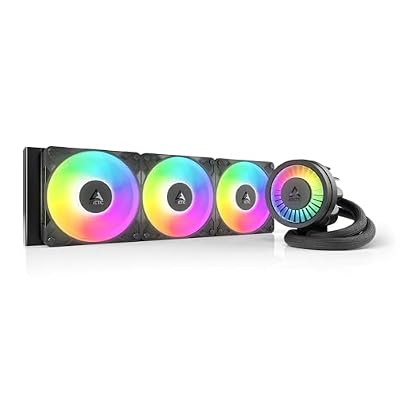
The hero listing was selected for the query “best AIO 360mm gaming” and may be a close match rather than the model you finally choose. Use the card for exact specifications and current price, and use the alternatives below for comparison.
Why 360mm Is the Gaming Sweet Spot
A 360mm radiator uses three 120mm fan positions, and that combination offers a good thermal margin for most gaming processors without the size and weight of a 420mm model. In a case that supports top or front 360mm mounting, it usually runs quieter than a 240mm radiator at the same temperature because the fans can spin more slowly. That is why 360mm designs are the default choice for many builders who want liquid cooling.
The main limit is case fit. A 360mm radiator needs a mount point, enough thickness clearance and room for the tubes. Compact cases often cannot take one, so measuring the case is the first step in any purchase.
What to Check Before You Buy
Cold Plate and Socket Support
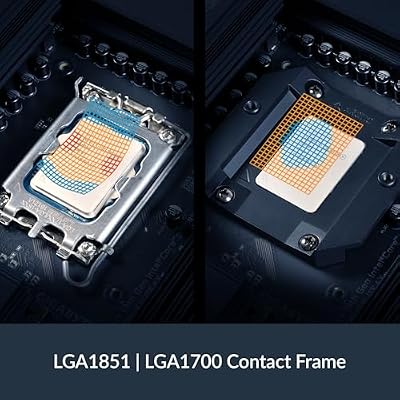
The cold plate is the part that touches the processor, and its mounting kit must match your socket. Check the listing for AM5, LGA1700, LGA1851 or other sockets you use. Some older boards need a separate bracket, so confirm the compatibility list before ordering.
Fan Quality and Speed Range
The fans matter as much as the radiator. Look for PWM fans with a sensible speed range, and check reviews for bearing noise. A slow-spinning fan with a good bearing usually sounds quieter than a fast fan at the same airflow.
Pump Behaviour
Pump noise is the most common complaint with AIO coolers. Check user reports for whine or rattle on your platform, and mount the cooler firmly. A moderate pump speed usually keeps noise down while still cooling well.
Software and Control
Some 360mm coolers rely on vendor software for fan curves and lighting. Others use BIOS controls or work with standard fan headers. Decide how much you want to depend on software, because that affects both convenience and long-term flexibility.
Warranty and Support
Warranty length varies by product and region. Read the warranty on the listing, and check how the manufacturer handles pump failures. A longer warranty is a useful signal, but it does not replace reading recent user reports.
Comparison Table: 360mm AIO Types
The table groups the main 360mm types you will see. Prices are broad ranges, and the exact model and price should be checked on the card before you buy.
| Type | Key feature | Best for | Main trade-off | Typical price range |
|---|---|---|---|---|
| Standard 360mm AIO | Pump, radiator, three fans | Most mid-to-high-end gaming CPUs | Pump noise depends on the unit | Check current price |
| Pump-in-block 360mm AIO | Pump built into cold plate | Tidy installs and short tube runs | Pump vibration travels through the mount | Check current price |
| Display 360mm AIO | LCD on pump head | Showcase builds | Higher cost and software reliance | Check current price |
| Ecosystem 360mm AIO | Single-cable fan chain and hub | Clean builds with matching fans | Lock-in to one vendor’s parts | Check current price |
If you are still deciding between liquid and air, our air vs AIO cooling comparison explains the trade-offs in noise, maintenance and case fit. For budget options, the best budget AIO liquid coolers roundup is a good next step.
How to Match a 360mm AIO to Your CPU
A 360mm radiator is well suited to mid-to-high-end processors. For a mainstream gaming CPU, a good 360mm model gives plenty of headroom, and you can run the fans at a moderate speed. For very hot high-core-count processors under sustained load, the extra radiator area helps keep temperatures in check. Our best 360mm AIO coolers for Ryzen 9 guide looks at the high-end end of the range in more detail.
If your CPU runs cool under gaming loads, a 240mm AIO or a good air cooler may be enough. Check your processor’s power draw and thermal guidance before paying for more capacity than you need. Our best CPU for low-temperature gaming guide covers processors that run cooler under load.
Case Fit and Airflow
Case design decides how well a 360mm radiator performs. A top-mounted radiator pulls warm air out of the case, and a front-mounted radiator draws in cool air from outside. Either works well if the case has good airflow. A case with restricted mesh or poor intake will reduce the radiator’s effect.
Our best mid-tower gaming cases guide lists chassis with good 360mm support, and the Corsair 5000D Airflow review shows how a popular airflow case handles a large radiator in practice.
Installation and Maintenance Checklist
Before fitting the cooler, measure the radiator, fans and tubes against your case. Mount the radiator with fans facing the right direction, and route the tubes so they do not kink or touch the GPU. After installation, check that the pump runs and that the fan curve responds to load. Clean the radiator periodically and listen for changes in pump or fan noise.
For a complete build, our step-by-step gaming PC build guide walks through the install order, and the complete gaming PC buying guide helps you plan the rest of the system.
Pair the cooler with the right platform and case. Our best AM5 motherboard for gaming guide covers boards that suit AIO mounting, and the best CPU for gaming article matches processors to cooling needs. The best CPU coolers for RTX 5090 builds list shows how cooling fits into a high-end system, and the best gaming cooler guide gives a wider overview of options.
ARCTIC Liquid Freezer III Pro 360 A-RGB - AIO CPU Cooler, Water Cooling | Cooler For LGA1851, LGA1700, AM4, AM5.




As an Amazon Associate we earn from qualifying purchases. Product prices and availability are accurate as of the date/time indicated.
Frequently Asked Questions
What is the best AIO 360mm gaming cooler for most builds?
For most builds, a standard 360mm AIO with three quality PWM fans, a firm mounting kit for your socket and a clear warranty is the most sensible choice. The hero listing and alternatives above are a good starting point, but compare specs and reviews before buying.
Is a 360mm AIO better than a 240mm AIO?
For mid-to-high-end processors in a case that supports 360mm, yes. The larger radiator gives more headroom and often runs quieter. A 240mm model is fine for lower-power chips and smaller cases.
How loud is a 360mm AIO?
Noise depends on the fans, the pump and the fan curve. A well-chosen 360mm AIO with a sensible curve can be quiet during gaming. Read reviews that measure noise on your platform.
How often should I clean a 360mm AIO radiator?
In a dusty environment, every few months is a good routine. In a cleaner setup, a check every six months is usually enough. Use compressed air and keep the fans from spinning freely while cleaning.
Final Recommendation
The best AIO 360mm gaming cooler for most builders is a standard 360mm model with quality PWM fans, a firm mounting kit for the socket and a clear warranty. It offers strong thermal headroom for mid-to-high-end gaming CPUs and can run quiet with a sensible fan curve. Before buying, confirm the exact model on the card, measure the case, check socket support and read recent noise reports. If those checks pass, a 360mm AIO is one of the most dependable liquid cooling options for a gaming PC in 2026.


