Corsair iCUE Link AIO 360mm Review: Is the iCUE LINK Ecosystem Worth It?
Corsair’s iCUE LINK platform changed how many builders think about cooling cables. Instead of a separate cable for every fan and pump, iCUE LINK uses a single daisy-chained cable routed through a hub, with the fans and cooler connected in sequence. For a 360mm all-in-one cooler, that promises a cleaner build and simpler fan control. This article reviews the Corsair iCUE Link AIO 360mm as a product class, explains the real benefits and trade-offs of the ecosystem, and helps you decide whether it fits your build. It is a spec-based buying review, and we have not run our own thermal or noise tests for it.
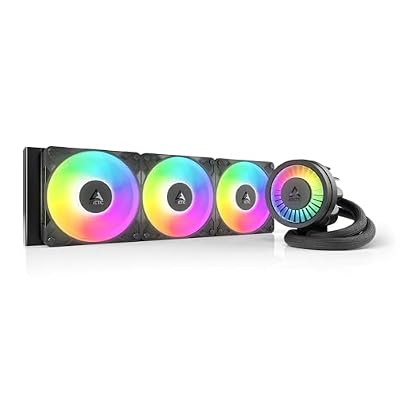
The hero listing was matched to the query “Corsair iCUE Link AIO” and may be a close match rather than the exact model you need. Verify the model, whether the fans and hub are included, and the current price on the card before ordering.
How iCUE LINK Changes the Build
Traditional AIO and fan setups use one cable per fan, plus a separate pump cable and a fan header split. A typical 360mm build with three fans and a pump can need several cables that all run to the motherboard. iCUE LINK reduces that to a single cable from the controller to the first device, and then the cables pass from one component to the next. The effect is a neater interior, fewer cable runs to hide and quicker installation.
The cost of that simplicity is dependence on the ecosystem. iCUE LINK components work best with other iCUE LINK parts and the iCUE software. Mixing them with standard PWM fans is more limited, and you may need the proper hub to manage lighting and fan speed. Before buying, check whether the fans in your listing are iCUE LINK fans and whether the hub is included, because adding those parts later can change the total cost.
Single-Cable Daisy Chain
The main advantage is cable management. You route one cable from the hub to the first fan, then connect the next fan and the pump in turn. Plan the chain so the cable does not stretch across the radiator and that the pump is reached without tension. A clean chain makes airflow tidier and reduces the chance of a fan or pump being disconnected during maintenance.
Software Control
iCUE handles fan curves, lighting and pump monitoring. You can set a fan profile based on CPU temperature, tune lighting for the case, and track pump status. The software is central to the experience, so check that you are comfortable installing it and that your platform is supported. Some users prefer to set fan curves in the motherboard BIOS or a separate tool, so consider how much you want to rely on a single program.
Who Should Choose an iCUE LINK 360mm AIO
This cooler class suits builders who want a clean, low-cable interior, plan to use iCUE for lighting and fan control and are happy to commit to the ecosystem. It fits best in a case with a top or front 360mm mount and a rear panel that allows tidy routing to the hub. Showcase builds with RGB lighting benefit the most.
It is less suitable for builders who want to mix several brands of fan, who run a Linux system without iCUE support, or who prefer a simple pump and fan setup with no software dependency. In those cases a standard 360mm AIO with PWM fans may be the more flexible choice.
Comparison: iCUE LINK and Other 360mm Approaches
The table compares the main approaches you will see in listings. Prices are broad ranges, and you should confirm the exact configuration on the card.
| Approach | Cabling | Best for | Main trade-off | Typical price range |
|---|---|---|---|---|
| iCUE LINK 360mm AIO (this review’s class) | Single daisy-chained cable through hub | Clean builds with iCUE control | Strong ecosystem lock-in | Check current price |
| Standard PWM 360mm AIO | Separate fan and pump cables | Mixed-brand and flexible builds | More cables to route | Check current price |
| iCUE LINK display AIO | Daisy chain plus display link | Showcase builds with an LCD | Higher cost and more software reliance | Check current price |
| Compact 240mm AIO | Simple two-fan setup | Small cases | Less thermal margin | Check current price |
If you are unsure whether an AIO is right for your build at all, our air vs AIO cooling comparison covers noise, maintenance and case fit. For a shortlist of value options, the best budget AIO liquid coolers guide is a good starting point.
Compatibility and Setup Checks
Motherboard Header and Software Requirements
Confirm that your motherboard and the iCUE software support the hub and the cooler. Corsair publishes compatibility information for its ecosystem, and you should check it before buying. Keep the software updated so the cooler and fans are recognised correctly.
Case Mount and Hub Placement
Plan where the hub will sit before you fit the radiator. The hub should be reachable from the cable route, close enough to the first fan, and not blocked by the GPU or drive cages. Measure the radiator thickness and check RAM height if you are mounting it at the top.
Thermal and Noise Considerations
We have not measured this cooler’s temperatures or acoustic performance for this article. The thermal result depends on the CPU, the fan speed and the case airflow, so treat any performance statement in a listing as a claim to verify. A 360mm radiator generally gives more headroom than a 240mm model, and a fan curve that keeps fans moderate often gives a good balance of noise and cooling. Use the software to set a curve that matches your CPU’s temperature targets rather than relying on a single fixed speed.
Maintenance and Long-Term Ownership
The sealed pump and radiator need little upkeep. Clean the radiator and fans periodically, and check that the hub and cables are secure after case moves. Because the ecosystem is software-driven, keep an eye on updates and make sure the iCUE version you use remains supported. Read the warranty terms on the listing, since they vary by product and region.
For a full build around an AIO, the step-by-step gaming PC build guide shows the install order, and the best gaming PC case guide helps you pick a chassis with a suitable 360mm mount.
For the rest of the build, the best PSU for gaming guide explains wattage and connectors, and the best CPU cooler for gaming article compares AIO and air options by processor. If you want to see how a popular airflow case handles a 360mm mount, the Corsair 5000D Airflow review is a useful reference, and the complete gaming PC buying guide covers the wider purchase.
Frequently Asked Questions
Do I need iCUE to run an iCUE LINK cooler?
In practice, yes. The software is how you set fan curves, lighting and pump monitoring, and it is the main interface for the ecosystem. Check the software requirements for your operating system before you buy.
Can I use iCUE LINK fans with other fans?
Mixing is limited. iCUE LINK fans connect through the hub, so standard PWM fans need a separate header or controller. Plan the build so the chain is simple and the software can manage every component you add.
Is the single-cable design more reliable?
Fewer cables can make a build easier to maintain, but reliability depends on connector quality, cable strain and the hub. A well-routed chain avoids tension and makes it easier to reach each component when you service the system.
Is iCUE LINK better than a standard AIO?
It depends on your priorities. If you want a tidy interior and iCUE control, the ecosystem is a strong fit. If you want to mix brands or avoid software dependence, a standard PWM AIO is more flexible.
Final Verdict
The Corsair iCUE Link AIO 360mm class is a good choice for builders who value clean cable management and are comfortable with the iCUE ecosystem. Its strengths are the single-cable daisy chain, tidy interior and centralised software control. Its limits are ecosystem lock-in, a dependence on software and a need to check hub and fan compatibility before buying. Confirm the exact configuration and price on the card, plan the chain before you install, and decide whether you want the ecosystem before you commit. For the right build, it is a clean and practical 360mm option.